






LordVader
Members
-
Joined
-
Last visited
Everything posted by LordVader
-
I'm sorry, I'm not very savvy. I imagine that I have to go to F12, console tab, enter the command fv3debug and press F5. After that, where can I get the .json?
-
Hello, thanks for your reply. I'm using Unraid v. 7.3.1 I did cleared the cache on my browser, same result. I don't see any apparent error on the code. I have tried various browsers and it's the same result.
-
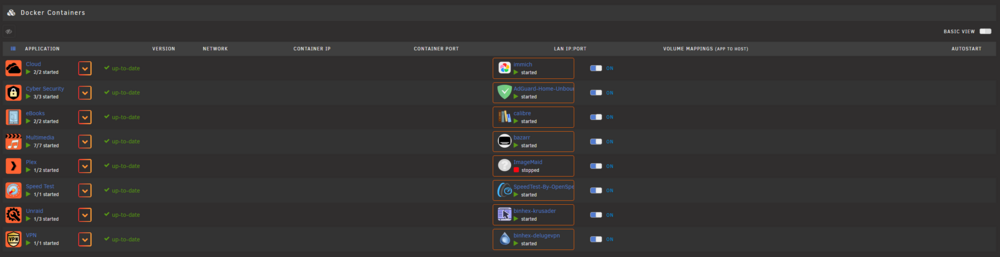
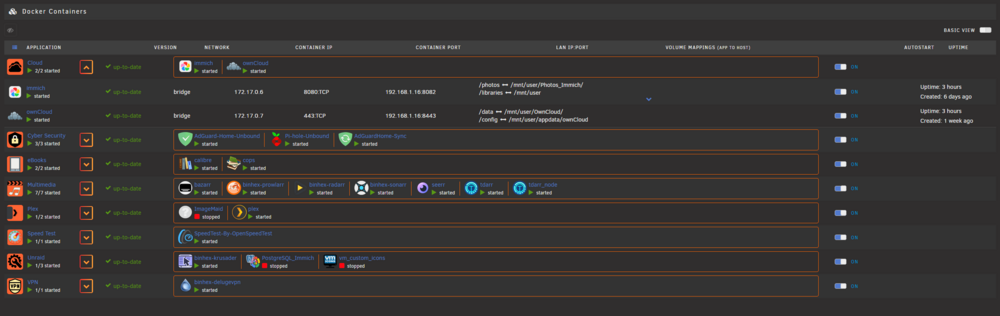
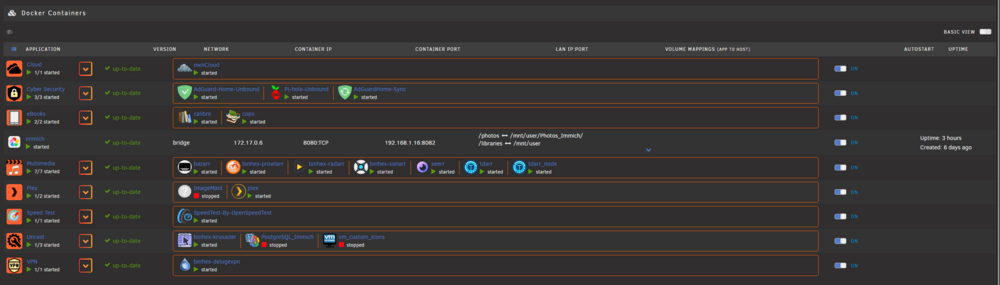
FolderView 3 fresh install I'm experiencing this bug : When I finish adding an app to a folder the preview is truncated. The only way to see the entire folder preview is to leave an app outside a folder or to expand the content with the arrow down on the left side. I don't have any other app that may interfere with folderview3. I create the folder as I did on folderview 2 so, nothing out of the ordinary. What is wrong here? Please help.
-
Thank you for your reply but I’m sure there’s more than the network configuration that’s gone haywire. That’s why I’m asking what files and folders to keep/transfer over to the newly created USBkey as well at what files for the license to keep working.
-
Hellow everyone. My server due to something that I did that I can't repair needs to be rebuilt from the ground up. My network is not working properly and makes the server stop responding on the webui and I have to hard reset it to start up again. I want to keep the data on all the disk to be recognized on the fresh install as well as the shares and user credentials / passwords and of course the license of the server on the same usb key. For what I have read the steps that I have to follow to start up a new instance of the server if I understand is as follow : Recreate the USB key with the Unraid USB creator app. But after that, I don't know what to copy from the USB backup to the newly created key. Can someone please explain step by step and location of what do I need to copy over the new USB Key from the Backup. I'm not an medium or advanced user of Unraid, I need your help and I work well with step by steps directives. Thank you in advance for your help, I know that for some advanced user my request will sound stupid but I don't want to loose all the data in the 7 drives data and parity drive. Sorry again for the inconvenience of my request for a step by step guide, it will be appreciated.
-
Hello Community. I'm a extremely green user of Unraid. (Whick I love by the way). Mostly I follow videos to install what I need on my server and then just let it do it's job. I don’t tweak much on the server besides installing or updating the docker containers when needed. I decided to upgrade from using the local onboard Lan card 1Gbps to install an 2.5Gbps Intel card. The installation and reconfiguration of the interface br0 and br1 worked. I had the The addition of the card was without a problem, and tried to my best to reconnect the links from the Realtek br0 to the Intel br1. And then assign the mac address from the intel to become br0 and the Realtek to be br1 and ultimately deactivate the Onboard LAN from the BIOS. The server was working on for a few days and then it started not responding when I tried to connect to the web interface, leading to a hard reset. This symptom started repeating itself after 24 hours and then had to do a hard reset again. At one point I thought that the problem was the new LAN card, so I reverted all back to the onboard card, uninstalled the intel but after at almost 36 hours the same issue started again. No response from the server when trying to connect to the web interface, so definitely not a LAN card problem. Reinstalled the Intel and then noticed that it was the Pi-Hole docker that was causing the issue, I decided to stop it and the server hasn’t given me the error when I try to connect to the web interface after 48 hours. So I decided to uninstall the Pi-Hole docker and reinstall it but now I’m facing a new problem. The docker won’t install. I get an error message “ linking docker: Error response from daemon: invalid config for network br0: invalid endpoint settings: user specified IP address is supported only when connecting to networks with user configured subnets. See 'docker run --help'. The command failed. There’s something not ok with the configuration of the br0 it is detected as a bridge all the time. Please some one help me on this very stressing issue maverick-diagnostics-20250516-1148.zip
-
A friend had the same version of plug-in and OS and yesterday was working ok, today it lost all info inside the config of the folder.
-
Had that since yesterday. It is over...? The plugin is dead? Can you keep it until the end of the month? Time to reinstall and place new folders for the last time...
-
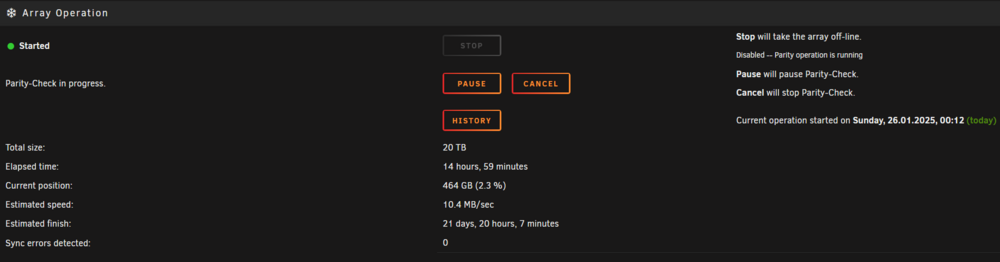
Hello to all of you,. Last friday I upgraded my server from version 6.12.14 to version 7.0.0 It all went without any problems at all. Since I mounted the server I have the parity check scheduled to start on the 26th of every month, all worked well, I usually have a duration of 1 day 5 hours for the task to complete. I haven't changed no hardware on my server since last month parity check. To my surprise, today the task started as scheduled 00h01 and usually by 08h or 09h it is advanced, except for today. When I checked the status of the parity check, I was only at 2% when it should have been at 24% or higher. The speed of the disk was at 8MB/s I decided to let go and check on the afternoon, again to my surprise it hasn't move I was at 2.2% complete which it is not normal. I went on the forums, found a tread from 2022 with a very slow parity check speed but no solution of the problem or what could have cause it. So I did the same action as someone posted, launched my server on GUI safe mode and started the array and the parity check. The speed was back at 198 MB/s So I don't know if it is a bug on version 7 or what was going on with my server. I managed to do a diagnostic while it was slow, I will be putting it for review if anyone can help me find what was causing my speed to be slow for the parity check. I don't have the knowledge to understand unraid diagnostic and where to look so I will thank you a lot for your information regarding this matter. Thank you in advance again for your precious help fellow Unraiders. maverick-diagnostics-20250126-1511.zip
-
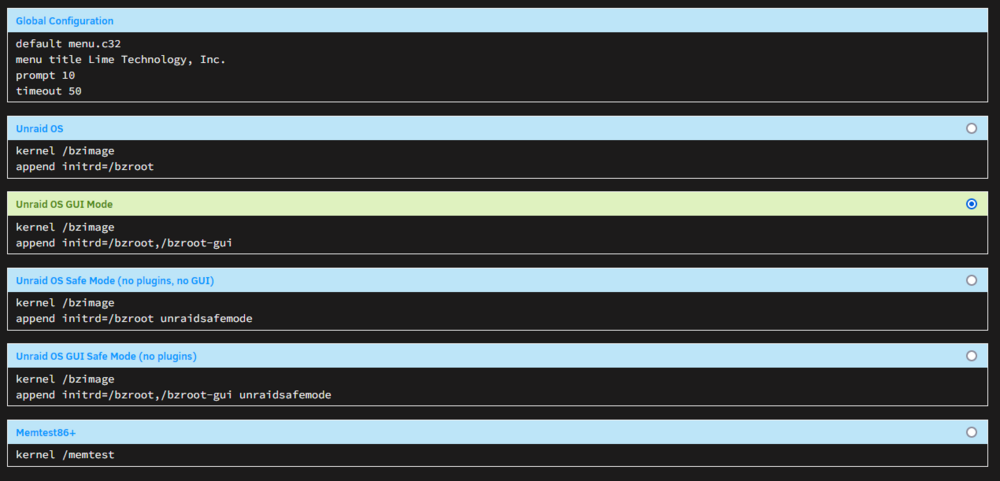
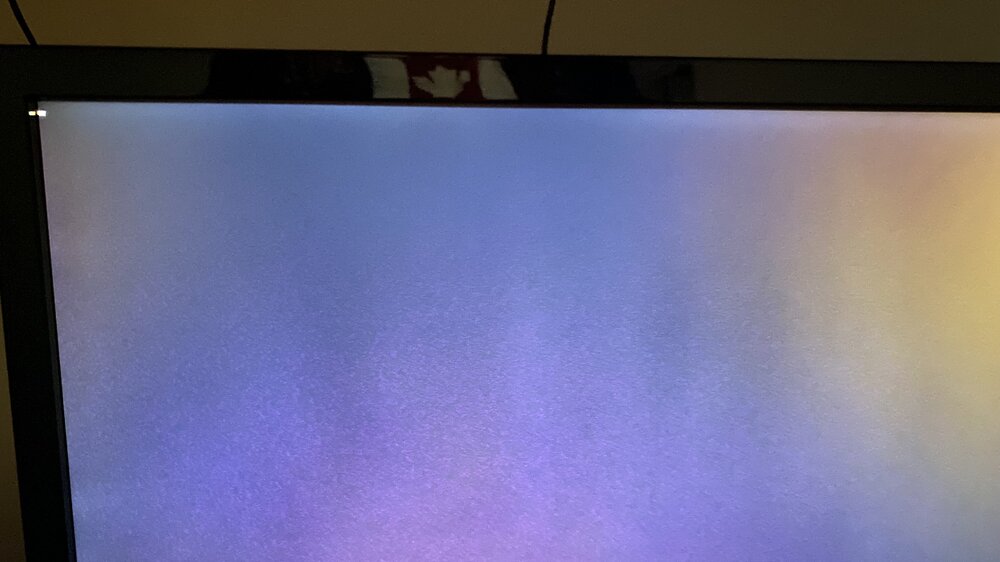
is the revert command sed -i "/disable_xconfig=/c\disable_xconfig=false" /boot/config/plugins/nvidia-driver/settings.cfgThis is the solution to my problem. In case someone experiencing the same situation with their unraid server.Thank you for your help. It worked, the GUI is now showing after the completition of the loading process. Fantastic. Out of curiosity. What that command dit?Sorry about that. Here it is. I'm a bit green on the unraid / unix side. maverick-diagnostics-20241211-1509.zipConcerning the post from ocean_breeze Posted April 24, 2023. I do have the same problem, booting Unraid on GUI mode gives after loading and being ready to load the GUI a blank screen. I'm trying desperately to find a solution to this issue. I know that it is caused by the Nvidia Driver, since once I uninstall it, the loading of the GUI works as it should. As soon as I reinstall the driver, I get a blank screen when booting in GUI mode. In text mode, no problem at all.Hello, Yes I do have a plugin (Nvidia Driver). I did uninstalled and rebooted the server, the GUI loaded. I reinsalled the Nvidia Driver, GUI gone. I don't know if there's a fix for this behavior. Or do I have to contact the developer.Hello everyone, I couldn't find the time to reply to the last post, but I found something interesting. I tried to find the options about the integrated graphic and it is the one selected. Still no GUI after reboot. I did launch the option "GUI safe mode (no plugins) and the GUI appeared (Unraid logo and password input). I don't know which plugin is creating this bug or won't allow the GUI in normal mode to load. Any ideas as to how to proceed next to debug. Thanks in advance for your time.I did check on the BIOS and I make sure that the IGC is selected. But still no GUI.Hello bmartino1 Here is the diagnostic file. maverick-diagnostics-20241031-0349.zipHello community. I'm as green as an it can be concerning Unraid. So I hope my ignorance will be pardoned. I'm having a problem that I cannot figure out how to fix. Here it is. A while ago, I was browsing the Flash Device Settings and I noticed that I can choose to have the unraid osgui mode load by default instead of having to choose after the BIOS prompt has finished. But since choosing that option, when it came to load unraid after seeing all the command prompts on screen and when usually in the pass the GUI load (unraid logo and user and password prompt appears) I have nothing, just the command prompt not even blinking, just static. I have reverted to Unraid OS and I see everything at the end and get the command prompt to input credentials. The webgui works, so I can log into unraid with any computer but I would love to have the option to logon directly to the machine with the GUI. Why is the GUI not loading. How can I fix this? Thanks in advance for your help in this matter.
 Thank you for the info.Hello, I'm having this problem with Disk Location. Both of my nvme cache drives, the manufacturer is not recognized. I had a pair of Samsung before and I had to replace them. Now, I can see the model but the manufacturer info is missing (Crucial Drives) What can I do to force recognition of the manufacturer ?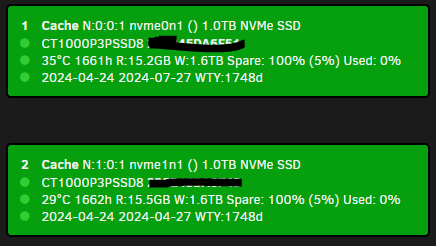
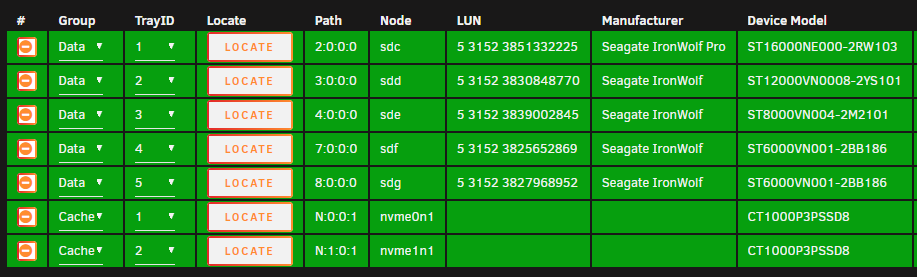 Thank you for your help JorgeB. I manage to transfer all data from mirror cache onto the array. Installed two new nvme drives, build the cache in mirror mode with larger capacity of nvme. Transferred the data from the array into the new cache and updated the file system of the cache. All is working now.Thank you JorgeB. It seems that that my cache drive was on the last breathe, it's no longer recognized by the BIOS and the second drive works on the slot were the one is missing. All I hope that I will find how to rebuild my pool or simply delete the existing pool and recreate one with two new ssd.Here it is. maverick-diagnostics-20240423-1427.zip





