





u20p17
Members
-
Joined
-
Last visited
Everything posted by u20p17
-
solution can be found here:
-
has nobody an idea how I could solve my issue?
-
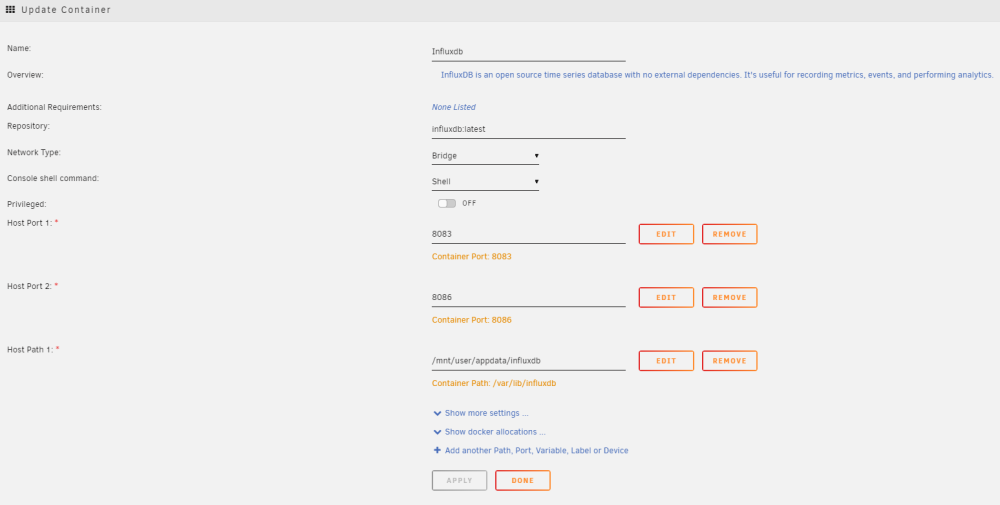
Hi all, I am running influxdb v2 docker in unraid. Data gets collected via HomeAssistant and saved in the database. Everything is working fine. The problem is that each time I update the docker in unraid it seems as everything gets reset (so there is no user available, the data seems to be empty and there is also no api-token set up.) What I am doing wrong? The docker config looks the following: Furthermore, If I open the WebUI it always uses port 8083, but I only reach the webinterface on port 8086. Why? And how could I solve this issue? Thank you very much! BR
-
same for me too. is there already a fix available?
-
I think I fixed the issue now. It's a bit strange, but what I did is the following: 1.) ls -ld /mnt/user/appdata/ESPHome Output: drwxrwxrwx 1 nobody users 90 Mar 3 2022 /mnt/user/appdata/ESPHome/ So it seemed that the every user/group should have read/write/execute rights on this folder. Nevertheless I did the following: 2.) chmod -R 777 /mnt/user/appdata/ESPHome I recursive changed the rights for all users/groups to read/wrtie/execute and now it is working again... Strange - but maybe it helps other people...
-
Hi all, unfortunately I couldn't solve the issue up to now As I wrote in my prior post it seems that unraid does not allow me to execute files in /mnt/user/appdata/ESPHome. How can I solve the issue? Thanks a lot in advance!
-
Hi it's me again - my workaround was working for some months but now it stopped working again. I think I was talking about a wrong thing at the start of this topic. I have to add the exec option not to the /boot, but to the /mnt/user/appdata/ESPHome. What I would have to add to the /etc/fstab in order to make it work? Sorry I am not deep into this topic... Up to now I think I mounting the remote share without the exec option, and as the result the local OS does not allow me to execute files which is needed for the ESPHome docker container. Thank you in advance!
-
I found a solution! Starting with 2021.10 the toolchain is stored in the /cache/platformio directory in the docker container (or /config/.esphome/platformio if /cache is not mapped in). If the filesystem where that's mapped doesn't support execute permissions on files you'd get that error. My /config is an NFS directory that is bind mounted into the container. I didn't know that I could also mount something for /cache, so I added a standard volume mount for the /cache directory and the builds are now working again. Thanks! found the solution here: https://github.com/esphome/issues/issues/2594
-
Hi, thanks for the very fast answer! I am using the ESPHome Docker container and I updated it from a x.2021 to the latest version. After the update when I try to install the new firmware for the esp via ESPHome I get the following log: INFO Reading configuration /config/kuehlung-lowboard.yaml... INFO Generating C++ source... INFO Compiling app... Processing kuehlung-lowboard (board: esp32dev; framework: arduino; platform: platformio/espressif32 @ 3.5.0) -------------------------------------------------------------------------------- HARDWARE: ESP32 240MHz, 320KB RAM, 4MB Flash LDF: Library Dependency Finder -> https://bit.ly/configure-pio-ldf Dependency Graph |-- <WiFi> 1.0 |-- <ESPmDNS> 1.0 |-- <Update> 1.0 Compiling .pioenvs/kuehlung-lowboard/src/esphome/components/api/api_connection.cpp.o sh: 1: xtensa-esp32-elf-g++: Permission denied Compiling .pioenvs/kuehlung-lowboard/src/esphome/components/api/api_frame_helper.cpp.o sh: 1: xtensa-esp32-elf-g++: Permission denied Compiling .pioenvs/kuehlung-lowboard/src/esphome/components/api/api_pb2.cpp.o sh: 1: xtensa-esp32-elf-g++: Permission denied Compiling .pioenvs/kuehlung-lowboard/src/esphome/components/api/api_pb2_service.cpp.o sh: 1: xtensa-esp32-elf-g++: Permission denied Compiling .pioenvs/kuehlung-lowboard/src/esphome/components/api/api_server.cpp.o sh: 1: xtensa-esp32-elf-g++: Permission denied Compiling .pioenvs/kuehlung-lowboard/src/esphome/components/api/list_entities.cpp.o sh: 1: xtensa-esp32-elf-g++: Permission denied Compiling .pioenvs/kuehlung-lowboard/src/esphome/components/api/proto.cpp.o sh: 1: xtensa-esp32-elf-g++: Permission denied *** [.pioenvs/kuehlung-lowboard/src/esphome/components/api/api_connection.cpp.o] Error 126 *** [.pioenvs/kuehlung-lowboard/src/esphome/components/api/api_frame_helper.cpp.o] Error 126 *** [.pioenvs/kuehlung-lowboard/src/esphome/components/api/api_pb2.cpp.o] Error 126 *** [.pioenvs/kuehlung-lowboard/src/esphome/components/api/api_pb2_service.cpp.o] Error 126 *** [.pioenvs/kuehlung-lowboard/src/esphome/components/api/api_server.cpp.o] Error 126 *** [.pioenvs/kuehlung-lowboard/src/esphome/components/api/list_entities.cpp.o] Error 126 *** [.pioenvs/kuehlung-lowboard/src/esphome/components/api/proto.cpp.o] Error 126 Compiling .pioenvs/kuehlung-lowboard/src/esphome/components/api/subscribe_state.cpp.o sh: 1: xtensa-esp32-elf-g++: Permission denied *** [.pioenvs/kuehlung-lowboard/src/esphome/components/api/subscribe_state.cpp.o] Error 126 ========================== [FAILED] Took 1.33 seconds ========================== I found some people with the same issue: https://github.com/esphome/issues/issues/2817 There they suggested to add the exec to the fstab...
-
Hi all, I've got my permissions problem which should get fixed by adding the 'exec' option to the /etc/fstab entry for the drive that has the docker mount point on. Therefore I opened the terminal on unraid, then cd /etc and after that nano fstab... Here I added the exec option to my hard drive and saved it. GNU nano 5.3 fstab /dev/disk/by-label/UNRAID /boot vfat auto,rw,flush,noatime,nodiratime,dmask=77,fmask=177,shortname=mixed,exec 0 1 /boot/bzmodules /lib/modules squashfs ro,defaults 0 2 /boot/bzfirmware /lib/firmware squashfs ro,defaults 0 2 tmpfs /dev/shm tmpfs defaults 0 0 hugetlbfs /hugetlbfs hugetlbfs defaults 0 0 It seems that the fstab gets reset each reboot. How can I make it persistent? (Sorry for this maybe dump question, but I am very new to unraid... ) Thanks!

