KeksExe
Members
-
Joined
-
Last visited
-
i post it on bug reports, hope it's ok https://forums.unraid.net/bug-reports/stable-releases/6126-mixed-array-btrfs-format-unmountable-r2791/
-
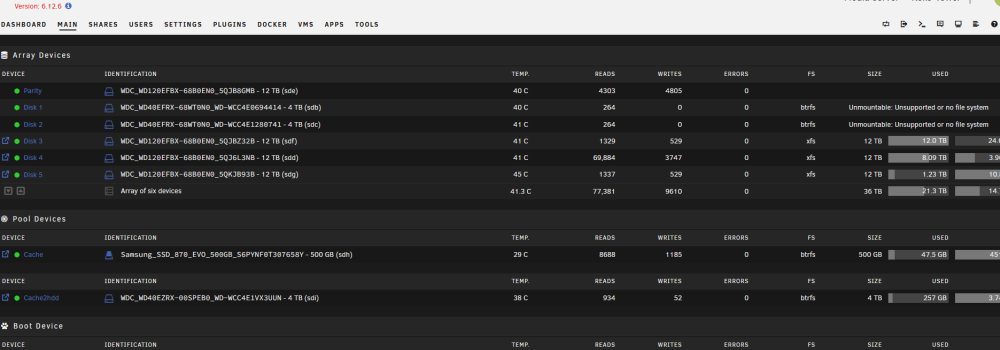
Hi, after OS update (6.11.0 to 6.12.6) the mixed array wiht btrfs and xfs disk is not complete running, only xfs is running. I ask first in the german section (https://forums.unraid.net/topic/150298-6126-btrfs-format-unmountable/), and my solution now is change both disks also to xfs. but here is the diagnostics file:keks-diagnostics-20231230-1424.zip
-
Mit deinem letzten Satz triffst du es ganz gut … aktuell habe ich den Platz um die Sachen einfach zu verschieben und kann dann komplett xfs im Array fahren und sollte dann auch zukünftig keine Probleme mehr haben. danke
-
Hallo zusammen, nutzt seit paar Jahren unraid ohne Problem, aber alles sehr oberflächlich. Gestern hab ich das OS von 6.11.0 auf 6.12.6 geupdate, seit dem gehen zwei Platten vom array nicht mehr. Es sind älter Platten und im btrfs Format, die anderen Platten im xfs werden ohne Probleme wieder erkannt. Hab selber auch schon ein wenig gesucht bin aber net schlau draus geworden. Z.b. Das Problem wurde wohl im mit einem update behoben, läuft bei mir aber nicht. Zwei Platten im cache sind ebenfalls btrfs die wurden auch ohne probelem wieder erkannt. Also Lösung hilft aktuell nur ein downgrad auf 6.11.0 und wenn ich es aus anderen Bereichen richtig gelesen habe müsste ich das Format der zwei platten ebenfalls auf xfs ändern, gibt es eine alternative? Würde mich freun wenn mir jemand weiter helfen könnte. Gruß Keks