




Skip to content
View in the app

A better way to browse. Learn more.

Unraid

A full-screen app on your home screen with push notifications, badges and more.

To install this app on iOS and iPadOS
  1. Tap the Share icon in Safari
  2. Scroll the menu and tap Add to Home Screen.
  3. Tap Add in the top-right corner.
To install this app on Android
  1. Tap the 3-dot menu (⋮) in the top-right corner of the browser.
  2. Tap Add to Home screen or Install app.
  3. Confirm by tapping Install.

Phobos

Members
  • Joined

  • Last visited

Everything posted by Phobos

  1. Replying to myself on the Insurgency issue, I followed the instructions for Palworld reinstall (including manually deleting game folder in appdata, rather than just relying on removing docker and adding a fresh one). Seems to work now.
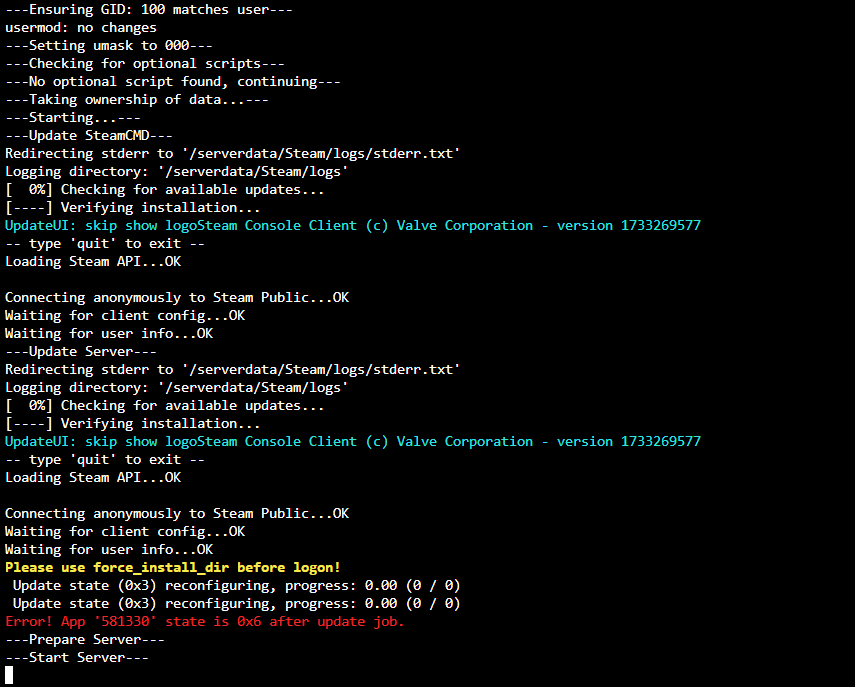
  2. After using the Insurgency: Sandstorm successfully for over a year, I'm unable to get a server up and running. It looks like it's failing after a server restart to grab the latest patch. Ports are correctly forwarded, and I've even done a complete fresh reinstall in case it wasn't updating properly. Screenshot attached, any ideas? For future Googlers, error message is:

Account

Navigation

Search

Search

Configure browser push notifications

Chrome (Android)
  1. Tap the lock icon next to the address bar.
  2. Tap Permissions → Notifications.
  3. Adjust your preference.
Chrome (Desktop)
  1. Click the padlock icon in the address bar.
  2. Select Site settings.
  3. Find Notifications and adjust your preference.