DingusKahn
Members
-
Joined
-
Last visited
-
Hey folks. I keep having this reoccuring issue were my nvidia 5050 will fail to be recognized by the driver after a few days. I'm not sure what the cause is, this never happened before with my 1660. I have reinstalled the driver plugin a few times, as well as made sure that the open source driver is being used. I have attached diagnostics to this message, appreciate any help I can get. dingleberry-diagnostics-20260205-1850.zip
-
Hello! I keep getting this code reappearing in the syslog. It makes my nvidia card disappear and reappear every so often in my Unraid. Not sure what the cause is. This has persisted across different drivers and even different gpus (a 5050 with the open source driver). Not sure what the issue is or what the fix is: ec 19 19:39:44 Dingleberry kernel: NVRM: GPU 0000:2b:00.0: RmInitAdapter failed! (0x22:0x51:884) Dec 19 19:39:44 Dingleberry kernel: NVRM: GPU 0000:2b:00.0: rm_init_adapter failed, device minor number 0I have attached the syslog and diag as well. Please let me know any thoughts you guys have. Thank you! dingleberry-syslog-20251220-1909.zip dingleberry-diagnostics-20251220-1410.zip
-
Hello! I keep getting this code reappering in the syslog. It makes my nvidia card disappear and reappear every so often in my Unraid. Not sure what the cause is. This has persisted across different drivers and even different gpus. Not sure what the issue is or what the fix is: ec 19 19:39:44 Dingleberry kernel: NVRM: GPU 0000:2b:00.0: RmInitAdapter failed! (0x22:0x51:884) Dec 19 19:39:44 Dingleberry kernel: NVRM: GPU 0000:2b:00.0: rm_init_adapter failed, device minor number 0I have attached the syslog as well. Please let me know any thoughts you guys have. Thank you!dingleberry-syslog-20251220-0044.zip
-
Hey guys, I got a machine check event logged last night for my cpu. I didn't even notice anything was wrong my server, it is now operating perfectly. The server for some reason rebooted in the middle of last night, I'm guessing that is related to the error? Parity check was ran and everything was fine. I've posted a diag, just want to see if this is just a random error or something I should keep an eye on. Thanks for your help in advance. dingleberry-diagnostics-20241229-1647.zip
-
Guys, I am, and I can not overstate this enough, a complete and utter dumbass. After messing around with my internet more, I realized that it wasnt just unraid that was funky, it was everything! i went to walmart and bought a garbage router just to see if that would fix the problem, and it wouldnt even connect to the internet. I then realized I had not done the age old trick of unplugging and replugging in the modem. Wouldn't you know, now everything is hunky dory. I'm gonna leave this post up so that someone can read it and chuckle at my incredible stupidity. Even though no one helped, I appreciate the fact that this forum exists with all its help and solutions.
-
Hey there folks! I a bit of a noob when it comes to networking and such so this issue is very confusing for me. Currently my unraid server is behaving normally when i access through my main pc, which is connected to the server via an ethernet cable, but when i try to access the server through anything wireless, be it a laptop, phone, ipad etc, the server keeps connecting and disconnecting (its mostly disconnected). At first I thought this was a plex specific issue, but the issue has also appeared on Jellyfin and just plain old accessing the server via IP address. I have no idea what the issue could be so any guidance would be very helpful. This issue cropped up today and I have not messed around with any settings in my router or unraid server. I have attached diagnostics to this post. Let me know if there is anything else you guys need. Thanks for all your guys' help in advance! dingleberry-diagnostics-20240519-2020.zip
-
Okay another update. Memtest passed with flying colors. It looks like the issue was the zfs pool on the cache drives. I erased the drives (there wasnt much on there to begin with) and lo and behold, the server came back online. I do believe that was the issue, but if someone smarter than me wants to confirm that by reading the syslog please go right ahead. Someone linked this to me in another post and this seems to be the way to do it if you don't go nuts and just want to delete the cache like I did.
-
Perfect thanks for this link! I just went ahead and erased my cache drives completely (there wasnt much on there to begin with to be honest, the important stuff was on my drives) and my server is up and running perfectly so that does seem to be the issue.
-
Hey, I think we are having the exact same issue. I've posted some syslog info on my post as well. Any ideas on how to proceed?
-
Server jut crashed again. Aug 6 16:55:47 Dingleberry emhttpd: mounting /mnt/cache Aug 6 16:55:47 Dingleberry emhttpd: shcmd (85526): mkdir -p /mnt/cache Aug 6 16:55:47 Dingleberry emhttpd: shcmd (85527): /usr/sbin/zpool import -N -o autoexpand=on -d /dev/nvme0n1p1 -d /dev/nvme1n1p1 13916249097028097922 cache Aug 6 16:55:47 Dingleberry kernel: VERIFY3(range_tree_space(smla->smla_rt) + sme->sme_run <= smla->smla_sm->sm_size) failed (281451084271616 <= 8589934592) Aug 6 16:55:47 Dingleberry kernel: PANIC at space_map.c:405:space_map_load_callback() Aug 6 16:55:47 Dingleberry kernel: Showing stack for process 20456 Aug 6 16:55:47 Dingleberry kernel: CPU: 10 PID: 20456 Comm: metaslab_group_ Tainted: P O 6.1.38-Unraid #2 Aug 6 16:55:47 Dingleberry kernel: Hardware name: To Be Filled By O.E.M. To Be Filled By O.E.M./X470D4U, BIOS P4.20 04/14/2021 Aug 6 16:55:47 Dingleberry kernel: Call Trace: Aug 6 16:55:47 Dingleberry kernel: <TASK> Aug 6 16:55:47 Dingleberry kernel: dump_stack_lvl+0x44/0x5c This appears to be the issue, as it also is show as an error in the syslog. Ive attached the full thing in the to this message. Please let me know what this means if possible. Thanks! syslog.txt
-
I ran the SMART test, nothing came up. I'll run memtest shortly and enable the syslog server as was mentioned and see if anything pops up. I hope RAM is the issue because that would be quite the easy fix, but we shall see. Thanks!
-
Okay so I've been messing around with this all day, and I haven't really made much progress. Ive removed all plugins, and replaced the bz* files on the usb, and the server still doesnt work. In fact now it is not even able to mount disks, crashes when it tries to do so. I've now got it up and running in safe mode and am running SMART extended tests on the disks just to see if anything comes up but that doesnt seem very likely to me. If nothing comes up I guess my next step is to mess around with the ram in the system to see if one or both sticks are causing the issue (xmp is not enabled). Does anyone have any ideas at all? i'd appreciate any tips at all at this point I'm a little lost/ out of my depth and not sure where to go next. Thanks in advance!
-
40 minutes later and it happened again... Here is the syslog dingleberry-syslog-20230804-1459.zip
-
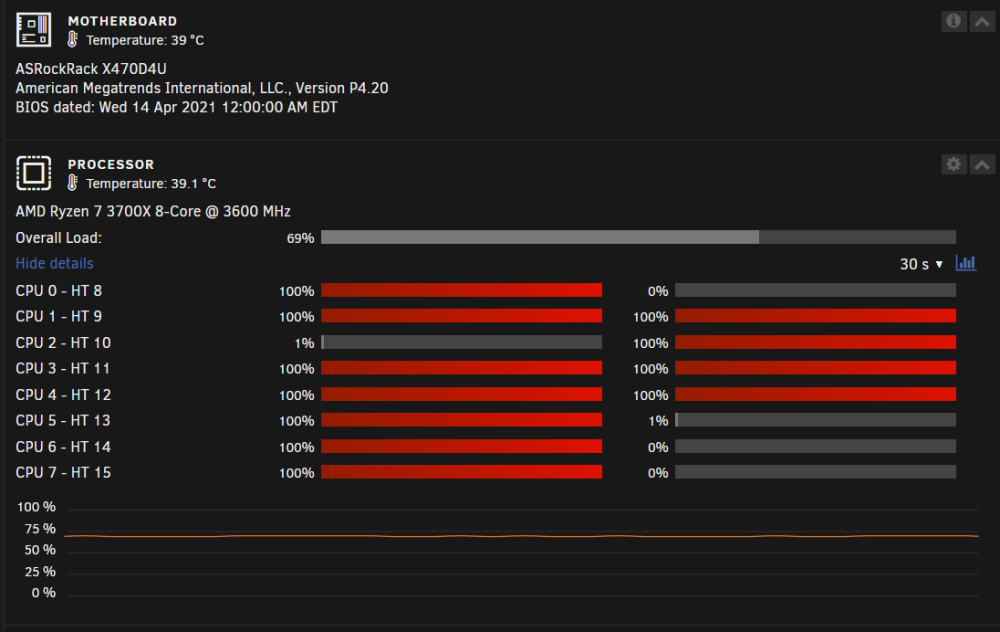
Recently, my server has been becoming unresponsive and all docker containers and VMs disappear. If i try to reboot the server nothing happens, and I have to shut if off manually. It also looks like most of the cores in my server are pegged at 100% usage despite the cpu temp hovering around 38c. Any ideas? I've attached diagnostics after I power cycled the server since I could not get diagnostics from when the server was unresponsive. Server Diagnostics .zip