zwar77
Members
-
Joined
-
Last visited
-
Edit: For anyone having this issue and finding this in the future: I was able to fix the issue by going to my network settings and taking a look at the routes section at the very bottom. The issue causing this problem was having my gateway entered on my static IP on the LAN only network, removing the gateway on that LAN only network stopped things from trying to access the internet, thus setting my internet to the internet network (192.168.7.x). This fixed the issue, and I am able to access all my services on 192.168.7.x and internet services through 192.168.1.x. Hi folks, I just migrated unraid over from an old server to a new server -- changing the motherboard and everything else but my hard drives. Everything is working great except for my binhex-qbittorrentvpn container and its internet connection. I previously (and currently) have two ethernet ports on my motherboard. I use one ethernet port for LAN only traffic (192.168.7.x) which connects all of my devices together - there is no internet available on this connection - it is for local traffic only. I also have a second ethernet port (192.168.1.x) that is used for binhex-qbittorrentvpn, which all my other docker containers go through to access the internet. After migrating unraid, my binhex qbittorrentvpn container is unable to establish a connection to the vpn server. I have the container network set to bridge so it can see both my ethernet ports -- for local lan and internet networks. However it appears the container is grabbing the wrong connection or gateway and appears to be sending requests to connect to the vpn by using the gateway of the local lan only network -- this causes the connection to fail. I receive this message in my logs when starting the container.. which repeats over and over. Looking at the FAQ Q17 stuck out to me, and it makes sense this is the case as this network does not have internet access. 2022-12-24 04:49:17,059 DEBG 'start-script' stderr output: Error: error sending query: Could not send or receive, because of network error I have tried assigning the network type to eth1 (which is the ethernet port with internet aka 192.168.1.x network, and qbittorrentvpn container works/connects, however it then changes all of my port mappings to the internet lan, making the container inaccessible from the local lan side (192.168.7.x) completely and the other containers relying on the qbittorrentvpn privoxy tunnel also will not function (since the port mappings are going to 192.168.1.x and not 192.168.7.x. Before migrating I had this working perfectly and I did not change any settings after the migration, however with upgrading to all new hardware, I am afraid something happened with the ethernet ports and caused everything to be messed up. I was under the impression using bridge network would make use of both eth0 and eth1 and the container would use some sort of check or failover, if it could not connect on the LAN only network (192.168.7.x), to the internet network and then be able to connect to the vpn provider. I have been looking for solutions on google/reddit/documentation but have yet to find out why this happened. I do think there is possibility an option I missed somewhere that could fix this, but I am hoping someone here can assist. I did have this working on my old hardware, using the same exact settings (or at least they appear to be the same after migrating) as I have now with bridge network type -- the container was accessible via lan (192.168.7.x) and also could access the internet lan (192.168.1.x) simultaneously. How can I achieve this again? Is there a simple way to do this that I am overlooking? Thank you!
-
I do luckily have backups. I am going to format my current (LDM) disks and then transfer over the backup data, then hopefully unassigned devices will read the files (since the disk should now be all NTFS data and not LDM). This way my backup data will remain read only/untouched and I can work with the fresh NTFS drive data. I have my fingers crossed and it seems logically correct. To move the data back will take some time, but I will post back here when done (or edit this post), so anyone having the issue in the future knows a potential fix. Thank you for your assistance everyone!
-
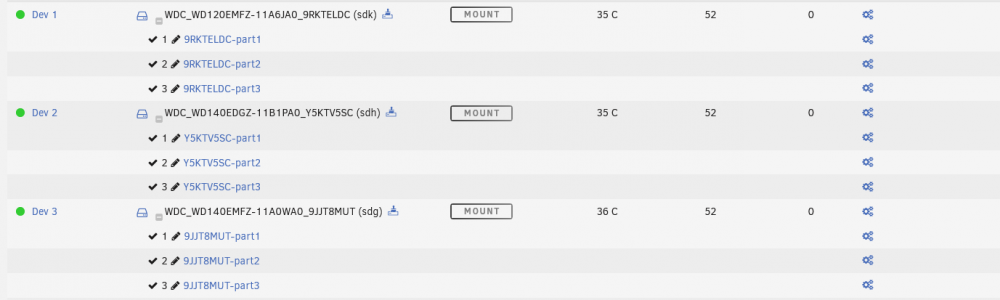
They are dynamic disks from Windows. The disks were used to mirror/backup the drives within Windows disk manager. I searched google but found nothing for how to mount these / convert them from LDM to NTFS though. Now I am in a pickle Is there any way to transfer the data locally? I have Windows on that machine, but have no way to boot unraid and windows at the same time to transfer the files over the network. All my drives are in that machine locally. Any help is appreciated.
-
Here is the output!
-
Hello, I am hoping someone can help me out. I just am getting started with Unraid and want to move over my data from my Windows NTFS drives to Unraid. I downloaded unassigned devices so I could mount the NTFS drives and begin copying over their files to my unraid array. However I am having an issue where 6 of my NTFS drives (all above 12TB) are not mountable and appear to not mount at all. In unassigned devices the mount button is completely grey. When I go to syslog I am getting errors about the disk not being able to mount due to Mount of 'sdf3' failed: 'mount: /mnt/disks/21274H802348-part3: unknown filesystem type 'LVM2_member'. ' I did read through the first two posts to check if my issue was answered and found a a tidbit on the second post of this thread talking about the mount being grayed out, but that does not appear to be applicable as it deals with an not symbol / array issue and my button does not look like that. I also found a post on reddit where a user had this issue also, however they had put on pass through accidentally. I did test out enabling and then disabling pass through on one drive to see if that had any effect and it did not. I am attaching my diagnostic file if someone is able to assist. If I am not able to mount the drives in unassigned devices, does anyone have any advice on how I can get the data off to Unraid? Thank you for your time! unraid-diagnostics-20220617-0456.zip