





SgtDoughnut
Members
-
Joined
-
Last visited
-
Thank you
-
Ok posting diagnostics along with screenshot from main Will work on syslog. eag-diagnostics-20250901-1031.zip
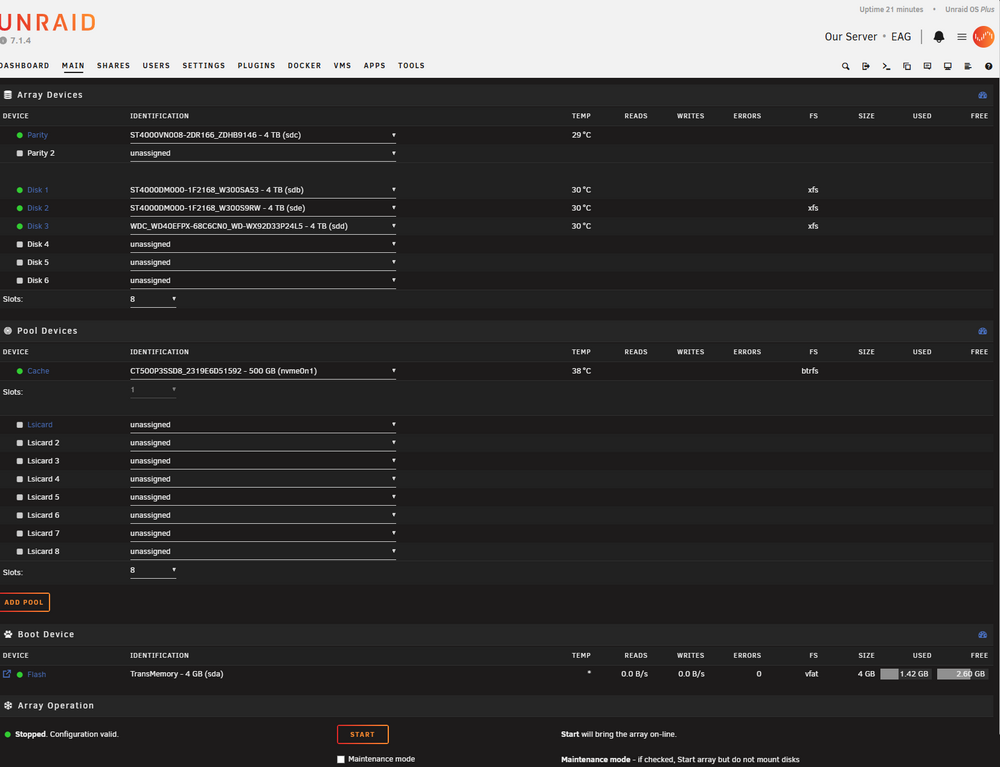
-
After updating unraid to 7.1.4 every time I try to start my array I get an error stating Wrong Pool State lsicard - missing devices. No idea what I need to change or fix here. Any help would be greatly appreciated. Let me know what files or information you need, though I may need to be guided on how to get that info.
-
Thank you I missed that
-
Running your satisfactory docker container, and trying to figure out how to force experimenttal. Do I need to add -beta experimental to game params or somewhere else?
-
Turns out it was validation, thanks for the help man.
-
Thank you will do
-
SgtDoughnut joined the community
-
Trying to setup my version of unRAID but it says my code is already redeemed, any help?

