





enlinks
Members
-
Joined
-
Last visited
-
I think the overall problem is the template is based off the Linuxserver.io github repo which has all those parameters as required. I filed this issue on the matter to get the readme updated. @koshia I'm using Nginx-Proxy-Manager-Official and don't have this issue. # HTTP proxies NetBox should use when sending outbound HTTP requests (e.g. for webhooks). # HTTP_PROXIES = { # 'http': 'http://10.10.1.10:3128', # 'https': 'http://10.10.1.10:1080', # } # IP addresses recognized as internal to the system. The debugging toolbar will be available only to clients accessing # NetBox from an internal IP. INTERNAL_IPS = ('127.0.0.1', '::1') The only part of my config I have anything referenced for access is the ALLOWED_HOSTS which just has my internal URL allowed: ALLOWED_HOSTS = ['<subdomain>.<domain>.<tld>'] @dgaglioni instead of using this method you can edit the template itself. When you're deploying hit the "Advanced View" and edit the REDIS_PASSWORD variable changing Required to no. If you've already deployed the container though then yes the only way to fix it is to modify the configuration.py file
-
No rush! At least with this post people can manually check it for the time being. Appreciate everything you all do!
-
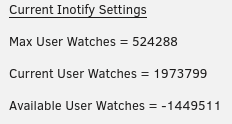
I think the Tips and Tweaks output for Current User Watches is wrong, if I had "-1449511" watches I should be seeing other issues. I ran this manually along with a script below and they are both giving the same results: find /proc/*/fd \ -lname anon_inode:inotify \ -printf '%hinfo/%f\n' 2>/dev/null \ \ | xargs grep -c '^inotify' \ | sort -n -t: -k2 -r /proc/24962/fdinfo/21:19423 /proc/24968/fdinfo/21:10640 /proc/34743/fdinfo/66:4801 /proc/9574/fdinfo/22:1254 /proc/20814/fdinfo/221:521 /proc/1324/fdinfo/5:41 etc..... Github Script: curl -s https://raw.githubusercontent.com/fatso83/dotfiles/master/utils/scripts/inotify-consumers | bash INOTIFY INSTANCES WATCHES PER COUNT PROCESS PID USER COMMAND ------------------------------------------------------------ 19423 1 24962 nobody /app/Tdarr_Server/Tdarr_Server /snapshot/be/srcug/fo 10640 1 24968 nobody /app/Tdarr_Server/Tdarr_Server /snapshot/be/srcug/fo 4801 1 34743 nobody /usr/lib/plexmediaserver/Plex Media Server etc....... 36806 WATCHES TOTAL COUNT It seems that the Tips and Tweaks script (took this command from the script) is only adding the PIDs together and not the actual count of active inotify watches? I grepped for my Plex PID and got a match. find /proc/*/fd -lname anon_inode:inotify | cut -d/ -f3 | awk '{s+=$1} END {print s}' 2138818 find /proc/*/fd -lname anon_inode:inotify | cut -d/ -f3 | grep 34743 34743 If we dig into the PID though we get the actual inotify watch count, example count from my Plex PID: grep -c '^inotify' /proc/34743/fdinfo/66 4801
-
@JorgeB just a final update on this. There seems to be something wrong with the WD Blues being able to do the extended test. The extended test is hung at 90% as I've tried running the test on 2 of them, Disk1 has been running since the 3rd and I started Disk2 about 3 days ago. However my WD Golds the Extended test finished in about a day or two (wasn't exactly watching the time). I'm going to try to swap out cables a monior and troubleshoot from that angle, thanks again!
-
Thanks @JorgeB, I ran a short test with no errors but had to restart the extended (it was running for a few days) because I lost power the other day and my UPS isn't the best so the shutdown triggered due to the UPS time remaining. I'm attempting to run the extended test again to see if I can get it to complete this time.
-
OK great thank you for confirming that. Excuse my ignorance but is there a other things I can validate to troubleshoot besides swapping cables and whatnot? I only ask because I don't want to wait and see if that's the problem after swapping. The problem is either my HBA, the QSFP cables, or my disk shelf. I know things like the megacli and storcli can give some outputs on the controller but not sure if that's usable here as I don't see those packages under the nerd pack.
-
Good afternoon everyone, Currently have left the array is the broken state and collected the diagnostics report, not sure if I should proceed with a reload at this time or anything else you'd like for me to collect prior to that? The impacted disk is WDC_WD40EZAZ-00SF3B0_WD-WX12D412T4UJ (sdc), currently mounted at (sdn). To add I did have an issue about a month or 2 ago where all 8 disks in my array generated read errors. I wasn't sure what happened but the issue never happened again. I have the diagnostics from that as well if you think that would be helpful. legion-diagnostics-20221226-1405.zip

