





laidou
Members
-
Joined
-
Last visited
Everything posted by laidou
-
更新Unraid Connect插件后显示正常了,更新页面变了。
-
一样的问题,更新最新版本后,左上角不显示版本号,更新页面不显示内容。
-
感谢大大,经测试,重启系统,iscsi正常使用,再次感谢!!
-
好的,我先退回之前版本,因为unraid不是一直在启动,另外非常感谢大佬的回复及帮助。谢谢!!!
-
大佬,libffi-3.3-x86_64-3.txz安装包执行后会被删除,此安装包不能永久保存在插件位置么。因地区政策等问题,链接github需要VPN才能正常访问,导致安装包无法正常下载。 。
-
libffi-3.3-x86_64-3.txz该安装包执行后会被删除,重启后无网络或网络不好,无法下载此安装包导致插件故障。 将之前下载好的 libffi-3.3-x86_64-3.txz复制进/boot/config/plugins/unraid.iSCSI/插件目录,重启unraid系统后,没有报错,但 libffi-3.3-x86_64-3.txz执行后被删除。
-
大佬,麻烦问下,每次重启unraid系统都需重新下载 libffi-3.3-x86_64-3.txz吗,该软件在安装插件时不是已下载?
-
ajian-unraid-diagnostics-20230123-2158.zip
-
升级6.11.5后,iscsi插件未更新,插件不显示配置信息,移除重新安装后插件正常运行,重启unraid后,还是报错。。 按大佬之前说的步骤,进行删除后重新安装,问题没有解决。。
-
虚拟机运行了openwrt
-
unraid系统退回6.11.0,iscsi插件退回7.25,运行正常
-
移除iscsi插件重新安装后,插件正常使用,但重新启动unraid后,iscsi插件提示错误,显示在下图位置

-
unraid从6.11.0升级到6.11.5,iscsi插件从7.23升级到11.06
-
之前运行正常,unraid升级6.11.5、iscsi升级11.06后,出现该问题删除。 删除插件,并通过共享删除config内iscsi文件,然后重启unraid后,再次安装iscsi插件,问题依旧。。。
-
ajian-unraid-diagnostics-20230123-0937.zip报错后无法查看iscsi日志,重新安装后日志空白 通过我的 SM-N9760 上的 Tapatalk发言问题是重启unraid系统后,iscsi报错!需移除重新安装,每次重启后都需要重新安装一次。plugin: installing: iSCSIgui.plg Executing hook script: pre_plugin_checks plugin: downloading: iSCSIgui.plg ... done plugin: downloading: unraid.iSCSI-2022.11.06.txz ... done +============================================================================== | Skipping package unraid.iSCSI-2022.11.06 (already installed) +============================================================================== plugin: downloading: libffi-3.3-x86_64-3.txz ... done Verifying package libffi-3.3-x86_64-3.txz. Installing package libffi-3.3-x86_64-3.txz: PACKAGE DESCRIPTION: # libffi (A Portable Foreign Function Interface Library) # # FFI stands for Foreign Function Interface. A foreign function # interface is the popular name for the interface that allows code # written in one language to call code written in another language. # The libffi library really only provides the lowest, machine dependent # layer of a fully featured foreign function interface. # # Homepage: https://sourceware.org/libffi/ # Executing install script for libffi-3.3-x86_64-3.txz. Package libffi-3.3-x86_64-3.txz installed. ----------------Downloading iSCSI v2.1.54b, please wait...!--------------- ----------This could take some time, please don't close this window!---------- --------------Successfully downloaded iSCSI, please wait...!---------------- ------------------Installing iSCSI v2.1.54b, please wait...!---------------- ---Starting iSCSI Target, please wait...!--- Configuration restored from /etc/target/saveconfig.json ----------------Installation of iSCSI v2.1.54b successful!------------------ ----------------------------------------------------------- unraid.iSCSI has been installed. Copyright 2016-2022, SimonFair Version: 2022.11.06 ----------------------------------------------------------- plugin: iSCSIgui.plg installed Executing hook script: post_plugin_checksunraid升级6.11.5、iscsi升级 2022.11.06后,重启unraid后,iscsi报错误,无法使用,移除后重新安装恢复使用,但unraid重启后,iscsi还是报错。2.1.54版本可以正常在unraid6.10.3上运行,升级至2022.04.22后出现问题。升级到最新版后,状态栏空白,安装栏里内容无法删除。PC上无iscsi链接,无法连到磁盘
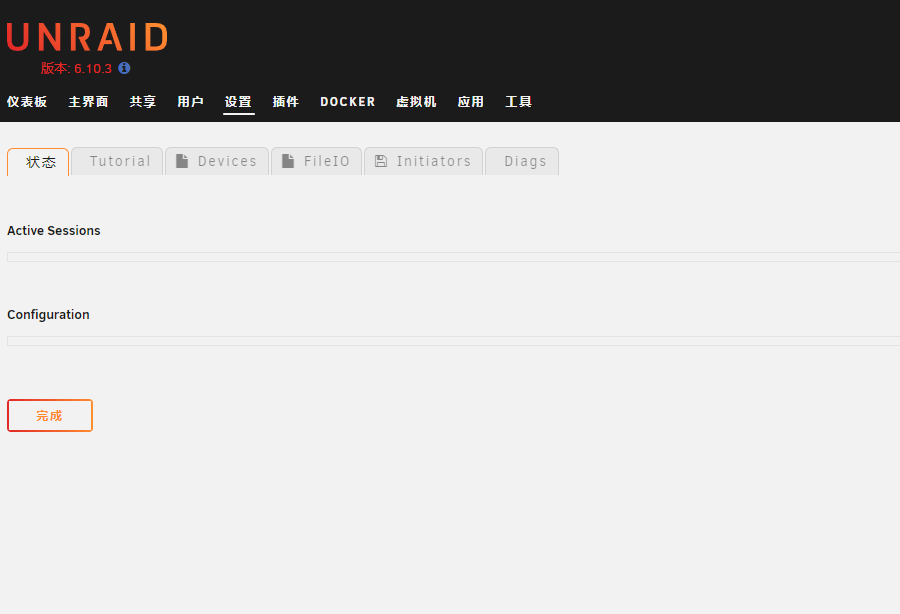
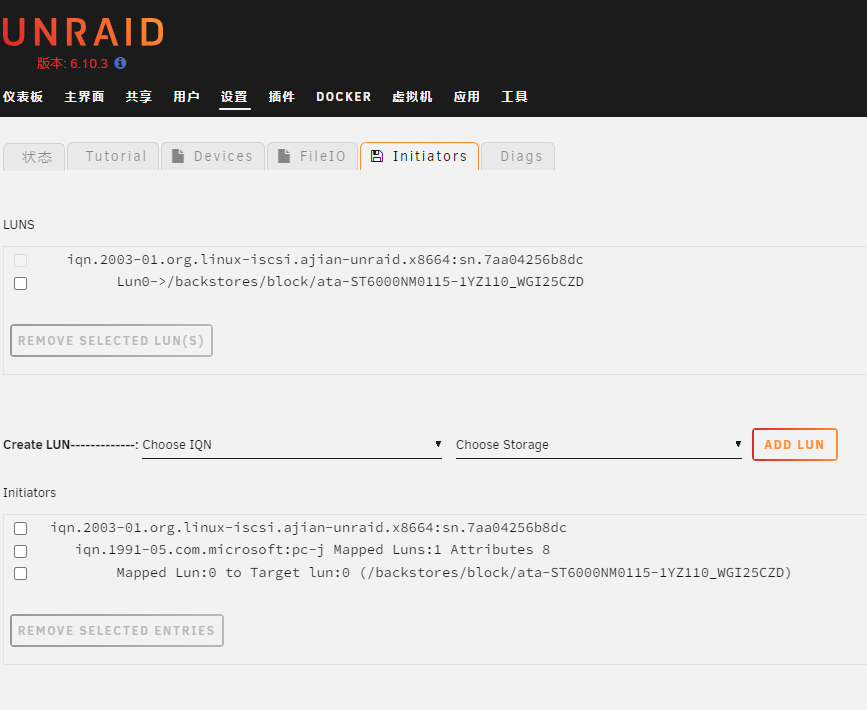 在unraid系统6.10.3下更新iscsi插件到2022.04.22版本,pc上没有iscsi链接。查看插件状态栏什么都不显示,安装栏内已有信息无法删除,移除iscsi插件并删除U盘插件内容后,重新安装,硬盘无法选择,安装栏没有信息。



Account
Navigation
Search
Configure browser push notifications
Chrome (Android)
- Tap the lock icon next to the address bar.
- Tap Permissions → Notifications.
- Adjust your preference.
Chrome (Desktop)
- Click the padlock icon in the address bar.
- Select Site settings.
- Find Notifications and adjust your preference.
Safari (iOS 16.4+)
- Ensure the site is installed via Add to Home Screen.
- Open Settings App → Notifications.
- Find your app name and adjust your preference.
Safari (macOS)
- Go to Safari → Preferences.
- Click the Websites tab.
- Select Notifications in the sidebar.
- Find this website and adjust your preference.
Edge (Android)
- Tap the lock icon next to the address bar.
- Tap Permissions.
- Find Notifications and adjust your preference.
Edge (Desktop)
- Click the padlock icon in the address bar.
- Click Permissions for this site.
- Find Notifications and adjust your preference.
Firefox (Android)
- Go to Settings → Site permissions.
- Tap Notifications.
- Find this site in the list and adjust your preference.
Firefox (Desktop)
- Open Firefox Settings.
- Search for Notifications.
- Find this site in the list and adjust your preference.