





UnraidRog
Members
-
Joined
-
Last visited
Everything posted by UnraidRog
-
PS I have 4 sticks of 16GB RAM. I tested 2 at a time but that didn't isolate the problem. Unless I had terrible luck and had more than 2 sticks of RAM go bad on me.
-
@Woosah following up on this. I'm running into the same issue. Did you find a fix? Thanks
-
I was wrong... it stopped crashing at the 17 min mark. I've attached a couple Syslog's. One is with the Dockers turned on and the other is with the Dockers turned off. I'm going to try replacing the PSU next. Should I also do a memtest to rule out the RAM? Thanks again syslog-previous 08.26.2025 12.28.txt syslog-previous 08.26.2025 12.39.txt
-
I'm starting to swap out different parts to get to what's causing this. I noticed something strange. The Parity Check will always stop at the 17min mark and NAS will reset. Does that help narrow down what's causing the crashes?
-
Got it. I have a spare PSU somewhere. I'll look for that. Thanks everyone
-
Sounds good. I’ll start troubleshooting one hardware at a time to see if I can narrow it down. Just wondering, can a bad HBA controller trigger a reset? I ordered a new one that ‘s coming on Monday. The heatsink on the old one was disconnected. I wonder if the chipset was damaged before I discovered that the heatsink came off.
-
Thanks - I’ll try the mirror to flash drive option. I don’t mind the additional wear on the flash drive for now. I don’t think it’s the PSU unless it’s going out. I actually have one less drive HDD now than before. Hopefully the syslog server can tell me something.
-
Hello, My Unraid server is rebooting by itself about 10-15 mins into the Parity Check. I recently had an issue with where some of my drives were throwing codes and were being disabled. The forum helped me out to solve this. The old post is: https://forums.unraid.net/topic/192547-help-needed-accidentally-used-new-config-with-a-failed-drive/ Since I got my server up and running again, 3 of the drives were disabled again so I rechecked the cables to make sure everything is seated correctly. I noticed that a plastic screw holding the heatsink on my LSI HBA had snapped off. I rigged up a temp zip tie fix and booted up again. Upon rebooting, I got the unclean shutdown message so I decided to complete a Parity Check. 10-15 mins into this, the server randomly reboots. Several times, I opened up the server and reconnected different components, but to no avail. Before I go and start replacing components, is there something in the logs that can tell me what's wrong? Logs attached. I was thinking about starting with the HBA. Thanks leungunraid-diagnostics-20250819-1722.zip
-
I think I'm good now. I ran the XFS Repair from the GUI. Parity is now Syncing. Thank you all!
-
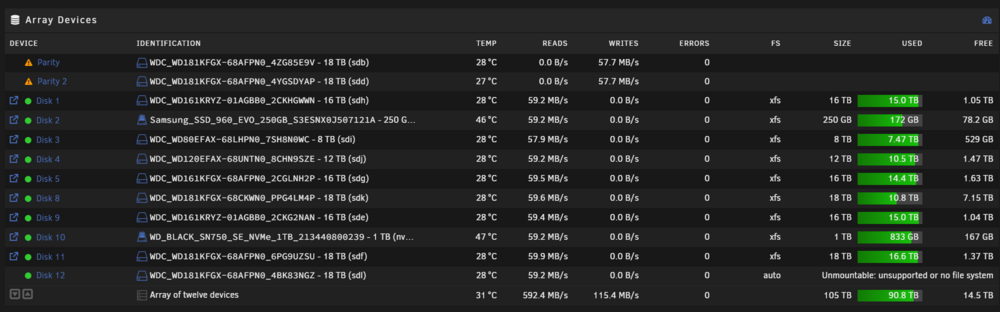
I have no idea what's going on.... I started the Array and the Parity Sync began, but then I noticed that Disk 12 is showing the "Unmountable: unsupported or no file system" error. Do I need to complete the same procedure and XFS repair for Disk 12 as well? Thanks
-
Awesome. I don't see a lost&found folder. Things are looking more promising. Is it safe to mount it back to my Array and let the Parity drives rebuild?
-
Sweet! I was able to mount it and look at the contents. It looks like most if not all of the data is there. I don't remember the exact total size of the files but it looks pretty close to what I had on the drive. Is there anyway I can mount the Parity drives to compare the data? Thanks!
-
root@LeungUnraid:~# xfs_repair -v /dev/sdk1 Phase 1 - find and verify superblock... bad primary superblock - bad CRC in superblock !!! attempting to find secondary superblock... .found candidate secondary superblock... verified secondary superblock... writing modified primary superblock - block cache size set to 2946608 entries sb root inode value 18446744073709551615 (NULLFSINO) inconsistent with calculated value 128 resetting superblock root inode pointer to 128 sb realtime bitmap inode value 18446744073709551615 (NULLFSINO) inconsistent with calculated value 129 resetting superblock realtime bitmap inode pointer to 129 sb realtime summary inode value 18446744073709551615 (NULLFSINO) inconsistent with calculated value 130 resetting superblock realtime summary inode pointer to 130 Phase 2 - using internal log - zero log... zero_log: head block 55 tail block 51 ERROR: The filesystem has valuable metadata changes in a log which needs to be replayed. Mount the filesystem to replay the log, and unmount it before re-running xfs_repair. If you are unable to mount the filesystem, then use the -L option to destroy the log and attempt a repair. Note that destroying the log may cause corruption -- please attempt a mount of the filesystem before doing this. Thanks
-
The last several lines from the "dmesg" command got me this: [216889.781259] XFS (sdk1): Metadata CRC error detected at xfs_sb_read_verify+0x10c/0x198, xfs_sb block 0x0 [216889.781548] XFS (sdk1): Unmount and run xfs_repair [216889.781824] XFS (sdk1): First 128 bytes of corrupted metadata buffer: [216889.782103] 00000000: 58 46 53 42 00 00 10 00 00 00 00 01 05 ef ff f3 XFSB............ [216889.782390] 00000010: 00 00 00 00 00 00 00 00 00 00 00 00 00 00 00 00 ................ [216889.782675] 00000020: 26 eb cb ef 4e fe 41 32 9e f4 81 39 a7 04 39 db &...N.A2...9..9. [216889.782963] 00000030: 00 00 00 00 80 00 00 07 00 00 00 00 00 00 00 80 ................ [216889.783245] 00000040: 00 00 00 00 00 00 00 81 00 00 00 00 00 00 00 82 ................ [216889.783526] 00000050: 00 00 00 01 0f ff ff ff 00 00 00 11 00 00 00 00 ................ [216889.783799] 00000060: 00 07 f6 00 b4 b5 02 00 02 00 00 08 00 00 00 00 ................ [216889.784067] 00000070: 00 00 00 00 00 00 00 00 0c 09 09 03 1c 00 00 05 ................ [216889.784336] XFS (sdk1): SB validate failed with error -74.
-
I tried the step above and got this: root@LeungUnraid:~# mkdir /x mkdir: cannot create directory ‘/x’: File exists root@LeungUnraid:~# mount -o ro -t xfs /dev/sdk1 /x mount: /x: mount system call failed: Structure needs cleaning. dmesg(1) may have more information after failed mount system call. The "dmesg" command got me a long list of messages. Am I doing this wrong? Thanks again
-
(So I'm learning myself) What does this command do? Does it mount it in Unassigned Devices? Thanks!
-
Correct. fdisk -l /dev/sdk Disk /dev/sdk: 16.37 TiB, 18000207937536 bytes, 35156656128 sectors Disk model: WDC WD181KFGX-68 Units: sectors of 1 * 512 = 512 bytes Sector size (logical/physical): 512 bytes / 4096 bytes I/O size (minimum/optimal): 4096 bytes / 4096 bytes Disklabel type: gpt Disk identifier: A9D127F7-2277-4910-A9A0-CBD278462CE6 Device Start End Sectors Size Type /dev/sdk1 64 35156656094 35156656031 16.4T Linux filesystem wipefs /dev/sdk1 DEVICE OFFSET TYPE UUID LABEL sdk1 0x0 xfs 26ebcbef-4efe-4132-9ef4-8139a70439db
-
Just rebooted. I was able to unassign it. The Mount option shows up now but it's greyed out. Thanks again for your help I appreciate it.

-
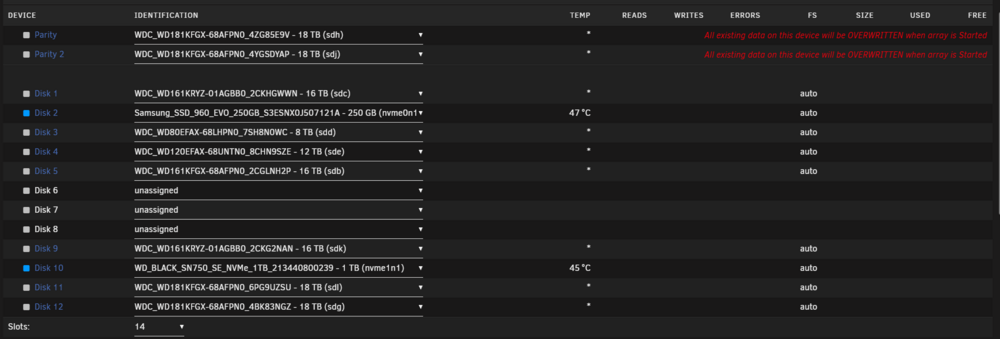
I believe so. It's no longer mounted in the array. Please see screenshot below Thanks!
-
I just got chance to try mounting the disk in question (Disk 8). It wouldn't let me. I assume it's because it's part of the array. I see an option to Change Disk Mount Point. Should I do this? Thanks

-
Thanks for your response. Disk 8 began the Parity Rebuild and stopped less than an hour into it. What I worry about is that part of the data was wiped during that time. I’ll mount it in UD and check the contents later on today. Thanks!
-
I need some help. The backstory is a bit long but I want to explain this as detailed as possible. I also attached the Diagnostic file. I am in the process of upgrading to a larger USB flash drive so I can upgrade to a new version of Unraid (I've been stuck on 7.0 because my USB drive didn't have enough space). I also had 2 older drives that were throwing errors so I replaced them with 1 larger drive. I have 2 Parity Drives and 8 HDDs in my array. Disk 6 (8 TB) and Disk 7 (8 TB) were the old drives throwing errors so I replaced it with Disk 8 (16 TB). The new drive is brand new. A few weeks ago I transferred all the data from Disk 6 and Disk 7 to Disk 8 uneventfully. On 8/2, I backed up my old USB boot drive and migrated it into a largest USB drive. It all went well and booted up fine. Then out of nowhere, Disk 8 and Disk 12 both were disabled because it was in an error state. Unraid showed that both drives were being emulated. I checked the cables and reattached them and then I unassigned Disk 8 and Disk 12 and reassigned it. During the Parity Rebuild, Disk 8 showed as disabled again and the Parity rebuild stops. I unpause Parity Rebuild and let Disk 12 finish. Today (8/4), I change the SATA cable for Disk 8 and reboot the server. For some reason, Disk 8 shows up under "Unassigned Disk Devices". THIS IS WHERE I MAY HAVE MESSED UP... I went to New Config and selected ALL of "Preserve current assignments". This is when I see the "All existing data on this device will be OVERWRITTEN when array is Started". Realizing that I messed up I stopped and haven't touched the server since then and the array is off. I believe the data for Disk 8 is still on the Parity drives. Is there anyway to undo the New Config? I still have my USB Flash Drive Backup from before I changed the USB drive. Can I use that backup to go back to my old Config? Thank you in advance! leungunraid-diagnostics-20250804-2129.zip
-
I got my 3090 working on the first try thanks to your guide along with the Spaceinvader videos. Thanks!



