





ksp
Members
-
Joined
-
Last visited
Everything posted by ksp
-
I mean I'm at 53.5 TB on this server and right around there on another server (that does not experience these issues). I have 32 GB ram, would that show up in diags? If I'm running out of memory? My other server that does NOT experience this has Plex on a separate PVE node and is serving the shares over the network. I am ready to try anything. I'm at 32 gb ram but didn't know if cache dir is required or else you get issues like this?
-
This is STILL happening by the way - even without the mods. Usually not as frequently but the amount of shows that go "missing" increases exponentially over time reaching over 10k episodes "missing" even though re-scans cause them to show back up. Any changes on your end @sfef? Wondering if anyone's been able to root out the issue because even after diagnostics, this problem still stands.
-
I'm hopeful. You might be interested in this script I made and dockerized since I had a bit of time yesterday: https://github.com/kpatdev/missingmediascanner Very niche, and likely overkill but I was really over having to go re-scan myself every time so I went down the rabbit hole. Very early and probably buggy but if this issue persists I'll maintain it. PM me ur Discord if you wanna chat further.
-
Did both of these, will report back if I see any improvements. Thank you for the suggestions. Although I will say, I run the same docker mod on Radarr, no issues and it's confirmed to work in both without issues. Doesn't hurt to try and rule anything out.
-
I didn't but I can. Only reason I didn't was because I have the exact same config running on another server for years now and it never had this issue crop up. I set up both servers from scratch and the 2nd server was setup using the other as reference throughout the entire process. Down to the directory structure they are the exact same. Plex and Sonarr are affected but not Radarr. If it's container related, it'd be weird that it's not affecting the movies because if you look at the directory structure, I'm passing in /data so everything else underneath it should be affected too, not just tvshows. I find that a bit odd. I understand, I wanted to ask here because all the reasons above led me to believe that it's not isolated to containers and could be an issue at the lower level. Appreciate you taking the time. Just to add: I see this in the debug logs for Sonarr earlier this morning: 2025-11-05 08:08:02.9|Debug|DiskScanService|Series folder doesn't exist: /data/media/tvshows/13 Reasons Why (2017) {tvdb-323168} @JorgeB
-
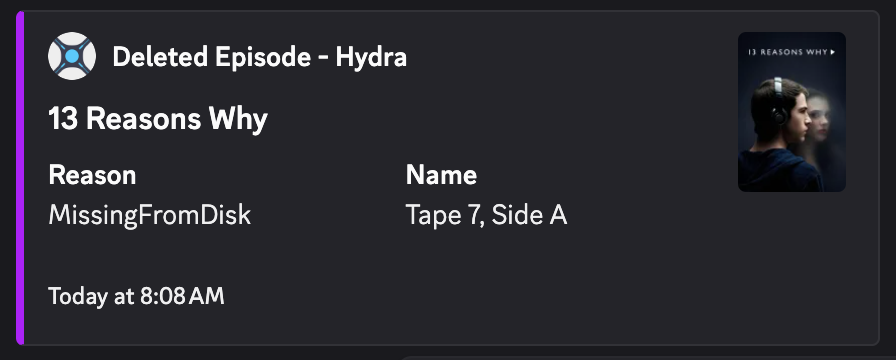
Sure. Let me recap: Files go "missing" to the Plex and the arr apps. I can't consistently monitor but I see that in my Discord Notifiarr notifications that Sonarr is showing that episode files were deleted due to it being "MissingFromDisk." I can verify that this is not the case by checking the filesystem through the terminal. After verifying that it's still there, if I refresh & scan in Sonarr and scan libraries in Plex (sometimes it takes multiple scans) the show comes right back up in both apps and plays fine. This is unexpected behavior and super annoying as the show when it is re-added to Plex, it will be added again in the Recently Added. And sometimes, I'll only know this is happening because someone trying to watch will tell me they can't play an episode or the entire show is missing from Plex. I'm running a server with identical setup that has never seen these issues. Additional information: File structure: mnt/ ..└── user/ ....└── data/ ......├── media/ ......│ ├── movies ......│ └── tvshows ......└── .downloads/ ........├── tmp ........└── completed I can't verify that the files are not missing over smb but I can verify that they are still there when I ssh in and ls. They are there. Trying to access over SMB hasn't solved this issue (hacky solution anyways but wanted to see if that would help cuz I've been pulling my hair out). This ONLY happens to the TV Shows library. I've never seen it happen to the Movies library. Example of the message I'll see in Discord: Then I'll go to Plex and see it show a red deleted icon. I'll re-scan 1-2 times and hopefully it'll show up again. It was never deleted, but Plex and the arrs think it was. Not sure why or how to even diagnose.
-
Okay so we're in the same boat. Same I just got around to this, but have been dealing with it since the summer. Even if I re-scan, it's become a manual process. One re-scan usually isn't enough, and if I re-scan too many times, everything goes missing immediately. I can't nail down why this is happening. I'm now on the latest Unraid version 7.2.0 and still having issues. It's ridiculous that this is still happening and I STILL don't have anything that I can conclusively point to as the issue. I tried a workaround to make Plex use a network share (since I thought this wasn't happening over SMB) but I learned that it was happening over the network share as well. Weird that this only happens in the TV Shows library for Plex. @JorgeB what else can we provide that can help us diagnose this very specific issue. For me it's went from minor inconvenience to getting pretty unusable at it's worst.
-
@sfef were you able to solve this? I still see this from time and time and it's crazy because I still can't root it out. I have all brand new hardware, same issue.
-
This would be awesome. Ideally, the plugin should accept any 1 of compose docker-compose with either yml or yaml extensions. I like having everything the same and my 3 other other servers use compose.yaml. Understood, I guess my feature request would just be to have an option for the plugin to choose between the aforementioned options as the standard filename for all simple stacks.
-
So I just had to re-scan a bunch of shows back in. And yep, I could access them locally and over SMB. Posting new diags here anyways just for posterity. I haven't looked at them yet. This is perplexing. Unsure what could be causing this AGAIN. hydra-diagnostics-20250901-1907.zip
-
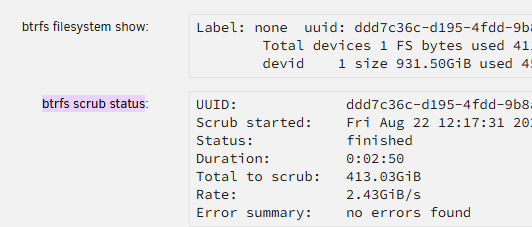
Okay. I ran it with correct any errors and it said no errors found.
-
@MowMdown @JorgeB Here's the Diagnostics with the GPU drivers removed and rebooted. hydra-diagnostics-20250822-1012.zip
-
Generally, no not really. Nothing else that I've really noticed. That's kind of it. I have the Nvidia GPU (in addition to the iGPU which is used for Plex) for Ollama but I can temporarily remove if that helps narrow this down. That was an error on my part. I had a disk referenced in Notifiarr that isn't present. I've removed it from the container. Okay, I'll remove the drivers this evening, reboot and provide a new log after some time.
-
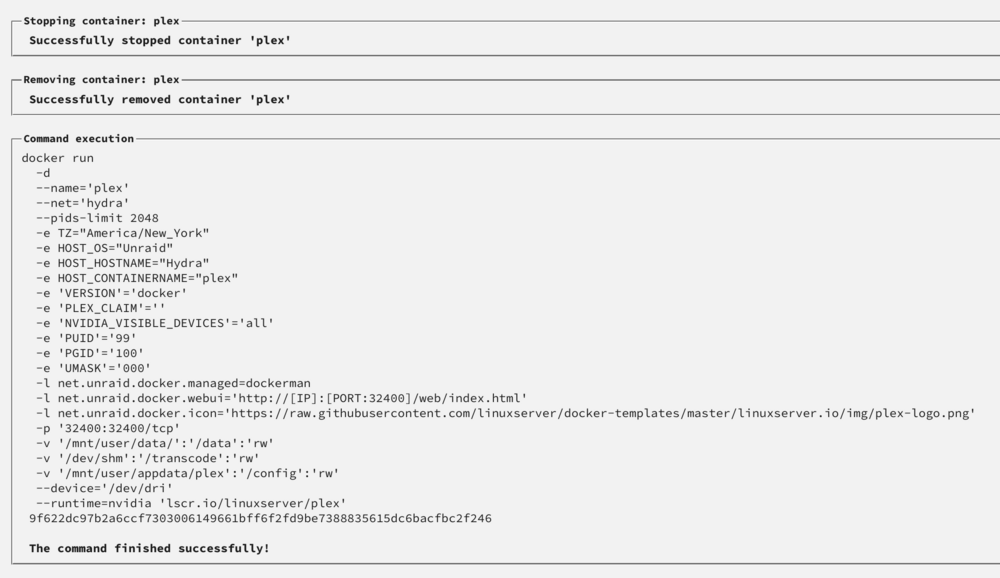
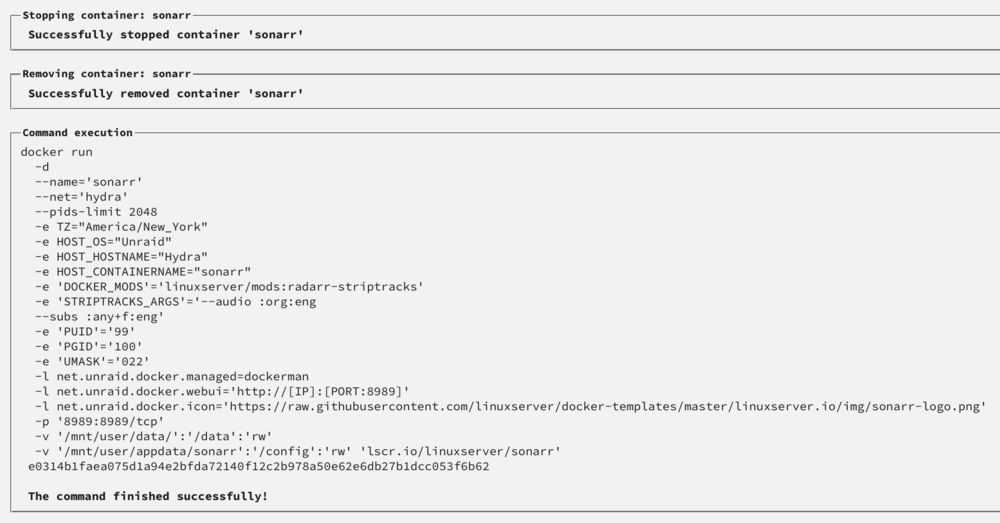
I'm all for giving more information as it's requested. The disks are connected via SATA directly to the controller on the motherboard - all brand new parts. I also would like to take this time to point out that due to this error I built a brand new server (to rule out any faulty hardware) and am running Unraid with new disks directly from WD (not the same as previous server). Docker run for Plex and Sonarr: Screenshot of the Shares Tab: hydra-diagnostics-20250819-1619.zip Yes the docker container is able to see the files. Intermittently they will go "missing" to Plex/Arrs. I am unable to catch the exact moment it does since it's seemingly random. A scan inside Plex quickly reveals what went missing. And then subsequent scans will bring those items back. When they are "missing" I can still see the files from the Shares. The permissions error is a red herring. That's a generic error from Sonarr. All it really is saying is Sonarr can't see the file at that point in time. However, if I force re-scan a couple times it'll show right back up.

-
Yeah so it's been a few weeks of running a brand new build. I started from scratch with the media as well and I am STILL seeing this issue. I just scanned my Plex library and it removed 100 shows because they are "missing" when they are STILL present on disk. This is baffling. The craziest part is I have all new disks. None of the same disks as the old build. I cannot understand what is going on. Let me know if you're able to find a solution.
-
Not too worried on an i5 tbh, i7 and up maybe. Reports are overblown tbh, have multiple systems doing fine on 14th gen. Parts are here so I’ll be building it out this Saturday and swapping over. Will post results here.
-
Nah, my other server NEVER experiences this. It's definitely not expected behavior. Have tried rooting hardware so gonna start brand new once the parts come in. My older server with older hardware and more disks never once experiences this issue so yes, it's a real issue. Nice, I'm not going that overkill but will modernize with this: Intel i5-14600k - iGPU more than capable for Plex Thermalright CPU cooler Z790 ATX motherboard with 8 sata ports and a couple m.2 slots and pcie expansion slots 32gb ddr5 ram (no ecc, since not compatible) Mid tower case with lots of disk space (darkrock classico storage master is nice) Use a PSU I have laying around Going for cheap but modern. It's a second server anyway so no point in going crazy. My Plex on another server never misses a file. And if you read the post you'd see that it's not just Plex. All the arrs and everywhere else also see it as missing. Mine is. It's not isolated to Plex if you read the post you'd know.
-
Yeah this is weird. After swapping the RAM with ECC RAM and running smart tests, no more errors but the issue still persists. Consistently my apps will show folders as "missing". Might be a faulty SATA controller on my hardware. I'm going to build a completely new server here shortly and just transfer the USB drive and all the other drives. Hoping that will finally end all these nonsense errors.
-
Ran memory test today and was seeing a lot of errors. Replacing my ram with ECC modules tomorrow when they come in. @sfef Maybe try running a memory test and see if you are having similar issues.
-
Bump, seeing the same thing. Really no one has been able to come up with a reason why. If it's hardware, how can we confirm that it's hardware? I'm replacing SATA cables Monday to see if they have anything to do with it. Read tests on the array showed no issues. Leaving my post below as well for posterity.
-
Hahah. Unfortunate but thanks for trying! I'm going to replace the SATA cables Monday to see if it may have anything to do with that. Let me know if you are able to solve this because it's borderline unusable because of how often it's happening.
-
So I'm experiencing the same issues again. Entire shows are going "missing" again even though they exist on disk. I turned off spin down on all the disks. I don't think this is related to the disks spinning down then? Any other ideas as to what is causing this behavior? Pulling my hair out trying to solve this D:
-
So I gave this a go as per your recommendation (and I don't use powertop). I'm not sure if it's fully worked as I did still have 1 show go "missing" randomly but the shows that would routinely go missing hasn't happened (yet, since this is still a small timeframe). Will keep it this way until I definitively see it go one way or another. This is odd because my other server doesn't require this (it has default spin down delay and likely never even spins down from what I can tell). Gave it a go, unsure if that's the actual case or something else. Could just be a coincidence, but seeing less shows go missing. It's only been a day so will update after maybe a week or so.
-
Hi all, I'm having a weird problem on my 2nd Unraid server (I do not see this on my 1st server - and they both have identical setups). Every so often I see that files become "missing" to the arr apps and Plex. I don't consistently monitor but I see that in my Discord Notifiarr notifications that Sonarr is showing that episode files were deleted due to it being "MissingFromDisk." I can verify that this is not the case by checking the filesystem through the terminal. After verifying that it's still there, if I refresh & scan in Sonarr and scan libraries in Plex (sometimes it takes multiple scans) the show comes right back up in both apps and plays fine. So odd. This is unexpected behavior and super annoying as the show when it is re-added to Plex, it will be added again in the Recently Added. And sometimes, I'll only know this is happening because my brother or someone lets me know they can't play a show or the entire show is missing from Plex (just happened this morning). I can't drill down what the issue is because I'm running a server with identical setup that has never seen these issues. Initial analysis of syslog and logs in sonarr don't seem to show anything that could point me in the direction to solve this. I've temporarily disabled my hdd_cache (download cache) to see if that has anything to do with this. Additional information: File structure: mnt/ ..└── user/ ....└── data/ ......├── media/ ......│ ├── movies ......│ └── tvshows ......└── .downloads/ ........├── tmp ........└── completed Diagnostics: hydra-diagnostics-20250520-1400.zip.download.zip Sonarr logs: sonarr.txt What other info can I provide to hopefully figure out why this is happening? Appreciate the help!
-
Thank you for this information but I'm a little confused as to what a proper solution is for someone who needs VMs (running Home Assistant) and wants to have AdGuard Home on Docker.


