Chrotesque
Members
-
Joined
-
Last visited
Everything posted by Chrotesque
-
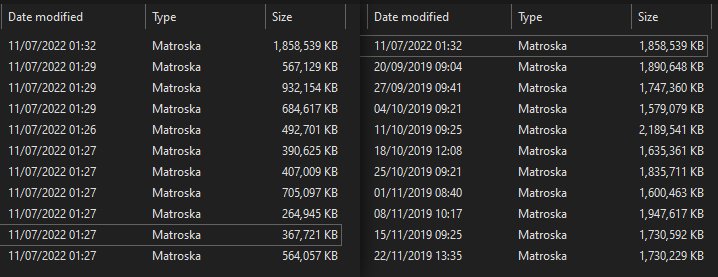
A season of Mr Inbetween had finished downloading with Deluge and then was moved into its season folder. However the files were not fully transferred, only portions of it. As per screenshot I attached, on the left side is how it was left. Note here is that this wasn't shortly after the download, this was many hours afterwards - my Discord notification already alerted me at that point, also hours ago, that the import had finished. I moved over the original files left in the downloads folder to fix this, as you can see the files were meant to be a lot larger. This is now the second time of this happening, I've noticed that 2 days ago with another show and season entirely. Here's the relevant excerpt from the log: [v3.0.6.1342] System.IO.IOException: File copy incomplete. [/media/Mr Inbetween/Season 1/Mr Inbetween - S01E03 - Captain Obvious WEBDL-1080p.mkv] was 1034217026 bytes long instead of 1021634114 bytes. at NzbDrone.Common.Disk.DiskTransferService.TryCopyFileVerified (System.String sourcePath, System.String targetPath, System.Int64 originalSize) [0x00047] in M:\BuildAgent\work\63739567f01dbcc2\src\NzbDrone.Common\Disk\DiskTransferService.cs:468 at NzbDrone.Common.Disk.DiskTransferService.TransferFil[...] From what I gathered updating Mono (whatever that is exactly) might be a fix, however that recommendation is about 3 years old and so I'm not entirely sure it would help, nor do I know how to do that (yet). Anything i can do to fix this?