





Rohit2122
Members
-
Joined
-
Last visited
-
So I've recently rebuilt my Server with new parts. I've inserted the usb booted it up and everything works as it should. I had to enable SR-IOV in the motherboard to allow VFIO binding as my VM with gpu passthrough and nvme passthrough wasn't able to start. At this point I am able to access the VM tab. I binded both in settings by clicking 'VFIO bind at boot'. Restarted the server and everything seems to run fine docker, plugins etc. The problem I'm having is as soon as I click on the VM tab the whole GUI seems to crash or is stuck on loading. If I delete the cookies stored I am able to access the GUI again but if I click the VM tab it happens again. Any suggestions as to what could be causing the issue? I have restored the usb at least 3 times to see if that could be the issue but it's not, as it always leads to the same issue. I have attached the diagnostic report hopefully that helps! tower-diagnostics-20240729-1122.zip
-
So I've recently rebuilt my Server with new parts. I've inserted the usb booted it up and everything works as it should. I had to enable SR-IOV in the motherboard to allow VFIO binding as my VM with gpu passthrough and nvme passthrough wasn't able to start. At this point I am able to access the VM tab. I binded both in settings by clicking 'VFIO bind at boot'. Restarted the server and everything seems to run fine docker, plugins etc. The problem I'm having is as soon as I click on the VM tab the whole GUI seems to crash or is stuck on loading. If I delete the cookies stored I am able to access the GUI again but if I click the VM tab it happens again. Any suggestions as to what could be causing the issue? I have restored the usb at least 3 times to see if that could be the issue but it's not, as it always leads to the same issue. I have attached the diagnostic report hopefully that helps! tower-diagnostics-20240729-1122.zip
-
tower-diagnostics-20230602-1734.zipSo I had an issue where the the motherboard time and date were wrong so I changed that to match IST (Irish Standard time) after that change in the bios I started up unraid. made sure ntp -> yes. The date and time were correct after this. Another weird thing I noticed was that I had my array auto start on boot up but now I have to do it manually. Could my usb be corrupt?
-
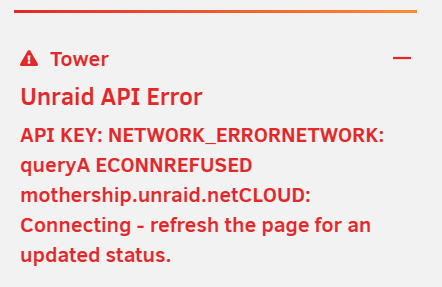
Got this error after a restart. changed date and time to ntp -> yes. still having the same issue. any recommendations? tower-syslog-20230602-1238.zip tower-diagnostics-20230602-1345.zip
-
Can someone help me with setting up sunshine? I have changed the sunshine.conf to settings to lan but when I run sunshine in the terminal I get this error. [2023:06:01:21:05:11]: Info: Open the Web UI to set your new username and password and getting started [2023:06:01:21:05:11]: Fatal: Couldn't bind RTSP server to port [48010], Address already in use [2023:06:01:21:05:11]: Info: File /root/.config/sunshine/sunshine_state.json doesn't exist [2023:06:01:21:05:11]: Fatal: Couldn't bind http server to ports [47989, 47989]: bind: Address already in use [2023:06:01:21:05:11]: Fatal: Couldn't bind http server to ports [47990]: bind: Address already in use [2023:06:01:21:05:11]: Error: Failed to create client: Daemon not running I have changed the port within sunshine.conf but the ports here never change. Any help would be appericiated!
-
@JorgeB I passed the memtest86+ with my ram OC to 3600mhz but I still dropped it to 3200mhz and everything started working again. Thanks for the help!
-
Oh that might be it, I will run the memtest86 and report back. Thanks
-
Hi, Got a big problem if anyone can help me get back up and running. Yesterday the power went out in my area and my unraid server went with it. When I turned on my Server the cache drives were missing in unraid. So I re sat them and they showed back up again. I ran a parity-check (which I normally do after every unclean shutdown) and the server randomly crashs. I have included the logs and I'm not to sure where to go from here. Any help would be appreciated! I have included the logs. syslog.txt
