big_boss
Members
-
Joined
-
Last visited
-
Thanks for the advice, I did install a new ram kit along with the existing ram while doing the upgrade. Might be worth doing some mem tests. Thanks for your help
-
I have also seen this in the first log. I am unsure what the md6p1 drive is? I am assuming it is a partition on the drive that was corrupt? Dec 8 02:40:04 TERABYTE kernel: XFS (md6p1): SB summary counter sanity check failed Dec 8 02:40:04 TERABYTE kernel: XFS (md6p1): Metadata corruption detected at xfs_sb_write_verify+0xc1/0x11a [xfs], xfs_sb block 0x0 Dec 8 02:40:04 TERABYTE kernel: XFS (md6p1): Unmount and run xfs_repair Dec 8 02:40:04 TERABYTE kernel: XFS (md6p1): First 128 bytes of corrupted metadata buffer: Dec 8 02:40:04 TERABYTE kernel: 00000000: 58 46 53 42 00 00 10 00 00 00 00 00 cb bb ff f3 XFSB............ Dec 8 02:40:04 TERABYTE kernel: 00000010: 00 00 00 00 00 00 00 00 00 00 00 00 00 00 00 00 ................ Dec 8 02:40:04 TERABYTE kernel: 00000020: 40 7d 36 3a 44 61 45 ad a2 1d 61 01 89 5c bc 98 @}6:DaE...a..\.. Dec 8 02:40:04 TERABYTE kernel: 00000030: 00 00 00 00 60 00 00 09 00 00 00 00 00 00 00 80 ....`........... Dec 8 02:40:04 TERABYTE kernel: 00000040: 00 00 00 00 00 00 00 81 00 00 00 00 00 00 00 82 ................ Dec 8 02:40:04 TERABYTE kernel: 00000050: 00 00 00 01 0f ff ff ff 00 00 00 0d 00 00 00 00 ................ Dec 8 02:40:04 TERABYTE kernel: 00000060: 00 07 f6 00 bc b5 10 00 02 00 00 08 00 00 00 00 ................ Dec 8 02:40:04 TERABYTE kernel: 00000070: 00 00 00 00 00 00 00 00 0c 0c 09 03 1c 00 00 05 ................ Dec 8 02:40:04 TERABYTE kernel: XFS (md6p1): Corruption of in-memory data (0x8) detected at __xfs_buf_submit+0xff/0x199 [xfs] (fs/xfs/xfs_buf.c:1552). Shutting down filesystem. Dec 8 02:40:04 TERABYTE kernel: XFS (md6p1): Please unmount the filesystem and rectify the problem(s)
-
Hi. I recently performed a platform upgrade to my server and in the process added a second cache drive and a new 14tb drive. All went well and the server seemed to be running fine until today where one of my users mentioned that a tv series they were watching was no longer available on plex which had been working yesterday. I then went to check the files and it appeared they had disappeared, along with all the other files I had downloaded to cache and then the mover moved to array this morning as per my settings. I went into fix common problems and saw this warning - Your drive is either completely full or mounted read-only (for disk6, the new drive I had added). I stopped the array and took the first diagnostics download. I rebooted and then saw the Unmountable: Unsupported partition layout warning beside drive6 as seen in the second diagnostics download. I could see the lines: XFS (sdi1): Unmount and run xfs_repair & Mount of 'sdi1' failed: 'mount: /mnt/disks/ZL20A875: mount(2) system call failed: Structure needs cleaning. dmesg(1) may have more information after failed mount system call.' With this I then ran the xfs_repair on the drive in maintenance mode and all seems to be okay now. My question is, why did this happen? Is it common? I have never had to do this before and the server has been running for years with unraid. Are there preventative measures I can take to prevent this happening in the future when adding more drives and is this likely to happen again on the same drive? SMART says there are no errors but I am still within the time limit to return the drive if anyone thinks this could be an issue with the hardware. I do recall the Unmountable: Unsupported partition layout warning with the drive when trying to add it to the array the first time after preclearing but I believe a restart and destrutive mode and deleting the partitions fixed that - could this have been the point where I should have ran the xfs_repair? Thanks in advance. terabyte-diagnostics-20241208-1504.zip terabyte-diagnostics-20241208-1516.zip
-
After some more investigation, I can see that the nvidia gpu is only being used to decode and not to encode
-
I am completely out of ideas then
-
Yes I beleive so. I think I have found the root of the issue. The 4670k only has 16 pcie lanes, when adding the raid card to the second pcie slot this will have halved the pcie bandwith of the second slot, resulting in the gpu only getting 8 lanes instead of the 16 and I think this would account for the drop in perfomance. Thanks again for your commitment to the community and for your time spent on noobs like myself.
-
Interestingly, when I disable HW accelerated transcoding on plex, the gpu still shows the same as the image above, suggesting it is being incorrectly utilised EDIT - When I disabled both checkboxes for hardware acceleration No running proccess was found with watch nvidia-smi
-
Thanks for speedy reply and for all the awesome work you do for this community. It is reporting this back. I think it may be working but not correctly, does this mean it is an issue with the plex implementation of the gpu?
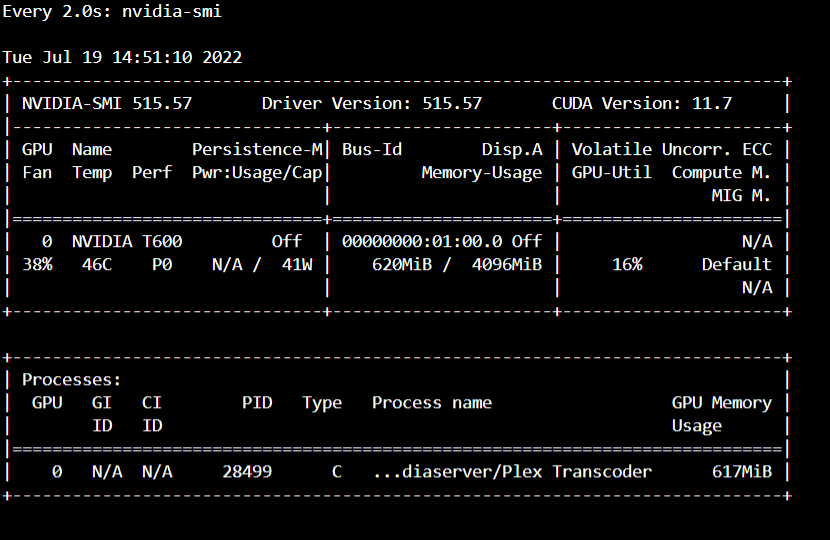
-
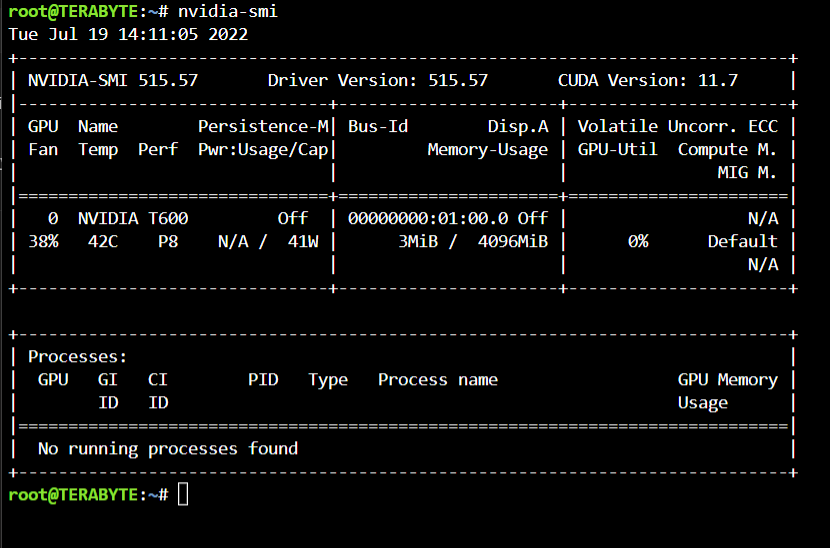
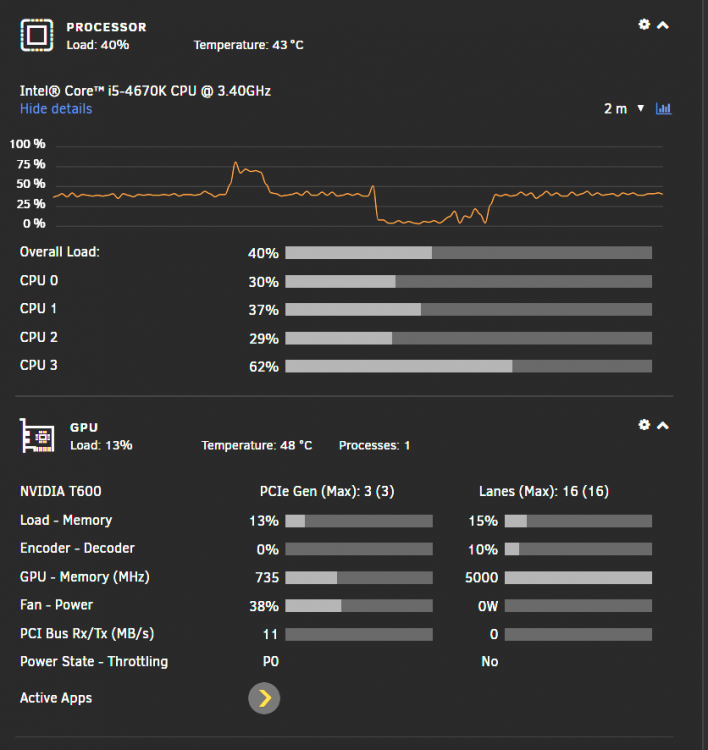
After updating to 6.10.3 my t600 no longer can be used to transcode or in vms. It is detected in the nvidia plugin. I have VT-D Enabled but IOMMU is showing as disabled in Unraid. I am pretty confused. The nvidia-smi command shows there are no processes, which is true as plex transcoding us being done on the cpu, but as this image shows, the gpu statistics says it is doing something. It all worked fine untill I added my raid card and updated to 6.10.3. I think it could possibly be the motherboard as 2 of the ram slots stopped working this morning as well. Any suggestions? terabyte-diagnostics-20220719-1409.zip