




Skip to content
View in the app

A better way to browse. Learn more.

Unraid

A full-screen app on your home screen with push notifications, badges and more.

To install this app on iOS and iPadOS
  1. Tap the Share icon in Safari
  2. Scroll the menu and tap Add to Home Screen.
  3. Tap Add in the top-right corner.
To install this app on Android
  1. Tap the 3-dot menu (⋮) in the top-right corner of the browser.
  2. Tap Add to Home screen or Install app.
  3. Confirm by tapping Install.

samuel3s

Members
  • Joined

  • Last visited

Everything posted by samuel3s

  1. Sorry, I didn't know there has a topic for this issue already, and the method perfectly solved the problem. Ps. notes to myself and anyone else. if you can't find the "Docker Patch" on the "Community Applications", your Unraid needs to update. Thank you Sir/Madam, hope you have a wonderful day!
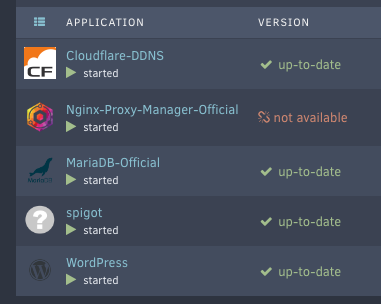
  2. Hi there, thanks for the awesome plugin that you've made! I am using the NPM docker from the APPS via Community Applications, and I recently I have a small problem of my NPM docker app, the version of the docker is suddenly turned into "not available" and doesn't auto-update anymore. And now it is a few versions behind the newest one, and I'm quite worried about it since is it a core docker for everything and security. Is that anyway to fix this problem? Thank you all!
Account

Navigation

Search

Search

Configure browser push notifications

Chrome (Android)
  1. Tap the lock icon next to the address bar.
  2. Tap Permissions → Notifications.
  3. Adjust your preference.
Chrome (Desktop)
  1. Click the padlock icon in the address bar.
  2. Select Site settings.
  3. Find Notifications and adjust your preference.