





MrOz
Members
-
Joined
-
Last visited
Everything posted by MrOz
-
Hey guys, I have another weird occurrence on my Unraid server today. This afternoon I was out of the house and I started to get alerts that my drives were filling up. I have a small array compared to many of you. 12tb. It looks like for some reason my community App Data backup started to run during the day. It is supposed to run at 3am. When it did that it created a 1.2TB plex-media-server.tar file. That file is usually just 4.26gb. It wrote that file to Drive 5 which is a 2tb drive. Maxxed out the drive. So I am not sure why the tar file was so much larger than normal and I have no idea why the back ran at about 3pm instead of 3am. It ran 3am this morning and I did not login to the server today. Unfortunately, since I was out and I started getting these alerts I rebooted the server instead of just stopped the array. Try hitting those little buttons on your phone.... not as easy as you would think. I am just going to delete this backup since it should never have been created and the huge plex backup is just a waste of space. Would it be an issue to just manually delete the backup that ran today? Thoughts? Like Comment Send
-
Different cables did not do anything. The drive can be seen in another computer but it appears that it does not have a partition. I was just hoping someone would have a clue as to how to get this back online. I rebuilt the parity drive today and the data looks good. I was planning on adding a different disk to replace the one in the pic. It is precleared and ready to go. I am also replacing the PCIE sata card as a precaution. Thanks for your input.
-
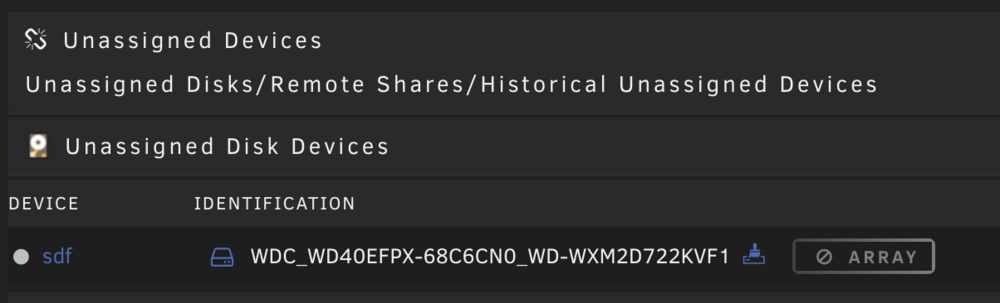
I had this in another post but I wanted to just get help getting this disk back: I had some issues adding a cache drive and I have verified that the cables and power are good but I cannot add this data drive back to the array. I did notice that it does not appear to have a mountpoint. It is listed as SDF not SDF1. xfs repair shows: Phase 1 - find and verify superblock... superblock read failed, offset 0, size 524288, ag 0, rval -1 fatal error -- Input/output error Any idea if I can get this drive back in the array without reformatting? ironman-diagnostics-20240625-1716.zip
-
Ok, I tried a new SATA cable and even moved the drive to a different port on the mobo but that didn't help. These diags are from after doing this. No power splitters etc. I replaced the power supply last night. What logs are you looking at? I need some tutoring as to what logs to look in. Thanks ironman-diagnostics-20240625-0915.zip
-
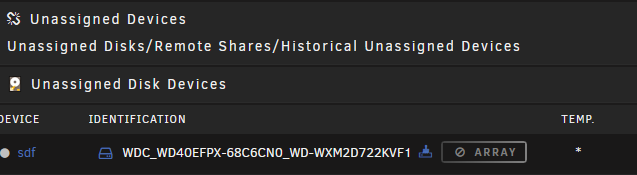
It is definitely still acting up as it still shows similar to the screenshot above but the drive designation has changed to SDF. There seems to be no options here other than to preclear the drive. Your assistance is very much appreciated. ironman-diagnostics-20240625-0835.zip
-
I went ahead and replaced the power supply to see if that will take care of the power issues. I still need help getting the drive back online. Normally I just add it back to the array and let it rebuild but it doesn't give the option to add it back or even get to it for repair. Anyone have any great ideas?
-
Sorry. My bad. I guess that is your setup at the bottom.... I thought you were listing my setup. I am thinking I may need to start with a new power supply and go from there. Any idea how to get the drive back from this weird place. I have not started the array yet. Should I just start it and add it back to the array?
-
I am not sure what you are listing here. This is not my setup. I have one server and I don't have 18tb drives.
-
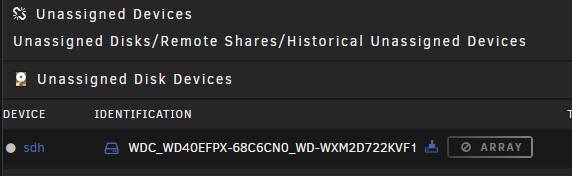
It is days like this that I think about going to TrueNas. I added a new SSD for a second cache the other day and then lost my parity drive and one of the Array drives. I got them back online this morning after a parity build and I rebooted then the other Parity drive and Disk 2 were showing as shown in the attached image. I unplugged the new SSD rebooted and the second parity showed up but needs to be rebuilt. The Disk 2 still shows up like below. There are no NVME drives installed. Thoughts? ironman-diagnostics-20240624-1143.zip
-
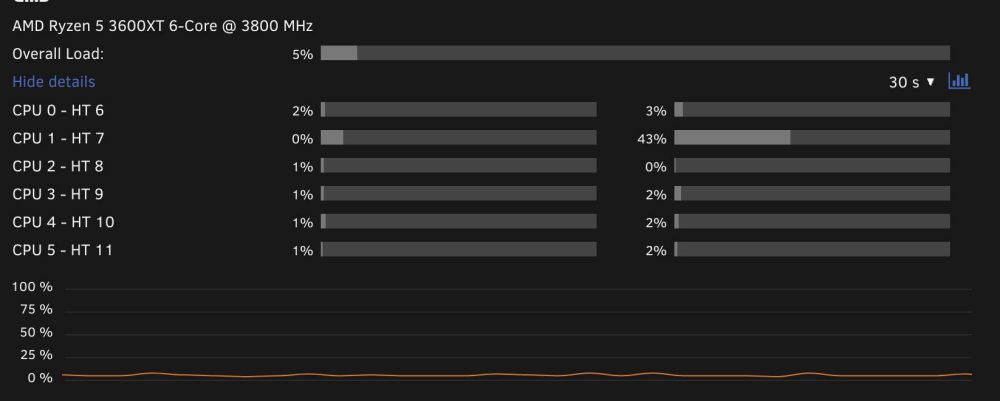
Has anyone seen this issue? HT7 is showing 40-43% all the time. I don't have anything pinned to that CPU. I have rebooted a couple of times and it persists. Disabled docker -- no change. Stopped the array. No change. Ideas on how to figure out what is doing this?
-
I had an issue over the weekend where two drives errored at the same time and both were disabled. I tested each but was advised to look at the power connections. Everything seemed fine. Looked at the drives and they are fine. I have restored the array after moving the drives to separate power cables. So my question to anyone who would like to answer is how do you power your drives? I have a relatively small array . Two parity drives, two SSD cache drives and five array drives. But I am sure many of you have much larger arrays. I have a 500W desktop power supply that I needed to add some Y power supply splitters to be able to power all of my drives. I was thinking of getting a modular power supply and try to minimize the use of any power splitters. Maybe use some custom cabling. Also, I don't have. a powered GPU in this system. Give me your thoughts. Thanks.
-
Thanks. It is rebuilding now. The data seemed fine on that drive but it will still take some time to rebuild. This is not the first time that I have had issues with this build even though the drives were fine. Let me ask you this.... I have two parity drives, two cache drivs and five data drives. I have a 500 watt 80+ Thermaltake power supply so I thought that would be more than enough power since I don't have a gpu to power but the last time I had issues it seemed tied to a power issue as well. Now this time I did move the power cables of these two drives so they were not on the same set of cables. The last time I had the issue it was also with the parity and this same data drive and also the drive health was fine with these drives back then. I have never heard of any issues with power distribution to the drives in Unraid but you never know. Thoughts on the power supply?
-
Attached are the new diagnostics but the problem is that the drive is not mounting. It still shows disabled/emulated. ironman-diagnostics-20240223-1106.zip
-
Also, my parity drive is also still in emulated/disabled mode. I have not run any commands against it. I would appreciate guidance handling this as well.
-
I ran this command xfs_repair -v /dev/mdX where mdX was replaced with my drive designation. It ran in the command windows for quite some time and then the window closed. I then downloaded the smart report.... I realize now that was not helpful. I then ran the repair from the gui.... added the -L switch and it seemed to run to success. Phase 1 - find and verify superblock... Phase 2 - using internal log - zero log... - scan filesystem freespace and inode maps... - found root inode chunk Phase 3 - for each AG... - scan and clear agi unlinked lists... - process known inodes and perform inode discovery... - agno = 0 - agno = 1 - agno = 2 - agno = 3 - process newly discovered inodes... Phase 4 - check for duplicate blocks... - setting up duplicate extent list... - check for inodes claiming duplicate blocks... - agno = 0 - agno = 1 - agno = 3 - agno = 2 Phase 5 - rebuild AG headers and trees... - reset superblock... Phase 6 - check inode connectivity... - resetting contents of realtime bitmap and summary inodes - traversing filesystem ... - traversal finished ... - moving disconnected inodes to lost+found ... Phase 7 - verify and correct link counts... done The drive is still in emulated/disabled mode and I would love to bring it back without losing data. Your guidance is appreciated.
-
I did read the link and I ran the command in the link not sure what else I can do.
-
SMART overall-health self-assessment test result: PASSED Best process for rebuilding it? And I will ask again, do I need to rebuild the Parity drive first? WDC_WD40EFZX-68AWUN0_WD-WX42D514RN6C-20240222-2158.txt
-
Should I start with the Parity disk or Disk 4?
-
Also, I would love to hear your suggestion for the process of rebuilding since I have a parity and a data drive both offline right now.
-
Thanks again for your help. It looks like you may have had it right. Both of the drives were on the same power splitter. I didn't have any option other than to replace the one going to one of the spinning drives with an SSD. I figured the power consumption would be lower with the SSD. Attached is the fresh diagnostics. ironman-diagnostics-20240222-1542.zip
-
Thanks for that. I will tear open the server and take a look at the power connectors. So I can learn to find these types of errors on my own where do you get these errors from. I am pretty good with diagnosing windows server but still struggle with Unraid. Also, what should I do to return it to an online status again. I have done this wrong in the past and it was way too much work. Since this has happened before it makes me want to give up on the technology and move to a self contained NAS solution.
-
Ugh. I woke up to array errors this morning. I would like some guidance before I do anything. I have two 4tb parity disks and one is in disabled/emulated. The array consists of five other disks one of them is disabled/emulated this morning. I have attached my diagnostics and have not rebooted. I appreciate the assistance. I pulled the diagnostics but not sure where to look in there. Your help is appreciated. ironman-diagnostics-20240222-0818.zip
-
Thanks. I replaced the data cables but will check the power cables. Both drives failed previously but showed no errors and I mounted them in an external linux server and copies files from them. I precleared them before adding them back in. I ordered a new drive and I am going to install it and see how that goes.
-
Thanks for the response. ironman-diagnostics-20231026-1038.zip
-
Ok, I found on another post where I need to try the repair from within Unraid. This is the result... the drives still do not attach when I start the array. Phase 1 - find and verify superblock... Phase 2 - using internal log - zero log... - scan filesystem freespace and inode maps... - found root inode chunk Phase 3 - for each AG... - scan and clear agi unlinked lists... - process known inodes and perform inode discovery... - agno = 0 - agno = 1 - agno = 2 - agno = 3 - process newly discovered inodes... Phase 4 - check for duplicate blocks... - setting up duplicate extent list... - check for inodes claiming duplicate blocks... - agno = 0 - agno = 3 - agno = 1 - agno = 2 Phase 5 - rebuild AG headers and trees... - reset superblock... Phase 6 - check inode connectivity... - resetting contents of realtime bitmap and summary inodes - traversing filesystem ... - traversal finished ... - moving disconnected inodes to lost+found ... Phase 7 - verify and correct link counts... done

