





KeeWay
Members
-
Joined
-
Last visited
-
Ok I think i found my issue, it seems the VMbackup app using snapshots was causing the issue. Before upgrading this worked fine using snapshots to backup the VM's but I guess their looks to be some issues with the new 7.3.1 Unraid and snapshots. Once I disabled the snapshot type backup I have not had any issues in a couple weeks now.
-
It happened again this morning starting at 1am and from what I can tell there is 2 cpu's pegged at 100% and no DNS resolving of any kind works. also my first VM is off which happens to be my main DNS server (Domain Controller) and in Unraid it is set to use this server as the primary but i have 2 others listed but it also seems that Unraid does not roll over to them. so looking at the scheduled tasks that start at 1am it my vmbackup plugin but i never had issues until upgrading to 7.3.1. I would roll back but since i have setup the boot from SSD not sure how much this complicates matters. attached is the syslog and diagnostics. nas-diagnostics-20260621-0649.zip syslog-192.168.200.10.log
-
The actual problem seems to start after 1am this morning and in the logs it is having issues resolving dns. Jun 19 01:00:01 NAS sSMTP[731746]: Creating SSL connection to host Jun 19 01:00:01 NAS sSMTP[731746]: SSL connection using TLS_AES_256_GCM_SHA384 Jun 19 01:00:03 NAS sSMTP[731746]: Sent mail for [email protected] (221 glacier.mxrouting.net closing connection) uid=0 username=xxx outbytes=750 Jun 19 01:00:23 NAS emhttpd: read SMART /dev/sdm Jun 19 01:11:52 NAS emhttpd: spinning down /dev/sdah Jun 19 01:11:52 NAS emhttpd: spinning down /dev/sdag Jun 19 01:16:47 NAS emhttpd: spinning down /dev/sdm Jun 19 01:20:07 NAS sSMTP[884916]: Unable to locate glacier.mxrouting.net Jun 19 01:20:07 NAS sSMTP[884916]: Cannot open glacier.mxrouting.net:465
-
I have upgraded to 7.3.1 and converted to booting from SSD and while it works fine normally lately the server has kind of crashed a couple times now. the GUI becomes unresponsive and it seems the networking DNS name resolution seems to be somewhat affected and after rebooting everything works fine for many days. This just happened this morning and the GUI was responding but slow and while everything can still be accessed i found the VM tab was not responding at all so i generated a diagnostic and attached it as well. Externally from what I can tell during the issue the SMB shares and dockers were operational from my workstation but could not ping one of my VM's. any help is appreciated. Thanks James nas-diagnostics-20260619-0730.zip
-
@FlexibleToast thanks that fixed the problem and I successfully upgraded to v7.2 and everything is running fine ;)
-
yep I am using the Nvidia drivers for my Plex. I will give that a shot to see if it fixes the issue and still will do the hardware transcoding. thanks.
-
After upgrading to v7.2 my plex docker does not start and gets the error below, all other dockers startup just fine and they all share the same storage drive. If I roll it back to v7.1.4 everything works fine. Attached is the diagnostics. I have rolled back to v7.1.4 in the meantime but any help in resolving this would be appreciated. Nov 4 12:45:33 NAS rc.docker: PlexMediaServer: Error response from daemon: failed to create task for container: failed to create shim task: OCI runtime create failed: runc create failed: unable to start container process: error during container init: error running createContainer hook #4: exit status 1, stdout: , stderr: 2025/11/04 12:45:33 Error updating ldcache: error running pivot_root: pivot_root .: invalid argument Nov 4 12:45:33 NAS rc.docker: exit status 1: unknown Nov 4 12:45:33 NAS rc.docker: Error: failed to start containers: PlexMediaServer nas-diagnostics-20251104-1248.zip
-
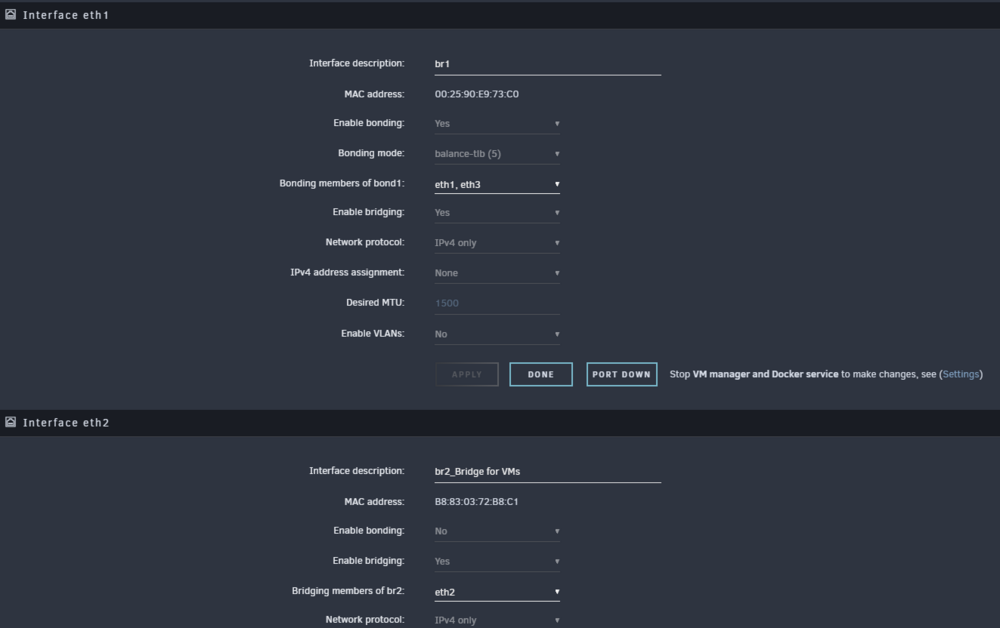
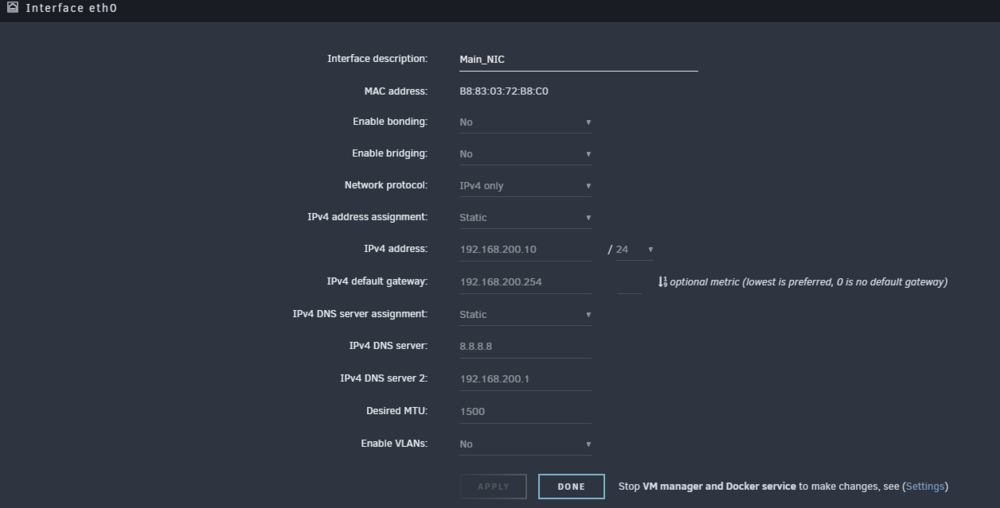
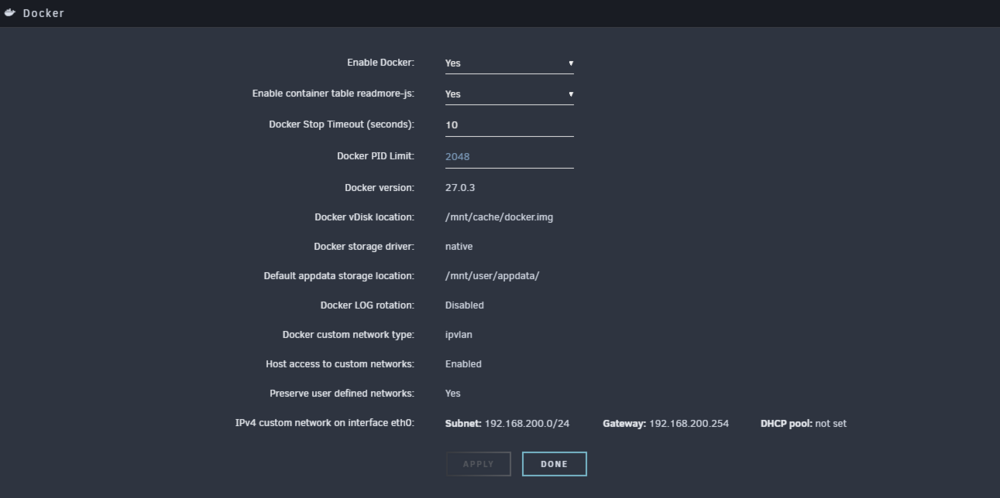
I was poking around and I noticed that my eth0 for the docker networks listing shows macvlan and I set my docker network to ipvlan so I wonder if that is the issue. So just for the heck of it I changed my eth0 to bridged yes and now it shows ipvlan and br0 and sure enough my dockers work without the extra settings. not sure why this is but unless there are major problems with this config I will probably leave it. here is before the change here is after
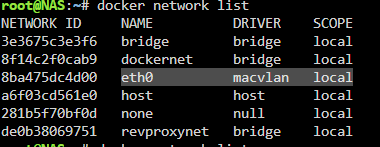
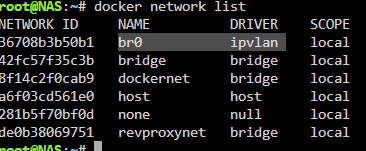
-
yep that is why I am asking here if I revert back to v6 it all works fine without the extra dns settings. is there a firewall in v7 that maybe got enabled?
-
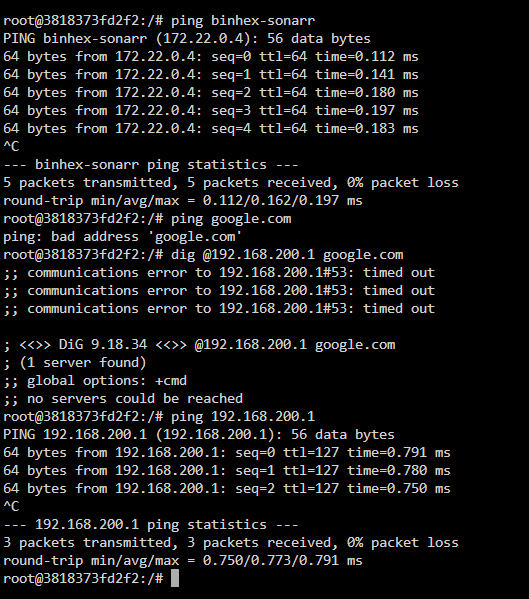
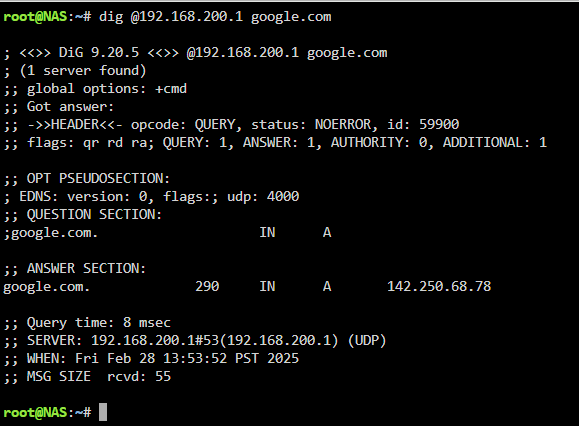
here is the results of the dig command. here is the same dig command on unraid
-
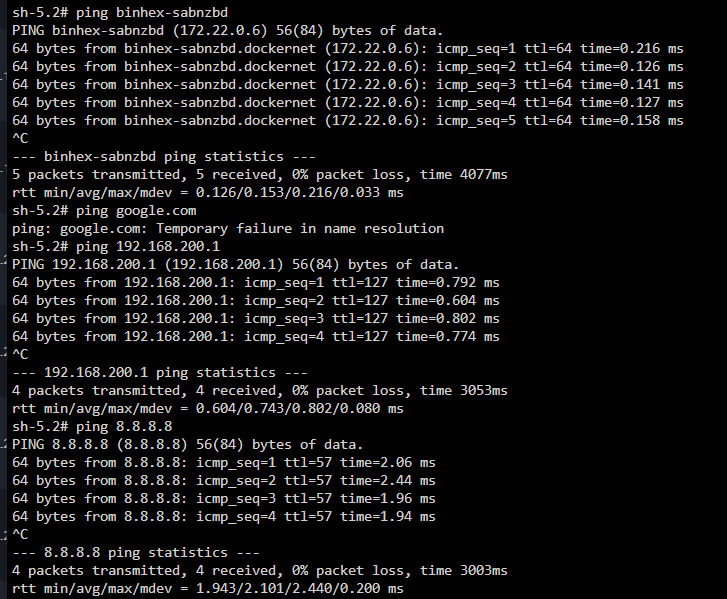
i just removed the dns extra settings and here is what happens. i can ping an other docker in the same network by name but no other dns to the internet works. the dig command did not work from this docker as it is the binhex-sonarr instance.
-
@Mainfrezzer I actually do have bridging enabled on the interfaces for VM's and Dockers, I do not have bridging enabled on the main eth0 which is the main unraid interface. do I need bridging on that interface as well?
-
do not have anything really configured and using the defaults when the docker network was originally created. Do I need to add the docker networks in the config even though it seems to be working on its own assigning ip's to the dockers already?
-
yes that is my main windows domain controller vm in unraid. it is what I set all my computers/devices to use.
-
I originally upgraded to v7.0 but all my dockers had problems resolving any internet names so I reverted back to v6. I just upgraded to version 7.0.1 thinking it might have fixed the issue but it looks like I had the same problems. It looks like any DNS name resolution like pinging from within each docker instance to something like google.com is broken in my dockers but pinging to the outside ip 8.8.8.8 works normally. my docker network settings are ipvlan and to allow host to connect to custom networks is enabled. I also tried the macvlan but it did not help. also most of my dockers are in the same custom docker network. It was not until I found some older posts that said to put the --dns 8.8.8.8 into the extra settings of each docker and by doing this it now allowed the dockers to work normally. connectivity from my desktop to the various docker web gui also works normally as well as the host docker name resolution between the dockers and from what I can tell it is using 127.0.0.11 for that. I would like to not have to worry about having to remember to put in the --dns entries in every docker I create Is this now normal now with v7x? Thanks James nas-diagnostics-20250227-1110.zip




