





Richard1
Members
-
Joined
-
Last visited
-
Danke, muss ich mal schauen ob ich die Mail noch habe.
-
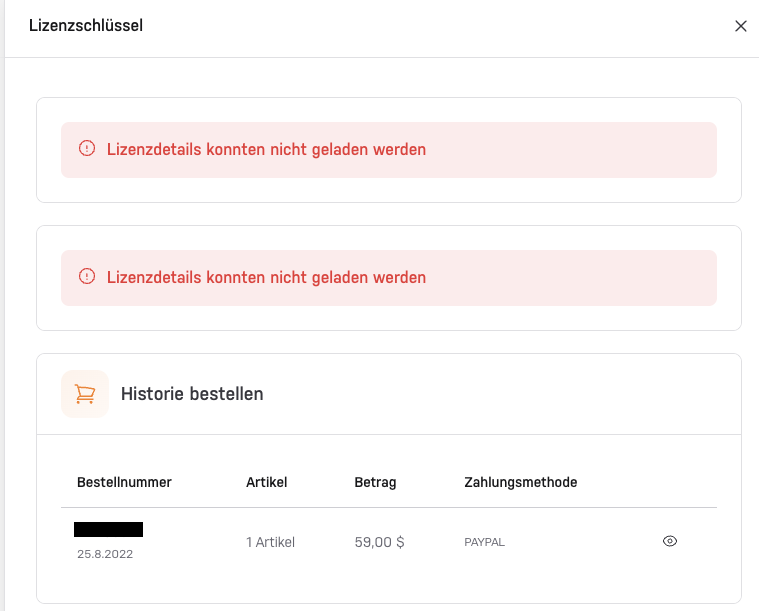
Hallo, ich wollte eine alte ungenutzte Unraid-Basic-Lizenz wieder reaktivieren. Leider habe ich nicht mehr den dazugehörigen USB-Stick. Im Kundenkonto von Unraid steht auch nur folgendes: Lizenzdetails konnten nicht geladen werden Besteht noch eine Möglichkeit den Schlüssel zu retten? Wie komme ich an die Basic.key Datei?
-
Danke, ich hatte es ja gefunden nur war ich mir nicht sicher dass es dort reingeschrieben wird. Ich bin von einer Konfigurationsdatei ausgegangen die Editiert werden muss. Aber so ist natürlich einfacher. Ist schon eingetragen.
-
Ich hoffe ich stehe nicht gerade auf dem Schlauch. Das kommt in Settings >SMB> und dort in diese Zeile Samba extra configuration: ? oder gibt es eine Datei wo ich das reinschreiben kann? Zum ursprünglichen Thema: ich habe noch eine 2TB NVME rumliegen gehabt die ich jetzt als Cache eingerichtet habe. Dort bleibt die Kopiergeschwindigkeit konstant auf 280MB/s bis zum Schluss. Finde ich zwar merkwürdig dass man SSD´s Cachen muss obwohl es bei einer Unraid Testversion geht, aber besser als alles neu zu machen. Damit kann ich leben :)
-
Du hast ein besseren Überblick über meine Hardware als ich selber. Ist wirklich eine Crucial P3 Plus SSD. Ich dachte die war im Notebook, aber auch gut. Habe mal nachgeschaut, nächsten Monat wird die 2Jahre alt. Jetzt schon erste Anzeichen ist schon traurig. Aber danke für den Hinweis.
-
Hm, steht da wirklich eine Crucial drin? Die hatte ich mal vor 2-3 Jahren das letzte mal im Betrieb. Ist zu klein geworden. Mehr als die 4 Datenträger laufen nicht. Solange deine nicht Vertrauenswürdigen Datenträger keine Fehlermeldung verursachen sind diese für mich genauso vertrauenswürdig wie Markenhersteller. Kommt halt manchmal auf den Preis an :) In der go habe ich alles ausgeraut (deaktiviert)

-
Den Inhalt des go-Files habe ich mal ausgeraut, hat aber hauptsächlich was mit der Beleuchtung zu tun. Metric hat Unraid selbst vergeben. Hatte früher mal mit einer USB-Netzwerkkarte rumgespielt, und zum Schluss die network.cfg gelöscht da es nicht mer funktionierte. Nach dem Löschen wurde es so wie es jetzt ist eigenständig angelegt. Allerdings war es ein anderes Mainboard. Ich werde die Datei mal sichern und nochmals löschen. Vielleicht passt ja da etwas nicht mit aktueller configuration serverMultiChannel ist jetzt deaktiviert. Habe mal das certificate neu ausstellen lassen, hat aber keinen Erfolg gebracht. Sonst noch eine Idee?
-
Anbei die diagnostic Datei. Vielleicht wird ja einer schlau daraus, ich leider nicht. Nicht missverstehen, ich habe keine Angst vor einer Konsole, aber ich wüsste nicht wonach ich da suchen sollte. Eine Neuinstallation würde ich gerne falls möglich vermeiden, bis auf das Netzwerk läuft ja alles. Unraid ist ja kein Windows was man 2x im Jahr neu instalieren muss :) Auch wenn es bei den aktuellen Windows Versionen nicht mehr so schlimm ist. mini-diagnostics-20251012-1343.zip
-
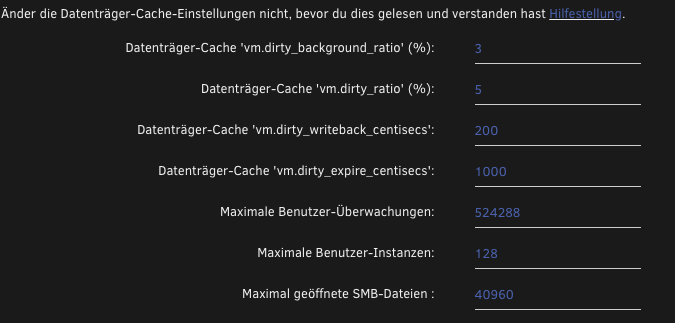
Was sind die Standard-Einstellungen? Die blauen Zahlen stehen automatisch drin nachdem die werte rausgelöscht wurden. Dieses ist ein Ausschnitt vom Plugin Tips and Tweaks
-
Hallo liebes Forum, ich habe mal wieder ein Problem mit Unraid. Diesmal betrifft es das Netzwerk, genauer gesagt die Kopiergeschwindigkeit. Wenn ich eine große Datei auf den Server kopiere, fängt er mit der Netzwerk-Maximalgeschwindigkeit an (280MB/s) und fällt dann teilweise auf 10MB/s. Mein Unraid-Server besteht ausschließlich aus SSD´s, Auch ist mein Komplettes Heimnetzwerk auf 2,5G ausgelegt.( Unraid, Mac mini, Switch) Kopiert wird über SMB. Ich vermute dass ich irgendwann mal was verstellt haben muss, als ich noch konventionelle Platten drin hatte. Wenn ich am Server den USB-Stick austausche zu einer Testlizenz, funktioniert alles bestens. Kopiergeschwindigkeit 280MB/s bis zum Schluss. Als früher noch „richtige Festplatten" drin waren, hatte ich mit vm_dirty_background_ratio und vm_dirty_ratio rumgespielt. Wenn ich die Werte höher stelle, bleibt die Geschwindigkeit länger auf max bis der Cache dann voll ist und einbricht. Kann man sowas komplett abstellen? SSD´s sollten doch schnell genug sein. Oder bin ich da auf dem Holzweg und es hat mit dirty nichts zu tun? Vielleicht hat jemand eine Idee warum es mit einer Testlizenz funktioniert, aber mit der richtigen Lizenz das Kopieren verlangsamt wird. Vielen Dank schonmal Richard
-
Hallo Joerg, vielen Dank für die Erklärung. Dann wird es ganz sicher das PSU 200W. Denn wer weiß, evtl kommt viel später noch eine Platte hinzu. Dann sollte das 200W immer noch stark genug sein für meine Zwecke,
-
Ich benötige ja jetzt schon 3x Sata-Anschluss, 2x HDD+ 1x Sata-SSD. Das 200W hat 4 Sata-Anschlüsse. Das sollte reichen. Doch beim 160W benötige ich jetzt schon Stomadapter da es nur 1 Sata-Stromanschluss hat. Es wird wohl das 200W Ich werde mir die Teile jetzt am Wochenende mal bestellen, Und wie gesagt, wenn die angepeilten 20W überschritten werden, werde ich es auch überleben, da ich Zz. bei 30W liege. Alles was unter 30W im Ruhemodus (heruntergefahrene HDDś) ist, sehe ich als Stromsparender an.
-
Die Platten ist korrekt, evtl. würde ich die 2x 1TB NVMe Cache auch gegen eine 2TB Tauschen (neukauf), Sonst wird man mit irgendwelchen Adaptern hantieren müssen. Mainboard hat ja nur 2x NVMe RAM ist in beiden Kisten SO-DDR, also auch neukauf. War aber auch schon eingeplant Dann halt 160W, dachte mehr ist besser Dann wird es wohl das werden. Wenn es paar Watt mehr sind ist es auch nicht so schlimm. Bei 2 Servern bin ich momentan bei ca. 30W zusammen. Keine USB-SSD´s 1x NVMe, 1x Sata vollbestückt Und Backup vorher ist klar. Vielen Dank für die Anmerkungen, hast mir schon viel geholfen
-
Hallo miteinander, ich habe momentan 2 Unraidserver welche ich zu einen zusammenfassen möchte. Server 1: Mini-PC mit N-100, 16GB Ram, 1x NVME-SSD 1x SATA SSD je 4TB Server 2: Q-NAP (TS-253D) Celeron J4125, 32GB Ram, 2x 14TB HDD, 2x 1TB NVME-SSD Cache. Da mich das ganze Setup ziemlich nervt nicht alles an einem Ort zu haben, möchte ich mir einen neuen Server bauen und alle Laufwerke der beiden Server in den neuen einbauen. Für den neuen Server plane ich bis ca. 500,-€ ein. Als Komponente habe ich mir folgende Teile ausgesucht: Gigabyte B760M DS3H I3-14100 Inter-Tech Mini-ITX PSU 200W, Wandlerplatine LEICKE ULL 156W Netzteil 12V 13A 32 GB DDR 4 / 5 Gehäuse ist noch nicht entschieden. Da ich auch den Stromhunger der Komponenten berücksichtigen möchte, stellt sich mir die Frage: Das Board gibt es mit DDR 4 oder DDR5. Gibt es rein vom Verbrauch unterschiede oder sollte man das kaufen, was günstiger ist? Nach Möglichkeit sollte der Server die 20W im Ruhemodus nicht überschreiten. Die HDD laufen nur bei Bedarf (1x Datengrab, 1xParität), Docker sollen alle von der SSD laufen. Wenn der neue Server zusammengebaut ist, wie ist die Migration ab besten zu bewerkstelligen? SSD´s und Unraid-USB-Stick von Server 1 in den neuen einbauen, schauen ob es auf der neuen Hardware läuft und dann die Platten von Server 2 nachrüsten? Oder traue ich Unraid zu viel zu, weil er die alte Hardware vermisst? Vielleicht möchte jemand Bedenken anmelden der ein Umzug schon vollzogen hat. Auch über Tipps bezüglich der neuen Hardware würde ich mich freuen. Vielen Dank schonmal
-
Vielen lieben Dank für die Unterstützung. Hat jetzt super geklappt. Der Server hat endlich wieder Internet auch nach Reboot.


