Cuffuf
Members
-
Joined
-
Last visited
-
Here is the new drive SMART file. I think it’s fine but figured I’d ask. Thanks again for all the help. george-smart-20250716-0030.zip
-
Okay thank you. I just received the new one so I’ll replace it and run a smart test just to be safe and I may ask you to look just real quick after a few hours of running. I’ll probably include a printed version in the return package. Thank you so much for your help.
-
Okay yeah this is so weird. Now it says X7 completed it without error and here is the new report. I’m so lost. If there was a way to upload the original to Amazon I would but honestly I’m more worried about getting back my money than anything else. Now, while I don’t know what any of this means, I asked ChatGPT (I know it’s iffy, but it can be helpful with checking things like this) and if you can confirm its analysis, there are now even more sectors that are problematic than before. Which makes me wonder why the test passed anyway. george-smart-20250715-0724.zip
-
Oh, sorry yeah thanks. Here it is. WDC_WD10EZEX-00BN5A0_WD-WCC3F2EJ2DE8-20250714-1905.txt Edit: And now my first drive seems to be healthy again and so I am running another extended SMART test. Would you advise even if it comes back as okay that I still return it? I would assume yes, right? I have already ordered a replacement drive to arrive tomorrow morning but I am a bit worried about getting a full refund on my (supposedly) defective drive. I will update you with the new test in the morning but it is late here so thank you again for all of your help.
-
Thank you so much for your help and I will begin the Amazon returns process as soon as I figure a couple of things. I also bought the second drive (identical to the first in model) and on the box it came in, it claims it's from the same batch. I would want to double check this when I pull them out but I'm currently running a SMART test on the other one. I have also attached the SMART folder from that drive here, although if you need different information, please just let me know. So anyway, if there is a problem with that one as well, and Amazon doesn't let me exchange them without return first, is the easiest way to do it than to take my older drives and reconstruct the data from the parity until I can then do that again later to install the new ones? Or is there an easier way to do it? I believe that's how I replaced the old ones with these in the first place. Again, thank you so much for your help. george-smart-OTHER DRIVE.zip[ UPDATE: SMART test was fine
-
Hello all, so I recently got some new HDDs to replace some older ones in my server. I noticed this morning a SMART error on the array dashboard and after reading some other forum posts, I ran an extended SMART test and it came back as "Read Failure." I would just simply replace the drive as other posts have suggested but this one is brand new (like, I got it 2 days ago) and I frankly just wanted to check to make sure that was the issue. I have attached the SMART test file for my drive and my server diagnostics file as well. If there is anything else you need, please ask and I greatly appreciate any help I can get. george-diagnostics-20250713-1254.zip george-smart-20250713-1247.zip
-
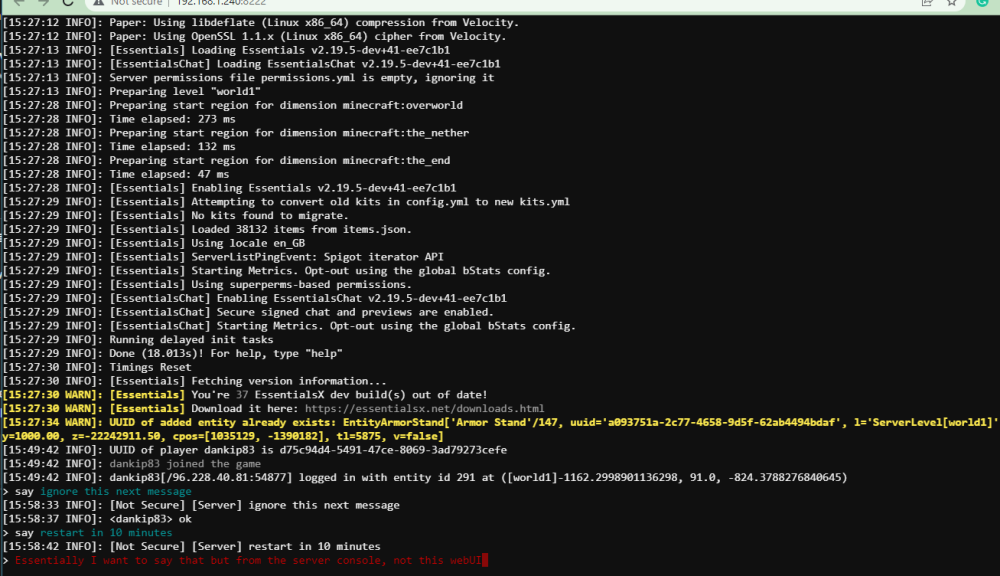
Okay so as a bit of a newbie to all this I need a bit of help with setting up auto restart. I would like to have it automatically send out a message at a certain time of day saying it will restart. I plan on using User scripts, which I have already used a bit. Here is the problem: I have no clue as to the command I need to get to the minecraft console and then to do "say Restart in 10 minutes". If you look at the bottom of the attached image, that is what I mean. I just want to say that from the actual web terminal of the whole server. That way I can just turn it into a User Script and schedule it. I already have commands for restarting the docker container and the whole server, it is just that very specific command I need to figure out. My knowledge about this stuff, especially console commands, is very limited. Any help I can get is greatly appreciated!