





Gibbo2787
Members
-
Joined
-
Last visited
Everything posted by Gibbo2787
-
Thanks that worked a treat I'll make new databases again - If they keep getting corrupted what do you suggest? New drive? I have a second one installed as a second cache and I was about to put it in place of this drive before you gave me this solution.
-
unraid-diagnostics-20241225-0155.zip
-
Another one? I ran one when this problem first started. I ran it for hours and it showed no problems with RAM. I mean, I'm happy to do one, but i just feel like I'm going in circles
-
I appreciate you trying to help, i really do. I ended up getting it going again last night, got everything finally installed - created new databases etc but that was shortlived. Plex went down again after about 6 hours reporting database corruption again. I have also started noticed some media file wont playback, even from a different device say the file itself is corrupted making me think the corruption is a bit deeper than just the cache drive. I've ran checks on all the disks but nothing jumps out - I have been trying to work out what is what by getting chatgpt to dumb it down for me. I can't work out a way to scan my whole media directory to see what else is corrupted, I only notice if i happen to try and play it. I'm sure there is a way, I checked out Dynamix File Integrity, but it looks like I should have had that setup before all this happened so it could compare checksums. I have a second SSD installed, I will backup all files to that and reformat the orginal and see what happens. I just backed up everything - removed the cache from the array and reformatted. Now upon restart its saying - Unmountable: Unsupported or no file system. Is it cactus?
-
I've got most of my containers reinstalled to some extent - however theres still things going on - Can someone please point me in the right direction. Ive been up for hours trying to get this sorted and its wearing thin. When i go to install my last container (regardless of what it is) I'm met with this error now docker: Error response from daemon: error creating temporary lease: write /var/lib/docker/containerd/daemon/io.containerd.metadata.v1.bolt/meta.db: read-only file system: unknown. I have around 20 containers installed. I increased the docker image from 20gb to 30gb. I read somewhere to perform a balance. I found an option to perform a full balance on the cache but it doesnt appear to do anything. It says above the button "No balance found on '/mnt/cache'". Found a command on another thread to run in terminal - btrfs balance start -dusage=75 /mnt/cache but was met with this message. "ERROR: error during balancing '/mnt/cache': Input/output error There may be more info in syslog - try dmesg | tail" I also just checked the log and its littered with error messages, all relating to btrfs i beleive. I have attached the log and diagnostics, hoping someone with more knowledge can help me out. unraid-syslog-20241223-0226.zip unraid-diagnostics-20241223-1329.zip
-
Containers not installing now because of an error saying its a read only file system. When I stop and restart the docker service, it fails to start, and I have to recreate it again. How do i nuke this thing and start again
-
Well i tried. Deleted the docker image and now I'm reinstalling the containers from previously installed app, watching them fail 1 by 1 . Now nothing works FML This always seems to be the problem - not sure why it kept reoccuring
-
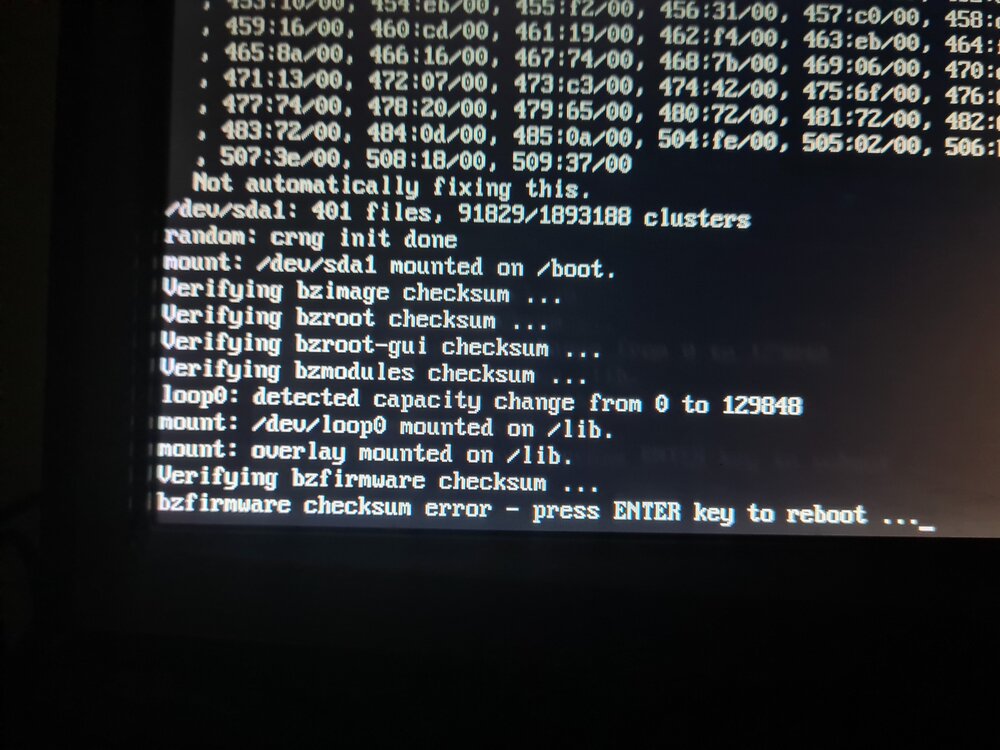
Finally got around to doing the memtest today - Completed 5 passes with 0 errors upon reboot was met again with bzfirmware checksum error - see attached photo recreated the flash drive again and copied over contents of the config folder. Booted back up fine then. Started the array Performed a scrub on the cache pool - 0 errors found. Now do i have to delete the docker image and recreate or is there something else I should test first?
-
Thanks for the quick reply. -What would cause this? Is it common? Its the second time I've been in this predicament. Along with failing flash drives and bzfirmware firmware checksum errors, I seem to be always trying to keep this system running. Is there something I should be checking to avoid these issues?
-
Today i noticed i couldnt start my docker containers once stopped. Began receiving a Error 403 message when trying to start them up. I have attached a system log - looks like a lot of errors begin Dec18 at 10:30+ Can someone please make sense of it for me. Am i going to have to nuke the whole docker image file? unraid-syslog-20241218-1221.zip
-
Today i got home and found my server had crashed again - It happens constantly - probably once every few months. This time I had the syslog writing to the USB flash drive. I was hoping someone could work out why it is happening and what I need to do to fix it. Upon restarting the server i get met with bzfirmware checksum error. I copied all fresh bz files to the root of the USB, but still had errors while trying to reset the GPU driver - I kept getting met with a checksum error there too. The only solution which appears to be a temporary one so far is to write a new flash drive and copy the config folder - even then i still have to redownload the Nvidia GPU driver everytime. Heres hoping someone knows whats happening. Please see the attached file for the logs - The crash happened after 12:30pm on Nov 22 syslog
-
Hey, I've had my setup working for a good year or 3 now - but today I came home to notice my qbittorent had failed. It appears to be the vpn failing in some way. Ive always had it setup with PIA with ovpn - although its never been perfect (always seems to drop once every few days). Today it had failed completely and no matter which ovpn config file I use, I am met with this error in the logs which I have never seen before. 2024-07-05 19:25:40.956943 [info] Host is running unRAID 2024-07-05 19:25:40.971183 [info] System information Linux 230c4a41d578 6.1.79-Unraid #1 SMP PREEMPT_DYNAMIC Fri Mar 29 13:34:03 PDT 2024 x86_64 GNU/Linux 2024-07-05 19:25:40.987430 [info] SHARED_NETWORK not defined (via -e SHARED_NETWORK), defaulting to 'no' 2024-07-05 19:25:41.003490 [info] PUID defined as '99' 2024-07-05 19:25:41.021934 [info] PGID defined as '100' 2024-07-05 19:25:41.050518 [info] UMASK defined as '000' 2024-07-05 19:25:41.066275 [info] Permissions already set for '/config' 2024-07-05 19:25:41.085321 [info] Deleting files in /tmp (non recursive)... 2024-07-05 19:25:41.107493 [info] VPN_ENABLED defined as 'yes' 2024-07-05 19:25:41.124685 [info] VPN_CLIENT defined as 'openvpn' 2024-07-05 19:25:41.140824 [info] VPN_PROV defined as 'pia' 2024-07-05 19:25:41.164674 [info] OpenVPN config file (ovpn extension) is located at /config/openvpn/au_sydney.ovpn 2024-07-05 19:25:41.199526 [info] VPN remote server(s) defined as 'au-sydney.privacy.network,' 2024-07-05 19:25:41.214292 [info] VPN remote port(s) defined as '502,' 2024-07-05 19:25:41.229797 [info] VPN remote protcol(s) defined as 'tcp-client,' 2024-07-05 19:25:41.246745 [info] VPN_DEVICE_TYPE defined as 'tun0' 2024-07-05 19:25:41.263928 [info] VPN_OPTIONS not defined (via -e VPN_OPTIONS) 2024-07-05 19:25:41.280084 [info] NAME_SERVERS defined as '1.1.1.1,1.0.0.1,8.8.8.8,8.8.4.4,' Error: error sending query: Error creating socket Error: error sending query: Error creating socket Has anyone got this error - Or have an idea how to fix it?
-
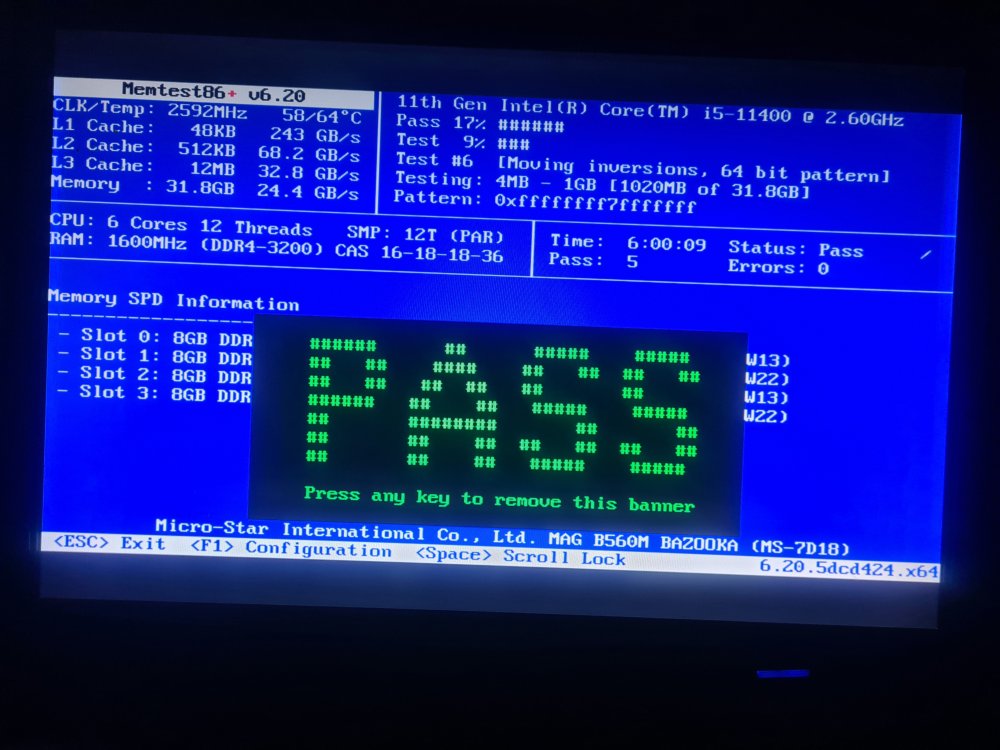
I finally got the chance to shut down my server and perform a memtest. Everything looked ok after several passes. I then performed the scrub on the pool. (Its just the cache right?) This resulted in multiple BTRFS errors and one the says "xhci_hcd 0000:01:00.2: xHC error in resume, USBSTS 0x401, Reinit". Please see the attached log for the errors. (At the bottom) Can i correct these by enabling "repair corrupted blocks" and performing the scrub again? EDIT* - Tried the scrub with repair corrupted blocks and they appear to be uncorrectable Or should I manually find the file in question and delete it? EDIT* - I just went through and deleted all the corrupted files and its flagging no errors during the scrub now. I'll see how it goes in the coming weeks/months - hopefully that has sorted out the issue. Now to sort out the Prowlarr connectivity issue and I won't have to spend so much time checking the server. syslog.txt
-
Cheers, appreciate the reply. Its just running a parity check after the reboot. Once its completed, I'll run a memtest. Not entirely sure how to perform a scrub, but I'll work it out. I'll post results once completed. Thanks again
-
I have been using unraid for a couple years now. But I've never been able to get it completely stable. I have 2 major problems. The first being with the prowlarr container. For some reason it always disconnects every few days and I have to manually restart the container and test all indexers to get everything working again for the next few days until it happens again. I think it may have something to do with openvpn that i am running it behind - My assumption is the vpn loses connectivity and then can not connect again after that - saying that, my assumption isn't based on much. I'm not even sure the syslog will show anything regarding this. But maybe someone has some ideas? The second and more major is the constant crashes, which result in me having to create a new USB flash drive and drag/drop the config folder over to get it going again. My server just had the longest runtime of its life of about 40 days, but this time I have had the syslog enabled and backing up to my flash drive so it was recoverable after the crash. However I need help decoding what's actually going on. I have attached the syslog file, hopefully someone could skim over it and identify the problem(s) I am experiencing. Any help would be greatly appreciated. syslog
-
This may be a tough one to work out, but i'll ask the question to see if anyone has had the same problem. A couple days ago we had a power failure that caused my unraid server to shutdown. Upon trying to restart the USB flash couldnt be read. So i created a new USB and copied over the config folder as i have done a couple of times before with no problems. This got my unraid server back online. Once up and running again i started noticing a few things were messing up. Namely my wireguard connections werent working. and plex was unreachable remotely. Thinking it was a port problem i checked the router ports were still open. checking with canyouseeme.org, i confirmed plex was reachable, but wireguard wasnt. after an hour or 2 things became accessable, my wireguard starting transferring packets and plex was reachable. Now the main problem i have noticed is with plex and my downloads. My transfer speeds used to be 10MB/s for downloading, and i would have no problem watching a 1080p movie remotely on direct play. Now my downloads seem to max out at 1MB/s and my plex buffers anything under 720p. Saying my connection isnt fast enough. I have run a speed test from the unraid box and i can confirm the max i can get is a 10Mb connection, it should be close to 100. What settings or things should i check? Its only my unraid box with this problem, and i cant work out what it is. I even tried disabling the VPN and the connection speed remained the same. Any thoughts? unraid-diagnostics-20230311-1832.zip
-
Can someone make sense of this for me please? I have just started using unraid, but getting I have got Plex using QSV for transcodes and it works great, however Handbrake refuses to encode anything with it selected. Videos will begin processing with the QSV off, in both 264 and 265 - however as soon as I select it, it just fails instantly. [17:25:43] hb_init: starting libhb thread [17:25:43] thread 15352ec69b38 started ("libhb") HandBrake 1.5.1 (2022062800) - Linux x86_64 - https://handbrake.fr 6 CPUs detected Opening /watch/The Blacklist Season 6 Complete 720p WEB-DL x264 [i_c]/The Blacklist S06E07 General Shiro.mkv... [17:25:43] CPU: 11th Gen Intel(R) Core(TM) i5-11400 @ 2.60GHz [17:25:43] - logical processor count: 6 [17:25:43] Intel Quick Sync Video support: yes [17:25:43] - Intel Media SDK hardware: API 1.35 (minimum: 1.3) [17:25:43] - Decode support: h264 hevc (8bit: yes, 10bit: yes) av1 (8bit: yes, 10bit: yes) [17:25:43] - H.264 encoder: yes [17:25:43] - preferred implementation: hardware (any) via ANY [17:25:43] - capabilities (hardware): breftype icq+la+i+downs vsinfo opt1 opt2+mbbrc+extbrc+trellis+ib_adapt+nmpslice [17:25:43] - H.265 encoder: yes (8bit: yes, 10bit: yes) [17:25:43] - preferred implementation: hardware (any) via ANY [17:25:43] - capabilities (hardware): lowpower bpyramid icq vsinfo opt1 [17:25:43] hb_scan: path=/watch/The Blacklist Season 6 Complete 720p WEB-DL x264 [i_c]/The Blacklist S06E07 General Shiro.mkv, title_index=1 udfread ERROR: ECMA 167 Volume Recognition failed disc.c:333: failed opening UDF image /watch/The Blacklist Season 6 Complete 720p WEB-DL x264 [i_c]/The Blacklist S06E07 General Shiro.mkv disc.c:437: error opening file BDMV/index.bdmv disc.c:437: error opening file BDMV/BACKUP/index.bdmv bluray.c:2646: nav_get_title_list(/watch/The Blacklist Season 6 Complete 720p WEB-DL x264 [i_c]/The Blacklist S06E07 General Shiro.mkv/) failed [17:25:43] bd: not a bd - trying as a stream/file instead libdvdread: DVDOpenFileUDF:UDFFindFile /VIDEO_TS/VIDEO_TS.IFO failed libdvdnav: vm: vm: failed to read VIDEO_TS.IFO [17:25:43] dvd: not a dvd - trying as a stream/file instead Input #0, matroska,webm, from '/watch/The Blacklist Season 6 Complete 720p WEB-DL x264 [i_c]/The Blacklist S06E07 General Shiro.mkv': Metadata: CREATION_TIME : 2019-02-17T10:13:17Z ENCODER : Lavf57.7.2 Duration: 00:42:56.55, start: 0.000000, bitrate: 1754 kb/s Stream #0:0: Video: h264 (Main), yuv420p(tv, bt709, progressive), 1280x720 [SAR 1:1 DAR 16:9], 23.98 fps, 23.98 tbr, 1k tbn, 180k tbc (default) Stream #0:1(eng): Audio: aac (LC), 48000 Hz, stereo, fltp (default) Metadata: title : Stereo Stream #0:2(eng): Subtitle: ass [17:25:43] scan: decoding previews for title 1 [17:25:43] scan: audio 0x1: aac, rate=48000Hz, bitrate=1 English (AAC LC) (2.0 ch) [17:25:43] scan: 10 previews, 1280x720, 23.976 fps, autocrop = 0/0/0/0, aspect 16:9, PAR 1:1, color profile: 1-1-1, chroma location: left [17:25:43] scan: supported video decoders: avcodec qsv [17:25:43] libhb: scan thread found 1 valid title(s) + Using preset: myx265QS + title 1: + stream: /watch/The Blacklist Season 6 Complete 720p WEB-DL x264 [i_c]/The Blacklist S06E07 General Shiro.mkv + duration: 00:42:56 + size: 1280x720, pixel aspect: 1/1, display aspect: 1.78, 23.976 fps + autocrop: 0/0/0/0 + chapters: + 1: duration 00:42:56 + audio tracks: + 1, English (AAC LC) (2.0 ch) (iso639-2: eng) + subtitle tracks: + 1, English [SSA] [17:25:43] Starting work at: Sat Aug 20 17:25:43 2022 [17:25:43] 1 job(s) to process [17:25:43] json job: { "Audio": { "AudioList": [ { "Bitrate": 192, "CompressionLevel": -1.0, "DRC": 0.0, "DitherMethod": "auto", "Encoder": "ac3", "Gain": 0.0, "Mixdown": "stereo", "Name": "Stereo", "NormalizeMixLevel": false, "PresetEncoder": "ac3", "Quality": -3.0, "Samplerate": 0, "Track": 0 } ], "CopyMask": [ "copy:mp3", "copy:aac", "copy:ac3", "copy:dts", "copy:eac3" ], "FallbackEncoder": "ac3" }, "Destination": { "AlignAVStart": false, "ChapterList": [ { "Duration": { "Hours": 0, "Minutes": 42, "Seconds": 56, "Ticks": 231889860 }, "Name": "" } ], "ChapterMarkers": false, "File": "/output/.AiTuKJ/The Blacklist S06E07 General Shiro.mkv", "InlineParameterSets": false, "Mp4Options": { "IpodAtom": false, "Mp4Optimize": false }, "Mux": "mkv" }, "Filters": { "FilterList": [ { "ID": 3, "Settings": { "block-height": "16", "block-thresh": "40", "block-width": "16", "filter-mode": "2", "mode": "3", "motion-thresh": "1", "spatial-metric": "2", "spatial-thresh": "1" } }, { "ID": 4, "Settings": { "mode": "7" } }, { "ID": 6, "Settings": { "mode": 0 } }, { "ID": 13, "Settings": { "crop-bottom": 0, "crop-left": 0, "crop-right": 0, "crop-top": 0, "height": 720, "width": 1280 } } ] }, "Metadata": {}, "PAR": { "Den": 1, "Num": 1 }, "SequenceID": 0, "Source": { "Angle": 0, "Path": "/watch/The Blacklist Season 6 Complete 720p WEB-DL x264 [i_c]/The Blacklist S06E07 General Shiro.mkv", "Range": { "End": 1, "Start": 1, "Type": "chapter" }, "Title": 1 }, "Subtitle": { "Search": { "Burn": true, "Default": false, "Enable": true, "Forced": true }, "SubtitleList": [ { "Burn": false, "Default": false, "Forced": false, "Track": 0 } ] }, "Video": { "ChromaLocation": 1, "ColorInputFormat": 0, "ColorMatrix": 1, "ColorOutputFormat": 0, "ColorPrimaries": 1, "ColorRange": 1, "ColorTransfer": 1, "Encoder": "qsv_h265_10bit", "Level": "auto", "Options": "", "Preset": "balanced", "Profile": "auto", "QSV": { "AdapterIndex": 0, "AsyncDepth": 0, "Decode": false }, "Quality": 22.0, "Tune": "", "Turbo": false, "TwoPass": false } } [17:25:43] Skipping subtitle scan. No suitable subtitle tracks. [17:25:43] Starting Task: Encoding Pass [17:25:43] Skipping vfr filter [17:25:43] Skipping crop/scale filter [17:25:43] job configuration: [17:25:43] * source [17:25:43] + /watch/The Blacklist Season 6 Complete 720p WEB-DL x264 [i_c]/The Blacklist S06E07 General Shiro.mkv [17:25:43] + title 1, chapter(s) 1 to 1 [17:25:43] + container: matroska,webm [17:25:43] + data rate: 1754 kbps [17:25:43] * destination [17:25:43] + /output/.AiTuKJ/The Blacklist S06E07 General Shiro.mkv [17:25:43] + container: Matroska (libavformat) [17:25:43] * video track [17:25:43] + decoder: h264 8-bit (yuv420p) [17:25:43] + filters [17:25:43] + Comb Detect (mode=3:spatial-metric=2:motion-thresh=1:spatial-thresh=1:filter-mode=2:block-thresh=40:block-width=16:block-height=16) [17:25:43] + Decomb (mode=39) [17:25:43] + Output geometry [17:25:43] + storage dimensions: 1280 x 720 [17:25:43] + pixel aspect ratio: 1 : 1 [17:25:43] + display dimensions: 1280 x 720 [17:25:43] + encoder: H.265 10-bit (Intel Media SDK) [17:25:43] + preset: balanced [17:25:43] + profile: auto [17:25:43] + level: auto [17:25:43] + quality: 22.00 (ICQ) [17:25:43] + color profile: 1-1-1 [17:25:43] + chroma location: left [17:25:43] * subtitle track 1, English [SSA] (track 0, id 0x2, Text) -> Passthrough [17:25:43] * audio track 1 [17:25:43] + name: Stereo [17:25:43] + decoder: English (AAC LC) (2.0 ch) (track 1, id 0x1) [17:25:43] + samplerate: 48000 Hz [17:25:43] + mixdown: Stereo [17:25:43] + encoder: AC3 (libavcodec) [17:25:43] + bitrate: 192 kbps, samplerate: 48000 Hz [17:25:43] sync: expecting 61775 video frames [17:25:43] hb_display_init: using VA driver 'iHD' libva info: VA-API version 1.14.0 libva info: User environment variable requested driver 'iHD' libva info: Trying to open /opt/intel/mediasdk/lib/iHD_drv_video.so libva info: Found init function __vaDriverInit_1_14 libva info: va_openDriver() returns 0 ERROR: encqsvInit: MFXVideoENCODE_Init failed (-15) [17:25:43] encqsvInit: using encode-only (LowPower) path [17:25:43] encqsvInit: H.265/HEVC Main 10 profile @ level (null) [17:25:43] encqsvInit: TargetUsage 4 AsyncDepth 6 [17:25:43] encqsvInit: GopRefDist 3 GopPicSize 24 NumRefFrame 1 [17:25:43] encqsvInit: BFramesMax 2 BRefType off [17:25:43] encqsvInit: RateControlMethod ICQ ICQQuality 22 ERROR: Failure to initialise thread 'Quick Sync Video encoder (Intel Media SDK)' [17:25:43] comb detect: heavy 0 | light 0 | uncombed 0 | total 0 [17:25:43] decomb: deinterlaced 0 | blended 0 | unfiltered 0 | total 0 [17:25:43] aac-decoder done: 0 frames, 0 decoder errors [17:25:43] h264-decoder done: 0 frames, 0 decoder errors [17:25:43] sync: got 0 frames, 61775 expected [17:25:43] Finished work at: Sat Aug 20 17:25:43 2022 [17:25:43] libhb: work result = 3 Encode failed (error 3). HandBrake has exited.

