MartinNr5
Members
-
Joined
-
Last visited
Everything posted by MartinNr5
-
Thanks, I suspected as much but wanted to check.
-
So stopping the data rebuild and shutting down the server would be ok at this point?
-
Yes. The power supply has enough power but not enough connectors.
-
Thanks, I forgot to include it. To add; the docker service isn't running - despite it running yesterday - and I can't access any content on the file system. nas-diagnostics-20260608-1703.zip
-
Hi all. I tried to search for this but I'm not even sure what keywords to use. I replaced one of my data disks and started a data rebuild. I have had to pause it a couple of times due to increased temperatures when all disks are running but it seemed to chug along as expected until it got done with rebuilding the data on the replaced disk sometime tonight. Currently it's mainly accessing the parity disk, at speeds I'm not sure is correct. It has also amassed 16+ billions of errors, and the number is increasing with ~400 000 per second. There are two other disks that have ~272 million and ~815 million errors respectively but they aren't showing any read or write activity. The disks that are showing read activity besides the parity disk have speeds of ~8,5 MB/s. If this is correct, what caused it and how can I fix it?

-
Thanks, the rebuild seems to have worked as expected (I didn't find a "lost+found" folder on the disk at least). Again, thanks for all the help. I'm not sure which reply to mark as the answer though so I'll mark the first one from trurl.
-
Then we're back to the problem with the dirty log on 1NFWTG. Is there any other way to try and fix the log since mounting the disk when starting the array in normal mode doesn't help?
-
And just to be sure that I don't screw myself over; should I start by replacing the emulated disk or should I start with fixing the file system on 1NFWTG?
-
Ok, let me clarify. ☺️ Since I'm using XFS for my array, I assumed that a disk in the array had to have a healthy XFS file system for the contents on that disk to be available. But if I understand JorgeB correctly, all my data is back despite the array having one emulated disk and one unmountable disk. I've always read that with 1 parity disk you can lose 1 data disk and be fine but if you lose 2 data disks, you're up the creek without a paddle.
-
I'm obviously completely misunderstanding how Unraid works under the hood. I was under the impression that all drives in the array (physical or emulated) had to have a functioning XFS file system for the contents to be accessible but that's clearly not the case. 🙂
-
So I can still add a new disk to the array to replace the emulated disk and rebuild as usual, without fixing 1NFWTG? What would the consequences be if I try and fix 1NFWTG and it fails?
-
As far as I can tell, the contents are restored. There's a lot of folders and files but everything looks ok at a glance. How does the unmountable disk 1NFWTG affect the contents? If I have one emulated disk and one unmountable with only 1 parity disk, it seems to me that I still need to repair 1NFWTG to get back all data.
-
No lost+found folder, at least not in the root of the disk. 🙂 Attached. nas-safemode-diagnostics-20260219-1938.zip
-
As far as I can tell the file system was fixed. I've included the output from xfs_repair if it might be of interest. xfs_repair status fixed emulated disk 8.txt
-
From the web UI.
-
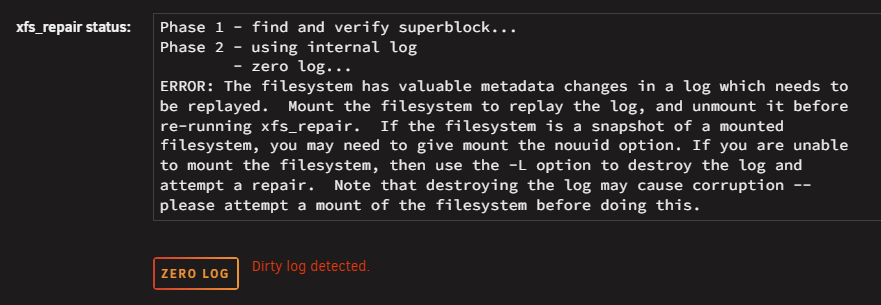
Because it was a simple fix to just restart the server and I've had this issue on and off for quite a while, before I installed the currently unmountable disk, so I assumed it was related to cabling or controller, not Unraid. This is the first time in all my years of using Unraid that I encounter an unmountable disk. That's because I didn't notice it was unmountable. I only noticed it on 1NFWTG. As far as I can tell everything valuable is backed up. No, they're all fine. When I try to fix 1NFWTG I get the following back: ERROR: The filesystem has valuable metadata changes in a log which needs to be replayed. Mount the filesystem to replay the log, and unmount it before re-running xfs_repair. If the filesystem is a snapshot of a mounted filesystem, you may need to give mount the nouuid option. If you are unable to mount the filesystem, then use the -L option to destroy the log and attempt a repair. Note that destroying the log may cause corruption -- please attempt a mount of the filesystem before doing this. Since I've accidentally mounted and unmounted the disks before I noticed the unmountable disk I assume that nothing might be gained from doing so again but just in case I misunderstand the above message, I'd rather double check before I tell it to zero the log. I've attached the information from that check to this post. Thanks for all the help so far. xfs_repair status emulated disk 8.txt
-
Hi! This morning I noticed that I couldn't access a directory on my server via an SMB share. When checking the UI I had a disabled device as well as read errors on 4 disks (if I recall correctly). Since I lose access to folders every now and then, for no apparent reason, I just restarted the server, which normally helps. It didn't this time so I shut the server down to work on the problem this evening. Since I've been starting, stopping, and rebooting quite a few times now I can't say for sure when the "Unmountable: wrong or no file system" error showed up for one of my disks, but it's there now. Just to be sure I've re-seated all SATA and power cables as well as my SATA-controllers without any luck. Swapping SATA cables with another disk makes no difference so I assume that the file system actually is corrupt. I'd really like to get that data back though, if possible. To make matters worse, the disabled device is still disabled. My plan was to replace that tomorrow when a new disk shows up but since I only have one parity disk I guess the data on the disabled disk is also gone? I unassigned the disk for that slot before I noticed the "Unmountable: wrong or no file system" error, although I guess it wouldn't have mattered if I left the disabled disk in the array since it was disabled. The unmountable disk is TOSHIBA_MG08ACA16TE_X4D0A01NFWTG. Not sure if it matters but the disabled disk is TOSHIBA_MG10ACA20TE_85K2A06GF4MJ . I got a lot of information when checking the file system on the unmountable disk via the UI, and it prompts me to fix the problems found with file system. Before I do that I just want to double check if there's anything else I need to do specific to how Unraid uses XFS (if there is in fact anything particular about it). Let me know if there's anything else you need to know or want me to do. nas-safemode-diagnostics-20260218-2001.zip xfs_repair status.txt
-
Thanks Jorge, that did the trick. I debated if I should update to 7.2 but wasn't sure if that'd make things worse. I'll do that before I change the next pool disk though. For anyone else using this thread as guidance, the "btrfs device remove missing /mnt/cache" command took quite a while to complete.
-
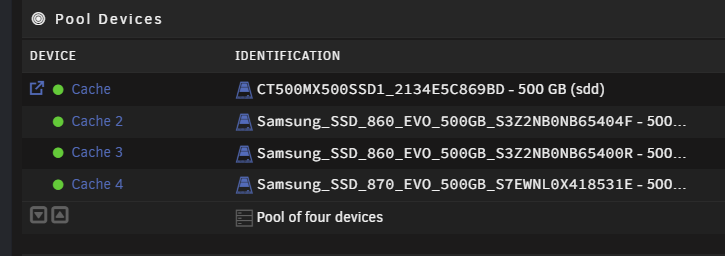
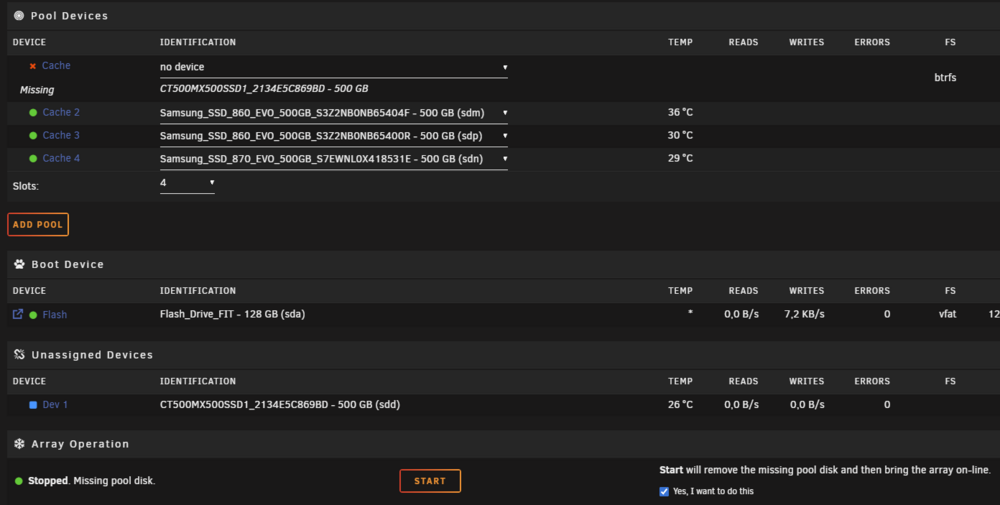
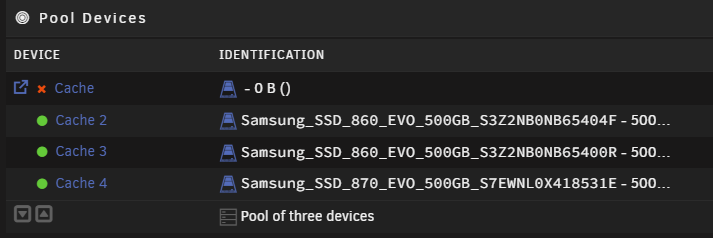
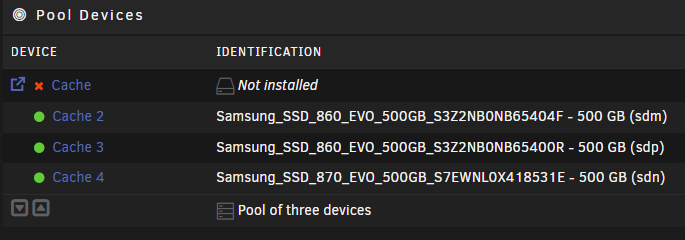
Hi all, and a happy new year. I have 2 faulty SSD's in my 3 disk cache pool that I need to replace. To be on the safe side I added a new drive to the pool before trying to remove a faulty one. After letting BTRFS balance the data and running a scrub I tried to remove one of the the faulty drives by un-assigning it from the pool. This didn't work as expected. This is the pool after I added the new device and BTRFS was done with re-balancing and scrubbing: I then stop the array and un-assign the faulty drive (sdd); However, when I start the array, the pool is broken: When I tried to stop the array it hung indefinitely on "Unmounting disks" and I had to reboot the system into safe mode, delete the config for the cache from /boot/config/pools, and restart the system again. I imported the 3 disks I want to keep in the pool but then I get this error when I start the array: I've read a couple of threads on this topic but I'm not comfortable going forward without guidance as I haven't backed up my cache in a while and would prefer not to screw things up further. 😅 I'm not sure which version of the diagnostics that's most useful but I've included the one where the pool is in the state as shown in the image directly above. I've also included information from "btrfs fi show" as that was requested in a thread similar to this. Any help is greatly appreciated. btrfs fi show.txt nas-diagnostics-20260101-1133.zip
-
Thanks, that wasn't as drastic as I had feared, and I didn't realize that you could rebuild the disk onto itself. I appreciate the quick response.
-
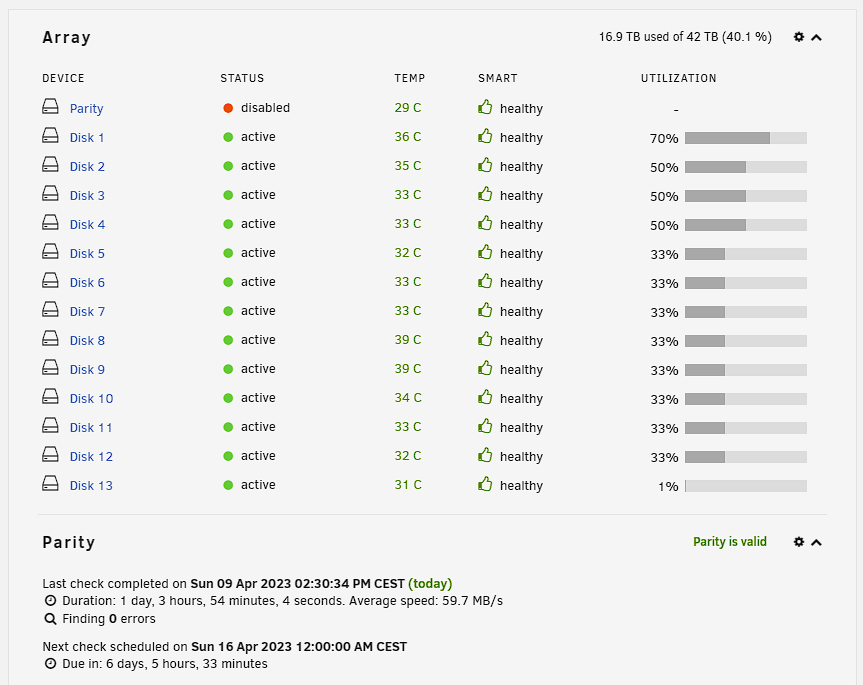
Hi! I've done my best to find a solution to this, both specifically on this forum and on the Internet in general, and although I've found some ideas and suggestions I don't really want to try something until I've asked specifically here for some more guidance. Earlier this week I had a power outage that caused the server to shut down. When the power came back I checked to see if the server started as it should and as far as I could tell, the array was healthy and all my apps started as they should. After a couple of hours the entire server became unresponsive though, not even the console via keyboard and monitor worked, and my only option was a hard reset. After this I ran a read check of all disks. Unfortunately I managed to bump the USB stick for the UnRaid OS which caused it to dismount, forcing me to reboot the server after only a couple of hours of the read check. When I restarted the check UnRaid reported that it had found 394 errors, but after the second check completed, everything was ok and it had found 0 errors. The array is healthy and parity is valid, but despite this I can't enable my parity disk. I've rebooted the server after the successful parity check, still no dice. This is the disk log information for the parity disk, which I interpret as the disk itself being just fine. Apr 9 18:17:36 NAS kernel: ata18: SATA max UDMA/133 abar m8192@0xdf280000 port 0xdf280680 irq 127 Apr 9 18:17:36 NAS kernel: ata18: SATA link up 6.0 Gbps (SStatus 133 SControl 300) Apr 9 18:17:36 NAS kernel: ata18.00: ATA-10: WDC WD60EFZX-68B3FN0, 81.00A81, max UDMA/133 Apr 9 18:17:36 NAS kernel: ata18.00: 11721045168 sectors, multi 16: LBA48 NCQ (depth 32), AA Apr 9 18:17:36 NAS kernel: ata18.00: configured for UDMA/133 Apr 9 18:17:36 NAS kernel: sd 18:0:0:0: [sdk] 11721045168 512-byte logical blocks: (6.00 TB/5.46 TiB) Apr 9 18:17:36 NAS kernel: sd 18:0:0:0: [sdk] 4096-byte physical blocks Apr 9 18:17:36 NAS kernel: sd 18:0:0:0: [sdk] Write Protect is off Apr 9 18:17:36 NAS kernel: sd 18:0:0:0: [sdk] Mode Sense: 00 3a 00 00 Apr 9 18:17:36 NAS kernel: sd 18:0:0:0: [sdk] Write cache: enabled, read cache: enabled, doesn't support DPO or FUA Apr 9 18:17:36 NAS kernel: sd 18:0:0:0: [sdk] Preferred minimum I/O size 4096 bytes Apr 9 18:17:36 NAS kernel: sdk: sdk1 Apr 9 18:17:36 NAS kernel: sd 18:0:0:0: [sdk] Attached SCSI disk Apr 9 18:17:49 NAS emhttpd: WDC_WD60EFZX-68B3FN0_WD-CA1K55ZK (sdk) 512 11721045168 Apr 9 18:17:49 NAS kernel: mdcmd (1): import 0 sdk 64 5860522532 0 WDC_WD60EFZX-68B3FN0_WD-CA1K55ZK Apr 9 18:17:49 NAS kernel: md: import disk0: (sdk) WDC_WD60EFZX-68B3FN0_WD-CA1K55ZK size: 5860522532 Apr 9 18:17:50 NAS emhttpd: read SMART /dev/sdk Apr 9 18:30:09 NAS emhttpd: spinning down /dev/sdk Apr 9 18:30:16 NAS emhttpd: spinning up /dev/sdk Apr 9 18:30:19 NAS emhttpd: read SMART /dev/sdk Before I start over with a new config, or remove and add back my parity disk, or other more or less intrusive operations, is there something else I should test or try? Thanks!