tonnyhii
Members
-
Joined
-
Last visited
Everything posted by tonnyhii
-
Please see files attached. I don't have knowledge to know what these files do. It is a script that set up to send unraid information to a display screen through wifi network. nvme-cli-1.16-x86_64-1.txz gcc-13.2.0-x86_64-1.txz glibc-2.39-x86_64-2.txz lm_sensors-3.6.0-x86_64-3.txz
-
sorted!!. a start up script has impacted the installation or start up of Tailscale.
-
i have exactly the same problem. Would you please explain how you resolve this?
-
Thanks for your help @JonathanM @wgstarks I have added my public ip to the Variable: LAN_NETWORK and now i can access to the webui remotely.
-
Thanks for the clarification. The connecting IP varies based on my VPN.
-
i was using xxxx.dyndns.org:8080 to access my QbittorrentVPN WebUI. It would be the public IP.
-
It was working fine when I was using nordvpn. It has stopped working when I changed my VPN to proton vpn with wireguard. I think I might have to look into alternative options if I can't access to webui through DNS
-
It works fine when I use wireguard. I am planning to use DNS with port forwarding for WEBUI.
-
thanks for the fast respond. I added 192.168.1.0/24,192.168.2.0/24 as per FAQ but still can't access remotely Any solution to this?
-
I can access to the WebUi locally It stopped working if i try to access through another network or mobile phone' i have checked the port forward 8080 is opened on my router Tried to dianose the issue according to Q4 and Q32 of the FAQ, but didn't work Please have a look at the docker run below: docker run -d --name='binhex-qbittorrentvpn' --net='bridge' --pids-limit 2048 --privileged=true -e TZ="Australia/Perth" -e HOST_OS="Unraid" -e HOST_HOSTNAME="TONNYHII" -e HOST_CONTAINERNAME="binhex-qbittorrentvpn" -e 'VPN_ENABLED'='yes' -e 'VPN_USER'='' -e 'VPN_PASS'='' -e 'VPN_PROV'='protonvpn' -e 'VPN_CLIENT'='wireguard' -e 'STRICT_PORT_FORWARD'='yes' -e 'ENABLE_PRIVOXY'='no' -e 'ENABLE_SOCKS'='no' -e 'SOCKS_USER'='admin' -e 'SOCKS_PASS'='socks' -e 'LAN_NETWORK'='192.168.1.0/24' -e 'WEBUI_PORT'='8080' -e 'VPN_INPUT_PORTS'='' -e 'VPN_OUTPUT_PORTS'='' -e 'DEBUG'='false' -e 'VPN_OPTIONS'='' -e 'ENABLE_STARTUP_SCRIPTS'='no' -e 'USERSPACE_WIREGUARD'='no' -e 'NAME_SERVERS'='84.200.69.80,37.235.1.174,1.1.1.1,37.235.1.177,84.200.70.40,1.0.0.1' -e 'PUID'='99' -e 'PGID'='100' -e 'UMASK'='000' -l net.unraid.docker.managed=dockerman -l net.unraid.docker.webui='http://[IP]:[PORT:8080]' -l net.unraid.docker.icon='https://raw.githubusercontent.com/binhex/docker-templates/master/binhex/images/qbittorrent-icon.png' -p '8080:8080/tcp' -p '8118:8118/tcp' -p '9118:9118/tcp' -p '58946:58946/tcp' -p '58946:58946/udp' -v '/mnt/user/appdata/binhex-qbittorrentvpn':'/config':'rw' -v '/mnt/user/appdata/binhex-qbittorrentvpn/qBittorrent/':'/data':'rw' -v 'binhex-shared':'/shared':'rw' --sysctl="net.ipv4.conf.all.src_valid_mark=1" 'binhex/arch-qbittorrentvpn' 4848e9bc99841bbe22f0cf34b48c7be5f6721d4b33569b9b60754b188678f87d
-
i think i will have to test this out when i gets to connect to unraid locally thanks for your help
-
uninstalled the docker and reinstalled it default WEBUI port to 8080. still cant get the webUI docker run -d --name='binhex-qbittorrentvpn' --net='bridge' --pids-limit 2048 --privileged=true -e TZ="Australia/Perth" -e HOST_OS="Unraid" -e HOST_HOSTNAME="TONNYHII" -e HOST_CONTAINERNAME="binhex-qbittorrentvpn" -e 'VPN_ENABLED'='yes' -e 'VPN_USER'='pmp' -e 'VPN_PASS'='' -e 'VPN_PROV'='protonvpn' -e 'VPN_CLIENT'='wireguard' -e 'STRICT_PORT_FORWARD'='yes' -e 'ENABLE_PRIVOXY'='no' -e 'ENABLE_SOCKS'='no' -e 'SOCKS_USER'='admin' -e 'SOCKS_PASS'='socks' -e 'LAN_NETWORK'='192.168.64.0/19' -e 'WEBUI_PORT'='8080' -e 'VPN_INPUT_PORTS'='' -e 'VPN_OUTPUT_PORTS'='' -e 'DEBUG'='false' -e 'VPN_OPTIONS'='' -e 'ENABLE_STARTUP_SCRIPTS'='no' -e 'USERSPACE_WIREGUARD'='no' -e 'NAME_SERVERS'='84.200.69.80,37.235.1.174,1.1.1.1,37.235.1.177,84.200.70.40,1.0.0.1' -e 'PUID'='99' -e 'PGID'='100' -e 'UMASK'='000' -l net.unraid.docker.managed=dockerman -l net.unraid.docker.webui='http://[IP]:[PORT:8080]' -l net.unraid.docker.icon='https://raw.githubusercontent.com/binhex/docker-templates/master/binhex/images/qbittorrent-icon.png' -p '8080:8080/tcp' -p '8118:8118/tcp' -p '9118:9118/tcp' -p '58946:58946/tcp' -p '58946:58946/udp' -v '/mnt/user/appdata/binhex-qbittorrentvpn':'/config':'rw' -v '/mnt/user/appdata/binhex-qbittorrentvpn/qBittorrent/':'/data':'rw' -v 'binhex-shared':'/shared':'rw' --sysctl="net.ipv4.conf.all.src_valid_mark=1" 'binhex/arch-qbittorrentvpn' b1242bfb440ccae9b238a3ea717618162ae8b0c9f67752d7f47b4ce514bfd1c5 The command finished successfully!
-
i only changed port 8080 to 4445 in settings below, which one is wrong?


-
docker run -d --name='binhex-qbittorrentvpn' --net='bridge' --pids-limit 2048 --privileged=true -e TZ="Australia/Perth" -e HOST_OS="Unraid" -e HOST_HOSTNAME="TONNYHII" -e HOST_CONTAINERNAME="binhex-qbittorrentvpn" -e 'VPN_ENABLED'='yes' -e 'VPN_USER'='' -e 'VPN_PASS'='' -e 'VPN_PROV'='protonvpn' -e 'VPN_CLIENT'='wireguard' -e 'STRICT_PORT_FORWARD'='yes' -e 'ENABLE_PRIVOXY'='no' -e 'ENABLE_SOCKS'='no' -e 'SOCKS_USER'='admin' -e 'SOCKS_PASS'='socks' -e 'LAN_NETWORK'='192.168.64.0/19' -e 'WEBUI_PORT'='4445' -e 'VPN_INPUT_PORTS'='' -e 'VPN_OUTPUT_PORTS'='' -e 'DEBUG'='false' -e 'VPN_OPTIONS'='' -e 'ENABLE_STARTUP_SCRIPTS'='no' -e 'USERSPACE_WIREGUARD'='no' -e 'NAME_SERVERS'='84.200.69.80,37.235.1.174,1.1.1.1,37.235.1.177,84.200.70.40,1.0.0.1' -e 'PUID'='99' -e 'PGID'='100' -e 'UMASK'='000' -l net.unraid.docker.managed=dockerman -l net.unraid.docker.webui='http://[IP]:[PORT:4445]' -l net.unraid.docker.icon='https://raw.githubusercontent.com/binhex/docker-templates/master/binhex/images/qbittorrent-icon.png' -p '4445:8080/tcp' -p '8118:8118/tcp' -p '9118:9118/tcp' -p '4445:4445/tcp' -p '58946:58946/tcp' -p '58946:58946/udp' -v '/mnt/user/appdata/binhex-qbittorrentvpn':'/config':'rw' -v '/mnt/user/appdata/binhex-qbittorrentvpn/':'/data':'rw' -v 'binhex-shared':'/shared':'rw' --sysctl="net.ipv4.conf.all.src_valid_mark=1" 'binhex/arch-qbittorrentvpn' 896538015c77c090821ca08e34900be48a1c30bc4fa978554e2ed484c069a976 docker: Error response from daemon: driver failed programming external connectivity on endpoint binhex-qbittorrentvpn (21c37545d78e489eea1f9fdb04d4fca9eaf977179eec1f9c4803727da518b1f8): Bind for 0.0.0.0:4445 failed: port is already allocated. The command failed.
-
Host Port 3 added, both container port and host port set to 4445 Docker failed to run
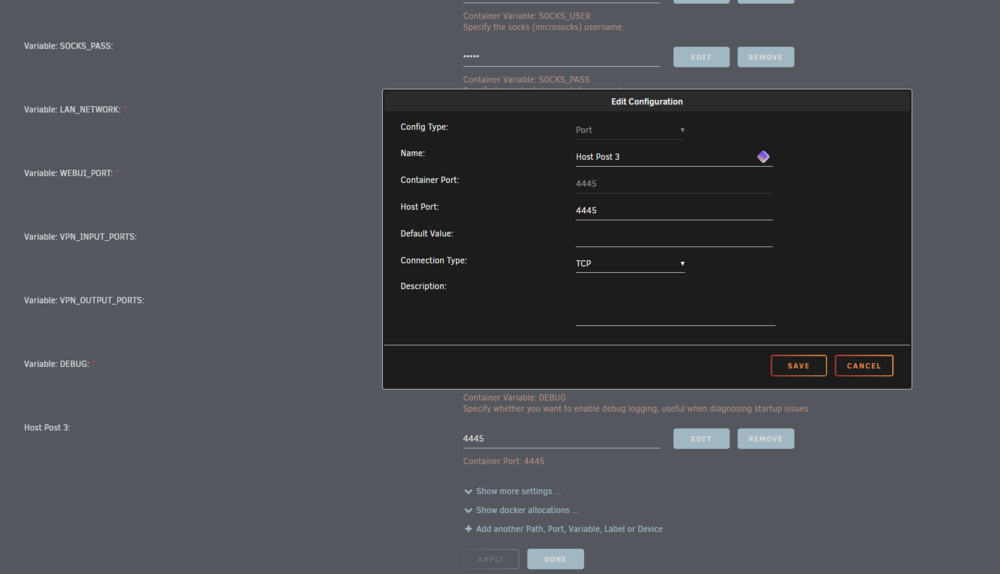
-
added Host Post 3 to 4445, still not access to WEBUI docker run -d --name='binhex-qbittorrentvpn' --net='bridge' --pids-limit 2048 --privileged=true -e TZ="Australia/Perth" -e HOST_OS="Unraid" -e HOST_HOSTNAME="TONNYHII" -e HOST_CONTAINERNAME="binhex-qbittorrentvpn" -e 'VPN_ENABLED'='yes' -e 'VPN_USER'='' -e 'VPN_PASS'='' -e 'VPN_PROV'='protonvpn' -e 'VPN_CLIENT'='wireguard' -e 'STRICT_PORT_FORWARD'='yes' -e 'ENABLE_PRIVOXY'='no' -e 'ENABLE_SOCKS'='no' -e 'SOCKS_USER'='admin' -e 'SOCKS_PASS'='socks' -e 'LAN_NETWORK'='192.168.64.0/19' -e 'WEBUI_PORT'='4445' -e 'VPN_INPUT_PORTS'='' -e 'VPN_OUTPUT_PORTS'='' -e 'DEBUG'='false' -e 'VPN_OPTIONS'='' -e 'ENABLE_STARTUP_SCRIPTS'='no' -e 'USERSPACE_WIREGUARD'='no' -e 'NAME_SERVERS'='84.200.69.80,37.235.1.174,1.1.1.1,37.235.1.177,84.200.70.40,1.0.0.1' -e 'PUID'='99' -e 'PGID'='100' -e 'UMASK'='000' -l net.unraid.docker.managed=dockerman -l net.unraid.docker.webui='http://[IP]:[PORT:4445]' -l net.unraid.docker.icon='https://raw.githubusercontent.com/binhex/docker-templates/master/binhex/images/qbittorrent-icon.png' -p '4445:8080/tcp' -p '8118:8118/tcp' -p '9118:9118/tcp' -p '58946:58946/tcp' -p '58946:58946/udp' -v '/mnt/user/appdata/binhex-qbittorrentvpn':'/config':'rw' -v '/mnt/user/appdata/binhex-qbittorrentvpn/':'/data':'rw' -v 'binhex-shared':'/shared':'rw' --sysctl="net.ipv4.conf.all.src_valid_mark=1" 'binhex/arch-qbittorrentvpn' 7b5465b63572fdd838cd8df76a32f91a4fb87bb8070289840b08151bdfc77fff The command finished successfully!
-
i cant find Host Port 3 in my edit. Do i have to add it?
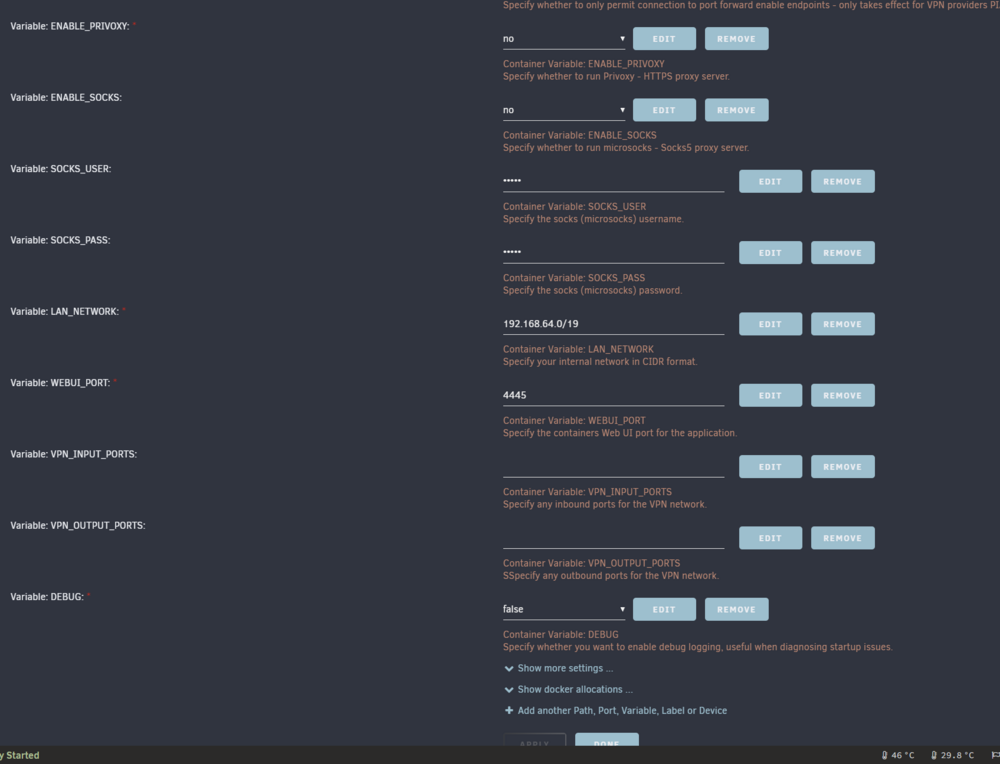
-
docker run -d --name='binhex-qbittorrentvpn' --net='bridge' --pids-limit 2048 --privileged=true -e TZ="Australia/Perth" -e HOST_OS="Unraid" -e HOST_HOSTNAME="TONNYHII" -e HOST_CONTAINERNAME="binhex-qbittorrentvpn" -e 'VPN_ENABLED'='yes' -e 'VPN_USER'='REMOVED' -e 'VPN_PASS'='REMOVED' -e 'VPN_PROV'='protonvpn' -e 'VPN_CLIENT'='wireguard' -e 'STRICT_PORT_FORWARD'='yes' -e 'ENABLE_PRIVOXY'='no' -e 'ENABLE_SOCKS'='no' -e 'SOCKS_USER'='admin' -e 'SOCKS_PASS'='socks' -e 'LAN_NETWORK'='192.168.64.0/19' -e 'WEBUI_PORT'='4445' -e 'VPN_INPUT_PORTS'='' -e 'VPN_OUTPUT_PORTS'='' -e 'DEBUG'='true' -e 'VPN_OPTIONS'='' -e 'ENABLE_STARTUP_SCRIPTS'='no' -e 'USERSPACE_WIREGUARD'='no' -e 'NAME_SERVERS'='84.200.69.80,37.235.1.174,1.1.1.1,37.235.1.177,84.200.70.40,1.0.0.1' -e 'PUID'='99' -e 'PGID'='100' -e 'UMASK'='000' -l net.unraid.docker.managed=dockerman -l net.unraid.docker.webui='http://[IP]:[PORT:4445]' -l net.unraid.docker.icon='https://raw.githubusercontent.com/binhex/docker-templates/master/binhex/images/qbittorrent-icon.png' -p '4445:8080/tcp' -p '8118:8118/tcp' -p '9118:9118/tcp' -p '58946:58946/tcp' -p '58946:58946/udp' -v '/mnt/user/appdata/binhex-qbittorrentvpn':'/config':'rw' -v '/mnt/user/appdata/binhex-qbittorrentvpn/':'/data':'rw' -v 'binhex-shared':'/shared':'rw' --sysctl="net.ipv4.conf.all.src_valid_mark=1" 'binhex/arch-qbittorrentvpn' ef5144504cf7af29cc289813b8bf2248120d7e6005b940f36c4163186f89dcb8 The command finished successfully!
-
i can't even get to WEBUI, haven't get to key in password yet
-
i have removed my binhex-qbittorrentVPN and reinstalled. Changed the LAN_NETWORK as per Q4 of the FAQ. i am using wireguard to get my ipconfig as i am remote from my unraid at the moment. still can't access to WEBUI even though it is listening at port 4445. Can someone please help? Thank you supervisord.log
-
i have been using qbittorrentVPN with NordVPN. i have changed to ProtonVPN with Wireguard. went through the VPN FAQ to change my qbittorentVPN set up from openVPN to wireguard. Now i can't get to Unraid WebUI Please help. supervisor log attached. supervisord.log
-
Appreciate your fast respond. It is now solved. Thank you very much!!
-
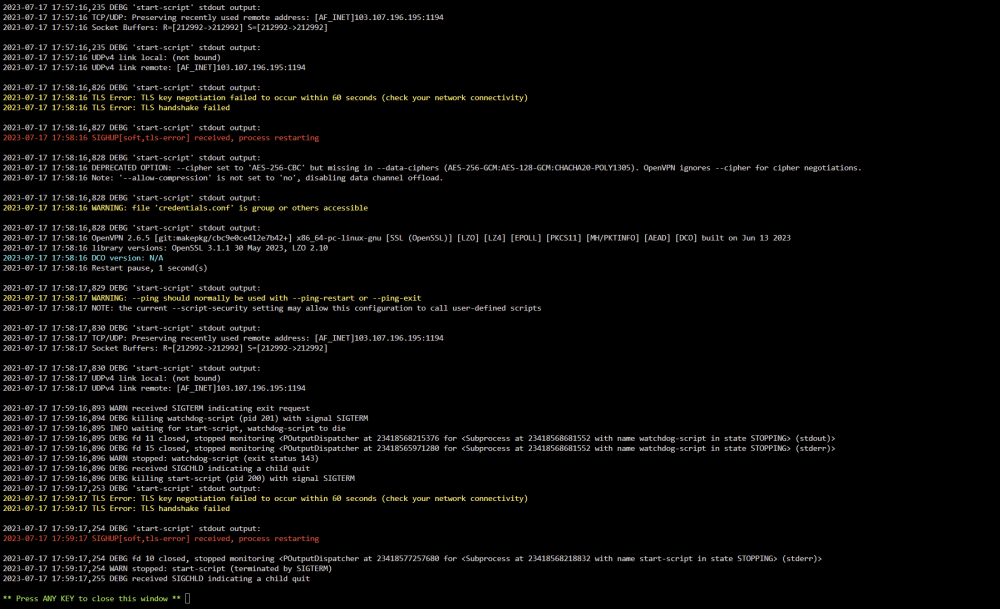
I am new to unraid and qBittorrent VPN. I was using qBittorrent VPN fine for few weeks and suddenly stopped working after i restarted it. Log as attached picture. Can't log onto WebUi Please assist