





slashgob
Members
-
Joined
-
Last visited
-
It was the model I had configured for when I was using the GPU. I commented this part out and its working! Thanks very much for your help
-
this i show i run the docker:
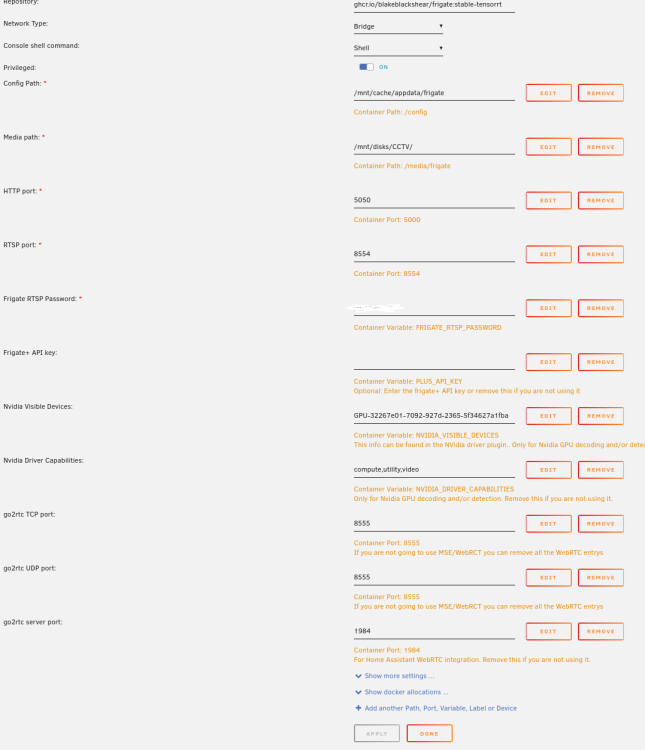
-
This is the config: mqtt: enabled: false ffmpeg: hwaccel_args: preset-nvidia-h264 detectors: coral: type: edgetpu device: usb # tensorrt: # type: tensorrt # device: 0 #This is the default, select the first GPU model: path: /config/model_cache/tensorrt/yolov7-320.trt input_tensor: nchw input_pixel_format: rgb width: 320 height: 320 cameras: Garden: # <--- Reolink enabled: true ffmpeg: output_args: record: preset-record-generic-audio-copy inputs: - path: rtsp://viewer:[email protected]:554/h264Preview_01_sub # <-- Low-res roles: - detect - path: rtsp://viewer:[email protected]:554/h264Preview_01_main # <-- Hi-res roles: - record detect: enabled: true record: enabled: true retain: days: 14 mode: all events: required_zones: - zone_0 retain: default: 30 mode: active_objects zones: zone_0: coordinates: 0,480,400,480,578,156,411,80,0,148 inertia: 3 objects: track: - person Front: enabled: true ffmpeg: inputs: - path: rtsp://10.0.0.81:554/12 # <-- Low-res roles: - detect - path: rtsp://10.0.0.81:554/11 # <-- Hi-res roles: - record detect: enabled: true # stationary: # interval: 20 # threshold: 50 record: enabled: true retain: days: 14 mode: all events: required_zones: - zone_1 retain: default: 30 mode: active_objects objects: track: - person # - car zones: zone_1: coordinates: 100,0,297,0,602,182,575,317,34,226 Side: enabled: true ffmpeg: inputs: - path: rtsp://10.0.0.80:554/12 # <-- Low-res roles: - detect - path: rtsp://10.0.0.80:554/11 # <-- Hi-res roles: - record detect: enabled: true # stationary: # interval: 20 # threshold: 50 record: enabled: true retain: days: 14 mode: all events: required_zones: - zone_2 retain: default: 30 mode: active_objects objects: track: - person # - car zones: zone_2: coordinates: 355,0,553,123,398,360,220,360,144,293,39,156,0,99,0,59,56,0 timestamp_style: # Optional: Position of the timestamp (default: shown below) # "tl" (top left), "tr" (top right), "bl" (bottom left), "br" (bottom right) position: "tl" # Optional: Format specifier conform to the Python package "datetime" (default: shown below) # Additional Examples: # german: "%d.%m.%Y %H:%M:%S" format: "%d/%m/%Y %H:%M:%S" # Optional: Color of font color: # All Required when color is specified (default: shown below) red: 255 green: 255 blue: 255 # Optional: Line thickness of font (default: shown below) thickness: 2 # Optional: Effect of lettering (default: shown below) # None (No effect), # "solid" (solid background in inverse color of font) # "shadow" (shadow for font) go2rtc: streams: Garden_Camera: - rtsp://viewer:[email protected]:554/h264Preview_01_sub # <-- Low-res
-
This is the error log: 2024-04-02 17:15:12.021315823 [INFO] Preparing Frigate... 2024-04-02 17:15:12.023112484 [INFO] Starting NGINX... 2024-04-02 17:15:12.039387243 [INFO] Preparing new go2rtc config... 2024-04-02 17:15:12.045838987 [INFO] Starting Frigate... 2024-04-02 17:15:12.637535936 [INFO] Starting go2rtc... 2024-04-02 17:15:12.779023571 17:15:12.778 INF go2rtc version 1.8.4 linux/amd64 2024-04-02 17:15:12.779721917 17:15:12.779 INF [rtsp] listen addr=:8554 2024-04-02 17:15:12.779760480 17:15:12.779 INF [api] listen addr=:1984 2024-04-02 17:15:12.780113123 17:15:12.780 INF [webrtc] listen addr=:8555 2024-04-02 17:15:15.042371804 [2024-04-02 17:15:15] frigate.app INFO : Starting Frigate (0.13.2-6476f8a) 2024-04-02 17:15:22.022403552 [INFO] Starting go2rtc healthcheck service... 2024-04-02 17:15:26.894930195 2024/04/02 17:15:26 [error] 154#154: *1 connect() failed (111: Connection refused) while connecting to upstream, client: 127.0.0.1, server: , request: "GET /api/version HTTP/1.1", upstream: "http://127.0.0.1:5001version", host: "127.0.0.1:5000" 2024-04-02 17:15:35.099098999 [2024-04-02 17:15:35] peewee_migrate.logs INFO : Starting migrations 2024-04-02 17:15:35.108366159 [2024-04-02 17:15:35] peewee_migrate.logs INFO : There is nothing to migrate 2024-04-02 17:15:35.119447329 [2024-04-02 17:15:35] frigate.app INFO : Recording process started: 482 2024-04-02 17:15:35.125390858 [2024-04-02 17:15:35] frigate.app INFO : go2rtc process pid: 98 2024-04-02 17:15:35.167602286 [2024-04-02 17:15:35] detector.coral INFO : Starting detection process: 491 2024-04-02 17:15:35.171784312 [2024-04-02 17:15:35] frigate.app INFO : Output process started: 493 2024-04-02 17:15:35.198245197 [2024-04-02 17:15:35] frigate.app INFO : Camera processor started for Garden: 499 2024-04-02 17:15:35.210373077 [2024-04-02 17:15:35] frigate.app INFO : Camera processor started for Front: 502 2024-04-02 17:15:35.222677398 [2024-04-02 17:15:35] frigate.app INFO : Camera processor started for Side: 505 2024-04-02 17:15:35.239248230 [2024-04-02 17:15:35] frigate.app INFO : Capture process started for Garden: 508 2024-04-02 17:15:35.251558369 [2024-04-02 17:15:35] frigate.app INFO : Capture process started for Front: 511 2024-04-02 17:15:35.263551027 [2024-04-02 17:15:35] frigate.app INFO : Capture process started for Side: 516 2024-04-02 17:15:37.824430472 [2024-04-02 17:15:35] frigate.detectors.plugins.edgetpu_tfl INFO : Attempting to load TPU as usb 2024-04-02 17:15:37.826667536 Process detector:coral: 2024-04-02 17:15:37.826742679 [2024-04-02 17:15:37] frigate.detectors.plugins.edgetpu_tfl INFO : TPU found 2024-04-02 17:15:37.827044855 [2024-04-02 17:15:37] frigate.detectors.plugins.edgetpu_tfl ERROR : No EdgeTPU was detected. If you do not have a Coral device yet, you must configure CPU detectors. 2024-04-02 17:15:37.829317565 Traceback (most recent call last): 2024-04-02 17:15:37.829413360 File "/usr/lib/python3.9/multiprocessing/process.py", line 315, in _bootstrap 2024-04-02 17:15:37.829420736 self.run() 2024-04-02 17:15:37.829425892 File "/usr/lib/python3.9/multiprocessing/process.py", line 108, in run 2024-04-02 17:15:37.829435494 self._target(*self._args, **self._kwargs) 2024-04-02 17:15:37.829471948 File "/opt/frigate/frigate/object_detection.py", line 102, in run_detector 2024-04-02 17:15:37.829477049 object_detector = LocalObjectDetector(detector_config=detector_config) 2024-04-02 17:15:37.829481993 File "/opt/frigate/frigate/object_detection.py", line 53, in __init__ 2024-04-02 17:15:37.829486382 self.detect_api = create_detector(detector_config) 2024-04-02 17:15:37.829492015 File "/opt/frigate/frigate/detectors/__init__.py", line 18, in create_detector 2024-04-02 17:15:37.829537086 return api(detector_config) 2024-04-02 17:15:37.829542505 File "/opt/frigate/frigate/detectors/plugins/edgetpu_tfl.py", line 43, in __init__ 2024-04-02 17:15:37.829548939 self.interpreter = Interpreter( 2024-04-02 17:15:37.829553570 File "/usr/lib/python3/dist-packages/tflite_runtime/interpreter.py", line 348, in __init__ 2024-04-02 17:15:37.829558394 _interpreter_wrapper.CreateWrapperFromFile( 2024-04-02 17:15:37.829595433 ValueError: Model provided has model identifier '
-
Yes, It's there in System Devices. Like I said, it works fine in the codeproject.ai docker... It's just Frigate doesn't seem to be able to detect it
-
I have the exact same issue. I know the Coral USB device is working fine because it works through Codeproject.ai and Agent-DVR. I would like to move over to Frigate though, but I won't unless this issue is fixed. It's obviously something to do with Frigate. I've done all the same things you have but still I get the TPU not detected error in Frigate
-
Probably a stupid question but how do i modify the config files and add mods to the Ark Survival evolved server Docker? I can see and connect to it, but not sure how to modify it?
-
slashgob joined the community
-
Is there a Docker for the Miscreated game server? https://miscreatedgame.com/


