





drslevy
Members
-
Joined
-
Last visited
Everything posted by drslevy
-
You were right, the drive is on a PCIe card adapter, and it got loose. I reseated it and it's now functioning properly.
-
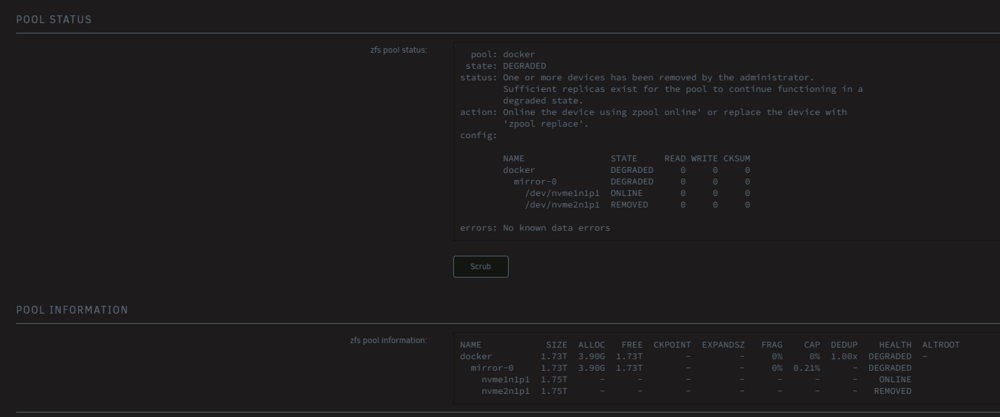
I just created the pool. The drive is visible. I think I missed a step setting up the pool. I added the diag. theforce-diagnostics-20250618-1129.zip
-
Thanks @itimpi , another related question. i created the secondary pool but it looks like i missed something. this is how the pool is showing its status:
-
I think after I made the changes the first time, I did not stop the Docker services. This time, the Docker services were stopped, so I got the mover options in the shares menu. It is moving now. Thank you. It's always the small details. LOL
-
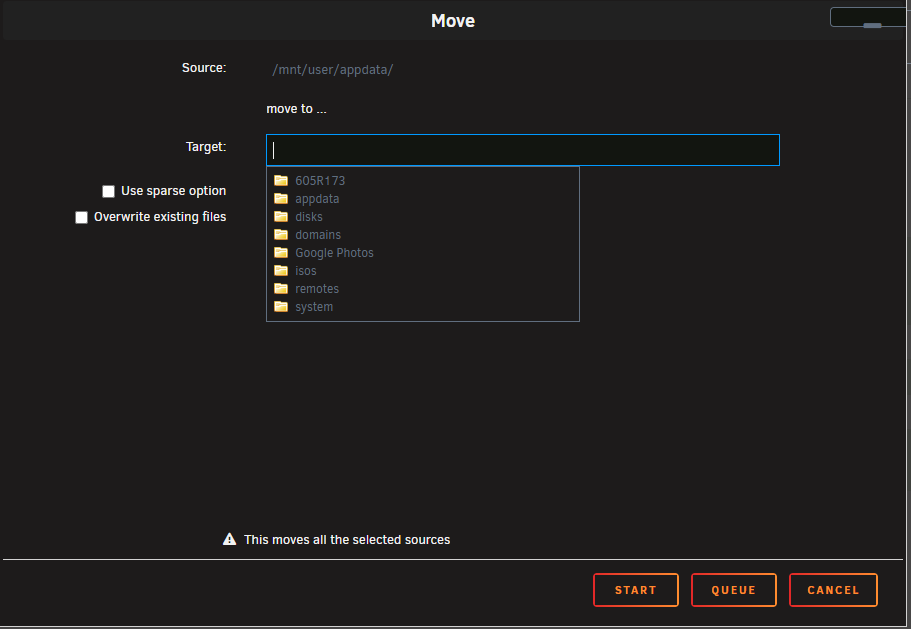
The built in file manager does not allow moving to the cache drive. Its not in the target pull down. I'm pretty sure I tried adding the secondary but you think I should do the pool as the secondary and they swap them after the operation is completed?
-
Good day all. I've spent the last 2 hours trying to get the appdata contents from my main array to a newly created secondary SSD based RAID 1 pool. I was able to create the Pool and change the appdata settings to the new pool as storage only. I disbled docker in settings and i even rebooted the server and ten tried mover and it is not moving the appdata files from the main array to the new pool. I am running 7.1.3. Any help would be apreciated. Not sure what I'm missing or should I just use unbalance to move the files?
-
Yup, I have switched this off once I completed all my research and checks. I had a bad drive a few months back and that's when I turned it on. Then i got the errors and folowed up on it so I'll see how it goes for the next few months.
-
I set it to correcting in the scheduler. I know its different from the on one the main page. Thanks for the additional info though. Hopefully I'm good going forward.
-
The first 3 were correcting parity checks. Just to make sure we are referring to the same thing. the " Write corrections to parity disk: " option was checked for the first 3 scans. Then i ran a 4th one, which still had the same # of errors and then the last scan was ran with this option unchecked.
-
So what youre saying is that the Parity check has fixed 126 errors in the past but now I'm good?
-
Thanks @JorgeB. This will all take 2 to 3 days, I will update once completed. Update @JorgeB. Correcting completed with the same # of errors - 126 and then the non correcting completed with no errors. I have attached the logs just in case but what exactly does this mean? I'm still a bit new to Unraid so I just wanted an explanation so i know what to do in the future. Thanks in advance for the help. theforce-diagnostics-20240319-1406.zip
-
Thanks @JorgeB. This will all take 2 to 3 days, I will update once completed.
-
Update - The diagnostic file was after a reboot because i had to reboot to complete the memory test sooooooo should I run another Parity test or whats the next best step here?
-
I've been busy with work and life so I'm finally getting around to trying to figure out whats going on here. I have my parity check running once a month and the last 3 times it ran, it has exactly the same # of errors. no drive errors and I tested the ram, no errors there either. I have attached the diagnostics logs. I have 2 parity disks and I also have write corrections to parity disk checked. Thanks in advance for any help provided. theforce-diagnostics-20240314-1118.zip


