





TrigServ
Members
-
Joined
-
Last visited
-
That fixed it and all looks good. Thank you!!
-
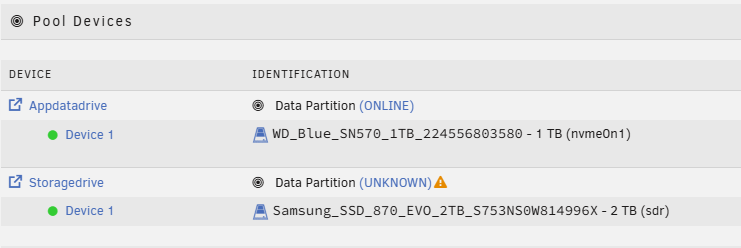
Upgraded to 7.3.0 from 7.2.6 and once it came back up the second pool device is showing this warning. I can access the drive / shares and things seem to be working but unsure what this message / warning is for. urnas-diagnostics-20260518-0808.zip
-
Reference this steam guide https://steamcommunity.com/sharedfiles/filedetails/?id=3706337486 under the FAQ | Transfer Saves > Dedi
-
This also happens on mine however once I connect, things load. Wanted to once again thank you for this docker config. I also wanted to just add some of my current configs and how I got it working with the new Dedicated IP / Direct IP settings they now allow. It has dramatically reduced my ping. Using the invite code method, everyone could connect but I would see my ping start at ~60 and even climb to over 100. Which is wild for the server sitting in the room next to me. I configured the docker using the original build (non-XVFB, though would probably work the same). For network I set it to a custom bridge for a separate NIC and gave it a dedicated IP. This way I could have it separate from my unraid server. Once the server was up, and generated all the files, I shut it down and modified the two settings below in the ServerDescription.json file to allow for Direct connection. "UseDirectConnection": true, (was false, set to true) "DirectConnectionServerPort": 7777, (may be set to -1 or already be set to 7777) Additionally, you can set the server name and server password. I booted up the server and then setup port forwarding on my FW to this docker / port. I am able to connect to it via the local IP/Port (7777) and others can connect externally via my ISP IP/Port Pings dropped to about 20-30 for everyone on the server. Keep in mind, with this config the invite code method will not work even if you enter one. It's one or the other. Also you have to enter the IP / Port / Password every time you connect as it currently does not save any info in the game UI.
-
Thank you so much for getting this running. Ive been using it and i have people connected fine but after a little while server crashes and reboots. Had it happen after about 5 hours of play and then it crashed about 2 hours later. So not consistent. which version of your docker do you recommend nodiaque/steamcmd:windrose or nodiaque/steamcmd:windrose-xvfb? it wouldn't mess with my save file if i change the repo would it?
-
I do, but no active downloads / seeds. Usually just use it for one off / random things as needed. Looking through that thread I haven't had any issues with deluge (I have the binhex/deluge docker) but I've gone ahead and turned off the docker for now. I'm using the official Plex container. In plex (which still seems to be working as does everything else on my server at the moment) I still see this, and it's been stuck there.
-
So the server didn't hard crash last night, but yet again, around the same time (~2-3AM) Plex gets hung during scheduled maintanance scanning something and I see the following in the GUI logs. I've attached syslog and diag files. In Plex, I see it stuck scanning a file. Everytime this has happened its been a different file. If I try to stop the docker, it fails and then Plex crashes. I've had to either try and take array down or stop docker services. Trying to kill the plex docker doesn't work and I have to use the umount cmd. Perhaps a bad SSD cache drive (where appdata is)? trg-urnas-diagnostics-20230224-0712.zip trg-urnas-syslog-20230224-1212.zip
-
Thanks, will do!
-
I've recently started having server stability issues. I can't seem to figure out what is going on. At first it would seem Plex would lock up on scanning / analysis overnight, but the server would appear fine. Plex still worked but would constantly show it stuck analyzing a show. I couldn't stop the container without killing Docker, stop the array, and even then i had to run umount -l /dev/loop2. Today I woke up to an unresponsive server. No video output or anything. Rebooted it and saw errors about MCE. I opened the terminal and checked the mcelog file. Well, the server stopped responding again from the gui. the array wasn't even started yet. I checked the box and hadn't crashed. I could login to the local box just fine. Here is the mce log i was able to screen grab. I ran a full MEMTEST and passed with no errors. I was able to pull diagnostic logs as well. Thanks in advance! diagnostics-20230223-0703.zip

