





Dazza993
Members
-
Joined
-
Last visited
Everything posted by Dazza993
-
Thanks @itimpi I've download a licensed copy of UFS explorer and gradually moving data from the reformatted drive onto a removable SSD attached to my Mac and then moving data back to the array. I've seen some files are corrupted still but something is better than nothing. Thanks to all for your input, advice and guidance.
-
Thanks @itimpi I'll give UFS explorer a try on my Mac once I get back from holiday.
-
Thanks for the continued support on this subject. The 14tb that I thought might have updated from the parity drive was unusable due to the filesystem mismatch to to get my array in a working condition that's formatted as XFS. As I have the Plus license of unRaid so would it be worth trying the 6tb drive originally formatted with reiserfs into the array? I'm guessing if it won't mount as an unassigned drive it won't mount as part of the array. If that prompts to be formatted as ReiserFS , would that overwrite all of the disk or does it just flag part of the disk as the filesystem to use? I could tolerate a partial loss of data so long as that approach got most of the data back, or would I be best using UFS explorer, and if I do decide to get that, how does that work? Can it be a plug in or dockerised app for Unraid, or can I install that on Mac OSX or does it need windows - and if it's the latter two, I guess I need to put the drive into an external caddy and connect to either my Mac or a Windows PC? Thanks in advance again.
-
When I tried to mount the original 6gb drive that I messed up, which is now shows in unassigned devices I get this when I try to mount it Does this give any clues to what might be wrong?

-
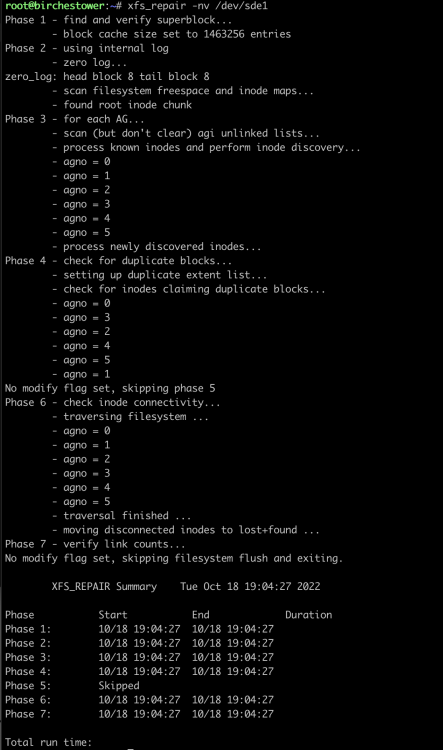
The rebuilt against the new drive finished but it shows as unmountable Reiserfsck is still giving error Unknown code er3k 127 so looking at another thread where some did the same as me I spotted the xfs_repair command. So running xfs_repair -nv /dev/sde1 I do get a readable output. Could it be worth trying to run xfs_repair without the n option? Or is it worth trying stop the array, edit the drive and change the format back to XFS? I'm grasping at straws I know

-
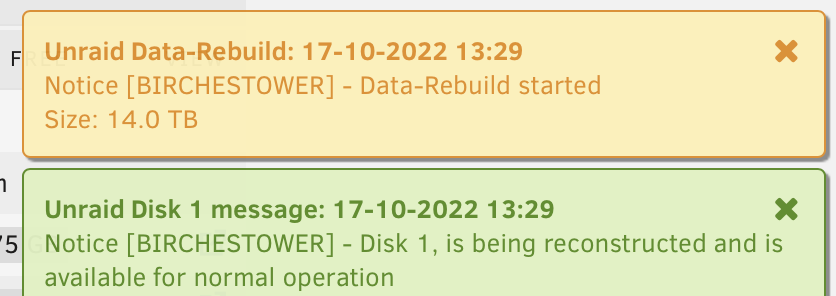
I've switched my new 14tb disk into disk position 1, replacing the one I was trying to change from reiserfs to XFS and it's showing the FS as ReiserFS and doing a data rebuild. Might I be lucky enough to end up with data on the new drive (albeit using the wrong format of reiserfs) at the end of the rebuid? If so I can worry about sorting that out later - which I guess involves coping the data off to one of the old 6gb drives (one reformatted to XFS) and showing as empty - then reformat the new 14tb drive and then copy back?
-
Would it be worthwhile, putting my new 14tb drive into the array as Disk 1 (replacing the one drive I tried to move from reiserfs to XFS) and then use unassigned devices to see what I can see on that old 6tb UD drive? If I did want to try and earlier version of unRaid, am I like to run into any issues doing that? On other posts others seem to have had similar issues and getting the same error code. On that thread the user has tried using unassigned devices to copy files off using MC I'm keen to make sure I don't make the problem any worse
-
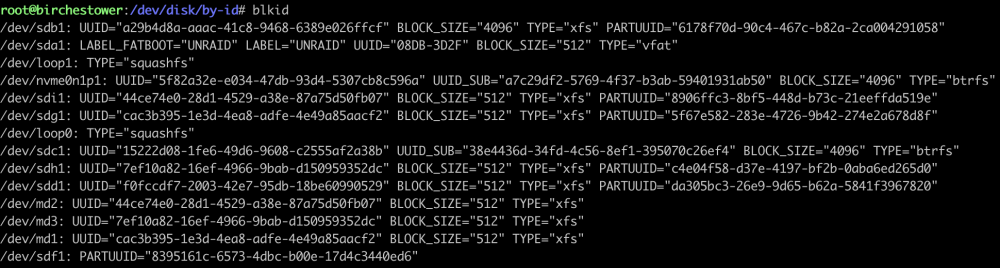
Attached are the logs after running reiserfsck --rebuild-sb /dev/md1 I've also ran the blkid command and that's still showing as all devices being XFS - but the device in question MD1 does show as being reiserfs in the UI Many thanks birchestower-diagnostics-20221017-1053.zip
-
I've looked at the thread above and another but whenever I try to use the command reiserfsck --rebuild-sb /dev/md1 I'm getting the error below. Unknown code er3k 127 Looks like I'm running reiserfsck 3.6.27 With the array stopped I'd changed the format from XFS back to ReiserFS and started the array in maintenance mode. Is that correct or would I need to start normally and do another format back to reiserfs back from XFS for the reiserfsck program to work correctly. Thanks for the input so far.
-
Thanks I'll take look at that thread. Fingers crossed
-
So I only formatted the data drive after the parity disc had been rebuilt so as far as I can see, the parity drive has all the information before I formatted the data drive. I've not run any parity checks since I formatted the data drive. If I had simply replaced the data drive with a new disk, it would have been able to rebuild the data drive. As soon as I've reformatted one of the data drives, will that have updated the parity drive, so that there's nothing available to rebuild? I understand that parity isn't a backup, but if I can pull one data drive and replace with new/empty one parity can be used to reinstate that data drive - or am I missing something?
-
Afternoon everyone, Looking for some help as to whether I can recover data on one of my data drive after I changed the filesystem type. I recently bought a pair of larger (14tb) drives to replace the parity drive and one of the data drives in my array. Replacing the parity went as planned. I'd precleared both new drives, shut down the array and brought in one of the new drives as parity and after 24 hours or so the new parity disc was up and running. All good at this point. One of the 3 data drive I had was formatted with ReiserFS which I wanted to switch to XFS. I stopped the array, went into the disk that was formatted with ReiserFS, changed it to XFS and restarted the array asking it to reformat, thinking it would format the drive then rebuild from parity. The drive that was ReiserFS now shows as XFS but it's also showing a lot of space free so I don't think any rebuilding took place. Have I lost the data on the drive forever or can I somehow force a rebuild of that disk using the parity. No data has been added, changed or deleted from the array since I've done this. I have available the other 14tb disc as an unassigned device at present (precleared and ready to go) if that can be of any use. I'm on version 6.11.0 at present. Thanks in advance
-
Yes, I think the correct terminology is to have a 2nd cache pool - so 2 pools, one with the 2.5 SSD and the other with the NVMe SSD I'm not to precious about anything downloaded to the cache pool but not moved to the array being lost but any VMs and their associated data I'd wanted backed up. I presume I could keep a backup of the NVMe apps and appdata folder on the array itself? (just manually backup every so often)
-
Hello everyone, Currently I have an unRaid setup on an HP Gen8 MicroServer that has 4 x 3.5 WD Reds as data & parity discs plus single 2.5 250gb Crucial SSD as the cache drive. I use that single cache drive for download files to and where I've got my docker apps & app data installed. I'm building a replacement for the Gen8 with the capacity to add more 3.5" drives and I've also gone for a new Mobo & CPU as I want to run one or two Windows VMs My new Mobo (ASRock X570M Pro4) as NVMe support, so could anyone confirm if I'd be better off getting a decent NVME SSD to put the docker apps and app data on and leave the 2.5 SSD purely as a download cache? I'm thinking about a 1tb NVMe drive - possibly a WD Black. Would this be the best approach and any SSD drive recommendations would be welcomed. If I do go down this route I guess it's fairly straightforward to move the existing apps/docker directory to the new drive? Thanks in advance
-
I’ve opted to build my custom unRaid server with the ASRock X570M Pro4 and the Ryzen 5600G Not yet built as awaiting case and memory but the 8 Sata ports were a big plus for me along with the M.2 slots for when I want to upgrade my cache drive It also seems to have decent power control
-
I've opted for a SeaSonic Focus PX-750 80PLUS Platinum PSU, looking at the costs of the Titanium rated models I simply couldn't justify the extra outlay. The Corsair HX850 looked a good price on Amazon (£135) but I spotted too many people complaining of coil whine and it looked like all the RM Corsair models were gold rated.
-
Thanks to @Froberg & @Lolight for your responses. I've ordered the ASRock X570M Pro4 motherboard and Ryzen 5 5600G CPU from eBay as there was a 15% discount this weekend so that made them about the cheapest I could find. Not being a Pro CPU that rules out ECC RAM (though the MB supports it) but I guess I'll have to live with that - if someone thinks ECC is absolutely critical - do let me know. Case wise, I've settled on either the Fractal Design Define R5 or the Node 804. I think the Define R5 edges it for me, as it can hold 8 drives and is smaller than the newer R7 case. Memory wise do I need anything better than this https://www.scan.co.uk/products/16gb-2x8gb-corsair-ddr4-vengeance-lpx-black-pc4-28800-3600-non-ecc-unbuff-cas-18-135v-amd-ryzen-opti or if there's anything cheaper do let me know. Is there any benefit for option for a single 16gb DIMM rather than 2 x 8gb DIMMs ? The MB has 4 slots anyway and I'm expecting that 16gb is more than sufficient for unRaid plus a Windows VM (or two) - not running any games just legacy applications. Back to the power supplies, Seasonic comes highly commended above but what about Corsair? I'd been looking at either the Corsair 850W Enthusiast RMx Series RM850X V2 PSU (£135) which is Gold rated and fully modular or the SeaSonic FOCUS PX-850 850w with is the same money but Platinum rated or I could save £35 and get the Gold rated Seasonic Focus GX-850 Looking at both PSUs I see 6 pin connectors - some labeled SATA some labeled CPU/PCIe - I presume I can use any of these to power 3.5" HDDs if I'm not running any discreet GPUs? I probably don't need 850w initially but I want to have ample capacity should I need to add more drives in future. Thanks again in advance for any other comments and suggestions.
-
Hello everyone, I'm new to the forum but have been using unRaid for close to 10 years, with different iterations of the HP ProLiant MicroServers, first the Gen7 and presently a Gen8. I'm currently running on 6.8.3 and don't do much other than just run the basic NAS with a couple of dockers (Sonarr & Sabnzdb) I've 4 x 6T WD RED drives in the Gen8 microserver and running short on disk space. One option would be to whack in a pair of bigger discs but I'm starting to feel that given the age of the Gen8 and my wanting to run a Windows 7 (and maybe Win10) VM on unRaid rather than using Parallels on my iMac, then and upgrade of the Gen8 may be a better option. I'd like the ability to run more than 4 x 3.5 HDDs, so that I can purchase a single new bigger drive for my parity disc and and then repurpose the existing parity disc as a new data drive. My current cache disk is a 250gb Crucial SSD but eventually I'd like to replace that with a M2 NVME SSD I plan to house the new setup in a case with at least 6 drives (ideally 8 ) with the smallest footprint possible. I like the look of the Fractal cases and was thinking about a Design 7 but I think this is going to be way too big, so the Fractal Node 804 is the most likely case I'll go for as it can hold 8 x 3.5 HDDs and has a similar profile to the Gen8 but a little larger in all dimensions, but will still fit on my desk. The Intel vs. AMD debate seems almost irrelevant as from what I understand basic CPUs from with will be more than sufficient for my needs. On the motherboard front I'd ideally want 6 SATA ports, but where I don't loose any of those if I add an M.2 SSD. The Node 804 case requires a micro-ATX motherboard so I've been looking at the ASRock X570M Pro4 which as 8 SATA ports and 2 x M2 slots - I don't see any mention that using these loses any SATA ports but with 8 of them I could tolerate that anyway. I like the fact this MB has support for ECC memory and a decent power phase design, and 8 SATA ports all in a micro ATX format I have no requirement for a dedicated GPU and would run the server headless so a CPU with video capability would be required and I'd been looking at the Ryzen 5 5600G - latest Zen3 architecture and more than enough oomph for a my needs. If there's a lesser & cheaper CPU that would suffice then any recommenations are welcome. I don't think I have any need for ultra fast RAM so 16gb of ECC RAM would suffice - from what I've read, unRaid can have issues with RAM running at high clock speeds anyway. I'd like to ask if anyone can foresee possible issues with my proposed setup or if there's alternate MBs or CPUs from either the Intel or AMD that meet my needs outlined above, but at a lower cost. Any recommendations would be most appreciated. I've not mentioned a power supply, but again if there's recommendations (Corsair / SeaSonic seem the best) and what wattage I'd need to run the above plus 8 HDDs then suggestions would be most welcome. The plan is to buy a new case, power supply, memory and CPU and then use the HDDs, and SSD cache disk from my Gen8 micro server initially but with a view to replacing the SSD cache with an M2 NVME SSD at a later date to release a SATA port for additional disks. Thanks in advance for any and all comments, suggestions or recommendations. Dazza....


