





generalxxxstark
Members
-
Joined
-
Last visited
-
I only have a single VM running Proxmox backup server and 12 docker containers but I do not lose any C-states. The VM is using virtio-net for its network adaptor.
-
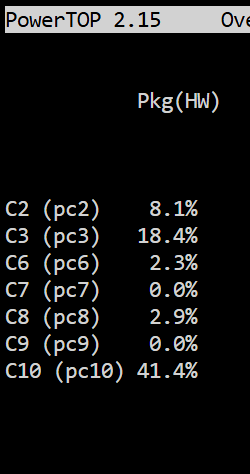
I just got the Intel X710 DA-2 so that I can run dual 10G to my switch. It does seem to support ASPM L1 but for some reason the system won't go past C3. Is there anything additional I need to do? I have disabled the onboard RTL8125 which used to hit C10. Edit: its now working. I pulled out the SSDs, tested the NIC it reached C8. Now with everything plugged in, it reaches C10. Lol this is some odd behavior. Nevertheless, the system runs about ~3W lower than with the RTL8125 but at 10G.
-
Just wanted to share my journey to optimize my PC build for lower power consumption. Paying almost $0.30 per kWh kicked off this mission to create an efficient setup while maintaining PCIE expansion options. I tested four motherboards on the LGA 1700 platform with the following base specs: My base specs: i5 12400 32gb Corsair DDR5/DDR4 1TB WD SN730 nvme 3x18 TB Toshiba N300 HDDs Seasonic PX750 2x80mm fans Initially I bought the ASRock B760M Pro RS/D4 since I had some DDR4 ram lying around but quickly found out no matter what I did it would not go past C3. There are some mods that let you unlock additional C states, but the best I got was C6, saving about 1W. In Unraid, with HDDs spun down, ~12 dockers running, it idled at ~25W. Next, I switched to the Asus Prime B760M-A AX DDR5. It reaches C10 without an SSD, idling at ~15W. Interestingly, with SSD in the CPU-connected NVMe slot, it reached C3. With the SSD in the chipset-connected slot, it reached C6. Overall power with HDDs spun down in Unraid, overall power consumption was ~20W. Then came the Asus Z790-AYW. This board reached C10 without an SSD at ~15W. With the SSD in any NVMe slot, it consistently hit C10, idling at ~15W. Power consumption with HDDs spun down was ~17W. Interestingly, with HDDs spun up, it stays at C10, but with them spun down, it only reaches C8. It was been quite stable and offers ample PCIe expansion with 4X16 and 3 NVMe slots. Finally, I tested the Asus TUF Gaming Z790-PLUS Wifi. Unfortunately, the Intel 226 NIC showed up as ASPM disabled and the system would not go past C2. As a side note, my PSU’s efficiency is about 70% at 20W. Perhaps switching to the Corsair RM750x could save another ~2W. All power measurements were taken using a Sonoff S31 running Tasmota.
