




Skip to content
View in the app

A better way to browse. Learn more.

Unraid

A full-screen app on your home screen with push notifications, badges and more.

To install this app on iOS and iPadOS
  1. Tap the Share icon in Safari
  2. Scroll the menu and tap Add to Home Screen.
  3. Tap Add in the top-right corner.
To install this app on Android
  1. Tap the 3-dot menu (⋮) in the top-right corner of the browser.
  2. Tap Add to Home screen or Install app.
  3. Confirm by tapping Install.

SolarBottcher

Members
  • Joined

  • Last visited

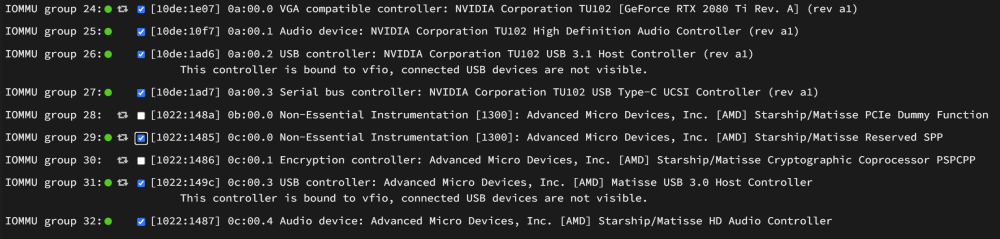
  1. No hope with x470 gaming 5 motherboard problem exists forever no flr support with latest f63c bios and 6.10.3 unraid system The temporary solution for me is to do pcie_no_flr=1022:148a,1022:1485,1022:1486,1022:149c,1022:1487 http://patchwork.ozlabs.org/project/linux-pci/patch/[email protected]/#2758883 <--reason why im doing this and do vfio bind as shown in the pic in this case, it stop crashing when the vm starts and did actually go into the windows logon menu. However! it still crashes when im logging in. I disable the windows startup sound, and I got no problems anymore.(weird, but I guess it might be some driver issues?) I stop configuring anything by then. I have spent too much time troubleshooting, I am losing interest messing up vm stuffs.
Account

Navigation

Search

Search

Configure browser push notifications

Chrome (Android)
  1. Tap the lock icon next to the address bar.
  2. Tap Permissions → Notifications.
  3. Adjust your preference.
Chrome (Desktop)
  1. Click the padlock icon in the address bar.
  2. Select Site settings.
  3. Find Notifications and adjust your preference.