





Threshermaw
Members
-
Joined
-
Last visited
-
Final - It appears to have been CPU-related. The machine had been up for 5 days with no hard crashes. I got Dell to send me a new 14900 CPU to replace this once, and I have now replaced the CPU and re-enabled TurboBoost, and all seems well—no SegFaults in the logs. Leaving this here to help another fellow homelabber work out what the problem could be. It is more than likely a hardware issue. Contact your warranty provider.
-
Update - So. After another crash, I've decided to disable Intel Turbo Boost on my CPU, and the system is FAR more stable (believe this might be a voltage-damaged 14th gen). I'm going to run this for a few days to see if we get a better experience.
-
I have now removed one stick, running 32GB, to see if the problem improves. Currently running the latest (1.18) BIOS for this machine. Will update. Problem with USB changes is that my previous one is blacklisted and i don't have another spare USB hanging around... Required a ticket to Unraid Support to fix..
-
Added syslog. It might be helpful, but I can't see anything that stands out. 2025-11-25T07:05:44+00:00 Tower kernel: traps: php-fpm[553878] general protection fault ip:941736 sp:7ffd3d8c5140 error:0 in php-fpm[541736,600000+3fb000] 2025-11-25T07:05:44+00:00 Tower nginx: 2025/11/25 07:05:44 [error] 242977#242977: *15236 recv() failed (104: Connection reset by peer) while reading response header from upstream, client: 10.0.0.59, server: , request: "POST /plugins/community.applications/include/exec.php HTTP/1.1", upstream: "fastcgi://unix:/var/run/php-fpm.sock:", host: "10.0.0.66", referrer: "http://10.0.0.66/Apps" 2025-11-25T10:59:13+00:00 Tower sshd-session[170715]: Read error from remote host 10.0.0.59 port 63339: Connection timed out 2025-11-27T02:27:21+00:00 Tower kernel: SQUASHFS error: Unable to read fragment cache entry [21835aa4] 2025-11-27T02:27:21+00:00 Tower kernel: SQUASHFS error: Unable to read page, block 21835aa4, size 6d90 2025-11-27T02:27:21+00:00 Tower kernel: SQUASHFS error: Unable to read fragment cache entry [21835aa4] 2025-11-27T02:27:21+00:00 Tower kernel: SQUASHFS error: Unable to read page, block 21835aa4, size 6d90 2025-11-27T02:27:22+00:00 Tower kernel: SQUASHFS error: Unable to read fragment cache entry [21835aa4] 2025-11-27T02:27:22+00:00 Tower kernel: SQUASHFS error: Unable to read page, block 21835aa4, size 6d90 2025-11-27T02:27:23+00:00 Tower kernel: SQUASHFS error: Unable to read fragment cache entry [21835aa4] 2025-11-27T02:27:23+00:00 Tower kernel: SQUASHFS error: Unable to read page, block 21835aa4, size 6d90 2025-11-27T02:27:23+00:00 Tower kernel: SQUASHFS error: Unable to read fragment cache entry [21835aa4] 2025-11-27T02:27:23+00:00 Tower kernel: SQUASHFS error: Unable to read page, block 21835aa4, size 6d90 2025-11-27T02:27:24+00:00 Tower kernel: SQUASHFS error: Unable to read fragment cache entry [21835aa4] 2025-11-27T02:27:24+00:00 Tower kernel: SQUASHFS error: Unable to read page, block 21835aa4, size 6d90 2025-11-27T02:27:33+00:00 Tower root: status : errored 2025-11-27T02:27:33+00:00 Tower root: error log : /var/log/graphql-api.log
-
So my server crashed this morning. Hardlocked up, no way to connect unless I pull the power. Checking DMESG, I see SQUASHFS errors. This is a brand-new SanDisk USB (about 1 month old), and I also used a Samsung USB before then. I'm aware of the issues with SanDisk USBs on this forum. But I don't believe this is the issue, since I've used two different USB sticks (originally three), and I've seen the problems with my Samsung USB. So would that point to a problem with the machine's USB ports? This machine has no problem when the OS is installed to an NVME drive (Proxmox OK, Debian 13 OK, Truenas OK) [ 48.238604] SQUASHFS error: xz decompression failed, data probably corrupt [ 48.238607] SQUASHFS error: Failed to read block 0x21835aa4: -5 [ 48.238609] SQUASHFS error: Unable to read fragment cache entry [21835aa4] [ 48.238613] SQUASHFS error: Unable to read fragment cache entry [21835aa4] [ 48.238613] SQUASHFS error: Unable to read page, block 21835aa4, size 6d90 [ 48.789518] SQUASHFS error: Unable to read fragment cache entry [21835aa4] [ 48.789522] SQUASHFS error: Unable to read page, block 21835aa4, size 6d90 [ 49.350254] SQUASHFS error: Unable to read fragment cache entry [21835aa4] [ 49.350258] SQUASHFS error: Unable to read page, block 21835aa4, size 6d90 [ 49.904344] SQUASHFS error: Unable to read fragment cache entry [21835aa4] [ 49.904348] SQUASHFS error: Unable to read page, block 21835aa4, size 6d90 [ 50.461711] SQUASHFS error: Unable to read fragment cache entry [21835aa4] [ 50.461714] SQUASHFS error: Unable to read page, block 21835aa4, size 6d90 [ 51.026955] SQUASHFS error: Unable to read fragment cache entry [21835aa4] [ 51.026959] SQUASHFS error: Unable to read page, block 21835aa4, size 6d90 [ 51.590774] SQUASHFS error: Unable to read fragment cache entry [21835aa4] [ 51.590778] SQUASHFS error: Unable to read page, block 21835aa4, size 6d90 [ 52.148430] SQUASHFS error: Unable to read fragment cache entry [21835aa4] [ 52.148434] SQUASHFS error: Unable to read page, block 21835aa4, size 6d90 [ 52.703884] SQUASHFS error: Unable to read fragment cache entry [21835aa4] [ 52.703888] SQUASHFS error: Unable to read page, block 21835aa4, size 6d90 [ 53.259070] SQUASHFS error: Unable to read fragment cache entry [21835aa4] [ 53.259074] SQUASHFS error: Unable to read page, block 21835aa4, size 6d90
-
Hi All, Wonder if one of you can help me better than the Unraid support rep I've had... Basically, my system is an unstable mess right now, and I have no idea where to start processing this. It's suffering from a complete system freeze, with no response to anything (Web UI, SSH, Ping). I have to pull the power to bring the system back up. The crashes are random. Seemingly appearing when no one is using the system at that moment or when people are using it. It's at least once a day I've tried different USBs and other ports. I can run Proxmox fine with zero issues like this. But Unraid is just too unstable for my stack at the moment. I'm on the latest version 7.2.2. This is a fresh install with a handful of *Arr apps, Plex running with Nvidia drivers, and Unassigned devices just for NFS. Occasionally, I see the odd SegFault error in the kernel log. But it doesn't seem to impact anything. I've run scans on the NVME's in the machine, and they've passed SMART and other checks (About 10% worn) The machine is a Dell Precision 3280 Compact with an Intel Core i9-14900, 64GB RAM, and Nvidia T1000 8GB, which has passed all Hardware Diags in the BIOS. Any ideas for me to look into would be massively appreciated, as I'm starting to pull my hair out. 😥 Thanks! tower-diagnostics-20251125-1032.zip
-
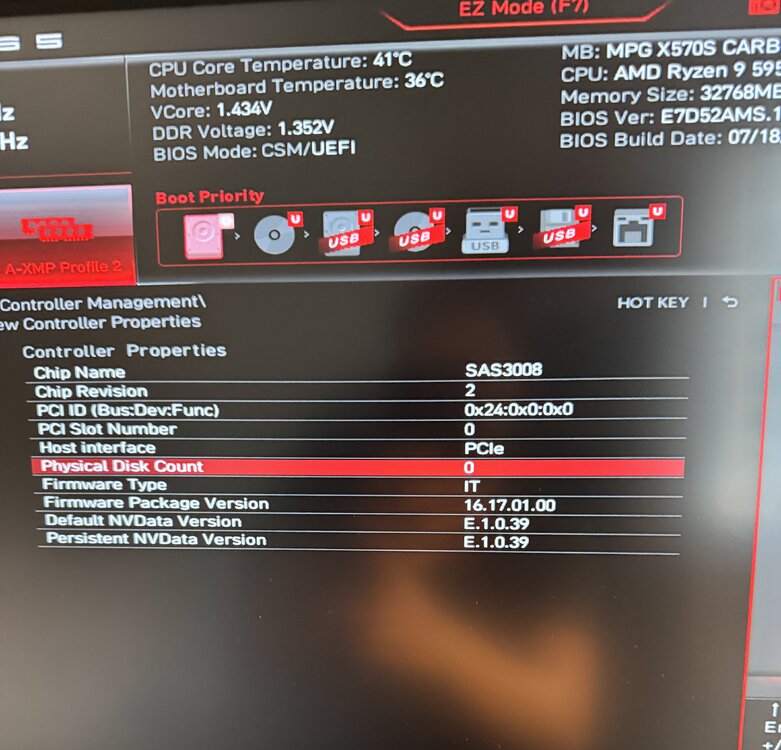
I can see the drive is detected in the Dell BIOS and I have access to configure the HBA (Enable Legecy Mode or not) But it's detected by the bios...
-
Appreciate the searching. Resize BAR is off. I even toggled it on and didn't make a change. The annoying part is that I have seen this card in the Unraid GUI. Like once, but it's disappeared ever since
-
Both, Works with a Windows OTG usb stick detected as a Dell 12GBPS HBA and within my personal machine just in the PCIe slot...
-
Agree not detected in Ubuntu. Even though the Bios does detect the card and is visible in windows. So why can’t Linux see it?
-
Also to add... The SAS card in the Dell machine has a green flashing LED (Heartbeat?)
-
I would, but this is going into a Dell Compact pc ( https://www.dell.com/en-uk/shop/desktop-computers/precision-3280-compact-workstation/spd/precision-3280-workstation) which has a riser with only 1 x 8X slot. and 1 x 8X (1x Eletrcial). This card is in the full 8X slot and I've reseated it multiple times. There's an Nvidia T1000 in the x1 slot but I have not used it so it just sits there. If I swap them round, I can see the Nvidia card is using the full 8X connection of the slot, so there's no "reason" why it wouldn't be detected.
-
I'm close to pulling my hair out.... I had a small project to create a 3D printed DAS box to hold some external SAS HDDs (Seagate Enterprise Storage V4) but so far I've hit wall after wall. Firstly, I cannot get the HBA to detect in unRaid. like it doesn't exist, but I can plug this into my windows 11 PC and it's detected and finds a driver for it. But it cannot detect any HDD's (SAS or SATA) I thought it was a power issue. So I bought a dedicated 200w pico PSU to power these drives but I can't get the SAS drives to spin up. I assumed it was the 3rd pin PWRDIS issue as seen here But I don't think my drives have this PWRDIS pin and even ripped a pin out of the HDD just in case, but they still won't power up. I assumed because they are not connected to the HBA but that doesn't appear to be it either. The SATA Drives are spinning but not detected by the HBA. So far I've tried with the following drive types 12G Dell Exos X18 SAS - 16TB WD Red SATA - 2TB Seagate Enterprise Storage V4 - 6TB SAS SSD - 1TB (This gets warm, telling me it's getting power and it's "on" but still not detected by the HBA) So there are 2 issues here - I can't get any SAS drives to power up, and I can't get my HBA detected in Unraid, but I can in Windows 11 and second, I can't get any SAS HDD's to power up. I can get SATA drives to power up but still not detected by the HBA on Windows or Unraid. Link to the HBA - https://www.bargainhardware.co.uk/dell-t93gb-lsi-sas3008-dual-port-12gbps-pcie-x8-sas-lp-hba Link to cables for HBA - https://www.aliexpress.com/item/1005006952954904.html?spm=a2g0o.order_list.order_list_main.29.6ee318028JgfYs Link to PSU for HDD's https://www.aliexpress.com/item/1005008113470654.html?spm=a2g0o.order_list.order_list_main.35.6ee318028JgfYs (Power supply is just for POC and was going to get a dedicated one when I actually build this thing) Current Firmware on the HBA is the latest - 16.17.01.00 Any ideas would be greatly appreciated, I've attached my diagnostics of my homelab just in case. homelab9-diagnostics-20250312-1532.zip
-
This is what i've already done. Files attached.... docker.txt supervisord.log
-
Am I missing something sorry? Not sure if your reply is automated. Are the files missing something?

