




Skip to content
View in the app

A better way to browse. Learn more.

Unraid

A full-screen app on your home screen with push notifications, badges and more.

To install this app on iOS and iPadOS
  1. Tap the Share icon in Safari
  2. Scroll the menu and tap Add to Home Screen.
  3. Tap Add in the top-right corner.
To install this app on Android
  1. Tap the 3-dot menu (⋮) in the top-right corner of the browser.
  2. Tap Add to Home screen or Install app.
  3. Confirm by tapping Install.

Ricky Andrea

Members
  • Joined

  • Last visited

Everything posted by Ricky Andrea

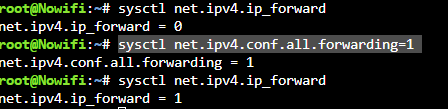
  1. Recently I cannot access my docker container that use network other than host network after every boot or the docker container restart after appdata backup process. After some digging I found out that the problem is ip forwarding being disabled, and i have to type "sysctl net.ipv4.conf.all.forwarding=1" everytime after reboot or after appdata backup process. This is so frustating. Does anyone have solution for this to make the ip forwarding permanent and not revert after every boot?
Account

Navigation

Search

Search

Configure browser push notifications

Chrome (Android)
  1. Tap the lock icon next to the address bar.
  2. Tap Permissions → Notifications.
  3. Adjust your preference.
Chrome (Desktop)
  1. Click the padlock icon in the address bar.
  2. Select Site settings.
  3. Find Notifications and adjust your preference.