





Eisi2005
Members
-
Joined
-
Last visited
-
Hello, I'd like to mount a Nextcloud share that I received from a friend into my Unraid filesystem so that I can access this mounted Nextcloud share using Docker containers running on my Unraid. Is that possible? Thanks
-
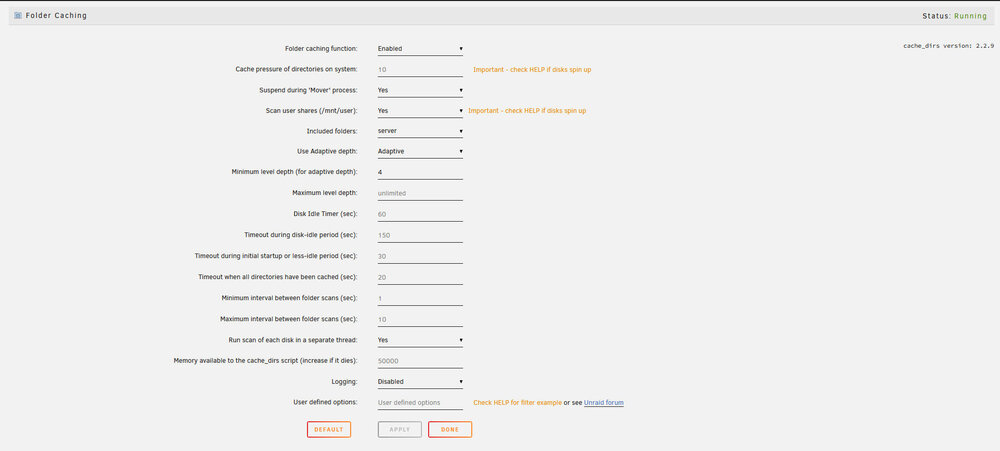
Can anything be improved in the settings?
-
Hello everyone, After a reboot, the entire cache is empty again. Is there a command that can be executed to cache all directories once? So that the hard disks are not gradually awakened again and again.
-
ok thanks for the answer I will try it. Where is the limit?
-
Thank you for your information. Sorry that I have to ask so often, but I don't want to do anything wrong at this point. So I can take a new USB stick, import my backup there and then request a new license key for the new USB stick via replace key ? Can I do this as often as I want and only the old uuid of the old stick will be blocked?
-
Thank you for your answer. But I wouldn't want to go down that route, then I might have the same problem again with the next update. Maybe the stick is really broken. I can only see the possibility of either using the new stick via the known methods using the update in Webgui or I need a new stick. What is important for me here is how the license will continue.
-
ok thanks for the answer. What are my options now? 1. I plug the USB stick into another port and hope that unraid boots. If it boots, I will try the update again and at best it will update properly. 2. unraid does not boot from the stick at all, then I could format the stick and import the backup that I pulled before the 1st update attempt. 3. what is most likely, the USB stick has a defect and I need a new USB stick, I have already ordered 2 new sticks. An Intenso Alu Line 8 GB USB 2.0 and a Verbatim Store ‘n’ Go V3 USB stick, USB 3.2 Gen1, 16 GB. I could then install one of these sticks with the backup. But what about the license? Can I register the new stick using the replace key, even though I only registered my new, apparently defective stick last Saturday?
-
Thanks for the info. This is the same USB port I have been using for the last few years. But I will try a different port. At the moment the server is still accessible and all my applications are still running. Can I unplug the USB stick while the server is running and plug it back in? Should it then reappear in the best case?
-
OK thanks for the info, here is the diagnostic.zip . I hope that anyone could help me. server-diagnostics-20250707-1728.zip
-
Hello everyone, last weekend, after a long period of hesitation, I finally replaced my USB stick, as my old one was too small to update. I switched from version 6.1.1 to 7.0.1. The license could be transferred and so far everything was fine and everything worked again. Now I wanted to update to 7.1.4 today and received an error message when installing the update that my stick could not be accessed. I now see the following message in the WebGUI. Your flash drive is corrupted or offline. Post your diagnostics in the forum for help. Which diagnostic file do you need now? What can I do? Translated with DeepL.com (free version)
-
thanks for the quick reply, I will first try to clean up the folders. There is another folder called packages there are many .txz files like well openvpn pycrypto python tcl and so on. i think these are all old files too ?
-
Hello, I have been running my server for 10 years now and back then I used a 1 GB USb stick. It was always sufficient, but now I wanted to do an update and it tells me I have too little space. Over the years a lot has accumulated there. But I'm not sure what I can and can't delete. The following folders are on my flash drive config custom EFI logs but empty previous syslinux unmenu and a lot of files in the root, the largest of which are bzfirmware and bzroot. Could I empty previous as this is the largest folder?
-
i use the official emby docker. my appdata directory is on my cache disk. All my directories there have nobody/users permission only the EmbyServer folder has daemon/daemon permission can I just rewrite the permission or does that have no effect?
-
ok thanks i will test it
-
Hello, I still have 2 free pcie 3.0 x1 slots on my mainboard and I have a 9207-8i controller here. could I install it there to install 4 more hard drives? Or should you just buy an x1 controller with 4 sata3 slots? I still have the 9207 lying around and before I buy something new I would of course like to use it. Would the performance be sufficient for normal operation?
