bomberski
Members
-
Joined
-
Last visited
-
That worked!!! Thank you so much!!!!
-
bomberski joined the community
-
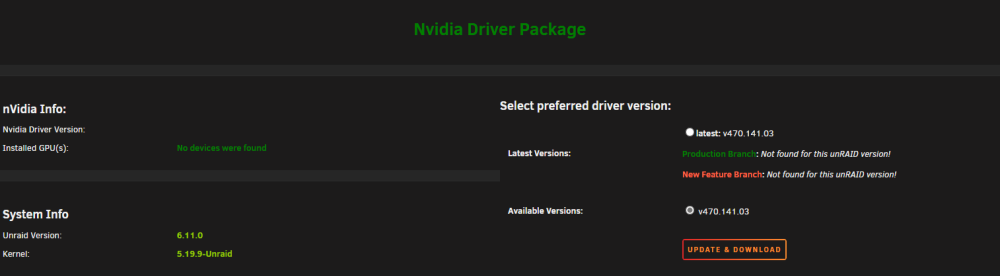
same problem after the Update to 6.11, Unraid cant find my GPU. Have uninstalled addon reboot, installed the app rebooted, installed v470.141.03 rebooted. And still no gpu found. Very laggy loading the GPU driver page, and i also get this now Sep 23 16:14:42 Unraid kernel: NVRM: 0000:05:00.0: DMA mapping request too large! Sep 23 16:14:42 Unraid kernel: NVRM: GPU 0000:05:00.0: RmInitAdapter failed! (0x23:0x3f:1195) Sep 23 16:14:42 Unraid kernel: NVRM: GPU 0000:05:00.0: rm_init_adapter failed, device minor number 0 Sep 23 16:14:45 Unraid kernel: NVRM: 0000:05:00.0: DMA mapping request too large! Sep 23 16:14:45 Unraid kernel: NVRM: GPU 0000:05:00.0: RmInitAdapter failed! (0x23:0x3f:1195) Sep 23 16:14:45 Unraid kernel: NVRM: GPU 0000:05:00.0: rm_init_adapter failed, device minor number 0 Sep 23 16:14:47 Unraid kernel: NVRM: 0000:05:00.0: DMA mapping request too large! Sep 23 16:14:47 Unraid kernel: NVRM: GPU 0000:05:00.0: RmInitAdapter failed! (0x23:0x3f:1195) Sep 23 16:14:47 Unraid kernel: NVRM: GPU 0000:05:00.0: rm_init_adapter failed, device minor number 0 Sep 23 16:14:50 Unraid kernel: NVRM: 0000:05:00.0: DMA mapping request too large! Sep 23 16:14:50 Unraid kernel: NVRM: GPU 0000:05:00.0: RmInitAdapter failed! (0x23:0x3f:1195) Sep 23 16:14:50 Unraid kernel: NVRM: GPU 0000:05:00.0: rm_init_adapter failed, device minor number 0