Distorter
Members
-
Joined
-
Last visited
Everything posted by Distorter
-
Thanks for your help. blkdiscard -f was the command needed to get the drive back into a working state.
-
Ah mounted it to pull the data. Will unmount and try again. The gui just cycles over and over, doesnt give too much to go on.
-
New diag attached. Re did commands above and then tried to format drives but unsuccessful. unraid-diagnostics-20260313-1823.zip
-
Have tried that. Even did a new config.
-
How do I get unraid to accept the disks as brand new like they've never seen them before?
-
How would that break the pool and btrfs? I tried to just go nuclear and did the new config and wiped the disks but it still won't mount the drives. This is as a brand new pool with wiped disks but it just loops and asks to format the drives over and over. It's like unraid has blacklisted the disks? unraid-diagnostics-20260311-2053.zip
-
OK, so that has at least allowed the fs to mount but I think the 54GB is correct as thats what it was originally before all of this. Not sure what the extra 30GB is? Or I could be wrong. Things aren't working though as docker wont start. unraid-diagnostics-20260311-0913.zip
-
So I can successfully mount /dev/sdh1 from the unassigned device and browse this. But mounting /dev/sdg1 give this error: Mar 11 00:49:44 Ragnarok unassigned.devices: Mounting partition 'sdg1' at mountpoint '/mnt/disks/S2R9NX0J522893R'... Mar 11 00:49:44 Ragnarok unassigned.devices: Mount cmd: /sbin/mount -t 'btrfs' -o rw,relatime,space_cache=v2,discard '/dev/sdg1' '/mnt/disks/S2R9NX0J522893R' Mar 11 00:49:44 Ragnarok kernel: BTRFS info (device sdg1): first mount of filesystem e4152190-aeeb-4c91-b1c1-6e222b394f50 Mar 11 00:49:44 Ragnarok kernel: BTRFS info (device sdg1): using crc32c (crc32c-intel) checksum algorithm Mar 11 00:49:44 Ragnarok kernel: BTRFS error (device sdg1): devid 2 uuid bac53136-eb52-4ea8-bf24-11b25eb40fe5 is missing Mar 11 00:49:44 Ragnarok kernel: BTRFS error (device sdg1): failed to read chunk tree: -2 Mar 11 00:49:44 Ragnarok kernel: BTRFS error (device sdg1): open_ctree failed: -2 Mar 11 00:49:44 Ragnarok unassigned.devices: Mount of 'sdg1' failed: 'mount: /mnt/disks/S2R9NX0J522893R: mount() failed: No such file or directory. dmesg(1) may have more information after failed mount system call.'
-
Label: none uuid: b87d8b7b-fbe0-4260-8dbd-05b70b3f9ce7 Total devices 2 FS bytes used 552.59GiB devid 1 size 931.51GiB used 618.03GiB path /dev/nvme0n1p1 devid 2 size 931.51GiB used 618.03GiB path /dev/nvme1n1p1 Label: none uuid: a36906f0-74ea-4479-b57b-fee2e8aec608 Total devices 1 FS bytes used 440.00KiB devid 1 size 1.00GiB used 126.38MiB path /dev/loop2 Label: none uuid: e4152190-aeeb-4c91-b1c1-6e222b394f50 Total devices 2 FS bytes used 77.58GiB devid 1 size 465.76GiB used 84.03GiB path /dev/sdg1 devid 2 size 465.76GiB used 54.06GiB path /dev/sdh1 I've removed the pool so I can start the array and get to my shares if that changes anything in those results.
-
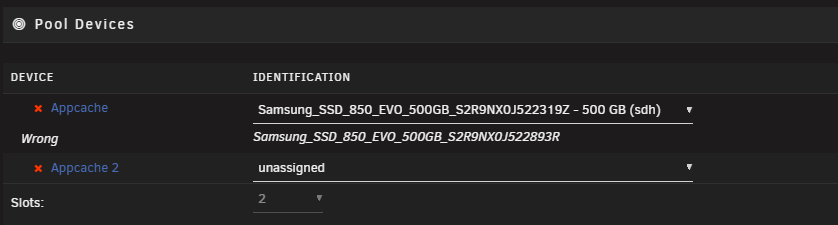
Even if I redo the Pool on reboot it has a mare: 19Z was in slot one whenever I create the pool and then on reboot it says it is wrong because it drops that disk completely on array start up. The "wrong" is wrong or more so unraid is very confused.
-
diag attached. unraid-diagnostics-20260310-1558.zip
-
Initially had what looked like a faulty sata cable, removed the disk and re-balanced back to the one disk. Have replaced the cable and on adding the drive back in, it's all turned to custard. Initial steps were: Re-added drive to appdata cache pool, prompted for a format of the disk. Ticked Yes. Array started and says the appdata cache pool is unmountable/readable fs. I thought it should automatically pick this up and set it up as raid1, it's done this for me in the past. Assume it as a v7 bug, which on googling looks like it might be? Rebooted the array and then got this: Wrong Pool State appcache - too many wrong or missing devices Found a few posts about this to remove the pool and re-add it back but in doing so when the array starts, it just comes back with no drive found in the 2nd slot(the original good disk with data) which is assigned to slot one but shows as missing from slot 2. If i remove the pool again, I just get the same.
-
Also occurs for 6.12.15 Flagged all my Array shares with this error. As suggested dummy change fixes it.
-
I'll do a manual disconnect and grab logs again.
-
Diags attached. ragnarok-diagnostics-20240218-2325.zip
-
If my internet connection drops my unraid throws a wobbly. Once it drops I can no longer access the unraid portal or any docker apps. Yes it's all local not accessed over the internet. It doesn't respond to pings but SMB shares are fine. Once my internet connection has restored unraid remains defunct. I have to hard reboot my unraid box to access any Web interfaces and for a ping response to start working again. I found a post from a while back that mentioned setting the dns check to an external address such as Google rather than an internal one that didn't help. Hopefully someone has an idea of what is happening here.
-
I've been able to restore from one of the cache pool disks that has survived with this command from the FAQ page. btrfs restore -v /dev/sdf1 /mnt/disk3/restore Have also ran extended smart tests across both drives with success. My thinking is that I'll turn off the docker service, delete the pool create a new one and move the files back? Diag attached. ragnarok-diagnostics-20230801-2003.zip
-
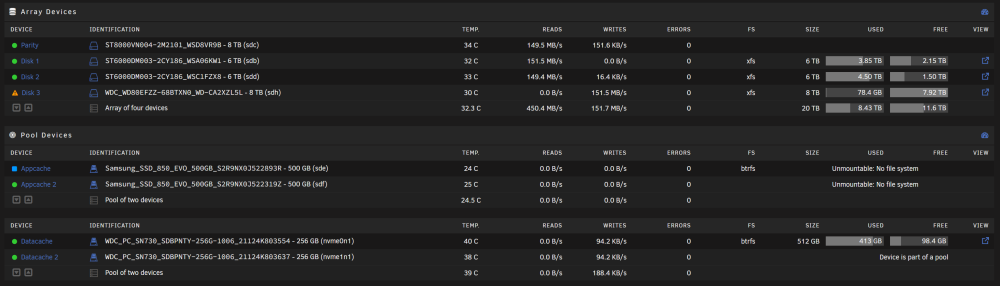
My unraid was dead and unresponsive, found that the USB stick had died, grabbed another and restored my backup, things were back up and running. Everything was good until I decided I may as well replace a failing data drive and kick off a rebuild, at the same time my app data cache pool decided to die. I dont know if this is recoverable or did the multiple reboots kill my SSD? Had no errors for this SSD previously. The cache pool initially showed "Cache drive unmountable: Wrong or no file system" But I then made it worse by trying to remove one drive from the cache pool to see if I encountered a different error but on starting the array unraid decided it was a new device and blew the config away for the drive. Now showing "Cache Pool: Unmountable no file system" Screen shot and logs below Jul 29 20:49:46 tower kernel: sde: sde1 Jul 29 20:51:40 tower emhttpd: read SMART /dev/sde Jul 29 20:53:17 tower kernel: BTRFS info (device sde1): turning on async discard Jul 29 20:53:17 tower kernel: BTRFS info (device sde1): using free space tree Jul 29 20:53:17 tower kernel: BTRFS info (device sde1): has skinny extents Jul 29 20:53:17 tower kernel: BTRFS info (device sde1): bdev /dev/sde1 errs: wr 0, rd 0, flush 0, corrupt 4, gen 0 Jul 29 20:53:17 tower kernel: BTRFS error (device sde1): parent transid verify failed on 1252245504 wanted 494259 found 494255 Jul 29 20:53:17 tower kernel: BTRFS warning (device sde1): checksum verify failed on 1252245504 wanted 0x16801d8b found 0x8f3bb060 level 1 Jul 29 20:53:17 tower kernel: BTRFS error (device sde1): failed to read block groups: -5 Jul 29 20:53:17 tower root: mount: /mnt/appcache: wrong fs type, bad option, bad superblock on /dev/sde1, missing codepage or helper program, or other error. Jul 29 20:53:17 tower kernel: BTRFS error (device sde1): open_ctree failed Jul 29 20:58:39 tower emhttpd: read SMART /dev/sde Jul 29 20:59:02 tower emhttpd: Samsung_SSD_850_EVO_500GB_S2R9NX0J522893R (sde) 512 976773168 Jul 29 20:59:02 tower emhttpd: read SMART /dev/sde Jul 29 20:59:14 tower emhttpd: shcmd (493): /usr/sbin/cryptsetup luksErase /dev/sde1 Jul 29 20:59:14 tower root: Device /dev/sde1 is not a valid LUKS device. Jul 29 20:59:14 tower emhttpd: shcmd (494): /sbin/wipefs -a /dev/sde1 Jul 29 20:59:14 tower root: /dev/sde1: 8 bytes were erased at offset 0x00010040 (btrfs): 5f 42 48 52 66 53 5f 4d Jul 29 20:59:17 tower unassigned.devices: Partition 'sde1' does not have a file system and cannot be mounted. Jul 29 21:00:30 tower emhttpd: read SMART /dev/sde Jul 29 21:00:51 tower emhttpd: Samsung_SSD_850_EVO_500GB_S2R9NX0J522893R (sde) 512 976773168 Jul 29 21:00:51 tower emhttpd: import 30 cache device: (sde) Samsung_SSD_850_EVO_500GB_S2R9NX0J522893R Jul 29 21:00:51 tower emhttpd: read SMART /dev/sde Jul 29 21:01:25 tower emhttpd: Samsung_SSD_850_EVO_500GB_S2R9NX0J522893R (sde) 512 976773168 Jul 29 21:01:25 tower emhttpd: read SMART /dev/sde Jul 29 21:01:39 tower emhttpd: Samsung_SSD_850_EVO_500GB_S2R9NX0J522893R (sde) 512 976773168 Jul 29 21:01:39 tower emhttpd: import 30 cache device: (sde) Samsung_SSD_850_EVO_500GB_S2R9NX0J522893R Jul 29 21:01:39 tower emhttpd: read SMART /dev/sde Jul 29 20:49:40 tower kernel: sdf: sdf1 Jul 29 20:51:40 tower emhttpd: read SMART /dev/sdf Jul 29 20:58:39 tower emhttpd: read SMART /dev/sdf Jul 29 20:59:02 tower emhttpd: Samsung_SSD_850_EVO_500GB_S2R9NX0J522319Z (sdf) 512 976773168 Jul 29 20:59:02 tower emhttpd: import 31 cache device: (sdf) Samsung_SSD_850_EVO_500GB_S2R9NX0J522319Z Jul 29 20:59:02 tower emhttpd: read SMART /dev/sdf Jul 29 20:59:16 tower kernel: BTRFS info (device sdf1): turning on async discard Jul 29 20:59:16 tower kernel: BTRFS info (device sdf1): allowing degraded mounts Jul 29 20:59:16 tower kernel: BTRFS info (device sdf1): using free space tree Jul 29 20:59:16 tower kernel: BTRFS info (device sdf1): has skinny extents Jul 29 20:59:16 tower kernel: BTRFS warning (device sdf1): devid 1 uuid f74f0fcf-9a14-4e4f-b889-3e4e39c34dbf is missing Jul 29 20:59:16 tower kernel: BTRFS warning (device sdf1): devid 1 uuid f74f0fcf-9a14-4e4f-b889-3e4e39c34dbf is missing Jul 29 20:59:16 tower kernel: BTRFS info (device sdf1): bdev (efault) errs: wr 0, rd 0, flush 0, corrupt 4, gen 0 Jul 29 20:59:16 tower root: mount: /mnt/appcache: wrong fs type, bad option, bad superblock on /dev/sdf1, missing codepage or helper program, or other error. Jul 29 20:59:16 tower kernel: BTRFS warning (device sdf1): checksum verify failed on 1252245504 wanted 0x16801d8b found 0x8f3bb060 level 1 Jul 29 20:59:16 tower kernel: BTRFS error (device sdf1): failed to read block groups: -5 Jul 29 20:59:16 tower kernel: BTRFS error (device sdf1): open_ctree failed Jul 29 21:00:30 tower emhttpd: read SMART /dev/sdf Jul 29 21:00:51 tower emhttpd: Samsung_SSD_850_EVO_500GB_S2R9NX0J522319Z (sdf) 512 976773168 Jul 29 21:00:51 tower emhttpd: import 31 cache device: (sdf) Samsung_SSD_850_EVO_500GB_S2R9NX0J522319Z Jul 29 21:00:51 tower emhttpd: read SMART /dev/sdf Jul 29 21:01:25 tower emhttpd: Samsung_SSD_850_EVO_500GB_S2R9NX0J522319Z (sdf) 512 976773168 Jul 29 21:01:25 tower emhttpd: import 31 cache device: (sdf) Samsung_SSD_850_EVO_500GB_S2R9NX0J522319Z Jul 29 21:01:25 tower emhttpd: read SMART /dev/sdf Jul 29 21:01:39 tower emhttpd: Samsung_SSD_850_EVO_500GB_S2R9NX0J522319Z (sdf) 512 976773168 Jul 29 21:01:39 tower emhttpd: import 31 cache device: (sdf) Samsung_SSD_850_EVO_500GB_S2R9NX0J522319Z Jul 29 21:01:39 tower emhttpd: read SMART /dev/sdf Jul 29 21:02:07 tower kernel: BTRFS info (device sdf1): turning on async discard Jul 29 21:02:07 tower kernel: BTRFS info (device sdf1): allowing degraded mounts Jul 29 21:02:07 tower kernel: BTRFS info (device sdf1): using free space tree Jul 29 21:02:07 tower kernel: BTRFS info (device sdf1): has skinny extents Jul 29 21:02:07 tower kernel: BTRFS warning (device sdf1): devid 1 uuid f74f0fcf-9a14-4e4f-b889-3e4e39c34dbf is missing Jul 29 21:02:07 tower kernel: BTRFS info (device sdf1): bdev (efault) errs: wr 0, rd 0, flush 0, corrupt 4, gen 0 Jul 29 21:02:07 tower kernel: BTRFS warning (device sdf1): checksum verify failed on 1252245504 wanted 0x16801d8b found 0x8f3bb060 level 1 Jul 29 21:02:07 tower kernel: BTRFS error (device sdf1): failed to read block groups: -5 Jul 29 21:02:07 tower kernel: BTRFS error (device sdf1): open_ctree failed Jul 29 21:02:07 tower root: mount: /mnt/appcache: wrong fs type, bad option, bad superblock on /dev/sdf1, missing codepage or helper program, or other error.