





NegZero
Members
-
Joined
-
Last visited
-
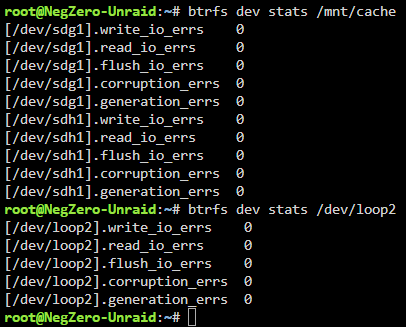
Odd. @JorgeB I just ran the query on both loop2 and my cache pool and I don't see a corrupt file count (I didn't run anything to clear it)
-
Thanks. That corruption count was from old bad ram. I should clear it out to make sure it's nothing new. Thanks again.
-
OK. dug into it and docker.img was corrupt (but seemingly not causing me any issues pre-upgrade). Any insights into what may have happened are welcome, but back up and running.
-
Diagnostics attached. Any hints?
-
I checked which file it is and it's com.plexapp.plugins.library.blobs.db which has caused issues for a while (and maybe is still residual corruption from before) I'll regenerate it and see what happens.
-
Seeing a similar thing again @JorgeB could it be anything else? It always seems to be on the SSD / Cache (where appdata is of course)

-
I'm seeing this error in my logs, <<ServerName>> was substituted for the action server name for privacy reasons. Dec 22 15:56:04 <<ServerName>> nginx: 2024/12/22 15:56:04 [error] 3682#3682: *176390 connect() to unix:/var/tmp/sdf.sock failed (111: Connection refused) while connecting to upstream, client: 192.168.2.79, server: , request: "GET /logterminal/sdf/ws HTTP/1.1", upstream: "http://unix:/var/tmp/sdf.sock:/ws", host: "<<ServerName>>" I don't recall seeing this before / can't find much on it. Anyone have any ideas?
-
Just posting here to close the loop after about a week. This was an old gaming motherboard and XMP was enabled. It seems the memory overclock was resulting in sporadic corruption. Thanks a tonne @JorgeB as removing XMP seems to have done the trick.
-
On a system that's been stable for years? Right now I'm using mover to get everything off the cache to the array just incase that SSD is about to die. Was that a good move? I'll follow-up with a memtest.
-
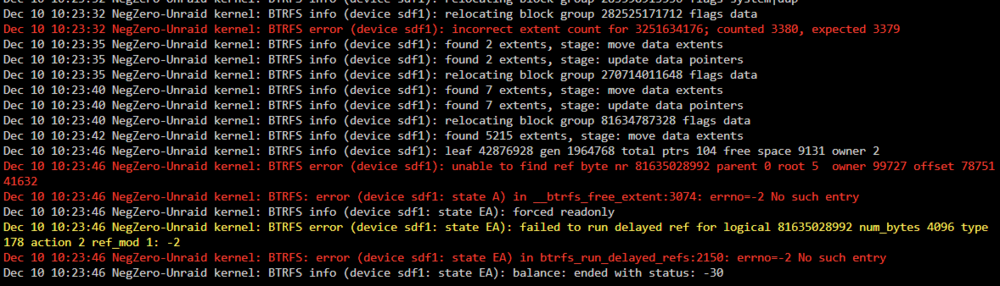
So that's my scenario. I saw a backup fail last night so I started poking around and saw some BTFRS errors on my cache drive. Read in the forums I should run a scrub / balance so I did so (it couldn't fix two things) and then I rebooted. Now the server is running a parity check and the docker service won't start. I still see some errors on my cache drive. Looking for what I should look at / attempt next. Should I move the files from the cache to the array and wipe the cache drive? SMART test / stats say it's fine. negzero-unraid-diagnostics-20241210-1031.zip

-
No it's not and all are stopped during the backup. At first I thought it was an issue with a failed container stoppage before backup, but that wasn't it. It's worked fine for a week, and again last night it failed out of the blue and a manual backup this morning succeeded. [09.11.2024 04:32:50][ℹ️][Plex-Media-Server] Verifying backup... [09.11.2024 04:33:02][❌][Plex-Media-Server] tar verification failed! Tar said: tar: Removing leading `/' from member names; ; gzip: stdin: invalid compressed data--crc error; mnt/user/appdata/Plex-Media-Server/Library/Application Support/Plex Media Server/Plug-in Support/Databases/com.plexapp.plugins.library.blobs.db-2024-11-04: Contents differ; tar: Child returned status 1; tar: Error is not recoverable: exiting now
-
Been backing up without issues for years, the last 2 nights I've gotten a tar verification failure on my plex container with this message: [03.11.2024 04:31:44][ℹ️][Plex-Media-Server] Backing up Plex-Media-Server... [03.11.2024 04:32:42][ℹ️][Plex-Media-Server] Backup created without issues (took 00:00:58 (hours:mins:secs)) [03.11.2024 04:32:42][ℹ️][Plex-Media-Server] Verifying backup... [03.11.2024 04:32:55][❌][Plex-Media-Server] tar verification failed! Tar said: tar: Removing leading `/' from member names; mnt/user/appdata/Plex-Media-Server/Library/Application Support/Plex Media Server/Logs/Plex Media Server.log: Mod time differs; mnt/user/appdata/Plex-Media-Server/Library/Application Support/Plex Media Server/Logs/Plex Media Server.log: Size differs What should I be looking at here?
-
I'd personally like that, it's nice to have a reminder that something was updated without digging through logs. That way if you see something behaving oddly you immediately have the option of investigating the container update.
-
Awesome work @KluthR! I used to be able to configure notifications when containers were updated upon restart (I think it fired via CA Auto Update Notifications). That seems to be gone / I don't see how to send a webhook notification an update was completed anymore / etc. Am I missing something?



