





StevieGee
Members
-
Joined
-
Last visited
-
@trurl Well, I replaced all the SATA cables, ran a diagnostic (attached), and re-enabled the disabled disk and started the parity rebuild. It seems to take about 3 days since parity building starts and stops from heat per the settings I've put in. I'll post another diagnostic once parity finishes. Thank you. ...Steve smg-nas-diagnostics-20260521-1557.zip
-
@trurl I checked connections and rebuilt parity to the same disk. Now, a week later, the same error. Should I rebuild parity on the same disk again? I have a Ting electrical monitoring device (a recent add) and no power burps or brown outs. I have attached diagnostics and checked connections again. Also, I did upgrade to 7.2.5 last week. Thank you for your help. ...Steve smg-nas-diagnostics-20260518-1151.zip
-
Also I got two other warnings: Warning [SMG-NAS] - udma crc error count is 2 WDC_WD80EFZZ-68BTXN0_WD-CA144PXK (dev3) (which is the parity drive) My plan would be to add a new parity drive, but I'm asking first. I was in the middle of a large copy from a remotely mounted windows share, which I have stopped. Diagnostics attached. The parity disk is disabled and will not spin up. I am not able to run extended diagnostics. ....Steve smg-nas-diagnostics-20260509-1746.zip
-
Attached. Oh, and another miracle, the dockers all work and appdata backup ended successfully. smg-nas-diagnostics-20260303-1626.zip
-
Trurl, Well, it looks to me like disk2 is empty (attached) And that appdata, domains, isos and system are all located on cache (attached) And that your patience is astounding. Thank you so much for your help, again!

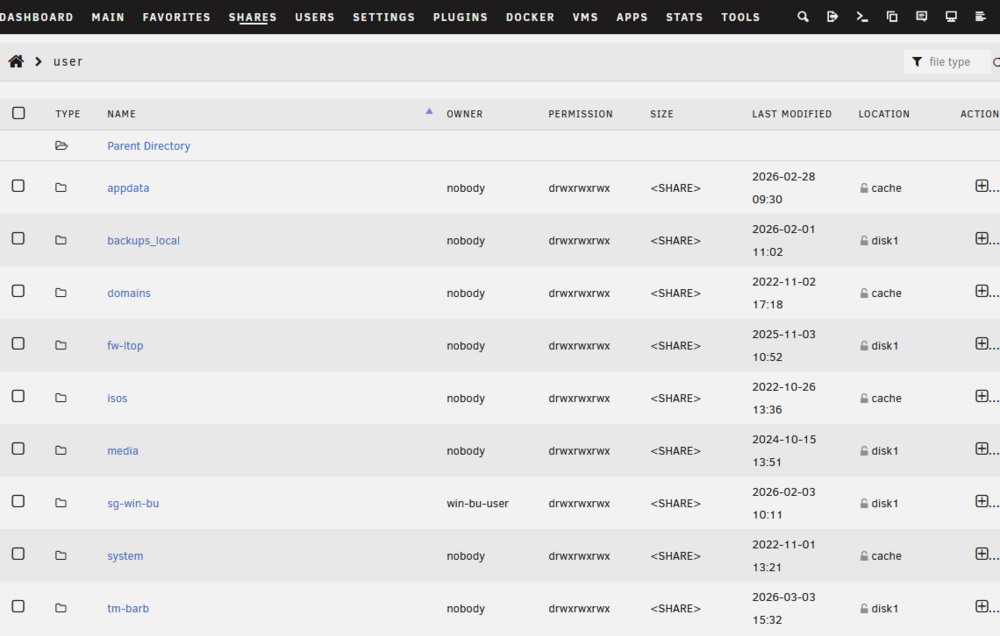
-
Since I have misunderstood before, I'll check before I begin. You're saying appdata, domains, isos and system shares are all hanging off /mnt/user and should be moved to cache. I'll check where there is data and see where it's current (e.g., system share is recent on /mnt/user and empty on cache). Stop the VMs and Dockers. Copy the most recent data from system, appdata, domains and isos shares to cache in the correct subdirectory on cache. Go into VM Manager and change the default VM and isos paths to cache. Go into the share settings for system, appdata, domains and isos share settings, make sure all have cache as primary and array as secondary, and mover action is set from cache -> array. (Or do I set secondary storage as none? And if I do that, how do I back all these shares up in case the cache fails). Restart VMs and Dockers. Am I close?
-
You got it. smg-nas-diagnostics-20260228-1236.zip
-
Got it. The rebuild finished and the array is up. I'm freshening backups at this point. My plan is to add a second parity drive when it arrives. As you said, "Unrelated, your system share has files on the array." I'm thinking you're seeing the /isos and /system directories on disk2. Do I need to correct that? I am not sure how those directories got there.
-
@trurl Again, I can't thank you enough for your help. Attached is the Disk2 extended smart report, which unRAID says completed without error. (I need to do some reading about this tool. The text of the report has a lot of stuff that looks like errors, so I need to learn a little more about smarttool interpretation). Also, yes, I do have a backup of my data files to iDrive via Duplicati. I'm pretty sure that the backup is good. I have not tested a complete restore, but random file restores are successful. I also have a somewhat recent copy to a USB HDD. Here's what I think I need to do now. I'm planning this from unRAID doc located here The doc says I should run a parity check. Should I do that? Rebuild the disabled Disk 1 in place per the doc. The doc talks about doing an "automated xfs repair". The criteria for doing that are not clear to me. I've used file explorer from my pc to look at some files and they appear good. Run a parity check. Stop the array. Remove an old empty data drive from the array. Power down, replace with new drive. Power up. Assign the new drive as a parity device. Run a parity check. Does that sound right? Also, you said, "Unrelated, your system share has files on the array. Possibly these were created because you enabled Docker/VM Manager without cache. We can look at that later." How do I tackle that? Disk2-smg-nas-smart-20260227-0910.zip
-
Results attached for all. Here's what I think, but I'd appreciate you proofreading: All the drives have prefailure flags. Are they all needing to be replaced? Parity is good Disk1 doesn't say failure, but it seems to be in communicado. I have two 8TB HDDs that are supposed to be here tomorrow. Disk2 restarted. The host interrupted the test. How the host interrupts one disk but not all, I don't understand. Disk3 OK Disk4 OK Again, thank you so much for your help. Disk3-smg-nas-smart-20260226-0903.zipDisk1-smg-nas-smart-20260226-0902.zipParity-smg-nas-smart-20260226-0900.zipDisk2-smg-nas-smart-20260226-0904.zipDisk4-smg-nas-smart-20260226-0904.zip
-
got it. they're all running now. I'm thinking I should replace the drives once the data are built back/safe. Do you agree? Also, should extended tests be run periodically?
-
OK. They are both started. Is there anything I should do after that or just send the two reports?
-
Yes. I thought I'd better do as you requested, so I stopped it and checked the connections. Should I restart it?
-
On Disk 1, the dead device, the dashboard says Device is disabled, Contents emulated Click to spin down device I don't know if that's helpful.
-
No splitters. Connections are good.

