





CrookedAutobot
Members
-
Joined
-
Last visited
Everything posted by CrookedAutobot
-
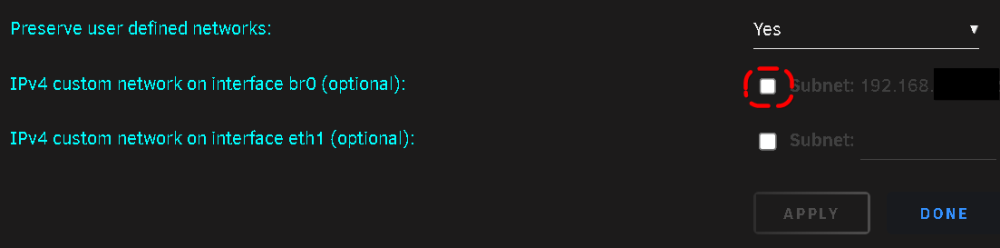
Apparently, it was an issue with a Docker setting. The "IPv4 custom network on interface br0 (optional):" option was checked by default when the Unraid upgrade was installed. Unchecking this allowed the docker containers to work as expected.
-
I am experiencing a similar issue that started after upgrading to Unraid 6.12.4. I am not aware of any correlation between the upgrade and the docker operation; however, i do not want to prematurely rule it out. The message i see in the log file is: [2023-09-13 21:56:19.307][panic][ERROR] thread 'main' panicked at 'Failed to turn on WAL: DatabaseError(Unknown, "unable to open database file")': src/db/mod.rs:447 Does anyone have any troubleshooting tips? Thanks.
-
Oh, Thank you. So out of safety and completeness, I stopped the array and rebooted the server. I then started the array as usual. The disk did not auto-mount; however I was able to manually mount it. SUCCESS! Thanks for pointing out my errors and helping me got on the right track.
-
I am a little confused. This drive is an unassigned drive. I do not follow how stopping and restarting the array will make any difference? Please forgive my ignorance.
-
Thanks, running that now. Here are the results. xfs_repair -v /dev/sdo1 Phase 1 - find and verify superblock... - block cache size set to 3079680 entries Phase 2 - using internal log - zero log... zero_log: head block 606090 tail block 606090 - scan filesystem freespace and inode maps... - found root inode chunk Phase 3 - for each AG... - scan and clear agi unlinked lists... - process known inodes and perform inode discovery... - agno = 0 - agno = 1 - agno = 2 - agno = 3 - process newly discovered inodes... Phase 4 - check for duplicate blocks... - setting up duplicate extent list... - check for inodes claiming duplicate blocks... - agno = 0 - agno = 2 - agno = 1 - agno = 3 clearing reflink flag on inode 1679107051 Phase 5 - rebuild AG headers and trees... - agno = 0 - agno = 1 - agno = 2 - agno = 3 - reset superblock... Phase 6 - check inode connectivity... - resetting contents of realtime bitmap and summary inodes - traversing filesystem ... - agno = 0 - agno = 1 - agno = 2 - agno = 3 - traversal finished ... - moving disconnected inodes to lost+found ... Phase 7 - verify and correct link counts... XFS_REPAIR Summary Tue Oct 11 12:14:40 2022 Phase Start End Duration Phase 1: 10/11 12:14:23 10/11 12:14:23 Phase 2: 10/11 12:14:23 10/11 12:14:23 Phase 3: 10/11 12:14:23 10/11 12:14:32 9 seconds Phase 4: 10/11 12:14:32 10/11 12:14:33 1 second Phase 5: 10/11 12:14:33 10/11 12:14:33 Phase 6: 10/11 12:14:33 10/11 12:14:40 7 seconds Phase 7: 10/11 12:14:40 10/11 12:14:40 Total run time: 17 seconds done
-
xfs_repair did finally finish. .Sorry, could not find valid secondary superblock Exiting now.
-
Please find the diagnostics file attached. Thank you. cybertron-diagnostics-20221011-1151.zip
-
HI, In researching my issues, I discovered this thread. The difference between my starting point and the original poster's is that I had a power outage while I was not at home. I do have a battery back-up. I do not know if Unraid would have automatically shut itself down when it was switched over to the battery back-up or not. If not, then my Unraid server experienced a power outage. Once power was restored, I started the server up. Everything seemed to come back up as expected. Everything except one Unassigned Device. This device is critical. It contains the docker containers and VM img file. The problem I have is that Unraid will not recognize the device as mountable. After a lot of research, I found out about xfs_repair. I have tried running it, but as the original poster mentioned here is my outcome. The "continuing dots" go on forever. It a 960 GB drive, so I thought it would take a while to go throught the entire drive, but I am not sure. I also do not know the best way to fix the issue. Any advice is greatly appreciated. xfs_repair -v /dev/sdo Phase 1 - find and verify superblock... bad primary superblock - bad magic number !!! attempting to find secondary superblock... .found candidate secondary superblock... unable to verify superblock, continuing... .found candidate secondary superblock... unable to verify superblock, continuing... .found candidate secondary superblock... unable to verify superblock, continuing... I also found this website https://serveradminz.com/blog/bad-magic-number-in-superblock/ and I am not sure if I should try following their recommendations since my drive is an xfs.

