BottleTop
Members
-
Joined
-
Last visited
-
Thank you Jorge, that is a relief.
-
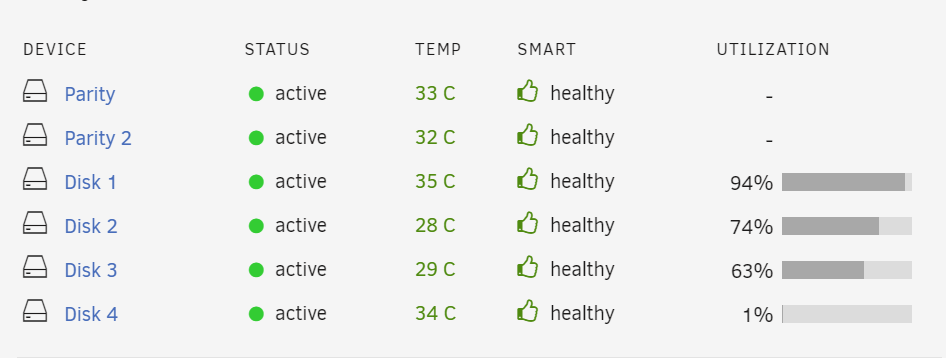
Interesting Jorge... The bottom is the whole array
-
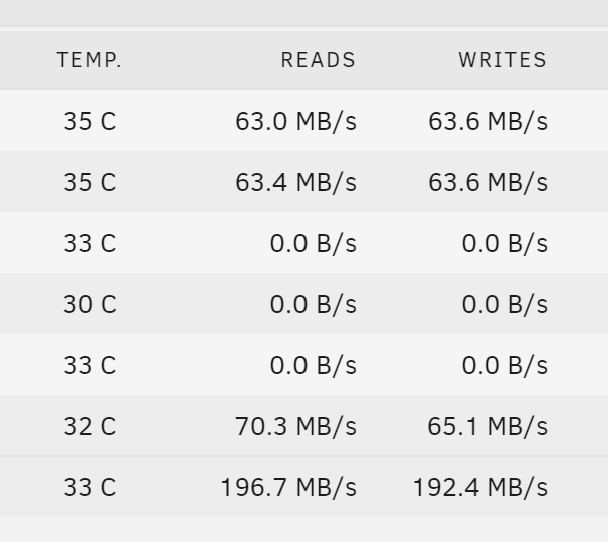
Thanks for coming back to me. Yes I have a landing folder if you will then normally copy it around the share into the correct folders. Only more recently, it jumps to 200mb/s then within a few seconds drops to around 6 and the speed stays at that with the occasional brief jump to 200 again. Is there anything obvious or dumb that might cause it?

-
Damn, ok thanks
-
Hello, I am having some trouble transferring files within Unraid. I have a share called media, within that share I am trying to transfer a file from one folder to another. The speed hits circa 250mb/s for a couple of seconds then drops to around 6mb/s for the remainder of the transfer I've searched everywhere for a solution but drawing a blank. My CPU utilisation and Cache utilisation remains under 20% for the duration of the transfer. I suspect I am doing something obvious but just cannot find the issue Thanks unraid-diagnostics-20241113-1839.zip
-
That was harder than I thought! Please see attached, thanks. Its media files on disk 4 I cannot see (sdd). I can see the folders just not the file. I can play the file on the source computer. Edit: Solved-ish and removed attachments Semi Solved: Posted to people on Reddit which was quite active. Apparently a bug with Plex and UnRaid but not sure. Not really a solution but one guy had exactly the same issue and resolved it by assigning the new disk to the share which didn't work for me. I tried all the usual stuff naming, mounts, permissions, turning it on and off etc. I completely reinstalled Plex including removing the app folder which one guy suggested. This seems to have worked but not really viable every time a disk is changed. One guy said try TruNAS as this is a bug in Plex and Unraid that has been around for a while. However I can't check the validity of that or if it even is a bug and not my drive installation process/share management.
-
Hi all, strange one for me: I installed a new data disk, it is part of my media share. I recently noticed that Plex cannot 'see' files that are soley written to this disk Files written to this disk and another are recognised. If a file sits only on this disk Plex will not recognise it. If I change to the folder view on Plex, I can see the folder but no files are shown within the folder. Everything works with other media stored on other disks. I've tried changing the owner for all files to "Nobody". I can see the files if I browse in UnRaid. I've checked the permissions and the Any thoughts are greatly appreciated.
-
Ahh ok. Makes sense, I will run one 👍 Cheers
-
Excellent, thank you Jorge. I have just done new config and disk is showing as expected. I did set "Parity is valid" to true as Parity rebuild just finished last night when I put the new drive in so avoided a whole new parity sync
-
Thanks Jorge! Damn, I have just resynched parity. I've just had a look at the new-config pages, and in 2016 you mentioned new-config will keep all the data unless someone accidently puts a data disk in a parity drive. Is that still the case? If I select preserve current assignment, will that keep disk 5 showing as not assigned rather than parity 2 ?
-
Hi, wondering if I can get some thoughts on the below. I installed 2 new disks into my array and tried to assign one to parity The array would not build due to incorrect arrangement. I searched the forums and found this was a bug. Following the post I set both disks to data disks then moved one into Parity which worked really well. However it left me with the system reporting disk 5 as not installed (It is now parity 2). This is not a huge problem, but the array reports incorrect space on the main tab now. The dashboard reports the correct number of disks. All the drives seem to be working correctly, and reporting no errors. It seems as though moving disk 5 to Parity has worked but just not reporting it through the main tab. Screen shot below shows disk 5 which is now parity but still reporting space: The below is from the dashboard is what I would expect: Any thoughts on how to stop disks 5s space showing would be greatly appreciated

-
Legend @JonathanM, many thanks, I think you might be right.
-
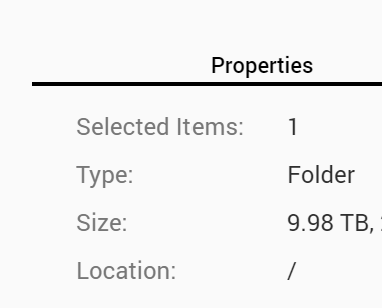
Hi, new to Unraid but loving it. I have an odd issue with my drives that I would appreciate any thoughts on. Hopefully I am just missing something in the problem below. I have 4 drives, 2 x 12tb and 2x4tb, one of the 12tb drives is my parity drive. I have allocated the 3 remaining drives to a share to give me 20tb. I copied 9.98tb from my server into 4 folders on my Unraid share. However my Unraid share is showing 11tb used. I cannot fathom where Schrodinger's 1.02tb has gone. If I look at the share from the perspective of my server it shows 9.98 but Unraid is reading out 11tb. I have compared the size of each folder to be sure and they match 9.98tb however Unraid at the share level shows 11tb. I've attached images below, as I say, any thoughts would be appreciated. Unraid 4 folders across the 3 drives equating to the assumed 9.98tb Unraid share from the perspective of the other server Unraid share from the perspective of Unraid (12tb drive plus the 2 remaining 3tb drives