seriphic
Members
-
Joined
-
Last visited
Everything posted by seriphic
-
Bumping this because the same thing happens to me. It's maddening. I have PowerToys Keep Awake active, the power plan is set to never sleep and as soon as I close the RDP session, it goes to sleep. I can't find anything on Google regarding this behavior within unraid or any QEMU. I'm using Qemu 7.2 and guest additions.
-
So far, I have not seemed to have run into that specific bug. VPN works perfectly fine, it's just not blacklisting the IPs that I define and still passes traffic to them regardless of my preference.
-
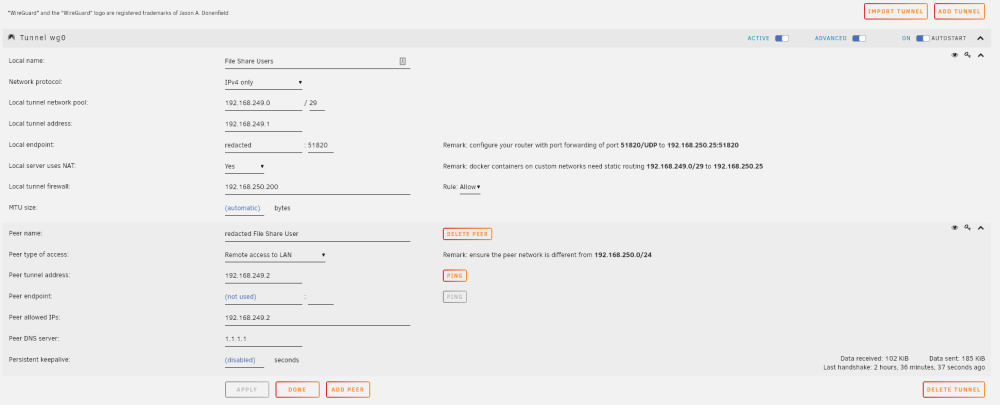
Hello, I can't seem to get the "Local Tunnel Firewall" to work at all. It passes all traffic, regardless of Allow or Deny rule. As you can see in the screenshot below, I have the host 192.168.250.200 allowed only. It still passes traffic to all the other hosts. I've tried this with NAT enabled and NAT disabled, with no functionality difference. Is this a known issue, or am I misunderstanding how this feature works? Checking the iptables report shows the entries in there, but they don't seem to do anything. root@hostname:/mnt/user/Docker# iptables -S -P INPUT ACCEPT -P FORWARD ACCEPT -P OUTPUT ACCEPT -N DOCKER -N DOCKER-ISOLATION-STAGE-1 -N DOCKER-ISOLATION-STAGE-2 -N DOCKER-USER -N LIBVIRT_FWI -N LIBVIRT_FWO -N LIBVIRT_FWX -N LIBVIRT_INP -N LIBVIRT_OUT -N WIREGUARD -N WIREGUARD_DROP_WG0 -A INPUT -j LIBVIRT_INP -A FORWARD -j DOCKER-USER -A FORWARD -j DOCKER-ISOLATION-STAGE-1 -A FORWARD -o br-1ee3c09348c9 -m conntrack --ctstate RELATED,ESTABLISHED -j ACCEPT -A FORWARD -o br-1ee3c09348c9 -j DOCKER -A FORWARD -i br-1ee3c09348c9 ! -o br-1ee3c09348c9 -j ACCEPT -A FORWARD -i br-1ee3c09348c9 -o br-1ee3c09348c9 -j ACCEPT -A FORWARD -o docker0 -m conntrack --ctstate RELATED,ESTABLISHED -j ACCEPT -A FORWARD -o docker0 -j DOCKER -A FORWARD -i docker0 ! -o docker0 -j ACCEPT -A FORWARD -i docker0 -o docker0 -j ACCEPT -A FORWARD -j LIBVIRT_FWX -A FORWARD -j LIBVIRT_FWI -A FORWARD -j LIBVIRT_FWO -A FORWARD -j WIREGUARD -A OUTPUT -j LIBVIRT_OUT -A DOCKER -d 172.17.0.2/32 ! -i docker0 -o docker0 -p tcp -m tcp --dport 443 -j ACCEPT -A DOCKER -d 172.17.0.2/32 ! -i docker0 -o docker0 -p tcp -m tcp --dport 3000 -j ACCEPT -A DOCKER -d 172.17.0.2/32 ! -i docker0 -o docker0 -p tcp -m tcp --dport 81 -j ACCEPT -A DOCKER -d 172.17.0.2/32 ! -i docker0 -o docker0 -p tcp -m tcp --dport 80 -j ACCEPT -A DOCKER -d 172.17.0.3/32 ! -i docker0 -o docker0 -p tcp -m tcp --dport 58946 -j ACCEPT -A DOCKER -d 172.17.0.3/32 ! -i docker0 -o docker0 -p udp -m udp --dport 58946 -j ACCEPT -A DOCKER -d 172.17.0.3/32 ! -i docker0 -o docker0 -p tcp -m tcp --dport 58846 -j ACCEPT -A DOCKER -d 172.17.0.3/32 ! -i docker0 -o docker0 -p tcp -m tcp --dport 8118 -j ACCEPT -A DOCKER -d 172.17.0.3/32 ! -i docker0 -o docker0 -p tcp -m tcp --dport 8112 -j ACCEPT -A DOCKER -d 172.17.0.4/32 ! -i docker0 -o docker0 -p tcp -m tcp --dport 4545 -j ACCEPT -A DOCKER-ISOLATION-STAGE-1 -i br-1ee3c09348c9 ! -o br-1ee3c09348c9 -j DOCKER-ISOLATION-STAGE-2 -A DOCKER-ISOLATION-STAGE-1 -i docker0 ! -o docker0 -j DOCKER-ISOLATION-STAGE-2 -A DOCKER-ISOLATION-STAGE-1 -j RETURN -A DOCKER-ISOLATION-STAGE-2 -o br-1ee3c09348c9 -j DROP -A DOCKER-ISOLATION-STAGE-2 -o docker0 -j DROP -A DOCKER-ISOLATION-STAGE-2 -j RETURN -A DOCKER-USER -j RETURN -A LIBVIRT_FWI -d 192.168.122.0/24 -o virbr0 -m conntrack --ctstate RELATED,ESTABLISHED -j ACCEPT -A LIBVIRT_FWI -o virbr0 -j REJECT --reject-with icmp-port-unreachable -A LIBVIRT_FWO -s 192.168.122.0/24 -i virbr0 -j ACCEPT -A LIBVIRT_FWO -i virbr0 -j REJECT --reject-with icmp-port-unreachable -A LIBVIRT_FWX -i virbr0 -o virbr0 -j ACCEPT -A LIBVIRT_INP -i virbr0 -p udp -m udp --dport 53 -j ACCEPT -A LIBVIRT_INP -i virbr0 -p tcp -m tcp --dport 53 -j ACCEPT -A LIBVIRT_INP -i virbr0 -p udp -m udp --dport 67 -j ACCEPT -A LIBVIRT_INP -i virbr0 -p tcp -m tcp --dport 67 -j ACCEPT -A LIBVIRT_OUT -o virbr0 -p udp -m udp --dport 53 -j ACCEPT -A LIBVIRT_OUT -o virbr0 -p tcp -m tcp --dport 53 -j ACCEPT -A LIBVIRT_OUT -o virbr0 -p udp -m udp --dport 68 -j ACCEPT -A LIBVIRT_OUT -o virbr0 -p tcp -m tcp --dport 68 -j ACCEPT -A WIREGUARD -o br0 -j WIREGUARD_DROP_WG0 -A WIREGUARD_DROP_WG0 -s 192.168.249.0/29 -d 192.168.250.200/32 -j ACCEPT -A WIREGUARD_DROP_WG0 -s 192.168.249.0/29 -j DROP -A WIREGUARD_DROP_WG0 -j RETURN root@hostname:/mnt/user/Docker#