





Everything posted by LunarstarFurry
-
No It's not crashing rn I even try to look BIOS, even BIOS doesn't seems to be detecting the Samsung Drive anymore. That drive is just like Gone xD
-
lunar-unraid-diagnostics-20250824-1519.zip
-
Tho After booting up, I've noticed that It's trying to run Scrub on it, is there any reason to do so at this time since there's only one drive until I get a replacement? It's also running at 200KiB/s and is estimate to finish in 500 hours lol
-
A just as things starting to cool down, It appears the Samsung Drive that was previously working has dropped completely
-
Gotcha Thx!
-
Do I need to go into Maintance Mode or Disable VM or Docker before copy them?
-
BTW By chance did you know about a way of backup Docker.img and libverb just in case it corrupted again? During this whole thing, the only thing that is corrupt is these 2 files
-
Gotcha Thx! I'll try to move everything back then!
-
oof, did you think a reformat is necessary in my case with this? Someone in the Discord said they wouldn't trust this Cache Pool anymore without a full format on the cache drives, SCRUB already indicate that nothiugn is wrong atm.
-
Also that's a post from 2018, It still can't show BTRFS Error? xD
-
Ya I believe it's the Samsung one that drop offline, tho I do randomly get an error with BTRFS Drive missing during the next reboot for some reason on the other pool drive. (Tho it seems to be there after the reboot so I'm not sure lol)
-
Sadly I'm no where near the server atm but for now the CRC error is no longer increasing, stayed at 20 for the last few days.
-
During the 4 years of running this server, I've never seen it once spin down on the Cache SSD until a while back, but I didn't put too much thought into it until today when I open up the Logs, it's being spammed with IO Error on the SSD that's shown as Spindown, and pressing the Dot doesn't seems to wake it up either. During this Period, the Entire Server remained functional on every aspect besides Parity I suppose (Even tho UnRAID didn't show the RAID 1 being broken, but running SCRUB indicates that it's all errors after the reboot) Tho despite the graceful Shutdown after I found out about the I/O Error, both Docker.img and VM seem to be completely corrupted (And also seems to be the only file that was corrupted? All the other Docker containers that were running in the cache seem to be running just fine after I rebuild the docker.img) After reboot, besides the CRC Error have jump to 20 (hasn't changed since) and the broken docker.img, everything else seems to be running fine The issue is mostly fixed, so I just wanna ask if anyone knows what could have happened from the log? And if possible, how to prevent it? Since the UnRAID never figures out the drive failed (Might not even be the drive even), it also never sends an Email to notify me about the problem. Here's the Log File before the reboot and after the reboot Thanks in advanced! Before Reboot Diag.zip After Reboot Diag.zip
-
Hmmmm Some kind of memory leak? Since generally with Frigate Running Ram usage is only around 10G.
-
lunar-unraid-diagnostics-20250201-1422.zip Was having a Weird issue where my UnRAID just suddenly goes offline and come back by itself 10 hours later, was wonder if anyone have any idea what happened?
-
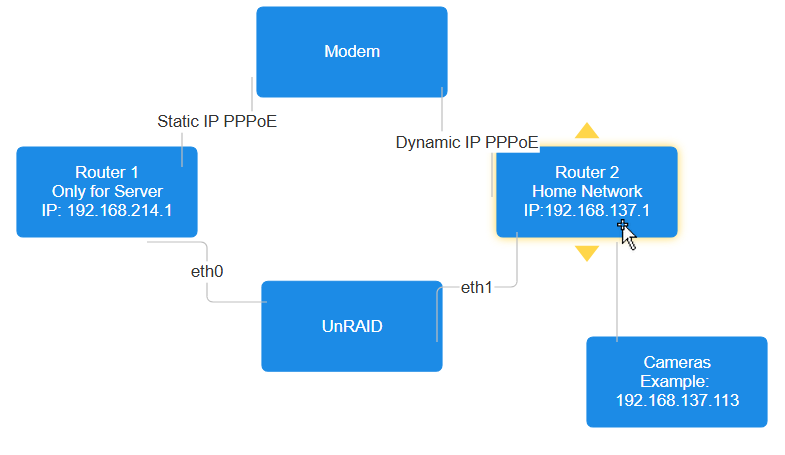
So Pretty much I'll need Frigate able to access the camera under home network while I'll access the site via Static IP. Both of them have internet access but I'd prefer internet only go out and in from the Static IP one
-
Hmmmm But the Camera Network is only needed for the Frigate to access the Camera Feed over RTSP, data will never go out that connection.
-
I'll read it in a bit and also here's the network layout, our ISP still Provides 7 Dynamic IP and 1 Static IP using PPPoE
-
So currently I have one ethernet cable handle everything, Recently wanting to setup frigate with some of our security cam which is in our home network, what would be the best way to set it up so the second ethernet will only be used for the security camera. (Both should have access to internet.
-
So No idea about my problem I supposed?
-
All the HDD drive in my system is SAS which all seems to spin down just fine beside the only one thats unassigned, as for mounted it shouldn't be, at least I never manual mount it. Here's the diag attatched if required lunar-unraid-diagnostics-20241201-2029.zip
-
Dec 1 05:13:14 Lunar-UnRAID SAS Assist v2024.11.25: Spinning down device /dev/sdf Dec 1 05:13:24 Lunar-UnRAID emhttpd: spinning down /dev/sdd Dec 1 05:13:24 Lunar-UnRAID SAS Assist v2024.11.25: Spinning down device /dev/sdd Dec 1 05:34:09 Lunar-UnRAID webGUI: Successful login user root from 192.168.214.152 Dec 1 05:36:44 Lunar-UnRAID emhttpd: spinning down /dev/sde Dec 1 05:36:44 Lunar-UnRAID SAS Assist v2024.11.25: Spinning down device /dev/sde Dec 1 05:36:52 Lunar-UnRAID emhttpd: read SMART /dev/sde Here sde is the unassigned drives, sdd and sdf is 2 of the other drive that get shutoff automatically. seems to do a smart read a lil after.
-
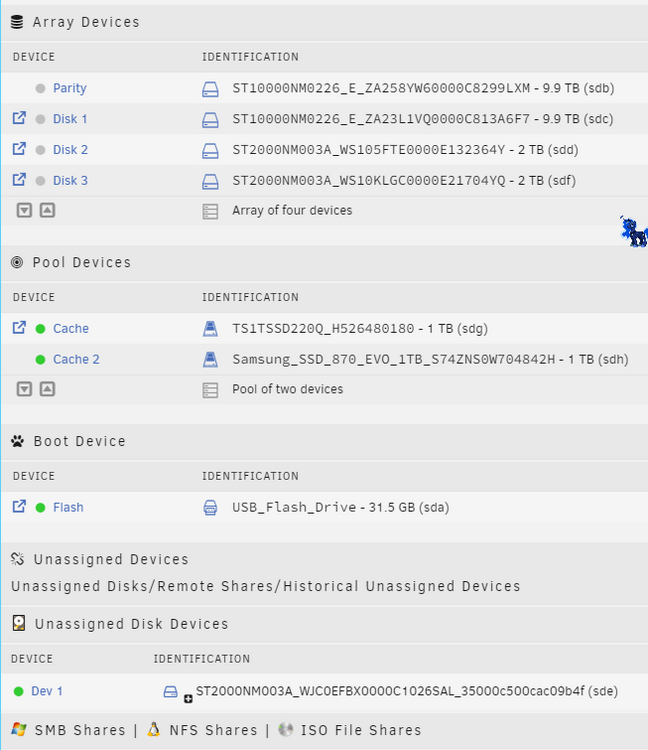
It's the ST2000NM003A, tho I do have the exact same drive in the array which spin down just fine. The only drive that failed to spin down is the one that's unassigned.
-
That's the weird thing tho, UnRAID seems to have no issue spin down drive in a Array, but for some reason when clicking the green dot in the GUI for the unassigned disk, it shows that it's trying to spin down the drive in the log, but green still remains green after wards. And 2 of the drives that's in the array is the exact same model, so there shouldn't be any issue with drives as well.
-
Helo! Would this able to Spun down Unassigned Drives? Have a Issue where the plugin seems to works just find with drives in array but seems to failed to spun down a unassigned drive(At least the lights stays green on the UI) I'm planning to use the unassigned drive as a backup just in case something died while I'm gone

