dss
Members
-
Joined
-
Last visited
-
Ok..i've removed the second audio device. This eliminates the group 31 reset issue, but the GPU passthrough is still not functioning.
-
I am attempting a GPU Passthrough to Linux with an Nvidia 3090ti. I have pasted my xml and my logs below. I am using nomachine and have no hdmi connection to my pc. Unfortunately, once in Ubuntu, nvidia-smi reveals that my passthrough has not been completed correctly (but the image runs correctly otherwise). I do see a reset error message in the code. Is there something I am doing incorrectly? Many thanks! <?xml version='1.0' encoding='UTF-8'?> <domain type='kvm'> <name>Ubuntu_2204_VM_GPU</name> <uuid>61f1035e-32cf-782a-56e8-8b548a9dad7f</uuid> <metadata> <vmtemplate xmlns="unraid" name="Ubuntu" icon="ubuntu.png" os="ubuntu"/> </metadata> <memory unit='KiB'>119013376</memory> <currentMemory unit='KiB'>119013376</currentMemory> <memoryBacking> <nosharepages/> </memoryBacking> <vcpu placement='static'>28</vcpu> <cputune> <vcpupin vcpu='0' cpuset='1'/> <vcpupin vcpu='1' cpuset='17'/> <vcpupin vcpu='2' cpuset='2'/> <vcpupin vcpu='3' cpuset='18'/> <vcpupin vcpu='4' cpuset='3'/> <vcpupin vcpu='5' cpuset='19'/> <vcpupin vcpu='6' cpuset='4'/> <vcpupin vcpu='7' cpuset='20'/> <vcpupin vcpu='8' cpuset='5'/> <vcpupin vcpu='9' cpuset='21'/> <vcpupin vcpu='10' cpuset='6'/> <vcpupin vcpu='11' cpuset='22'/> <vcpupin vcpu='12' cpuset='7'/> <vcpupin vcpu='13' cpuset='23'/> <vcpupin vcpu='14' cpuset='8'/> <vcpupin vcpu='15' cpuset='24'/> <vcpupin vcpu='16' cpuset='9'/> <vcpupin vcpu='17' cpuset='25'/> <vcpupin vcpu='18' cpuset='10'/> <vcpupin vcpu='19' cpuset='26'/> <vcpupin vcpu='20' cpuset='11'/> <vcpupin vcpu='21' cpuset='27'/> <vcpupin vcpu='22' cpuset='12'/> <vcpupin vcpu='23' cpuset='28'/> <vcpupin vcpu='24' cpuset='13'/> <vcpupin vcpu='25' cpuset='29'/> <vcpupin vcpu='26' cpuset='14'/> <vcpupin vcpu='27' cpuset='30'/> </cputune> <os> <type arch='x86_64' machine='pc-q35-7.1'>hvm</type> <loader readonly='yes' type='pflash'>/usr/share/qemu/ovmf-x64/OVMF_CODE-pure-efi.fd</loader> <nvram>/etc/libvirt/qemu/nvram/61f1035e-32cf-782a-56e8-8b548a9dad7f_VARS-pure-efi.fd</nvram> </os> <features> <acpi/> <apic/> </features> <cpu mode='host-passthrough' check='none' migratable='on'> <topology sockets='1' dies='1' cores='14' threads='2'/> <cache mode='passthrough'/> <feature policy='require' name='topoext'/> </cpu> <clock offset='utc'> <timer name='rtc' tickpolicy='catchup'/> <timer name='pit' tickpolicy='delay'/> <timer name='hpet' present='no'/> </clock> <on_poweroff>destroy</on_poweroff> <on_reboot>restart</on_reboot> <on_crash>restart</on_crash> <devices> <emulator>/usr/local/sbin/qemu</emulator> <disk type='file' device='disk'> <driver name='qemu' type='raw' cache='writeback'/> <source file='/mnt/disk1/Personal/VM/VM_03_Ubuntu_2204_DS/Ubuntu_2204_VM_GPU/vdisk1.img'/> <target dev='hdc' bus='virtio'/> <boot order='1'/> <address type='pci' domain='0x0000' bus='0x03' slot='0x00' function='0x0'/> </disk> <controller type='pci' index='0' model='pcie-root'/> <controller type='pci' index='1' model='pcie-root-port'> <model name='pcie-root-port'/> <target chassis='1' port='0x8'/> <address type='pci' domain='0x0000' bus='0x00' slot='0x01' function='0x0' multifunction='on'/> </controller> <controller type='pci' index='2' model='pcie-root-port'> <model name='pcie-root-port'/> <target chassis='2' port='0x9'/> <address type='pci' domain='0x0000' bus='0x00' slot='0x01' function='0x1'/> </controller> <controller type='pci' index='3' model='pcie-root-port'> <model name='pcie-root-port'/> <target chassis='3' port='0xa'/> <address type='pci' domain='0x0000' bus='0x00' slot='0x01' function='0x2'/> </controller> <controller type='pci' index='4' model='pcie-root-port'> <model name='pcie-root-port'/> <target chassis='4' port='0x13'/> <address type='pci' domain='0x0000' bus='0x00' slot='0x02' function='0x3'/> </controller> <controller type='pci' index='5' model='pcie-root-port'> <model name='pcie-root-port'/> <target chassis='5' port='0x14'/> <address type='pci' domain='0x0000' bus='0x00' slot='0x02' function='0x4'/> </controller> <controller type='pci' index='6' model='pcie-root-port'> <model name='pcie-root-port'/> <target chassis='6' port='0xb'/> <address type='pci' domain='0x0000' bus='0x00' slot='0x01' function='0x3'/> </controller> <controller type='virtio-serial' index='0'> <address type='pci' domain='0x0000' bus='0x02' slot='0x00' function='0x0'/> </controller> <controller type='sata' index='0'> <address type='pci' domain='0x0000' bus='0x00' slot='0x1f' function='0x2'/> </controller> <controller type='usb' index='0' model='ich9-ehci1'> <address type='pci' domain='0x0000' bus='0x00' slot='0x07' function='0x7'/> </controller> <controller type='usb' index='0' model='ich9-uhci1'> <master startport='0'/> <address type='pci' domain='0x0000' bus='0x00' slot='0x07' function='0x0' multifunction='on'/> </controller> <controller type='usb' index='0' model='ich9-uhci2'> <master startport='2'/> <address type='pci' domain='0x0000' bus='0x00' slot='0x07' function='0x1'/> </controller> <controller type='usb' index='0' model='ich9-uhci3'> <master startport='4'/> <address type='pci' domain='0x0000' bus='0x00' slot='0x07' function='0x2'/> </controller> <interface type='bridge'> <mac address='52:54:00:c0:0b:9c'/> <source bridge='br0'/> <model type='virtio-net'/> <address type='pci' domain='0x0000' bus='0x01' slot='0x00' function='0x0'/> </interface> <serial type='pty'> <target type='isa-serial' port='0'> <model name='isa-serial'/> </target> </serial> <console type='pty'> <target type='serial' port='0'/> </console> <channel type='unix'> <target type='virtio' name='org.qemu.guest_agent.0'/> <address type='virtio-serial' controller='0' bus='0' port='1'/> </channel> <input type='tablet' bus='usb'> <address type='usb' bus='0' port='1'/> </input> <input type='mouse' bus='ps2'/> <input type='keyboard' bus='ps2'/> <audio id='1' type='none'/> <hostdev mode='subsystem' type='pci' managed='yes'> <driver name='vfio'/> <source> <address domain='0x0000' bus='0x0c' slot='0x00' function='0x0'/> </source> <address type='pci' domain='0x0000' bus='0x04' slot='0x00' function='0x0' multifunction='on'/> </hostdev> <hostdev mode='subsystem' type='pci' managed='yes'> <driver name='vfio'/> <source> <address domain='0x0000' bus='0x0c' slot='0x00' function='0x1'/> </source> <address type='pci' domain='0x0000' bus='0x05' slot='0x00' function='0x1'/> </hostdev> <hostdev mode='subsystem' type='pci' managed='yes'> <driver name='vfio'/> <source> <address domain='0x0000' bus='0x0e' slot='0x00' function='0x4'/> </source> <address type='pci' domain='0x0000' bus='0x06' slot='0x00' function='0x0'/> </hostdev> <memballoon model='none'/> </devices> </domain> Here is my log: 2022-12-24 15:45:53.579+0000: starting up libvirt version: 8.7.0, qemu version: 7.1.0, kernel: 5.19.14-Unraid, hostname: CorsairR10 LC_ALL=C \ PATH=/bin:/sbin:/usr/bin:/usr/sbin \ HOME=/var/lib/libvirt/qemu/domain-2-Ubuntu_2204_VM_GPU \ XDG_DATA_HOME=/var/lib/libvirt/qemu/domain-2-Ubuntu_2204_VM_GPU/.local/share \ XDG_CACHE_HOME=/var/lib/libvirt/qemu/domain-2-Ubuntu_2204_VM_GPU/.cache \ XDG_CONFIG_HOME=/var/lib/libvirt/qemu/domain-2-Ubuntu_2204_VM_GPU/.config \ /usr/local/sbin/qemu \ -name guest=Ubuntu_2204_VM_GPU,debug-threads=on \ -S \ -object '{"qom-type":"secret","id":"masterKey0","format":"raw","file":"/var/lib/libvirt/qemu/domain-2-Ubuntu_2204_VM_GPU/master-key.aes"}' \ -blockdev '{"driver":"file","filename":"/usr/share/qemu/ovmf-x64/OVMF_CODE-pure-efi.fd","node-name":"libvirt-pflash0-storage","auto-read-only":true,"discard":"unmap"}' \ -blockdev '{"node-name":"libvirt-pflash0-format","read-only":true,"driver":"raw","file":"libvirt-pflash0-storage"}' \ -blockdev '{"driver":"file","filename":"/etc/libvirt/qemu/nvram/61f1035e-32cf-782a-56e8-8b548a9dad7f_VARS-pure-efi.fd","node-name":"libvirt-pflash1-storage","auto-read-only":true,"discard":"unmap"}' \ -blockdev '{"node-name":"libvirt-pflash1-format","read-only":false,"driver":"raw","file":"libvirt-pflash1-storage"}' \ -machine pc-q35-7.1,usb=off,dump-guest-core=off,mem-merge=off,memory-backend=pc.ram,pflash0=libvirt-pflash0-format,pflash1=libvirt-pflash1-format \ -accel kvm \ -cpu host,migratable=on,topoext=on,host-cache-info=on,l3-cache=off \ -m 116224 \ -object '{"qom-type":"memory-backend-ram","id":"pc.ram","size":121869697024}' \ -overcommit mem-lock=off \ -smp 28,sockets=1,dies=1,cores=14,threads=2 \ -uuid 61f1035e-32cf-782a-56e8-8b548a9dad7f \ -display none \ -no-user-config \ -nodefaults \ -chardev socket,id=charmonitor,fd=36,server=on,wait=off \ -mon chardev=charmonitor,id=monitor,mode=control \ -rtc base=utc,driftfix=slew \ -global kvm-pit.lost_tick_policy=delay \ -no-hpet \ -no-shutdown \ -boot strict=on \ -device '{"driver":"pcie-root-port","port":8,"chassis":1,"id":"pci.1","bus":"pcie.0","multifunction":true,"addr":"0x1"}' \ -device '{"driver":"pcie-root-port","port":9,"chassis":2,"id":"pci.2","bus":"pcie.0","addr":"0x1.0x1"}' \ -device '{"driver":"pcie-root-port","port":10,"chassis":3,"id":"pci.3","bus":"pcie.0","addr":"0x1.0x2"}' \ -device '{"driver":"pcie-root-port","port":19,"chassis":4,"id":"pci.4","bus":"pcie.0","addr":"0x2.0x3"}' \ -device '{"driver":"pcie-root-port","port":20,"chassis":5,"id":"pci.5","bus":"pcie.0","addr":"0x2.0x4"}' \ -device '{"driver":"pcie-root-port","port":11,"chassis":6,"id":"pci.6","bus":"pcie.0","addr":"0x1.0x3"}' \ -device '{"driver":"ich9-usb-ehci1","id":"usb","bus":"pcie.0","addr":"0x7.0x7"}' \ -device '{"driver":"ich9-usb-uhci1","masterbus":"usb.0","firstport":0,"bus":"pcie.0","multifunction":true,"addr":"0x7"}' \ -device '{"driver":"ich9-usb-uhci2","masterbus":"usb.0","firstport":2,"bus":"pcie.0","addr":"0x7.0x1"}' \ -device '{"driver":"ich9-usb-uhci3","masterbus":"usb.0","firstport":4,"bus":"pcie.0","addr":"0x7.0x2"}' \ -device '{"driver":"virtio-serial-pci","id":"virtio-serial0","bus":"pci.2","addr":"0x0"}' \ -blockdev '{"driver":"file","filename":"/mnt/disk1/Personal/VM/VM_03_Ubuntu_2204_DS/Ubuntu_2204_VM_GPU/vdisk1.img","node-name":"libvirt-1-storage","cache":{"direct":false,"no-flush":false},"auto-read-only":true,"discard":"unmap"}' \ -blockdev '{"node-name":"libvirt-1-format","read-only":false,"cache":{"direct":false,"no-flush":false},"driver":"raw","file":"libvirt-1-storage"}' \ -device '{"driver":"virtio-blk-pci","bus":"pci.3","addr":"0x0","drive":"libvirt-1-format","id":"virtio-disk2","bootindex":1,"write-cache":"on"}' \ -netdev tap,fd=37,id=hostnet0 \ -device '{"driver":"virtio-net","netdev":"hostnet0","id":"net0","mac":"52:54:00:c0:0b:9c","bus":"pci.1","addr":"0x0"}' \ -chardev pty,id=charserial0 \ -device '{"driver":"isa-serial","chardev":"charserial0","id":"serial0","index":0}' \ -chardev socket,id=charchannel0,fd=35,server=on,wait=off \ -device '{"driver":"virtserialport","bus":"virtio-serial0.0","nr":1,"chardev":"charchannel0","id":"channel0","name":"org.qemu.guest_agent.0"}' \ -device '{"driver":"usb-tablet","id":"input0","bus":"usb.0","port":"1"}' \ -audiodev '{"id":"audio1","driver":"none"}' \ -device '{"driver":"vfio-pci","host":"0000:0c:00.0","id":"hostdev0","bus":"pci.4","multifunction":true,"addr":"0x0"}' \ -device '{"driver":"vfio-pci","host":"0000:0c:00.1","id":"hostdev1","bus":"pci.5","addr":"0x0.0x1"}' \ -device '{"driver":"vfio-pci","host":"0000:0e:00.4","id":"hostdev2","bus":"pci.6","addr":"0x0"}' \ -sandbox on,obsolete=deny,elevateprivileges=deny,spawn=deny,resourcecontrol=deny \ -msg timestamp=on char device redirected to /dev/pts/0 (label charserial0) 2022-12-24T15:46:05.050051Z qemu-system-x86_64: vfio: Cannot reset device 0000:0e:00.4, depends on group 31 which is not owned. 2022-12-24T15:46:06.098779Z qemu-system-x86_64: vfio: Cannot reset device 0000:0e:00.4, depends on group 31 which is not owned. 2022-12-24T15:48:25.082515Z qemu-system-x86_64: terminating on signal 15 from pid 4607 (/usr/sbin/libvirtd) 2022-12-24 15:48:25.883+0000: shutting down, reason=destroyed
-
Incredibly, all I had to do was install "NoMachine" and utilize it to connect to the machine. The GPU pass through was even simpler than for Windows since there's no editting of the XML that I had to do. I now see the card in nvidia-smi (note that I am seeking an ML / Data Science usage...not graphical).
-
Closing with resolution: purchased a new Gigabyte motherboard and utilized the components from the old system. Disappointing but necessary, and GPU passthrough worked on initial creation of a Windows VM machine (struggling to get Linux passthrough working).
-
I have pasted my log below. Any suggestions regarding where to begin? text error warn system array login -device '{"driver":"ich9-usb-uhci2","masterbus":"usb.0","firstport":2,"bus":"pcie.0","addr":"0x7.0x1"}' \ -device '{"driver":"ich9-usb-uhci3","masterbus":"usb.0","firstport":4,"bus":"pcie.0","addr":"0x7.0x2"}' \ -device '{"driver":"virtio-serial-pci","id":"virtio-serial0","bus":"pci.2","addr":"0x0"}' \ -blockdev '{"driver":"file","filename":"/mnt/disk1/Personal/VM/VM_03_Ubuntu_2204_DS/Ubuntu_2204_VM_03_DS/vdisk1.img","node-name":"libvirt-2-storage","cache":{"direct":false,"no-flush":false},"auto-read-only":true,"discard":"unmap"}' \ -blockdev '{"node-name":"libvirt-2-format","read-only":false,"cache":{"direct":false,"no-flush":false},"driver":"raw","file":"libvirt-2-storage"}' \ -device '{"driver":"virtio-blk-pci","bus":"pci.3","addr":"0x0","drive":"libvirt-2-format","id":"virtio-disk2","bootindex":1,"write-cache":"on"}' \ -blockdev '{"driver":"file","filename":"/mnt/user/isos/Ubuntu_2204/ubuntu-22.04.1-desktop-amd64.iso","node-name":"libvirt-1-storage","auto-read-only":true,"discard":"unmap"}' \ -blockdev '{"node-name":"libvirt-1-format","read-only":true,"driver":"raw","file":"libvirt-1-storage"}' \ -device '{"driver":"ide-cd","bus":"ide.0","drive":"libvirt-1-format","id":"sata0-0-0","bootindex":2}' \ -netdev tap,fd=37,id=hostnet0 \ -device '{"driver":"virtio-net","netdev":"hostnet0","id":"net0","mac":"52:54:00:4e:92:9e","bus":"pci.1","addr":"0x0"}' \ -chardev pty,id=charserial0 \ -device '{"driver":"isa-serial","chardev":"charserial0","id":"serial0","index":0}' \ -chardev socket,id=charchannel0,fd=35,server=on,wait=off \ -device '{"driver":"virtserialport","bus":"virtio-serial0.0","nr":1,"chardev":"charchannel0","id":"channel0","name":"org.qemu.guest_agent.0"}' \ -device '{"driver":"usb-tablet","id":"input0","bus":"usb.0","port":"1"}' \ -audiodev '{"id":"audio1","driver":"none"}' \ -vnc 0.0.0.0:0,websocket=5700,audiodev=audio1 \ -k en-us \ -device '{"driver":"qxl-vga","id":"video0","max_outputs":1,"ram_size":67108864,"vram_size":67108864,"vram64_size_mb":0,"vgamem_mb":16,"bus":"pcie.0","addr":"0x1"}' \ -device '{"driver":"virtio-balloon-pci","id":"balloon0","bus":"pci.4","addr":"0x0"}' \ -sandbox on,obsolete=deny,elevateprivileges=deny,spawn=deny,resourcecontrol=deny \ -msg timestamp=on char device redirected to /dev/pts/3 (label charserial0) qxl_send_events: spice-server bug: guest stopped, ignoring 2022-11-05T10:56:56.075837Z qemu-system-x86_64: terminating on signal 15 from pid 13489 (/usr/sbin/libvirtd) 2022-11-05 10:56:56.309+0000: shutting down, reason=shutdown 2022-11-05 10:57:26.461+0000: starting up libvirt version: 8.7.0, qemu version: 7.1.0, kernel: 5.19.14-Unraid, hostname: CorsairR10 LC_ALL=C \ PATH=/bin:/sbin:/usr/bin:/usr/sbin \ HOME=/var/lib/libvirt/qemu/domain-11-Ubuntu_2204_VM_03_DS \ XDG_DATA_HOME=/var/lib/libvirt/qemu/domain-11-Ubuntu_2204_VM_03_DS/.local/share \ XDG_CACHE_HOME=/var/lib/libvirt/qemu/domain-11-Ubuntu_2204_VM_03_DS/.cache \ XDG_CONFIG_HOME=/var/lib/libvirt/qemu/domain-11-Ubuntu_2204_VM_03_DS/.config \ /usr/local/sbin/qemu \ -name guest=Ubuntu_2204_VM_03_DS,debug-threads=on \ -S \ -object '{"qom-type":"secret","id":"masterKey0","format":"raw","file":"/var/lib/libvirt/qemu/domain-11-Ubuntu_2204_VM_03_DS/master-key.aes"}' \ -blockdev '{"driver":"file","filename":"/usr/share/qemu/ovmf-x64/OVMF_CODE-pure-efi.fd","node-name":"libvirt-pflash0-storage","auto-read-only":true,"discard":"unmap"}' \ -blockdev '{"node-name":"libvirt-pflash0-format","read-only":true,"driver":"raw","file":"libvirt-pflash0-storage"}' \ -blockdev '{"driver":"file","filename":"/etc/libvirt/qemu/nvram/1c7f5d01-8c6f-b2a6-f4c1-97b36a34874d_VARS-pure-efi.fd","node-name":"libvirt-pflash1-storage","auto-read-only":true,"discard":"unmap"}' \ -blockdev '{"node-name":"libvirt-pflash1-format","read-only":false,"driver":"raw","file":"libvirt-pflash1-storage"}' \ -machine pc-q35-7.1,usb=off,dump-guest-core=off,mem-merge=off,memory-backend=pc.ram,pflash0=libvirt-pflash0-format,pflash1=libvirt-pflash1-format \ -accel kvm \ -cpu host,migratable=on,topoext=on,host-cache-info=on,l3-cache=off \ -m 128512 \ -object '{"qom-type":"memory-backend-ram","id":"pc.ram","size":134754598912}' \ -overcommit mem-lock=off \ -smp 8,sockets=1,dies=1,cores=4,threads=2 \ -uuid 1c7f5d01-8c6f-b2a6-f4c1-97b36a34874d \ -display none \ -no-user-config \ -nodefaults \ -chardev socket,id=charmonitor,fd=36,server=on,wait=off \ -mon chardev=charmonitor,id=monitor,mode=control \ -rtc base=utc,driftfix=slew \ -global kvm-pit.lost_tick_policy=delay \ -no-hpet \ -no-shutdown \ -boot strict=on \ -device '{"driver":"pcie-root-port","port":16,"chassis":1,"id":"pci.1","bus":"pcie.0","multifunction":true,"addr":"0x2"}' \ -device '{"driver":"pcie-root-port","port":17,"chassis":2,"id":"pci.2","bus":"pcie.0","addr":"0x2.0x1"}' \ -device '{"driver":"pcie-root-port","port":18,"chassis":3,"id":"pci.3","bus":"pcie.0","addr":"0x2.0x2"}' \ -device '{"driver":"pcie-root-port","port":19,"chassis":4,"id":"pci.4","bus":"pcie.0","addr":"0x2.0x3"}' \ -device '{"driver":"pcie-root-port","port":20,"chassis":5,"id":"pci.5","bus":"pcie.0","addr":"0x2.0x4"}' \ -device '{"driver":"ich9-usb-ehci1","id":"usb","bus":"pcie.0","addr":"0x7.0x7"}' \ -device '{"driver":"ich9-usb-uhci1","masterbus":"usb.0","firstport":0,"bus":"pcie.0","multifunction":true,"addr":"0x7"}' \ -device '{"driver":"ich9-usb-uhci2","masterbus":"usb.0","firstport":2,"bus":"pcie.0","addr":"0x7.0x1"}' \ -device '{"driver":"ich9-usb-uhci3","masterbus":"usb.0","firstport":4,"bus":"pcie.0","addr":"0x7.0x2"}' \ -device '{"driver":"virtio-serial-pci","id":"virtio-serial0","bus":"pci.2","addr":"0x0"}' \ -blockdev '{"driver":"file","filename":"/mnt/disk1/Personal/VM/VM_03_Ubuntu_2204_DS/Ubuntu_2204_VM_03_DS/vdisk1.img","node-name":"libvirt-2-storage","cache":{"direct":false,"no-flush":false},"auto-read-only":true,"discard":"unmap"}' \ -blockdev '{"node-name":"libvirt-2-format","read-only":false,"cache":{"direct":false,"no-flush":false},"driver":"raw","file":"libvirt-2-storage"}' \ -device '{"driver":"virtio-blk-pci","bus":"pci.3","addr":"0x0","drive":"libvirt-2-format","id":"virtio-disk2","bootindex":1,"write-cache":"on"}' \ -blockdev '{"driver":"file","filename":"/mnt/user/isos/Ubuntu_2204/ubuntu-22.04.1-desktop-amd64.iso","node-name":"libvirt-1-storage","auto-read-only":true,"discard":"unmap"}' \ -blockdev '{"node-name":"libvirt-1-format","read-only":true,"driver":"raw","file":"libvirt-1-storage"}' \ -device '{"driver":"ide-cd","bus":"ide.0","drive":"libvirt-1-format","id":"sata0-0-0","bootindex":2}' \ -netdev tap,fd=37,id=hostnet0 \ -device '{"driver":"virtio-net","netdev":"hostnet0","id":"net0","mac":"52:54:00:4e:92:9e","bus":"pci.1","addr":"0x0"}' \ -chardev pty,id=charserial0 \ -device '{"driver":"isa-serial","chardev":"charserial0","id":"serial0","index":0}' \ -chardev socket,id=charchannel0,fd=35,server=on,wait=off \ -device '{"driver":"virtserialport","bus":"virtio-serial0.0","nr":1,"chardev":"charchannel0","id":"channel0","name":"org.qemu.guest_agent.0"}' \ -device '{"driver":"usb-tablet","id":"input0","bus":"usb.0","port":"1"}' \ -audiodev '{"id":"audio1","driver":"none"}' \ -device '{"driver":"vfio-pci","host":"0000:0c:00.0","id":"hostdev0","bus":"pci.4","addr":"0x0"}' \ -device '{"driver":"vfio-pci","host":"0000:0c:00.1","id":"hostdev1","bus":"pci.5","addr":"0x0"}' \ -sandbox on,obsolete=deny,elevateprivileges=deny,spawn=deny,resourcecontrol=deny \ -msg timestamp=on char device redirected to /dev/pts/3 (label charserial0) 2022-11-05 10:57:52.642+0000: shutting down, reason=failed
-
Got through all of the steps to begin an unRAID install and then discovered Dell will not permit me to passthrough the GPU (IOMMU disabled without a bios option to re-enable). Really frustrating - won't buy another Dell system.
-
Thanks!
-
I'm still not clear on how to utilize the *.img file within a virtual server? Did you create a Linux VM? Slackware? All VM options are requiring an *.iso file which i do not have prior to mounting the *.img file. Thank you.
-
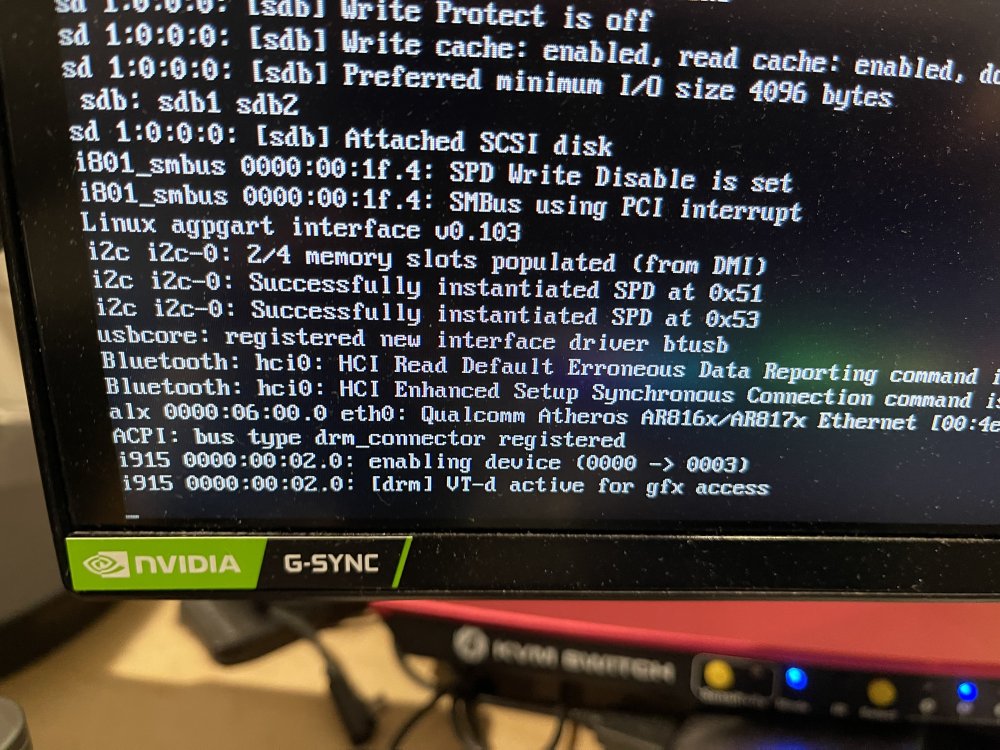
I’m running in UEFI boot mode. I have an Alienware R9 Z370 i9-9900. Hangs at the line in the photo below: Any thoughts regarding how to troubleshoot?