




.jpg.8b0a67f03de455f28ba71affbb3fc45a.jpg)
ThumperZ
Members
-
Joined
-
Last visited
-
yea sounds like the VM in a VM is the real issue.. I totally forgot sandbox even existed.
-
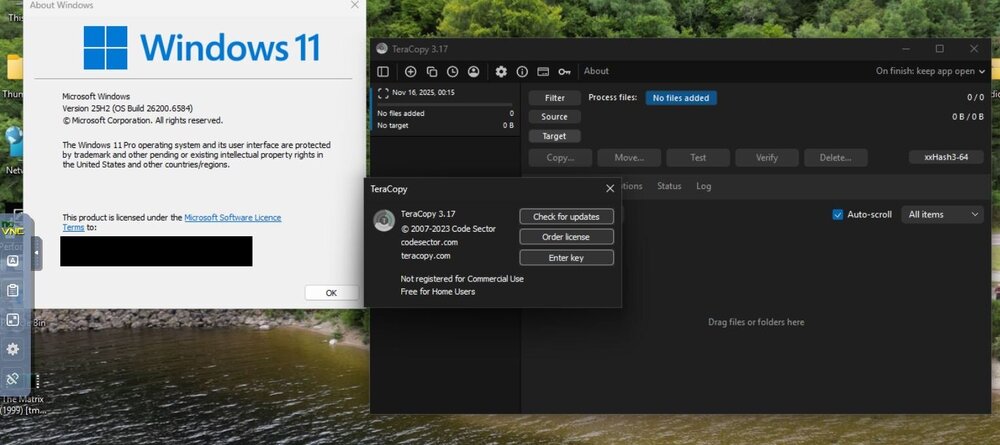
Hi I also use teracopy & have just done a new Windows 11 VM install in the last week or so - 25H2 OS Build 26200.6584 teracopy v3.17 Intel 14th gen CPU - Unraid 7.1.4 everything is working ok no crashes & have moved about 1TB so far So it should work ok VM details are CPU host passthrough - machine i440fx-9.2 - vdisk is VirtIO - graphics Virtual - video driver QXL (best - network model virtio-net I used a windows ISO downloaded from Microsoft but ran it through the Chris Titus winutil to get what he calls a microwin version but it just strips junk out etc local account install etc It makes for a really quick clean install. but if anything this may cause an issue not fix it in this problem. I also always pin my CPU cores in the VM config & never use CPU/Core 0/1 any further information you need just ask but at least you know it should work if that helps !?!
-
ThumperZ changed their profile photo
-
I went with the 14700 in the end. Thx for the advice Zonediver but I really wanted new parts & the 12th gen chips are in my opinion way expensive new for the age of the CPUs i.e. 12700 about £25 less than the 14700 on scan The 14700 is working great - the Quicksync hardware encoding in Emby worked straight away - I guess its the same setup as my old chip. I got the bios updated on the new motherboard (at store) before I even put the new CPU in & have checked the power level settings etc so I hope that I'll be ok 14th gen problems etc The VM performance difference is way more than I expected even If I don't pass on many cores or use the Ecores. Unraid is amazing for the fact that I upgraded 11 generations of CPU & changed every part except for the NVME/HDD +USB boot drive & everything works on first boot..gotta love that! the old system didn't even have any m.2 slots on it - I had to use a pcie adapter card..
-
Hi, I'm looking to finally upgrade from my intel i7 3770 - this has been rock solid for the last 3 years or so & I have just updated it to Unraid 7.14 after an uptime over 500 days. this system is just getting a bit slow with my newer usage Main Unraid use is for an Emby server & the usual stack of 'arrs' docker containers etc -I am also getting into VMs far more lately. With Emby I have an Nvidia Shield so 4k HDR is an easy direct play even from the 3770 locally but remotely 1080p using intel quicksync is possible but no 4k - it's simply to old. This is the first time I've ever picked new hardware for a unraid build I like I'm sure many do have previously used old hardware for older systems that I had on hand. Since my upgrade to unraid 7 I finally have everything available remotely using Tailscale (love it) so am using the system for more than a media server/download box now. I want Intel Quicksync still so no AMD & am not really a fan of used parts. I am basically looking at the :- I7 14700 or the Core Ultra 7 265 (non K for both for TDP heat etc) the 14700 (14th gen) has had issues but if new & bios updates/power levels sorted should be ok I think has UHD 770 should be widely supported for hardware encoding & 20 cores/28 threads good for VMs etc the Core Ultra 7 265 is newer but might have some compatibility issues? especially with the QSV hardware encoding plus not many people seem to use this with unraid. Would be 64GB ram in either I pick & future upgrades i.e. CPU are not important as will be a long term system & full replace when unsuitable. Any help or opinions about these two CPUs would be great - thanks in advance!
-
Turning off fast boot fixed the same issue for me on totally different hardware thanks
.thumb.jpg.1ba080f18a62ec044627e93be07a3262.jpg)
