





mklecka
Members
-
Joined
-
Last visited
-
Hi, is it normal that the MOVE command leaves empty folders behind on original disk?
-
Title is probably self explainatory. Attached screenshot and diagnostics. lesath-diagnostics-20250111-2237.zip
-
I dont think thats the cause, because i have more than 20GB free and frigate is not using more than about 500MB
-
HI, i've recently been having some out of memory errors appearing. I can't seem to find a cause in the logs. Any tips? Happened about three times this month. Thanks lesath-diagnostics-20240818-1442.zip
-
I'm planning to get one. But I thought docker cfg is stored on the USB, so why would it reset do default after a power loss?
-
Noone able to help me?
-
Hi, i've had some problems with docker not starting after power loss. The issue seems to be, that the docker settings get reset after power loss (to the dafult values, with Enable docker = no, disk size back to 20GB from my set 50GB etc.) If i enable it manually again, it starts no problem. Is there any way to eliminate this in the future? Thanks for any help. First diag right after boot and second after fixing the docker settings and starting the service. ghost-diagnostics-20240121-1229-after power loss.zip ghost-diagnostics-20240121-1232-changed back to my settings.zip
-
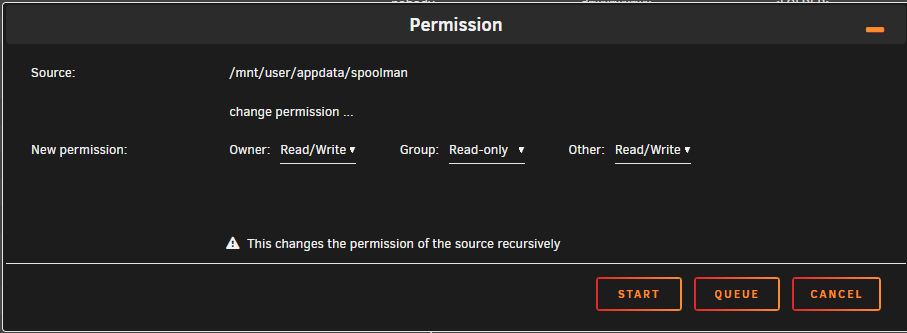
Hi, mount appdata to the original path "/home/app/.local/share/spoolman", start the container and if it shows permission error in the log run New Permissions from the "Tools" menu in unraid. That should fix it and database should be in the right place in appdata
-
Hi, i trying to resolve the permission issues on Spoolman github, but nothing so far. The workaround is manually changing permissions for the appdata folder created (i dont know why its created with wrong permissions). You can use the original path to the container data folder "/home/app/.local/share/spoolman" and manually change appdata folder permissions to this or run the new permissions tool from "Tools" tab in the unraid menu.
-
Hi, did you remove every variable you are not using? If you just want to use sqlite then basically remove everything except the path and port variables.
-
[Template only, I am not the container author/maintainer] Template: https://github.com/m-klecka/unraid-templates/blob/main/spoolman/spoolman.xml Source container: https://github.com/Donkie/Spoolman Spoolman is a docker application with Klipper support for tracking filament spool usage. I'll try to provide support for the template here, but any issues with the container should be posted to the creator's github repo The default data path inside container has problem with unraid appdata permissions. After installing open unraid console and run "sudo chown -R 1000:1000 /mnt/user/appdata/spoolman" (or your different specified appdata path) to fix the issue.
-
That worked:) Many thanks for helping
-
I guess it worked, but when i now try to format, it still says unmountable. Heres another diag. ghost-diagnostics-20230710-1218.zip

-
Tries that like 5 times, but heres another diag after reboot and format. ghost-diagnostics-20230710-1143.zip
-
Here ghost-diagnostics-20230710-1136.zip


