





Nedio Server Unraid
Members
-
Joined
-
Last visited
-
Currently
Viewing Topic: Docker container's update is maxing CPU -> the UI/ssh becomes unusable
Everything posted by Nedio Server Unraid
-
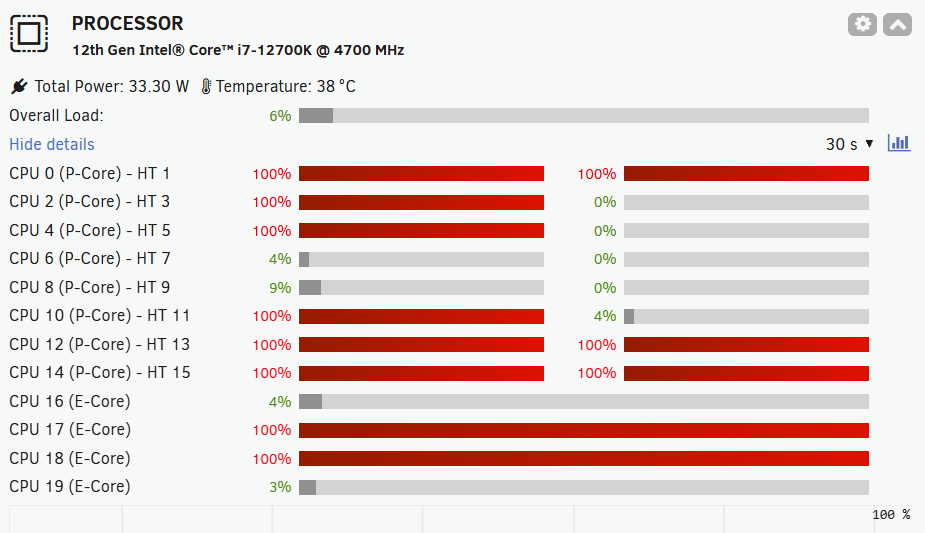
Hi, Since some months now, I noticed that any process can use all available CPUs. For example updating my docker containers has become complicated and often fails to remove the container before starting it with the new image. Also my immich docker (installed via CA) was using all the CPU when files are synced to it (for transcoding and other ML activities), rendering my server unavailable/inaccessible until the CPUs are freed. Now I moved my immich installation to docker compose with a dedicated container for ML, so that I can control the resources it is allowed to use. But the issue with docker updates is still there. I see this: And UI does not refresh anymore. I can't ssh into the box. Nothing responds. Please advise on few fronts: 1) How can I make sure that my unraid server OS always has 2 CPU cores reserved for itself (and nothing can steal those). 2) How can I get the docker updates working seamlessly? They often fail, leave the orphan containers, case my docker container disappear from the list (leaving me with the only option to reinstall those from previous apps) etc. nedio-server-diagnostics-20261104-1421.zip
-
All the scrubs run ok, no errors. VMs started. I'd say the topic closed. Thank you @JorgeB!
-
nedio-server-diagnostics-20261104-1154.zip
-
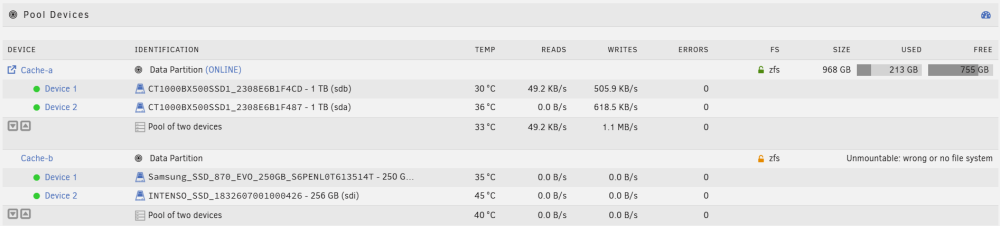
did that. array started. looks good on the Main. phew. before starting to format the cache-b, how should I verify that cache-a is in-tact now?
-
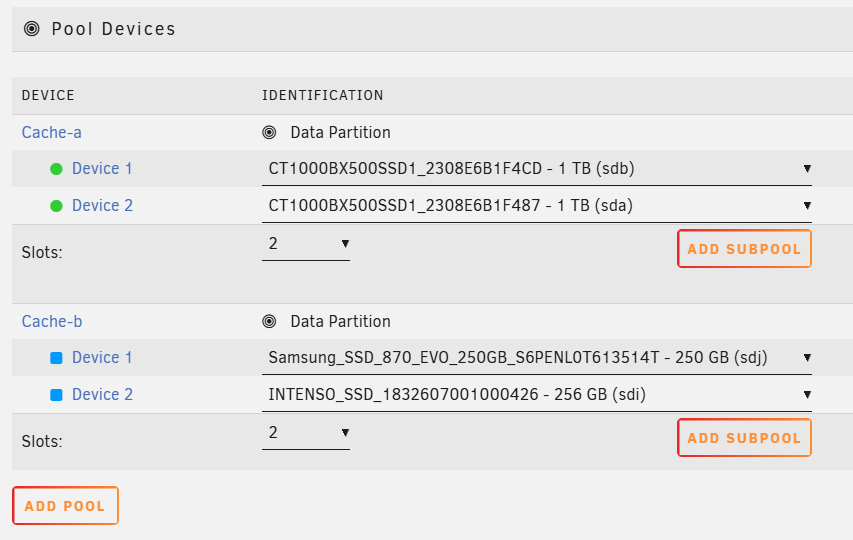
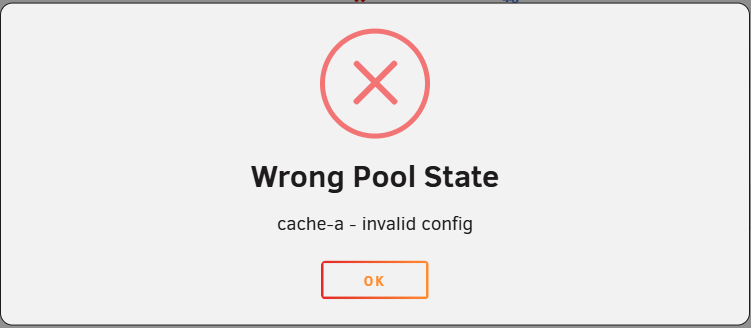
I followed your suggested steps all the way to #4. But now I can't start the array. What do I do now? nedio-server-diagnostics-20261104-1008.zip
-
Thank you @JorgeB ! I will follow the steps you advised tonight. The 840 EVO is not detected as I have disconnected it and connected the replacement disk already.
-
Hi, My zfs cache pool with 2 slots has degraded. Not sure what's the root cause. But need the array back, so I guess will have to rebuild the pool. Since one of the two SSD disks is old and far beyond the write limits, I decided to not rebuild the pool mirror onto it and got a replacement. My cache-b shows 1 vdev with 3 devices. I never had 3 devices on this pool. (diag attached). So the pool config got corrupted? My idea now is to: 1) Remove the pool 2) Re-create a 2 slot zfs pool with same name (cache-b) and props 3) Assign the good disk to slot 1, none to slot 2 and Start Array 4) Optional: copy the data of the pool into array (backup). 5) Stop the array and assign new disk (pre-cleared) to the 2nd slot 6) Start array so that the zfs pool is rebuild Is this plan correct? (double checking here, don't want to lose data). nedio-server-diagnostics-20261028-0823.zip
-
issue resolved - it was the slow network (going via power line). replaced that with LAN - all good now. 🙈
-
Hi, I am running immich 2.x on my unraid v7.1.4. The UI of Unraid as well as writing to the cache pools (ZFS) are ultra slow (2-7MB/s). Please advise where to start troubleshooting.. This was working well before, and is unbearable now. Immich backup uploads assets in the range of KB/s, hangs. Attaching the diagnostics. Thanks nedio-server-diagnostics-20251009-1551.zip
-
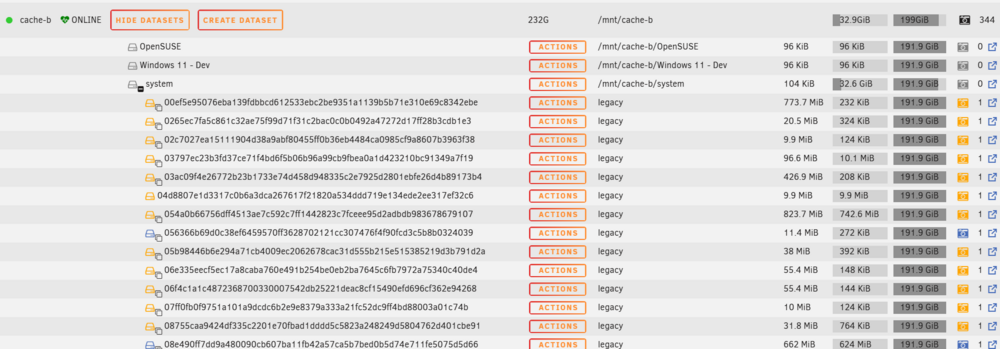
ok, my disk 2 was rebuilt. no errors so far 🤞. Now I want to eliminate the potential reason of the cache-b holding back from array stop/clean reboot.. I have changed the docker settings to be overlay2. Did not enable docker yet. Also I have moved everything from cache-b to array (using the mover). Now, since there is nothing on the cache-b, I would expect to see 0 on the sizes in Main tab: But I see some misterious 35 GB on it. Then I noticed that there are 344 snapshots (legacy) of the system share folder in the cache-b pool. (those grey/yellow/blue photo camera icons are confusing 😕) I want to clean the cache-b. Can I just delete these snapshots? I need to get rid of those legacy snapshots and stop them being taken.
-
Thank you @JorgeB! I think the answers to both parts of the condition you mentioned are "Yes". But just to clarify, how/where do I see if the emulated disk 2 is mounting? It shows as disabled in the array with a ❌ mark.
-
Ok, hard restarted 🥶, started the array in maintenance mode (docker and VM are still off). Did the XFS check on disk 2 - no errors detected 🥳 Phase 1 - find and verify superblock... Phase 2 - using internal log - zero log... - scan filesystem freespace and inode maps... - found root inode chunk Phase 3 - for each AG... - scan (but don't clear) agi unlinked lists... - process known inodes and perform inode discovery... - agno = 0 - agno = 1 - agno = 2 - agno = 3 - process newly discovered inodes... Phase 4 - check for duplicate blocks... - setting up duplicate extent list... - check for inodes claiming duplicate blocks... - agno = 0 - agno = 1 - agno = 2 - agno = 3 No modify flag set, skipping phase 5 Phase 6 - check inode connectivity... - traversing filesystem ... - traversal finished ... - moving disconnected inodes to lost+found ... Phase 7 - verify link counts... No modify flag set, skipping filesystem flush and exiting. No file system corruption detected. The disc 2 still shows disabled. What are the next steps? I can't find the rebuilding-a-drive-onto-itself in the unraid documentation.. Did the procedure of restoring the disabled disc change? How should I proceed to fix the array?
-
I had switched to docker folder as my docker image file would get corrupt several times (due to not being able to shutdown the system cleanly and having to hard restart).. I will look into re-creating it using overlay2 driver, thanks! For now - any idea how do I proceed? Is it that the only option I have a hard restart again? Since my array is not ok, do I risk to get in trouble even more if I hard restart?
-
Here's the outcome: SRV:~# lsof | grep /mnt SRV:~# ps -f | grep "bash" | grep -v "grep" root 3081899 3081748 0 23:54 pts/0 00:00:00 /bin/bash --login SRV:~#
-
Yeah, docker was already stopped at the time of the diags taking (from the settings > docker > enable docker=No). The web-console was also closed (after diag extract). Still I have run the command you suggested. SRV:~# /etc/rc.d/rc.docker status Docker daemon is not running. SRV:~# /etc/rc.d/rc.docker stop rc.docker: Stopping containers... rc.docker: Stopping network... rc.docker: Stopping Docker daemon... rc.docker: Docker daemon... Already stopped. SRV:~# tail -f /var/log/syslog Sep 20 21:22:35 nedio-server emhttpd: Unmounting disks... Sep 20 21:22:35 nedio-server emhttpd: shcmd (39782356): /usr/sbin/zpool export -f cache-b Sep 20 21:22:36 nedio-server root: cannot export 'cache-b': pool is busy Sep 20 21:22:36 nedio-server emhttpd: shcmd (39782356): exit status: 1 Sep 20 21:22:36 nedio-server emhttpd: Retry unmounting disk share(s)... Sep 20 21:22:41 nedio-server emhttpd: Unmounting disks... Sep 20 21:22:41 nedio-server emhttpd: shcmd (39782357): /usr/sbin/zpool export -f cache-b Sep 20 21:22:41 nedio-server root: cannot export 'cache-b': pool is busy Sep 20 21:22:41 nedio-server emhttpd: shcmd (39782357): exit status: 1 Sep 20 21:22:41 nedio-server emhttpd: Retry unmounting disk share(s)... SRV:~#Isn't there a way to figure out what could be hugging the pool cache-b ?
-
Hi, I needed to stop my array. For that I stopped all the docker containers and the docker service itself. Same with the VMs. Then hit the stop button. The array still did not go down. Syslog shows: Sep 20 16:06:04 nedio-server emhttpd: Unmounting disks... Sep 20 16:06:04 nedio-server emhttpd: shcmd (39778678): /usr/sbin/zpool export -f cache-b Sep 20 16:06:04 nedio-server root: cannot export 'cache-b': pool is busy Sep 20 16:06:04 nedio-server emhttpd: shcmd (39778678): exit status: 1 Sep 20 16:06:04 nedio-server emhttpd: Retry unmounting disk share(s)... I tried to check if there's anything holding the pool. Can't see anything. On the Main tab - the array and the cache pools show online. Note: there is a small write (400-700 KB/s) that happens every few seconds on the cache-b. Please advise what should I do. I want to stop the array in order to start it in maintenance mode, so that I can check the array xfs for errors and then rebuild one of the disks which is showing as x Disabled. Please see attached the diagnostics. nedio-server-diagnostics-20250920-1610.zip
-
rebuilding onto inself sorted out the issue. back to green again. thanks!
-
Thank you for the swift reply @JorgeB Hmmm, last time I had the issue with disk 2 (back then I ended up replacing the HDD). See the thread here: https://forums.unraid.net/topic/186498-700-disk-error-xfs-dm-2-metadata-io-error Now before rebuilding it onto itself, I will indeed have to ckeck the cable. What should I be looking for with the cables replacement?
-
Hello, I am still having problems shutting down my server cleanly... Every update is a nightmare for me. I often end up with hard shutdown :( Like this time, where the UI stopped responding at some time and I could not ssh into the instance too. After the startup I see one of my disks is disabled. I did an XFS check xfs_repair -n /dev/mapper/md2p1 | tee /tmp/disk2_xfs_dryrun.log and then an XFS repair xfs_repair /dev/mapper/md2p1 | tee /tmp/disk2_xfs_repair.log of the disk2 which completed successfully While srray was started in Maintenance mode). The I stopped the array and started in normal mode hoping the disk will be back to normal, but it is stil shown as disabled and the contents is emulated. The disk seems ok. SMART test results are ok. The parity disk and the rest of the 3 disks of the array are shown as ok. Please see attached the diagnostics. Before I mess up irreversibly, wanted to consult with you guys, what are my next steps? nedio-server-diagnostics-20250526-1523.zip
-
managed to copy all my data from the old disk 🍀. have setup the backup ⛑️. a bit bitter after taste - why the hell my XFS file system got corrupted - still no answer 🤷♂️.
-
My array was messed up: Duration: 12 hours, 49 minutes, 35 seconds. Average speed: 86.6 MB/s Finding 487755460 errors All of that is supposed to be corrected now. Will start copying the data from the original disk to array.
-
I am considering to run a full parity check first on my Array. I somehow lost faith in it.. With writing corrections. Once I know my array is in a good shape - I will try to read from the original disk and write to the array. Please let me know if any part of this plan is a bad idea? 🙏 Then I will setup a proper 3-2-1 backup urgently...
-
nedio-server-diagnostics-20250209-1456.zip
-
I have started the array in maintenance mode (so that I can pass the encryption passphrase to unraid). Then I pressed the [mount] button next to the original disk in unassigned devices. Here is the log I see: Feb 9 14:46:56 nedio-server unassigned.devices: Mounting partition 'sdb1' at mountpoint '/mnt/disks/WD-WMC4N0F887V2'... Feb 9 14:46:56 nedio-server emhttpd: shcmd (4857): /usr/sbin/cryptsetup luksOpen '/dev/sdb1' 'WD-WMC4N0F887V2' Feb 9 14:46:58 nedio-server nginx: 2025/02/09 14:46:58 [alert] 11265#11265: worker process 90202 exited on signal 6 Feb 9 14:46:58 nedio-server unassigned.devices: Mount cmd: /sbin/mount -t 'xfs' -o rw,relatime '/dev/mapper/WD-WMC4N0F887V2' '/mnt/disks/WD-WMC4N0F887V2' Feb 9 14:46:58 nedio-server kernel: XFS (dm-8): Mounting V5 Filesystem f185aae9-b6c9-4eb8-b7dc-23ae79ee4411 Feb 9 14:46:58 nedio-server kernel: XFS (dm-8): Starting recovery (logdev: internal) Feb 9 14:46:59 nedio-server kernel: XFS (dm-8): Ending recovery (logdev: internal) Feb 9 14:47:00 nedio-server unassigned.devices: Successfully mounted '/dev/mapper/WD-WMC4N0F887V2' on '/mnt/disks/WD-WMC4N0F887V2'. Feb 9 14:47:00 nedio-server unassigned.devices: Device '/dev/sdb1' is not set to be shared. Feb 9 14:47:00 nedio-server nginx: 2025/02/09 14:47:00 [alert] 11265#11265: worker process 90521 exited on signal 6
-
ok, I have plugged in the original (3TB) disk. It shows up in the unassigned devices. Should I start the array (with the new 4TB disk) before posting the diagnostics? Should I try to mount the original disk outside of the array?




