





Nedio Server Unraid
Members
-
Joined
-
Last visited
Everything posted by Nedio Server Unraid
-
It mounted. The array has started. But there is a lot in the lost+found directory on disk3... 😨 Also the used and free size of the disk 3 shows only 49 GB used.. whereas I remember having 2+TB there... BTW: is there a way to know from the diagnostic how much data was on that HDD before XFS restore? Now, this disk (4TB) is the one that was rebuilt from the parity (when I replaced the originally failing HDD which was 3TB). On that 3TB disk I did not try to check/restore the xfs.. Do you think it is safe to plug the HDD-3TB back, start the array in maintenance mode and try to check the XFS there? Could it restore more data?
-
Done. Here are the last lines of the console output: Format log to cycle 2069032622. cache_purge: shake on cache 0x4d67c0 left 1 nodes!? cache_purge: shake on cache 0x4d67c0 left 1 nodes!? cache_zero_check: refcount is 1, not zero (node=0x14bf180fb010) XFS_REPAIR Summary Thu Feb 6 16:03:17 2025 Phase Start End Duration Phase 1: 02/06 16:00:31 02/06 16:00:31 Phase 2: 02/06 16:00:31 02/06 16:01:00 29 seconds Phase 3: 02/06 16:01:00 02/06 16:01:36 36 seconds Phase 4: 02/06 16:01:36 02/06 16:01:36 Phase 5: 02/06 16:01:36 02/06 16:01:37 1 second Phase 6: 02/06 16:01:37 02/06 16:01:37 Phase 7: 02/06 16:01:37 02/06 16:01:37 Total run time: 1 minute, 6 seconds done user@nedio-server:~# Thanks for helping me out JorgeB. I am a bit nervous, hoping I did not lose my data.. What's next?
-
I've run it. Got this: user@nedio-server:~# xfs_repair -v /dev/mapper/md3p1 Phase 1 - find and verify superblock... - block cache size set to 4590072 entries Phase 2 - using internal log - zero log... Log inconsistent (didn't find previous header) failed to find log head zero_log: cannot find log head/tail (xlog_find_tail=5) ERROR: The log head and/or tail cannot be discovered. Attempt to mount the filesystem to replay the log or use the -L option to destroy the log and attempt a repair.
-
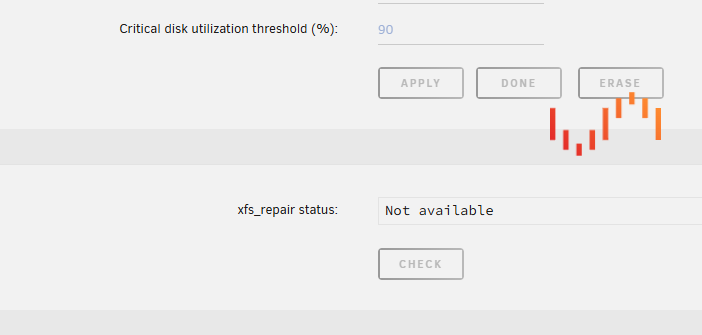
ok, after rebooting the server I was able to start the array in Maintenance mode and clicked the Check File System button on disk 3. I have the unraid spinner running since 25 mins.. Here is the log output: Feb 6 14:28:53 nedio-server rc.nginx: Reloading Nginx server daemon configuration... Feb 6 14:28:54 nedio-server nginx: 2025/02/06 14:28:54 [alert] 11134#11134: worker process 25079 exited on signal 6 Feb 6 14:28:56 nedio-server nginx: 2025/02/06 14:28:56 [alert] 11134#11134: worker process 25363 exited on signal 6 Feb 6 14:28:57 nedio-server nginx: 2025/02/06 14:28:57 [alert] 11134#11134: worker process 25511 exited on signal 6 Feb 6 14:29:06 nedio-server nginx: 2025/02/06 14:29:06 [alert] 11134#11134: worker process 25549 exited on signal 6 Feb 6 14:29:07 nedio-server ool www[15128]: /usr/local/emhttp/plugins/dynamix/scripts/xfs_check 'start' '/dev/mapper/md3p1' 'ST4000NE001-2MA101_WS25BT0Z' '-n' Feb 6 14:29:07 nedio-server nginx: 2025/02/06 14:29:07 [alert] 11134#11134: worker process 26094 exited on signal 6 Feb 6 14:29:08 nedio-server nginx: 2025/02/06 14:29:08 [alert] 11134#11134: worker process 26284 exited on signal 6 ... Feb 6 14:31:02 nedio-server nginx: 2025/02/06 14:31:02 [alert] 11134#11134: worker process 33870 exited on signal 6 Feb 6 14:31:04 nedio-server nginx: 2025/02/06 14:31:04 [alert] 11134#11134: worker process 33950 exited on signal 6 Feb 6 14:31:06 nedio-server nginx: 2025/02/06 14:31:06 [alert] 11134#11134: worker process 34135 exited on signal 6 Feb 6 14:31:06 nedio-server publish: curl to arraymonitor failed Feb 6 14:31:08 nedio-server nginx: 2025/02/06 14:31:08 [alert] 11134#11134: worker process 34242 exited on signal 6 Feb 6 14:31:10 nedio-server nginx: 2025/02/06 14:31:10 [alert] 11134#11134: worker process 34321 exited on signal 6 ... Feb 6 14:34:48 nedio-server nginx: 2025/02/06 14:34:48 [alert] 11134#11134: worker process 48053 exited on signal 6 Feb 6 14:34:49 nedio-server nginx: 2025/02/06 14:34:49 [alert] 11134#11134: worker process 48151 exited on signal 6 Feb 6 14:39:14 nedio-server emhttpd: spinning down /dev/sdf Feb 6 14:39:14 nedio-server emhttpd: spinning down /dev/nvme0n1 Feb 6 14:39:15 nedio-server emhttpd: sdspin /dev/nvme0n1 down: 25 Feb 6 14:43:48 nedio-server emhttpd: spinning down /dev/sdj Feb 6 14:43:48 nedio-server emhttpd: spinning down /dev/sdh Feb 6 14:43:48 nedio-server emhttpd: spinning down /dev/sdg Feb 6 14:43:48 nedio-server emhttpd: spinning down /dev/sdd Feb 6 14:43:48 nedio-server emhttpd: spinning down /dev/sde Feb 6 14:43:48 nedio-server emhttpd: spinning down /dev/sdb Feb 6 14:43:48 nedio-server emhttpd: spinning down /dev/sdi Feb 6 14:44:17 nedio-server emhttpd: spinning down /dev/sdc Should I wait more? I do not see the xfs_check in htop.
-
The log that I am getting is: Feb 6 13:31:19 nedio-server emhttpd: cmdStart: already started Although on the main page the array looks like not started.. With dropdown boxes for disk selection. Should I restart the server maybe?
-
I can't start the array in maintenance mode... So currently I still have the previous HDD (3TB) which was mounted as Disk 3 - unplugged from the unraid server. And the new HDD (4TB) which I used trying to replace the HDD at Disk 3 of the array. I have precleared the 4TB HDD and then mounted in into the Disk3 slot. The array rebuild completed without errors. But now the array does not start (even if I check the maintenance mode). Please advise what should I do.
-
I got an error on one of my disks. I replaced it with a new one and rebuilt the array successfully. After one day I started getting this: Feb 6 00:00:33 nedio-server Docker Auto Update: Installing Updates for borgmatic immich mariadb Minio netdata nextcloud Feb 6 00:00:33 nedio-server kernel: XFS (dm-2): Metadata corruption detected at xfs_buf_ioend+0xa9/0x384, xfs_inode block 0xe4343410 xfs_inode_buf_verify Feb 6 00:00:33 nedio-server kernel: XFS (dm-2): Unmount and run xfs_repair Feb 6 00:00:33 nedio-server kernel: XFS (dm-2): First 128 bytes of corrupted metadata buffer: Feb 6 00:00:33 nedio-server kernel: 00000000: b4 cb fc 73 d1 4d 06 7b e3 4c 72 74 f9 72 b9 42 ...s.M.{.Lrt.r.B Feb 6 00:00:33 nedio-server kernel: 00000010: f1 19 35 c4 a7 ce b4 66 36 dc 1f f6 88 e1 ea ad ..5....f6....... Feb 6 00:00:33 nedio-server kernel: 00000020: 13 28 1e 6a a1 1c e5 46 6c 9f ff 94 7a 5d e1 12 .(.j...Fl...z].. Feb 6 00:00:33 nedio-server kernel: 00000030: 9b 97 0b 2c 47 92 6d 19 f3 84 fa d6 22 0b a3 3e ...,G.m....."..> Feb 6 00:00:33 nedio-server kernel: 00000040: 4b 51 0d 41 a3 8e 59 f9 09 13 ce 3f c1 a2 57 87 KQ.A..Y....?..W. Feb 6 00:00:33 nedio-server kernel: 00000050: f9 c6 30 b4 bc 30 65 b1 0f 86 aa 06 6f 35 57 cc ..0..0e.....o5W. Feb 6 00:00:33 nedio-server kernel: 00000060: c6 33 3c 33 9c 11 cc 2c d3 fc 97 10 61 ea 1f 7c .3<3...,....a..| Feb 6 00:00:33 nedio-server kernel: 00000070: bc 50 a2 fe bf b9 23 36 b3 60 bc 01 60 c0 c3 d7 .P....#6.`..`... Feb 6 00:00:33 nedio-server kernel: XFS (dm-2): metadata I/O error in "xfs_imap_to_bp+0x52/0x74" at daddr 0xe4343410 len 32 error 117 Feb 6 00:00:34 nedio-server emhttpd: read SMART /dev/sdd Feb 6 00:00:41 nedio-server emhttpd: read SMART /dev/sde Feb 6 00:00:45 nedio-server kernel: XFS (dm-2): Metadata corruption detected at xfs_buf_ioend+0xa9/0x384, xfs_inode block 0x1467bfac8 xfs_inode_buf_verify Feb 6 00:00:45 nedio-server kernel: XFS (dm-2): Unmount and run xfs_repair I have stopped the array. Now I can't start it. Please help. My data is only partially backed up.. 😱 nedio-server-diagnostics-20250206-0928.zip
-
BTW, an update here. After downgrading my Unraid I got the disks visible again.. The array started without any problems. Will wait for the next version to upgrade. In the mean time I will need to fix the cannot cleanly restart/shutdown issue. Thanks JorgeB for your help and support.
-
yeah, so with a freshly installed unraid on a different flash drive, all disks are visible... (diags are attached) what are my next best steps to revive my Unraid server (which for some weird reason does not see my drives)? (I do not have a recent backup of the flash drive 🫣) tower-diagnostics-20240803-1510.zip
-
Nah, I do not have another one, and would like to troubleshoot before going for buying another HBA..
-
Hi JorgeB, it took me a while (vacation time). It detected the drive I have connected to the onboard SATA.. I am attaching the new diagnostics. What could that mean? Is my SATA extension card dead? I would appreciate any hints troubleshooting this further. Thanks! diagnostics-20240730-1332.zip
-
Can it be undone? I.e. can I safely try a new config and then return back to my original config? (newbie here )
-
Hi guys, I have upgraded my Unraid to 6.12.11 and the server went into reboot. But it would never shutdown (I have this issue since a while). The only way to actually restart the server is to press Reset button - this would usually work fine. But not this time. After booting, all devices of the array (except the flash drive) show as missing. Getting this in logs: Jul 24 21:52:42 nedio-server emhttpd: device /dev/sdi problem getting id Jul 24 21:52:43 nedio-server emhttpd: device /dev/sdj problem getting id Jul 24 21:52:43 nedio-server emhttpd: device /dev/sdh problem getting id Jul 24 21:52:43 nedio-server emhttpd: device /dev/sdg problem getting id Jul 24 21:52:43 nedio-server emhttpd: device /dev/sdd problem getting id Jul 24 21:52:43 nedio-server emhttpd: device /dev/sde problem getting id Jul 24 21:52:43 nedio-server emhttpd: device /dev/sdf problem getting id Jul 24 21:52:43 nedio-server emhttpd: device /dev/sdc problem getting id Attaching the diagnostics. Please help! diagnostics-20240724-2038.zip
-
Hello everyone! New to unraid and loving it so far. But I can't get the video pass through working as I need Below is my setup. Hardware: Motherboard: ASUS Prime Z690-P WiFi Intel® Z690 (LGA 1700) CPU: Intel® Core™ i7-12700K Processor External GPU: ASUS Turbo GeForce® GTX 1080Ti 11GB GDDR5X (An old LCD) Monitor connected to External GPU via Display Port to DVI port cable (I Know my monitor is long overdue, will replace it at some point but a bit later) Software: Unraid v6.11.5 with an XFS-encrypted data array Windows 10 VM (with auto start and with the External GPU passed through to it) What I want: Use the VM as a day-to-day PC Shutdown my server nearly every day (it is in my bedroom and is annoying if working at night) Upon power-on get to the VM (on my monitor) with minimum hassle (need to figure out how to do encrypted array auto-start with the passphrase feeding without compromising the purpose of encryption). My problem: Upon power-on Unraid "captures" the Graphics card where the monitor is connected... I can't force it to always stick to the iGPU and leave the External GPU for the Windows VM. Workaround that works: attach the monitor to iGPU boot unraid (boot logs showing on the monitor) and start array disconnect monitor from iGPU and connect to the external Graphics Card - it works (displays the VM welcome screen) The workaround is a no-go for me... Please help me understanding what am I missing.
