





lucahammer
Members
-
Joined
-
Last visited
Everything posted by lucahammer
-
@irishjd Do you need the old data in elasticsearch or will it be re-populated? The easiest option would be to delete all files in the current elasticsearch data folder. The log says that there are indices from v7 and they aren't compatible with v8.
-
Just wanted to let others know how to make this template work with Elasticsearch 8.9: Replace repository with 'docker.elastic.co/elasticsearch/elasticsearch:8.9.0' (not sure why it isn't on dockerhub, maybe because of the last pricing discussion failure) Add variable 'xpack.security.enabled' with value 'false' (enabled by default since 8.0; if enabled, elasticsearch can't be accessed without username/password and SSL https://www.elastic.co/guide/en/elasticsearch/reference/current/security-settings.html) There are two options to work around file permission issues (without fixing them manually after each reboot): Either add '--user 99 --group-add=100 --group-add=0' at Extra Parameters (uid 99 and gid 100 allow the elasticsearch user to access files on Unraid, gid 0 adds it to the group that can change files in the container; https://www.elastic.co/guide/en/elasticsearch/reference/8.9/docker.html#_configuration_files_must_be_readable_by_the_elasticsearch_user) or add the variable 'TAKE_FILE_OWNERSHIP' with value 'true' (thanks @siege9929 and @wolfNZ) Not necessary changes, but I wanted them: Add Plugins directory path '/usr/share/elasticsearch/plugins' (allows you to keep plugins that you install through the console of the container) Add Extra Parameters '--ulimit memlock=-1:-1 --cap-add=IPC_LOCK' (should improve performance by preventing memory from being swapped https://www.elastic.co/guide/en/elasticsearch/reference/current/_memory_lock_check.html) My complete template: <?xml version="1.0"?> <Container version="2"> <Name>elasticsearch</Name> <Repository>docker.elastic.co/elasticsearch/elasticsearch:8.9.0</Repository> <Registry>https://hub.docker.com/_/elasticsearch</Registry> <Network>bridge</Network> <MyIP/> <Shell>bash</Shell> <Privileged>false</Privileged> <Support>https://forums.unraid.net/topic/79125-support-foxxmd-elasticsearch</Support> <Project/> <Overview>Elasticsearch with instructions for installation on unraid. 
 
 Directions below MUST be used in order to get Elasticsearch 5 and above working correctly. Check support thread for more information.
 
 Directions:
 1. Install CA User Scripts
 2. Create a new script named vm.max_map_count
 3. Contents of script as follows: 
 
 #!/bin/bash
 sysctl -w vm.max_map_count=262144
 
 4. Set script schedule to At Startup of Array
 
 Adapted version by Luca for elasticsearch 8.x.x</Overview> <Category>Other: Tools:Utilities</Category> <WebUI>http://[IP]:[PORT:9200]/</WebUI> <TemplateURL>https://raw.githubusercontent.com/FoxxMD/unraid-docker-templates/master/foxxmd/elasticsearch.xml</TemplateURL> <Icon>https://github.com/FoxxMD/unraid-docker-templates/raw/master/elasticsearch.png</Icon> <ExtraParams>--ulimit nofile=262144:262144 --ulimit memlock=-1:-1 --cap-add=IPC_LOCK --user 99 --group-add=100 --group-add=0</ExtraParams> <PostArgs/> <CPUset/> <DateInstalled>1692281389</DateInstalled> <DonateText/> <DonateLink/> <Requires/> <Config Name="Data" Target="/usr/share/elasticsearch/data" Default="/mnt/user/appdata/elasticsearch/data" Mode="rw" Description="Directory where ES data is persisted" Type="Path" Display="always" Required="true" Mask="false">/mnt/user/appdata/elasticsearch/data</Config> <Config Name="REST API Port" Target="9200" Default="9200" Mode="tcp" Description="Host port exposed for REST HTTP interface." Type="Port" Display="always" Required="true" Mask="false">9200</Config> <Config Name="Nodes Communication Port" Target="9300" Default="9300" Mode="tcp" Description="Host port exposed for node communication." Type="Port" Display="always" Required="true" Mask="false">9300</Config> <Config Name="enforce SSL/login" Target="xpack.security.enabled" Default="false" Mode="" Description="" Type="Variable" Display="always" Required="false" Mask="false">false</Config> <Config Name="Plugins" Target="/usr/share/elasticsearch/plugins" Default="/mnt/user/appdata/elasticsearch/plugins" Mode="rw" Description="Install plugins through the console of the container. eg. bin/elasticsearch-plugin install [plugin_name]" Type="Path" Display="always" Required="false" Mask="false">/mnt/user/appdata/elasticsearch/plugins</Config> <Config Name="Logs" Target="/usr/share/elasticsearch/logs" Default="" Mode="rw" Description="" Type="Path" Display="always" Required="false" Mask="false">/mnt/user/appdata/elasticsearch/logs</Config> <Config Name="ES_JAVA_OPTS" Target="ES_JAVA_OPTS" Default="-Xms512m -Xmx512m" Mode="" Description="https://www.elastic.co/guide/en/elasticsearch/reference/8.9/advanced-configuration.html#set-jvm-heap-size" Type="Variable" Display="advanced-hide" Required="false" Mask="false">-Xms512m -Xmx512m</Config> <Config Name="Discovery Type" Target="discovery.type" Default="single-node" Mode="" Description="" Type="Variable" Display="advanced-hide" Required="true" Mask="false">single-node</Config> </Container>
-
What does your log say?
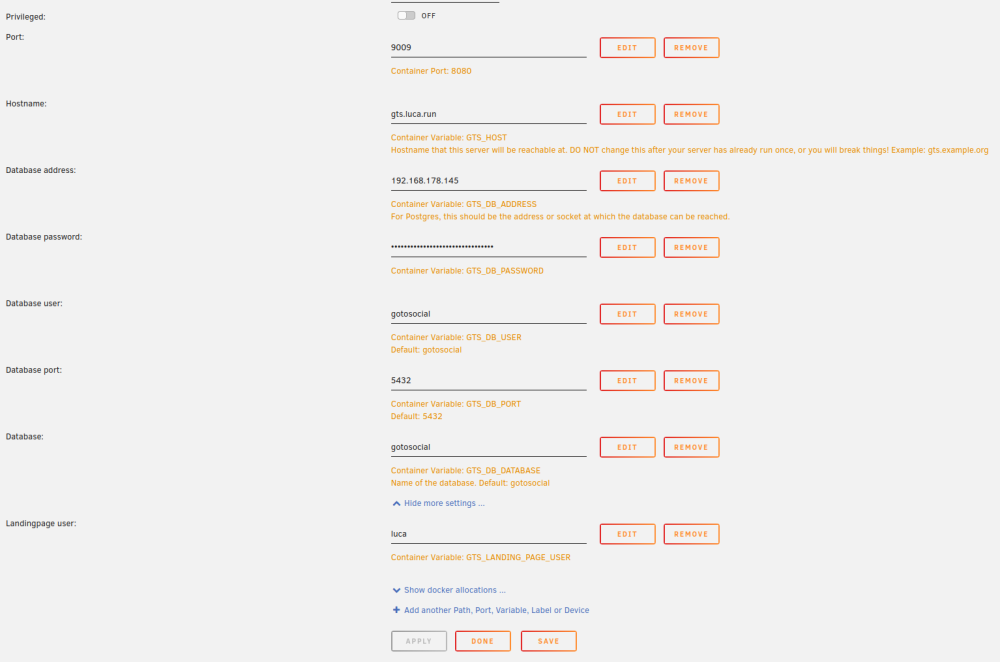
-
@StenFrisk Yes. I haven't used it much, but it works: https://gts.luca.run/.
-
Template uses the official GoToSocial Docker: https://hub.docker.com/r/superseriousbusiness/gotosocial GoToSocial documentation: https://docs.gotosocial.org/en/latest/ GoToSocial issues: https://github.com/superseriousbusiness/gotosocial/issues Pull requests for the template are welcome at https://github.com/lucahammer/unraid-templates Additional variables can be found in the example config https://github.com/superseriousbusiness/gotosocial/blob/main/example/config.yaml

