





Daaadou
Members
-
Joined
-
Last visited
-
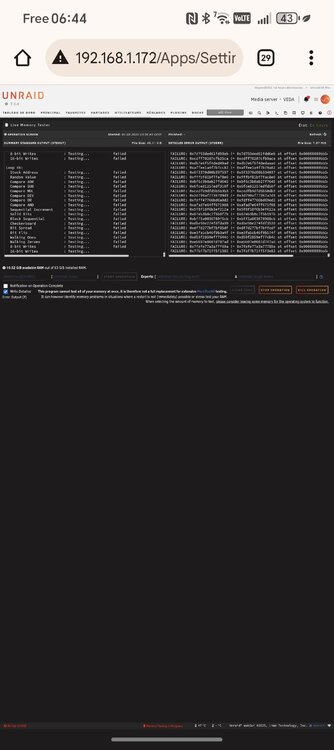
Hello, It is solved, I had one bad RAM stick as you thought. I needed to plug a monitor in to troubleshoot properly but I have been able to identify the culprit thanks to the built in memtest plugin, very useful. I have a question, how can I have access to all the warning etc? The corruption started when I had the first message of the cache getting full because the mover was not able top empty the corrupted files. I would like to find these messages and I will suppress all files copied on the NAS since then. How can I find that info ?
-
Ok, thank you.
-
Thank you Jorge, you've been very helpful. Is tehre a way to find the corrupted file on my array disks ? Some shares are set to copy directly to the array, not going through the cache, how can I assess these files ?
-
Also, do you have any ideas about the address name change? From veda.local to veda-2.local? Seems begnine but how does it happen? Due to the network config? Using a second network interface (10g)?
-
It looks like the memory is failing a lot. With this information, next step is to change the memory sticks? Or is there other tests to run?
-
veda-diagnostics-20250805-1653.zip
-
From The 2 smart tests, can I conclude that the NVME Serial Number: S4J4NX0RA34479X needs to be replaced ?
-
Second NVME extended smart test smartctl 7.4 2023-08-01 r5530 [x86_64-linux-6.12.24-Unraid] (local build) Copyright (C) 2002-23, Bruce Allen, Christian Franke, www.smartmontools.org === START OF INFORMATION SECTION === Model Number: Samsung SSD 970 EVO Plus 2TB Serial Number: S4J4NX0RA34479X Firmware Version: 2B2QEXM7 PCI Vendor/Subsystem ID: 0x144d IEEE OUI Identifier: 0x002538 Total NVM Capacity: 2,000,398,934,016 [2.00 TB] Unallocated NVM Capacity: 0 Controller ID: 4 NVMe Version: 1.3 Number of Namespaces: 1 Namespace 1 Size/Capacity: 2,000,398,934,016 [2.00 TB] Namespace 1 Utilization: 59,546,669,056 [59.5 GB] Namespace 1 Formatted LBA Size: 512 Namespace 1 IEEE EUI-64: 002538 5a11b29dbd Local Time is: Tue Aug 5 15:55:03 2025 CEST Firmware Updates (0x16): 3 Slots, no Reset required Optional Admin Commands (0x0017): Security Format Frmw_DL Self_Test Optional NVM Commands (0x005f): Comp Wr_Unc DS_Mngmt Wr_Zero Sav/Sel_Feat Timestmp Log Page Attributes (0x03): S/H_per_NS Cmd_Eff_Lg Maximum Data Transfer Size: 512 Pages Warning Comp. Temp. Threshold: 85 Celsius Critical Comp. Temp. Threshold: 85 Celsius Supported Power States St Op Max Active Idle RL RT WL WT Ent_Lat Ex_Lat 0 + 7.50W - - 0 0 0 0 0 0 1 + 5.90W - - 1 1 1 1 0 0 2 + 3.60W - - 2 2 2 2 0 0 3 - 0.0700W - - 3 3 3 3 210 1200 4 - 0.0050W - - 4 4 4 4 2000 8000 Supported LBA Sizes (NSID 0x1) Id Fmt Data Metadt Rel_Perf 0 + 512 0 0 === START OF SMART DATA SECTION === SMART overall-health self-assessment test result: PASSED SMART/Health Information (NVMe Log 0x02) Critical Warning: 0x00 Temperature: 55 Celsius Available Spare: 100% Available Spare Threshold: 10% Percentage Used: 3% Data Units Read: 151,303,560 [77.4 TB] Data Units Written: 229,018,503 [117 TB] Host Read Commands: 507,030,412 Host Write Commands: 844,078,201 Controller Busy Time: 3,307 Power Cycles: 1,573 Power On Hours: 3,347 Unsafe Shutdowns: 106 Media and Data Integrity Errors: 0 Error Information Log Entries: 9,747 Warning Comp. Temperature Time: 0 Critical Comp. Temperature Time: 0 Temperature Sensor 1: 55 Celsius Temperature Sensor 2: 59 Celsius Error Information (NVMe Log 0x01, 16 of 64 entries) Num ErrCount SQId CmdId Status PELoc LBA NSID VS Message 0 9747 0 0x4004 0x4004 - 0 0 - Invalid Field in Command Self-test Log (NVMe Log 0x06) Self-test status: No self-test in progress Num Test_Description Status Power_on_Hours Failing_LBA NSID Seg SCT Code 0 Extended Completed without error 3347 - - - - - 1 Short Completed without error 3290 - - - - -
-
First SMART extended test : smartctl 7.4 2023-08-01 r5530 [x86_64-linux-6.12.24-Unraid] (local build) Copyright (C) 2002-23, Bruce Allen, Christian Franke, www.smartmontools.org === START OF INFORMATION SECTION === Model Number: Samsung SSD 970 EVO Plus 2TB Serial Number: S6P1NS0T218097N Firmware Version: 4B2QEXM7 PCI Vendor/Subsystem ID: 0x144d IEEE OUI Identifier: 0x002538 Total NVM Capacity: 2,000,398,934,016 [2.00 TB] Unallocated NVM Capacity: 0 Controller ID: 6 NVMe Version: 1.3 Number of Namespaces: 1 Namespace 1 Size/Capacity: 2,000,398,934,016 [2.00 TB] Namespace 1 Utilization: 59,547,701,248 [59.5 GB] Namespace 1 Formatted LBA Size: 512 Namespace 1 IEEE EUI-64: 002538 5221415def Local Time is: Tue Aug 5 15:18:55 2025 CEST Firmware Updates (0x16): 3 Slots, no Reset required Optional Admin Commands (0x0017): Security Format Frmw_DL Self_Test Optional NVM Commands (0x0057): Comp Wr_Unc DS_Mngmt Sav/Sel_Feat Timestmp Log Page Attributes (0x0f): S/H_per_NS Cmd_Eff_Lg Ext_Get_Lg Telmtry_Lg Maximum Data Transfer Size: 128 Pages Warning Comp. Temp. Threshold: 82 Celsius Critical Comp. Temp. Threshold: 85 Celsius Supported Power States St Op Max Active Idle RL RT WL WT Ent_Lat Ex_Lat 0 + 7.59W - - 0 0 0 0 0 0 1 + 7.59W - - 1 1 1 1 0 200 2 + 7.59W - - 2 2 2 2 0 1000 3 - 0.0500W - - 3 3 3 3 2000 1200 4 - 0.0050W - - 4 4 4 4 500 9500 Supported LBA Sizes (NSID 0x1) Id Fmt Data Metadt Rel_Perf 0 + 512 0 0 === START OF SMART DATA SECTION === SMART overall-health self-assessment test result: PASSED SMART/Health Information (NVMe Log 0x02) Critical Warning: 0x00 Temperature: 45 Celsius Available Spare: 100% Available Spare Threshold: 10% Percentage Used: 2% Data Units Read: 105,082,200 [53.8 TB] Data Units Written: 166,882,781 [85.4 TB] Host Read Commands: 167,266,757 Host Write Commands: 306,469,559 Controller Busy Time: 4,656 Power Cycles: 1,413 Power On Hours: 1,364 Unsafe Shutdowns: 68 Media and Data Integrity Errors: 0 Error Information Log Entries: 0 Warning Comp. Temperature Time: 0 Critical Comp. Temperature Time: 0 Temperature Sensor 1: 45 Celsius Temperature Sensor 2: 51 Celsius Error Information (NVMe Log 0x01, 16 of 64 entries) No Errors Logged Self-test Log (NVMe Log 0x06) Self-test status: No self-test in progress Num Test_Description Status Power_on_Hours Failing_LBA NSID Seg SCT Code 0 Extended Completed without error 1364 - - - - - 1 Extended Completed without error 1347 - - - - - 2 Short Completed without error 1329 - - - - -
-
Hello everyone, I would like to get some help about a problem I am having for the last few weeks. First of all and before describing the main topic, I had a weird thing happening to my server, its name (host.local) changed to host-2.local. Still reachable with 192.168.1.xxx but its name got a -2 appendix... Sometimes, it would even be reachable with host.local and after a few minutes, it is not available anymore, host-2.local is the one working. I don't know if that would be of any interest for the main topic. So my configuration is a 14 disks array, 2 parity. XFS. 2 cache nvme, samsung evo 970, btfrs. I noticed one day that the disk were full, very surprised and trying to use the mover did not emptied the disks. So I opened their log file and saw this kind of output : The main NVME Aug 5 11:49:23 VEDA emhttpd: part nvme1n1p1 2048 2000397885440 Aug 5 11:49:23 VEDA emhttpd: device nvme1n1 partition: nvme1n1p1 type: dos start: 2048 size: 1953513560, code: 0x83 (4) Aug 5 11:49:23 VEDA emhttpd: import 30 pool device: (nvme1n1) Samsung_SSD_970_EVO_Plus_2TB_S6P1NS0T218097N Aug 5 11:49:24 VEDA emhttpd: read SMART /dev/nvme1n1 Aug 5 11:49:31 VEDA emhttpd: /bin/lsblk -lnbo TYPE,NAME,START,SIZE /dev/nvme1n1 2>&1 Aug 5 11:49:31 VEDA emhttpd: disk nvme1n1 2000398934016 Aug 5 11:49:31 VEDA emhttpd: part nvme1n1p1 2048 2000397885440 Aug 5 11:49:31 VEDA emhttpd: device nvme1n1 partition: nvme1n1p1 type: dos start: 2048 size: 1953513560, code: 0x83 (4) Aug 5 11:49:31 VEDA emhttpd: import 30 pool device: (nvme1n1) Samsung_SSD_970_EVO_Plus_2TB_S6P1NS0T218097N Aug 5 11:50:29 VEDA emhttpd: shcmd (159): /sbin/wipefs -af --lock /dev/nvme1n1p1 Aug 5 11:50:29 VEDA root: /dev/nvme1n1p1: 8 bytes were erased at offset 0x00010040 (btrfs): 5f 42 48 52 66 53 5f 4d Aug 5 11:50:29 VEDA emhttpd: shcmd (160): /sbin/blkdiscard /dev/nvme1n1p1 Aug 5 11:50:31 VEDA emhttpd: /sbin/mkfs.btrfs -K -f -d raid1 -m raid1 /dev/nvme1n1p1 /dev/nvme0n1p1 Aug 5 11:50:31 VEDA emhttpd: 1 1.82TiB /dev/nvme1n1p1 Aug 5 11:50:31 VEDA kernel: BTRFS: device fsid 808ce4b7-939f-4fb4-9803-c88631a31031 devid 1 transid 8 /dev/nvme1n1p1 (259:1) scanned by mkfs.btrfs (17504) Aug 5 11:50:31 VEDA emhttpd: devid 1 size 1.82TiB used 2.01GiB path /dev/nvme1n1p1 Aug 5 11:50:31 VEDA kernel: BTRFS info (device nvme1n1p1): first mount of filesystem 808ce4b7-939f-4fb4-9803-c88631a31031 Aug 5 11:50:31 VEDA kernel: BTRFS info (device nvme1n1p1): using crc32c (crc32c-intel) checksum algorithm Aug 5 11:50:31 VEDA kernel: BTRFS info (device nvme1n1p1): using free-space-tree Aug 5 11:50:31 VEDA kernel: BTRFS info (device nvme1n1p1): checking UUID tree Aug 5 11:50:31 VEDA kernel: BTRFS info (device nvme1n1p1 state M): turning on async discard Aug 5 12:25:46 VEDA kernel: BTRFS warning (device nvme1n1p1): csum failed root 5 ino 264 off 23114084352 csum 0xc9ffeae6 expected csum 0x79285d08 mirror 1 Aug 5 12:25:46 VEDA kernel: BTRFS error (device nvme1n1p1): bdev /dev/nvme0n1p1 errs: wr 0, rd 0, flush 0, corrupt 1, gen 0 Aug 5 12:25:46 VEDA kernel: BTRFS warning (device nvme1n1p1): csum failed root 5 ino 264 off 23116075008 csum 0x42991881 expected csum 0xb673d817 mirror 1 Aug 5 12:25:46 VEDA kernel: BTRFS error (device nvme1n1p1): bdev /dev/nvme0n1p1 errs: wr 0, rd 0, flush 0, corrupt 2, gen 0 Aug 5 12:25:46 VEDA kernel: BTRFS warning (device nvme1n1p1): csum failed root 5 ino 264 off 23116079104 csum 0x2e7e8ea0 expected csum 0x7e21569d mirror 1 Aug 5 12:25:46 VEDA kernel: BTRFS error (device nvme1n1p1): bdev /dev/nvme0n1p1 errs: wr 0, rd 0, flush 0, corrupt 3, gen 0 Aug 5 12:25:46 VEDA kernel: BTRFS warning (device nvme1n1p1): csum failed root 5 ino 264 off 23116075008 csum 0x9910ff6c expected csum 0xb673d817 mirror 2 Aug 5 12:25:46 VEDA kernel: BTRFS error (device nvme1n1p1): bdev /dev/nvme1n1p1 errs: wr 0, rd 0, flush 0, corrupt 1, gen 0 Aug 5 12:25:46 VEDA kernel: BTRFS warning (device nvme1n1p1): csum failed root 5 ino 264 off 23116079104 csum 0x87f407ef expected csum 0x7e21569d mirror 2 Aug 5 12:25:46 VEDA kernel: BTRFS error (device nvme1n1p1): bdev /dev/nvme1n1p1 errs: wr 0, rd 0, flush 0, corrupt 2, gen 0 Aug 5 12:25:46 VEDA kernel: BTRFS warning (device nvme1n1p1): csum failed root 5 ino 264 off 23114084352 csum 0xdfdb5394 expected csum 0x79285d08 mirror 2 Aug 5 12:25:46 VEDA kernel: BTRFS error (device nvme1n1p1): bdev /dev/nvme1n1p1 errs: wr 0, rd 0, flush 0, corrupt 3, gen 0 Aug 5 12:25:46 VEDA kernel: BTRFS warning (device nvme1n1p1): csum failed root 5 ino 264 off 23114084352 csum 0xcb5b98df expected csum 0x79285d08 mirror 1 Aug 5 12:25:46 VEDA kernel: BTRFS error (device nvme1n1p1): bdev /dev/nvme0n1p1 errs: wr 0, rd 0, flush 0, corrupt 4, gen 0 Aug 5 12:25:46 VEDA kernel: BTRFS warning (device nvme1n1p1): csum failed root 5 ino 264 off 23114084352 csum 0xbfbd1aee expected csum 0x79285d08 mirror 2 Aug 5 12:25:46 VEDA kernel: BTRFS error (device nvme1n1p1): bdev /dev/nvme1n1p1 errs: wr 0, rd 0, flush 0, corrupt 4, gen 0 Aug 5 12:25:46 VEDA kernel: BTRFS warning (device nvme1n1p1): csum failed root 5 ino 264 off 23114084352 csum 0x04415b26 expected csum 0x79285d08 mirror 1 Aug 5 12:25:46 VEDA kernel: BTRFS error (device nvme1n1p1): bdev /dev/nvme0n1p1 errs: wr 0, rd 0, flush 0, corrupt 5, gen 0 Aug 5 12:25:46 VEDA kernel: BTRFS warning (device nvme1n1p1): csum failed root 5 ino 264 off 23114084352 csum 0x8c1d12ce expected csum 0x79285d08 mirror 2 Aug 5 12:25:46 VEDA kernel: BTRFS error (device nvme1n1p1): bdev /dev/nvme1n1p1 errs: wr 0, rd 0, flush 0, corrupt 5, gen 0 Appuyer une touche pour fermer cette fenêtre The second NVME : Aug 5 11:48:46 VEDA kernel: nvme0n1: p1 Aug 5 11:49:23 VEDA emhttpd: online: Samsung_SSD_970_EVO_Plus_2TB_S4J4NX0RA34479X (nvme0n1) 512 3907029168 Aug 5 11:49:23 VEDA emhttpd: /bin/lsblk -lnbo TYPE,NAME,START,SIZE /dev/nvme0n1 2>&1 Aug 5 11:49:23 VEDA emhttpd: disk nvme0n1 2000398934016 Aug 5 11:49:23 VEDA emhttpd: part nvme0n1p1 2048 2000397885440 Aug 5 11:49:23 VEDA emhttpd: device nvme0n1 partition: nvme0n1p1 type: dos start: 2048 size: 1953513560, code: 0x83 (4) Aug 5 11:49:23 VEDA emhttpd: import 31 pool device: (nvme0n1) Samsung_SSD_970_EVO_Plus_2TB_S4J4NX0RA34479X Aug 5 11:49:24 VEDA emhttpd: read SMART /dev/nvme0n1 Aug 5 11:49:31 VEDA emhttpd: /bin/lsblk -lnbo TYPE,NAME,START,SIZE /dev/nvme0n1 2>&1 Aug 5 11:49:31 VEDA emhttpd: disk nvme0n1 2000398934016 Aug 5 11:49:31 VEDA emhttpd: part nvme0n1p1 2048 2000397885440 Aug 5 11:49:31 VEDA emhttpd: device nvme0n1 partition: nvme0n1p1 type: dos start: 2048 size: 1953513560, code: 0x83 (4) Aug 5 11:49:31 VEDA emhttpd: import 31 pool device: (nvme0n1) Samsung_SSD_970_EVO_Plus_2TB_S4J4NX0RA34479X Aug 5 11:50:30 VEDA emhttpd: shcmd (161): /sbin/wipefs -af --lock /dev/nvme0n1p1 Aug 5 11:50:30 VEDA root: /dev/nvme0n1p1: 8 bytes were erased at offset 0x00010040 (btrfs): 5f 42 48 52 66 53 5f 4d Aug 5 11:50:30 VEDA emhttpd: shcmd (162): /sbin/blkdiscard /dev/nvme0n1p1 Aug 5 11:50:31 VEDA emhttpd: /sbin/mkfs.btrfs -K -f -d raid1 -m raid1 /dev/nvme1n1p1 /dev/nvme0n1p1 Aug 5 11:50:31 VEDA emhttpd: 2 1.82TiB /dev/nvme0n1p1 Aug 5 11:50:31 VEDA kernel: BTRFS: device fsid 808ce4b7-939f-4fb4-9803-c88631a31031 devid 2 transid 8 /dev/nvme0n1p1 (259:3) scanned by mkfs.btrfs (17504) Aug 5 11:50:31 VEDA emhttpd: devid 2 size 1.82TiB used 2.01GiB path /dev/nvme0n1p1 Aug 5 12:25:46 VEDA kernel: BTRFS error (device nvme1n1p1): bdev /dev/nvme0n1p1 errs: wr 0, rd 0, flush 0, corrupt 1, gen 0 Aug 5 12:25:46 VEDA kernel: BTRFS error (device nvme1n1p1): bdev /dev/nvme0n1p1 errs: wr 0, rd 0, flush 0, corrupt 2, gen 0 Aug 5 12:25:46 VEDA kernel: BTRFS error (device nvme1n1p1): bdev /dev/nvme0n1p1 errs: wr 0, rd 0, flush 0, corrupt 3, gen 0 Aug 5 12:25:46 VEDA kernel: BTRFS error (device nvme1n1p1): bdev /dev/nvme0n1p1 errs: wr 0, rd 0, flush 0, corrupt 4, gen 0 Aug 5 12:25:46 VEDA kernel: BTRFS error (device nvme1n1p1): bdev /dev/nvme0n1p1 errs: wr 0, rd 0, flush 0, corrupt 5, gen 0 Appuyer une touche pour fermer cette fenêtre So these outputs are from today because I finally decided to format the two NVMEs and put them back in the pool. I installed Jdownloader again, it got the file from the web but again, corruption, everywhere as you can see. I am puzzled how 2 NVMEs could go bad at the same time. So if you can help me, let me know what info you need, I am not an expert but I can follow instructions. I am running a parity check right now, the last one had lots of errors, 900 or something so I got worried, thgat is why I am creating this ticket.
-
Ok I think I found it. I killed the two other smb option, wds and macos. Reboot, now I can access via veda.local. I Hope it stays that way. Thank you for your help Frank.
-
Thank you for your answer. Sorry for the screenshot in French. I just set my unraid as static on the router as well. Maybe I need to reboot devices. I did a factory reset on the router but it still sees it as veda-2.
-
I forgot to mention something. When I looked at the address the first time, there were a netbios mdns address named veda and another one named veda-2. I suppressed the netbios ability in the smb section. No more netbios address in the router menu but he kept veda-2 for the server name.
-
Here are some screenshot of the settings on the router and the server. The mac is the same. I dont know where he got that veda-2 name from seriously.
-
Hello, My server name has been changed to its name-2 on my router and I can access it with name-2.local instead of name.local. Ip address still working normaly. Anyone has already experienced that? I have a cor api notification so I added the new origin in the connect menu. I think it comes from the router but everyone on the web people are saying it is the machine which declares itself to the router so I dont understand. Thank you for your help.
