





Daaadou
Members
-
Joined
-
Last visited
Everything posted by Daaadou
-
Hello, It is solved, I had one bad RAM stick as you thought. I needed to plug a monitor in to troubleshoot properly but I have been able to identify the culprit thanks to the built in memtest plugin, very useful. I have a question, how can I have access to all the warning etc? The corruption started when I had the first message of the cache getting full because the mover was not able top empty the corrupted files. I would like to find these messages and I will suppress all files copied on the NAS since then. How can I find that info ?
-
Ok, thank you.
-
Thank you Jorge, you've been very helpful. Is tehre a way to find the corrupted file on my array disks ? Some shares are set to copy directly to the array, not going through the cache, how can I assess these files ?
-
Also, do you have any ideas about the address name change? From veda.local to veda-2.local? Seems begnine but how does it happen? Due to the network config? Using a second network interface (10g)?
-
It looks like the memory is failing a lot. With this information, next step is to change the memory sticks? Or is there other tests to run?
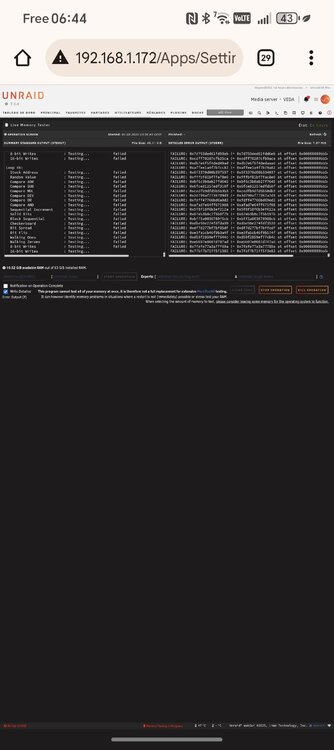
-
veda-diagnostics-20250805-1653.zip
-
From The 2 smart tests, can I conclude that the NVME Serial Number: S4J4NX0RA34479X needs to be replaced ?
-
Second NVME extended smart test smartctl 7.4 2023-08-01 r5530 [x86_64-linux-6.12.24-Unraid] (local build) Copyright (C) 2002-23, Bruce Allen, Christian Franke, www.smartmontools.org === START OF INFORMATION SECTION === Model Number: Samsung SSD 970 EVO Plus 2TB Serial Number: S4J4NX0RA34479X Firmware Version: 2B2QEXM7 PCI Vendor/Subsystem ID: 0x144d IEEE OUI Identifier: 0x002538 Total NVM Capacity: 2,000,398,934,016 [2.00 TB] Unallocated NVM Capacity: 0 Controller ID: 4 NVMe Version: 1.3 Number of Namespaces: 1 Namespace 1 Size/Capacity: 2,000,398,934,016 [2.00 TB] Namespace 1 Utilization: 59,546,669,056 [59.5 GB] Namespace 1 Formatted LBA Size: 512 Namespace 1 IEEE EUI-64: 002538 5a11b29dbd Local Time is: Tue Aug 5 15:55:03 2025 CEST Firmware Updates (0x16): 3 Slots, no Reset required Optional Admin Commands (0x0017): Security Format Frmw_DL Self_Test Optional NVM Commands (0x005f): Comp Wr_Unc DS_Mngmt Wr_Zero Sav/Sel_Feat Timestmp Log Page Attributes (0x03): S/H_per_NS Cmd_Eff_Lg Maximum Data Transfer Size: 512 Pages Warning Comp. Temp. Threshold: 85 Celsius Critical Comp. Temp. Threshold: 85 Celsius Supported Power States St Op Max Active Idle RL RT WL WT Ent_Lat Ex_Lat 0 + 7.50W - - 0 0 0 0 0 0 1 + 5.90W - - 1 1 1 1 0 0 2 + 3.60W - - 2 2 2 2 0 0 3 - 0.0700W - - 3 3 3 3 210 1200 4 - 0.0050W - - 4 4 4 4 2000 8000 Supported LBA Sizes (NSID 0x1) Id Fmt Data Metadt Rel_Perf 0 + 512 0 0 === START OF SMART DATA SECTION === SMART overall-health self-assessment test result: PASSED SMART/Health Information (NVMe Log 0x02) Critical Warning: 0x00 Temperature: 55 Celsius Available Spare: 100% Available Spare Threshold: 10% Percentage Used: 3% Data Units Read: 151,303,560 [77.4 TB] Data Units Written: 229,018,503 [117 TB] Host Read Commands: 507,030,412 Host Write Commands: 844,078,201 Controller Busy Time: 3,307 Power Cycles: 1,573 Power On Hours: 3,347 Unsafe Shutdowns: 106 Media and Data Integrity Errors: 0 Error Information Log Entries: 9,747 Warning Comp. Temperature Time: 0 Critical Comp. Temperature Time: 0 Temperature Sensor 1: 55 Celsius Temperature Sensor 2: 59 Celsius Error Information (NVMe Log 0x01, 16 of 64 entries) Num ErrCount SQId CmdId Status PELoc LBA NSID VS Message 0 9747 0 0x4004 0x4004 - 0 0 - Invalid Field in Command Self-test Log (NVMe Log 0x06) Self-test status: No self-test in progress Num Test_Description Status Power_on_Hours Failing_LBA NSID Seg SCT Code 0 Extended Completed without error 3347 - - - - - 1 Short Completed without error 3290 - - - - -
-
First SMART extended test : smartctl 7.4 2023-08-01 r5530 [x86_64-linux-6.12.24-Unraid] (local build) Copyright (C) 2002-23, Bruce Allen, Christian Franke, www.smartmontools.org === START OF INFORMATION SECTION === Model Number: Samsung SSD 970 EVO Plus 2TB Serial Number: S6P1NS0T218097N Firmware Version: 4B2QEXM7 PCI Vendor/Subsystem ID: 0x144d IEEE OUI Identifier: 0x002538 Total NVM Capacity: 2,000,398,934,016 [2.00 TB] Unallocated NVM Capacity: 0 Controller ID: 6 NVMe Version: 1.3 Number of Namespaces: 1 Namespace 1 Size/Capacity: 2,000,398,934,016 [2.00 TB] Namespace 1 Utilization: 59,547,701,248 [59.5 GB] Namespace 1 Formatted LBA Size: 512 Namespace 1 IEEE EUI-64: 002538 5221415def Local Time is: Tue Aug 5 15:18:55 2025 CEST Firmware Updates (0x16): 3 Slots, no Reset required Optional Admin Commands (0x0017): Security Format Frmw_DL Self_Test Optional NVM Commands (0x0057): Comp Wr_Unc DS_Mngmt Sav/Sel_Feat Timestmp Log Page Attributes (0x0f): S/H_per_NS Cmd_Eff_Lg Ext_Get_Lg Telmtry_Lg Maximum Data Transfer Size: 128 Pages Warning Comp. Temp. Threshold: 82 Celsius Critical Comp. Temp. Threshold: 85 Celsius Supported Power States St Op Max Active Idle RL RT WL WT Ent_Lat Ex_Lat 0 + 7.59W - - 0 0 0 0 0 0 1 + 7.59W - - 1 1 1 1 0 200 2 + 7.59W - - 2 2 2 2 0 1000 3 - 0.0500W - - 3 3 3 3 2000 1200 4 - 0.0050W - - 4 4 4 4 500 9500 Supported LBA Sizes (NSID 0x1) Id Fmt Data Metadt Rel_Perf 0 + 512 0 0 === START OF SMART DATA SECTION === SMART overall-health self-assessment test result: PASSED SMART/Health Information (NVMe Log 0x02) Critical Warning: 0x00 Temperature: 45 Celsius Available Spare: 100% Available Spare Threshold: 10% Percentage Used: 2% Data Units Read: 105,082,200 [53.8 TB] Data Units Written: 166,882,781 [85.4 TB] Host Read Commands: 167,266,757 Host Write Commands: 306,469,559 Controller Busy Time: 4,656 Power Cycles: 1,413 Power On Hours: 1,364 Unsafe Shutdowns: 68 Media and Data Integrity Errors: 0 Error Information Log Entries: 0 Warning Comp. Temperature Time: 0 Critical Comp. Temperature Time: 0 Temperature Sensor 1: 45 Celsius Temperature Sensor 2: 51 Celsius Error Information (NVMe Log 0x01, 16 of 64 entries) No Errors Logged Self-test Log (NVMe Log 0x06) Self-test status: No self-test in progress Num Test_Description Status Power_on_Hours Failing_LBA NSID Seg SCT Code 0 Extended Completed without error 1364 - - - - - 1 Extended Completed without error 1347 - - - - - 2 Short Completed without error 1329 - - - - -
-
Hello everyone, I would like to get some help about a problem I am having for the last few weeks. First of all and before describing the main topic, I had a weird thing happening to my server, its name (host.local) changed to host-2.local. Still reachable with 192.168.1.xxx but its name got a -2 appendix... Sometimes, it would even be reachable with host.local and after a few minutes, it is not available anymore, host-2.local is the one working. I don't know if that would be of any interest for the main topic. So my configuration is a 14 disks array, 2 parity. XFS. 2 cache nvme, samsung evo 970, btfrs. I noticed one day that the disk were full, very surprised and trying to use the mover did not emptied the disks. So I opened their log file and saw this kind of output : The main NVME Aug 5 11:49:23 VEDA emhttpd: part nvme1n1p1 2048 2000397885440 Aug 5 11:49:23 VEDA emhttpd: device nvme1n1 partition: nvme1n1p1 type: dos start: 2048 size: 1953513560, code: 0x83 (4) Aug 5 11:49:23 VEDA emhttpd: import 30 pool device: (nvme1n1) Samsung_SSD_970_EVO_Plus_2TB_S6P1NS0T218097N Aug 5 11:49:24 VEDA emhttpd: read SMART /dev/nvme1n1 Aug 5 11:49:31 VEDA emhttpd: /bin/lsblk -lnbo TYPE,NAME,START,SIZE /dev/nvme1n1 2>&1 Aug 5 11:49:31 VEDA emhttpd: disk nvme1n1 2000398934016 Aug 5 11:49:31 VEDA emhttpd: part nvme1n1p1 2048 2000397885440 Aug 5 11:49:31 VEDA emhttpd: device nvme1n1 partition: nvme1n1p1 type: dos start: 2048 size: 1953513560, code: 0x83 (4) Aug 5 11:49:31 VEDA emhttpd: import 30 pool device: (nvme1n1) Samsung_SSD_970_EVO_Plus_2TB_S6P1NS0T218097N Aug 5 11:50:29 VEDA emhttpd: shcmd (159): /sbin/wipefs -af --lock /dev/nvme1n1p1 Aug 5 11:50:29 VEDA root: /dev/nvme1n1p1: 8 bytes were erased at offset 0x00010040 (btrfs): 5f 42 48 52 66 53 5f 4d Aug 5 11:50:29 VEDA emhttpd: shcmd (160): /sbin/blkdiscard /dev/nvme1n1p1 Aug 5 11:50:31 VEDA emhttpd: /sbin/mkfs.btrfs -K -f -d raid1 -m raid1 /dev/nvme1n1p1 /dev/nvme0n1p1 Aug 5 11:50:31 VEDA emhttpd: 1 1.82TiB /dev/nvme1n1p1 Aug 5 11:50:31 VEDA kernel: BTRFS: device fsid 808ce4b7-939f-4fb4-9803-c88631a31031 devid 1 transid 8 /dev/nvme1n1p1 (259:1) scanned by mkfs.btrfs (17504) Aug 5 11:50:31 VEDA emhttpd: devid 1 size 1.82TiB used 2.01GiB path /dev/nvme1n1p1 Aug 5 11:50:31 VEDA kernel: BTRFS info (device nvme1n1p1): first mount of filesystem 808ce4b7-939f-4fb4-9803-c88631a31031 Aug 5 11:50:31 VEDA kernel: BTRFS info (device nvme1n1p1): using crc32c (crc32c-intel) checksum algorithm Aug 5 11:50:31 VEDA kernel: BTRFS info (device nvme1n1p1): using free-space-tree Aug 5 11:50:31 VEDA kernel: BTRFS info (device nvme1n1p1): checking UUID tree Aug 5 11:50:31 VEDA kernel: BTRFS info (device nvme1n1p1 state M): turning on async discard Aug 5 12:25:46 VEDA kernel: BTRFS warning (device nvme1n1p1): csum failed root 5 ino 264 off 23114084352 csum 0xc9ffeae6 expected csum 0x79285d08 mirror 1 Aug 5 12:25:46 VEDA kernel: BTRFS error (device nvme1n1p1): bdev /dev/nvme0n1p1 errs: wr 0, rd 0, flush 0, corrupt 1, gen 0 Aug 5 12:25:46 VEDA kernel: BTRFS warning (device nvme1n1p1): csum failed root 5 ino 264 off 23116075008 csum 0x42991881 expected csum 0xb673d817 mirror 1 Aug 5 12:25:46 VEDA kernel: BTRFS error (device nvme1n1p1): bdev /dev/nvme0n1p1 errs: wr 0, rd 0, flush 0, corrupt 2, gen 0 Aug 5 12:25:46 VEDA kernel: BTRFS warning (device nvme1n1p1): csum failed root 5 ino 264 off 23116079104 csum 0x2e7e8ea0 expected csum 0x7e21569d mirror 1 Aug 5 12:25:46 VEDA kernel: BTRFS error (device nvme1n1p1): bdev /dev/nvme0n1p1 errs: wr 0, rd 0, flush 0, corrupt 3, gen 0 Aug 5 12:25:46 VEDA kernel: BTRFS warning (device nvme1n1p1): csum failed root 5 ino 264 off 23116075008 csum 0x9910ff6c expected csum 0xb673d817 mirror 2 Aug 5 12:25:46 VEDA kernel: BTRFS error (device nvme1n1p1): bdev /dev/nvme1n1p1 errs: wr 0, rd 0, flush 0, corrupt 1, gen 0 Aug 5 12:25:46 VEDA kernel: BTRFS warning (device nvme1n1p1): csum failed root 5 ino 264 off 23116079104 csum 0x87f407ef expected csum 0x7e21569d mirror 2 Aug 5 12:25:46 VEDA kernel: BTRFS error (device nvme1n1p1): bdev /dev/nvme1n1p1 errs: wr 0, rd 0, flush 0, corrupt 2, gen 0 Aug 5 12:25:46 VEDA kernel: BTRFS warning (device nvme1n1p1): csum failed root 5 ino 264 off 23114084352 csum 0xdfdb5394 expected csum 0x79285d08 mirror 2 Aug 5 12:25:46 VEDA kernel: BTRFS error (device nvme1n1p1): bdev /dev/nvme1n1p1 errs: wr 0, rd 0, flush 0, corrupt 3, gen 0 Aug 5 12:25:46 VEDA kernel: BTRFS warning (device nvme1n1p1): csum failed root 5 ino 264 off 23114084352 csum 0xcb5b98df expected csum 0x79285d08 mirror 1 Aug 5 12:25:46 VEDA kernel: BTRFS error (device nvme1n1p1): bdev /dev/nvme0n1p1 errs: wr 0, rd 0, flush 0, corrupt 4, gen 0 Aug 5 12:25:46 VEDA kernel: BTRFS warning (device nvme1n1p1): csum failed root 5 ino 264 off 23114084352 csum 0xbfbd1aee expected csum 0x79285d08 mirror 2 Aug 5 12:25:46 VEDA kernel: BTRFS error (device nvme1n1p1): bdev /dev/nvme1n1p1 errs: wr 0, rd 0, flush 0, corrupt 4, gen 0 Aug 5 12:25:46 VEDA kernel: BTRFS warning (device nvme1n1p1): csum failed root 5 ino 264 off 23114084352 csum 0x04415b26 expected csum 0x79285d08 mirror 1 Aug 5 12:25:46 VEDA kernel: BTRFS error (device nvme1n1p1): bdev /dev/nvme0n1p1 errs: wr 0, rd 0, flush 0, corrupt 5, gen 0 Aug 5 12:25:46 VEDA kernel: BTRFS warning (device nvme1n1p1): csum failed root 5 ino 264 off 23114084352 csum 0x8c1d12ce expected csum 0x79285d08 mirror 2 Aug 5 12:25:46 VEDA kernel: BTRFS error (device nvme1n1p1): bdev /dev/nvme1n1p1 errs: wr 0, rd 0, flush 0, corrupt 5, gen 0 Appuyer une touche pour fermer cette fenêtre The second NVME : Aug 5 11:48:46 VEDA kernel: nvme0n1: p1 Aug 5 11:49:23 VEDA emhttpd: online: Samsung_SSD_970_EVO_Plus_2TB_S4J4NX0RA34479X (nvme0n1) 512 3907029168 Aug 5 11:49:23 VEDA emhttpd: /bin/lsblk -lnbo TYPE,NAME,START,SIZE /dev/nvme0n1 2>&1 Aug 5 11:49:23 VEDA emhttpd: disk nvme0n1 2000398934016 Aug 5 11:49:23 VEDA emhttpd: part nvme0n1p1 2048 2000397885440 Aug 5 11:49:23 VEDA emhttpd: device nvme0n1 partition: nvme0n1p1 type: dos start: 2048 size: 1953513560, code: 0x83 (4) Aug 5 11:49:23 VEDA emhttpd: import 31 pool device: (nvme0n1) Samsung_SSD_970_EVO_Plus_2TB_S4J4NX0RA34479X Aug 5 11:49:24 VEDA emhttpd: read SMART /dev/nvme0n1 Aug 5 11:49:31 VEDA emhttpd: /bin/lsblk -lnbo TYPE,NAME,START,SIZE /dev/nvme0n1 2>&1 Aug 5 11:49:31 VEDA emhttpd: disk nvme0n1 2000398934016 Aug 5 11:49:31 VEDA emhttpd: part nvme0n1p1 2048 2000397885440 Aug 5 11:49:31 VEDA emhttpd: device nvme0n1 partition: nvme0n1p1 type: dos start: 2048 size: 1953513560, code: 0x83 (4) Aug 5 11:49:31 VEDA emhttpd: import 31 pool device: (nvme0n1) Samsung_SSD_970_EVO_Plus_2TB_S4J4NX0RA34479X Aug 5 11:50:30 VEDA emhttpd: shcmd (161): /sbin/wipefs -af --lock /dev/nvme0n1p1 Aug 5 11:50:30 VEDA root: /dev/nvme0n1p1: 8 bytes were erased at offset 0x00010040 (btrfs): 5f 42 48 52 66 53 5f 4d Aug 5 11:50:30 VEDA emhttpd: shcmd (162): /sbin/blkdiscard /dev/nvme0n1p1 Aug 5 11:50:31 VEDA emhttpd: /sbin/mkfs.btrfs -K -f -d raid1 -m raid1 /dev/nvme1n1p1 /dev/nvme0n1p1 Aug 5 11:50:31 VEDA emhttpd: 2 1.82TiB /dev/nvme0n1p1 Aug 5 11:50:31 VEDA kernel: BTRFS: device fsid 808ce4b7-939f-4fb4-9803-c88631a31031 devid 2 transid 8 /dev/nvme0n1p1 (259:3) scanned by mkfs.btrfs (17504) Aug 5 11:50:31 VEDA emhttpd: devid 2 size 1.82TiB used 2.01GiB path /dev/nvme0n1p1 Aug 5 12:25:46 VEDA kernel: BTRFS error (device nvme1n1p1): bdev /dev/nvme0n1p1 errs: wr 0, rd 0, flush 0, corrupt 1, gen 0 Aug 5 12:25:46 VEDA kernel: BTRFS error (device nvme1n1p1): bdev /dev/nvme0n1p1 errs: wr 0, rd 0, flush 0, corrupt 2, gen 0 Aug 5 12:25:46 VEDA kernel: BTRFS error (device nvme1n1p1): bdev /dev/nvme0n1p1 errs: wr 0, rd 0, flush 0, corrupt 3, gen 0 Aug 5 12:25:46 VEDA kernel: BTRFS error (device nvme1n1p1): bdev /dev/nvme0n1p1 errs: wr 0, rd 0, flush 0, corrupt 4, gen 0 Aug 5 12:25:46 VEDA kernel: BTRFS error (device nvme1n1p1): bdev /dev/nvme0n1p1 errs: wr 0, rd 0, flush 0, corrupt 5, gen 0 Appuyer une touche pour fermer cette fenêtre So these outputs are from today because I finally decided to format the two NVMEs and put them back in the pool. I installed Jdownloader again, it got the file from the web but again, corruption, everywhere as you can see. I am puzzled how 2 NVMEs could go bad at the same time. So if you can help me, let me know what info you need, I am not an expert but I can follow instructions. I am running a parity check right now, the last one had lots of errors, 900 or something so I got worried, thgat is why I am creating this ticket.
-
Ok I think I found it. I killed the two other smb option, wds and macos. Reboot, now I can access via veda.local. I Hope it stays that way. Thank you for your help Frank.
-
Thank you for your answer. Sorry for the screenshot in French. I just set my unraid as static on the router as well. Maybe I need to reboot devices. I did a factory reset on the router but it still sees it as veda-2.
-
I forgot to mention something. When I looked at the address the first time, there were a netbios mdns address named veda and another one named veda-2. I suppressed the netbios ability in the smb section. No more netbios address in the router menu but he kept veda-2 for the server name.
-
Here are some screenshot of the settings on the router and the server. The mac is the same. I dont know where he got that veda-2 name from seriously.
-
Hello, My server name has been changed to its name-2 on my router and I can access it with name-2.local instead of name.local. Ip address still working normaly. Anyone has already experienced that? I have a cor api notification so I added the new origin in the connect menu. I think it comes from the router but everyone on the web people are saying it is the machine which declares itself to the router so I dont understand. Thank you for your help.
-
I did that with the bz files but it didn't work. Since I suspected it could be hardware, I used the RAM from my desktop and put it inside my Unraid NAS, no more bzfirmware issue, got stucked once or twice trying to boot but at different level. Then it reached the login page. I hope that was it. These were some 10 years old RAM sticks from my old desktop, RIP...
-
Hello, I received the new thumb drive, fresh install of 6.12.4, still stuck at bzfirmware...
-
Hello Jorge, Thank you for your answer. Will do, how about config files? BR, David
-
Hello, Yet another Unraid is not booting topic. It started yesterday, I don't even know why since it was running for two months and I did nothing to stop it. Anyways. It was not able to start again. I brought the server in my room so I could see what was going on with a monitor, plugged a keyboard etc. At first, not possible to go through bzfirmware checksum, error and reboot. I reinstalled my flash drive (sandisk cruzer fit) with the Unraid soft and copied my config files. Once, it worked and got passed the bzfirmware and got stuck there, here is the screen : I tried again, now it stops at another bz files... Strongly indicates the thumb drive. Everytime I flash the drive, it seems to work once (not sure anymore with the many attemps I did) but not twice and get stucked at checksum afterwards. I ordered a new thumb drive but in the meantime, having some feedback would not hurt. Especially to decipher the INIT warning messages. What is going on? Thanks in advance community.
-
You totally rock dimebag, I installed system temp and now I can detect pwm on the mobo! It's quite the mess, there is multiple pwm entries but I have to work it out. Many many thanks.
-
Yup, same problem. I wonder how I can get the plugin to access the pwm chip on my mobo.
-
Hello, I have installed the plugin to help me manage the fan speed in regards to HDD temp but the plugin is not finding any of the fan. My motherboard is an Asrock H670 mITX and the fans are Noctuas' with the PWM feature. PWM feature is activated in the BIOS. I have the latest version of Unraid and the plugin is up to date. It is probably the PWM controller from the mobo which is not recognized? Do you know if there is a trick to get fan control to recognize the fans plugged in chassis fan 1 on this mobo? Thank you in advance,
-
Hey everyone, I am looking for a way to add two new function to my unraid server. The first one is an hba card to add more sata and the second is a 10gbe network card. My hardware is as follows : Asrock h670 mini itx Intel 12100 Crucial ddr4 3200 2x8gb Node 304 Several hc560 I ordered an hba card already, a 9207-8i and a small fan to cool it. I would like to be able to add a 10gbe sfp+ card to the server. The mobo support bifurcation, I have only one slot but it could split 16x to 2 8x thanks to an option in the bios. How do I do that trick? I am in Europe, could you point out a few references of hardware ? From what I’ve seen, I could use a riser that goes into the pcie slot and would have two cables that goes into two pcie daughter boards where could plug the hba and the nic. I would get the nic card on the last slot of the node since there is nothing there and would put the hba card inside with a fan. I d like some feedback if this is possible. Thank you in advance. Edit : I could also transform one of the nvme slot into pcie and fit the lsi sad card there?
-
Hello lolight, Thank you for your answer. You're right, it makes a lot of sense going with the 804 instead. First, I'll save a few bucks on the micro ATX as it is cheaper and I won't need an expansion card. Second, and probably most important, you make a very valid point about having a better cooling over all, shall be a great thing for the disks on the longer run I guess. About the PSU, you are totally right, I won't overlook it, a good PSU will enhance the MTBF of all other components of the unit because it delivers a better current. I'll look at your link, thank you very much. About the motherboard, micro ATX, 8 SATA ports, 2.5GBe natively, would you know a reference? Is there a similar website for the tier list mobo?
-
Hey there, Brand new to Unraid, I'm starting this post to get a feedback about my hardware shopping list and to get some best practices. First of all, I need to install a NAS at home to isolate the HDD in a room where we are not spending our time because they are noisy. I would also like to have access to data from any computers in the house. It will mainly be used to store some media files, big one, like 1:1 mkv rip I am making from my media collection (900 blu ray, 400 dvd and 250 4k disks). I am using madvr on some other computer to do the playback, the image quality is better on a videoprojector than with my panasonic blu ray player... Also music files so it is possible to listen to my library from the bedroom or the living room. Why Unraid? First of all because it is flexible, I don't want to invest in all the disks at the same time like zfs would ask me to. I also don't want to have a giant pool like in a classical raid meaning if anything goes wrong, I lose everyting. I also want the disks to be in a dedicated hardware and software, I think it is better for them to be operated this way in the long run. Also, the ease of use of the operating system, the ability to have the data available 24/7 from a device that has a low consumption unlike the two other computers in the house equipped with recent GPUs. At this point, I have read some people are using their NAS with Proxmox and Unraid in a VM so that they can use it also for domotic purpose using another dedicated VM, I am not at that level so far But I could be interested in the future. I don't need the highest performance since the main usage will be to store massive amount of video files and make them available for the other computer over a 2.5Gbe network I've set up at home. No critical data. Here is the hardware I have chosen so far : Node 304 white Asrock H670 M ITX Intel 12100 Crucial DDR4 2400Mhz 2x8Gb I chose the Node for its form factor and also because white is WAF compliant since the NAS will be in the main room right next to the router (a freebox delta, it has a SFP+ 10gbe output, I will use a Qnap switch to convert 10gbe to 2.5gbe). I chose the asrock even if it is a bit expensive because it supports recent Intel processor and it has 2.5GBe support. I chose the 12100 because it is a solid performer and requires very low electrical consumption. Plus it has an iGPU. The Crucial is something I got from a previous pc that died a few months ago, I think it is enough for what I intend to do. I am looking for a nvme, a power supply and an extension card to get the last two hdds in place since the mobo provides only 4 sata port. I guess 500GB for the nvme is far from enough, right? For the PSU, I'm not finding anything below 300watts nor fully modular. I guess I need to go with SFF PSU, what do you guys think? For the extension card, I don't know how it works, should I plug one in the PCIE port? And then connect all disks to it or also use the mobo SATA port? If you could propose some references or any insight. About the storage and the HDDs. I own one 4TB HDD but this one will only be temporary in the NAS. I own two Ultrastar HC560, 20TB each HDDs. These guys are loud Currently, they are full, formatted in NTFS and in a Windows 11 operated full tower in the living room. My plan is to buy another 20TB disk, fit it in inside the Unraid NAS, format it to XFS (good choice?) and start transferring data from one of the full disk to this disk. Then get the disk I just emptied out of the Windows tower and put it in the Unraid NAS, format it and do the same trick. I'll probably use the last disk as parity or maybe not, the disks have been bought during the last six months (not at the same time) so I think it is OK to put a parity in place a bit later in the year. I'll probably go for a total of 6 20TB HDDs, one dedicated for parity. I'm here so you guys can give me a proper feedback, first of all about if my media storage use case will be OK, what about my shopping list, should I optimize it? Is the workflow I have imagined to transfer the disk from Windows to Unraid is doable?
