





vast
Members
-
Joined
-
Last visited
-
I am sure in time they will pick up your template in the CA. They must!!! If you need any help let me know!
-
Just made a quick guide on how to do it here ;)
-
I have managed to install it just now. Open Unraid console from Web-UI. Navigate to DockerMan Template folder using "cd /boot/config/plugins/dockerMan/templates-user/" Then use wget to the download the template from Github using "wget https://raw.githubusercontent.com/Mayo-248/unraid-templates/refs/heads/main/teamspeak6server/my-TeamSpeak6-Server-Beta.xml" You should now have a template file called "my-Teamspeak6-Server-Beta.xml" in that folder. Go to your Unraid "Docker" tab, click "Add Container", and select the newly added template from the "Template" dropdown menu. Just install and done ;)
-
Thanks for doing this Mayo, greatly appreciated!
-
I keep getting the following error, not sure what to do about it: socket: Protocol not supported socket: Protocol not supported socket: Protocol not supported socket: Protocol not supported socket: Protocol not supported socket: Protocol not supported socket: Protocol not supported socket: Protocol not supported socket: Protocol not supported socket: Protocol not supported socket: Protocol not supported socket: Protocol not supported socket: Protocol not supported socket: Protocol not supported socket: Protocol not supported socket: Protocol not supported socket: Protocol not supported socket: Protocol not supported socket: Protocol not supported socket: Protocol not supported socket: Protocol not supported socket: Protocol not supported socket: Protocol not supported socket: Protocol not supported socket: Protocol not supported socket: Protocol not supported socket: Protocol not supported socket: Protocol not supported socket: Protocol not supported socket: Protocol not supported socket: Protocol not supported socket: Protocol not supported socket: Protocol not supported socket: Protocol not supported socket: Protocol not supported socket: Protocol not supported socket: Protocol not supported Traceback (most recent call last): File "<frozen runpy>", line 198, in runmodule_as_main File "<frozen runpy>", line 88, in runcode File "/matrix/venv/lib/python3.13/site-packages/synapse/app/homeserver.py", line 505, in <module> main() ~~~~^^ File "/matrix/venv/lib/python3.13/site-packages/synapse/app/homeserver.py", line 478, in main homeserver_config = load_or_generate_config(sys.argv[1:]) File "/matrix/venv/lib/python3.13/site-packages/synapse/app/homeserver.py", line 333, in load_or_generate_config config = HomeServerConfig.load_or_generate_config( "Synapse Homeserver", argv_options ) File "/matrix/venv/lib/python3.13/site-packages/synapse/config/_base.py", line 899, in load_or_generate_config return cls.load_config(description, argv_options) ~~~~~~~~~~~~~~~^^^^^^^^^^^^^^^^^^^^^^^^^^^ File "/matrix/venv/lib/python3.13/site-packages/synapse/config/_base.py", line 595, in load_config obj, = cls.loadconfig_with_parser(config_parser, argv_options) ~~~~~~~~~~~~~~~~~~~~~~~~~~~^^^^^^^^^^^^^^^^^^^^^^^^^^^^^ File "/matrix/venv/lib/python3.13/site-packages/synapse/config/_base.py", line 676, in load_config_with_parser obj.parse_config_dict( ~~~~~~~~~~~~~~~~~~~~~^ config_dict, ^^^^^^^^^^^^ ...<2 lines>... allow_secrets_in_config=config_args.secrets_in_config, ^^^^^^^^^^^^^^^^^^^^^^^^^^^^^^^^^^^^^^^^^^^^^^^^^^^^^^ ) ^ File "/matrix/venv/lib/python3.13/site-packages/synapse/config/_base.py", line 919, in parse_config_dict self.invoke_all( ~~~~~~~~~~~~~~~^ "read_config", ^^^^^^^^^^^^^^ ...<3 lines>... allow_secrets_in_config=allow_secrets_in_config, ^^^^^^^^^^^^^^^^^^^^^^^^^^^^^^^^^^^^^^^^^^^^^^^^ ) ^ File "/matrix/venv/lib/python3.13/site-packages/synapse/config/_base.py", line 438, in invoke_all res[config_class.section] = getattr(config, func_name)(*args, **kwargs) ~~~~~~~~~~~~~~~~~~~~~~~~~~^^^^^^^^^^^^^^^^^ File "/matrix/venv/lib/python3.13/site-packages/synapse/config/repository.py", line 173, in read_config self.media_store_path = self.ensure_directory( ~~~~~~~~~~~~~~~~~~~~~^ config.get("media_store_path", "media_store") ^^^^^^^^^^^^^^^^^^^^^^^^^^^^^^^^^^^^^^^^^^^^^ ) ^ File "/matrix/venv/lib/python3.13/site-packages/synapse/config/_base.py", line 287, in ensure_directory os.makedirs(dir_path, exist_ok=True) ~~~~~~~~~~~^^^^^^^^^^^^^^^^^^^^^^^^^ File "<frozen os>", line 228, in makedirs PermissionError: [Errno 13] Permission denied: '/media_store'
-
binhex/arch-qbittorrentvpn:5.1.2-1-03 fixed it for me thanks, not the first time this has happened unfortunately
-
I have a different problem now, just updated to the latest version of the docker image and now I've got this happeneing: 2025-07-14 11:38:59.593374 [info] Host is running unRAID 2025-07-14 11:38:59.611980 [info] System information: Linux 0318619ed79f 6.12.24-Unraid #1 SMP PREEMPT_DYNAMIC Sat May 3 00:12:52 PDT 2025 x86_64 GNU/Linux 2025-07-14 11:38:59.632850 [info] Image tags: BASE_RELEASE_TAG=2025071102,INT_RELEASE_TAG=2025071102,IMAGE_RELEASE_TAG=5.1.2-1-04 2025-07-14 11:38:59.667996 [info] PUID defined as '99' 2025-07-14 11:38:59.728295 [info] PGID defined as '100' 2025-07-14 11:39:00.104598 [info] UMASK defined as '000' 2025-07-14 11:39:00.132961 [info] Permissions already set for '/config' 2025-07-14 11:39:00.187957 [info] Deleting files in /tmp (non recursive)... 2025-07-14 11:39:00.223388 [info] VPN_ENABLED defined as 'yes' 2025-07-14 11:39:00.254178 [info] VPN_CLIENT defined as 'wireguard' 2025-07-14 11:39:00.278685 [info] VPN_PROV defined as 'pia' 2025-07-14 11:39:00.353402 [info] WireGuard config file (conf extension) is located at /config/wireguard/wg0.conf /usr/sbin/init.sh: line 212: /usr/local/bin/dos2unix.sh: No such file or directory
-
Well it was 50 exactly, dunno if thats what you mean, I went ahead and set it to 10 now, just to see if anything changes.
-
For a while now I've been having issues with the client using excessive CPU resources. All of my cores are running on 100% which only leaves me with hyper-threads. I'm not sure what's going on. The torrent client isn't even downloading anything. The logs don't seem to indicate anything special either: 2025-06-12 17:47:44,059 DEBG 'start-script' stdout output: [info] Successfully assigned and bound incoming port '32775' 2025-06-12 17:57:44,127 DEBG 'start-script' stdout output: [info] Successfully assigned and bound incoming port '32775' 2025-06-12 18:07:44,167 DEBG 'start-script' stdout output: [info] Successfully assigned and bound incoming port '32775' 2025-06-12 18:17:44,208 DEBG 'start-script' stdout output: [info] Successfully assigned and bound incoming port '32775' 2025-06-12 18:27:44,248 DEBG 'start-script' stdout output: [info] Successfully assigned and bound incoming port '32775' 2025-06-12 18:37:44,290 DEBG 'start-script' stdout output: [info] Successfully assigned and bound incoming port '32775' I have looked into the other supervisord files as well and I'm not sure what to look for, it all seems relatively normal for me. Any input would really help!

-
My worry is as soon as I start transferring everything (about 18 TB) back to the server with all the QVOs and writing it onto them, that the performance will completely plummet as soon as the transfer is complete. That would be the most write intensive task. Sometimes I write bigger shows with entire seasons or entire shows to the disks, sometimes it requires extraction of files too. So if those don't have major an impact it's fine, but if its an issue, then the QVOs would not do the job.
-
Yes, that is my expectation. I would offload all the data onto another server I have with Krusader, then take out replace all the drives and setup a new array. Yeah I was thinking of that and it sounds reasonable, but I heard that the QVOs would definitely not be good with that.. Maybe you can give advise on the drives you'd recommend for that purpose...
-
Yep, I would assume so. I should have clarified this in my post, and will edit it, I would like to replace the entire array with SSDs if and when I do.
-
Nope, so the idea would be replacing the entire array with SSDs only.
-
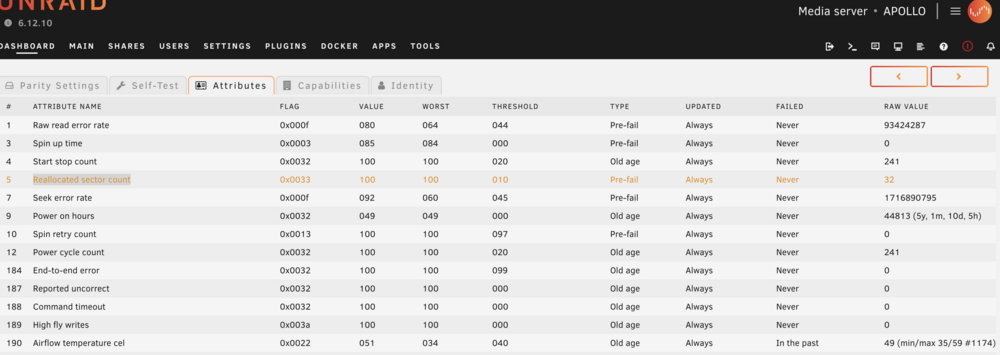
Hi everyone, I'd appreciate you opinion on this matter. I've been having a Seagate drive in my Plex Unraid server failing (SMART Report Reallocated sector count is increasing slowly) potentially due to overheating (Sometimes they run about 50 Celcius). Not sure if I should just leave it or replace it. Its the parity drive ironically. Unfortunately, I can't really get the server much cooler with noise/fan speed ratio as it is all in a cupboard and the hot air circulates in there. I was thinking a practical solution would be to just scrap all the hdds as they run quite hot and need quite a bit of cooling. So I came across QVO drives by Samsung that have 8TB, the only thing I'm concerned about is them completely slowing down after a while, especially while being in an array. I was also thinking about the PM drives as they seem more resilient. I'm evaluating on replacing all my HDDs to SSDs. I'm curious for your opinions and feedback. Thank you!
-
On another note, I saw PIA recently added Switzerland as a dedicated IP location. So I am considering getting that again. Do you think there would be a way to select this dedicated IP via the ENDPOINT variable?


