





holyscotsman
Members
-
Joined
-
Last visited
-
I did try to move them into the other enclosure, but the Array refuses to start (even in Maintenance Mode) if one of those disks are missing.
-
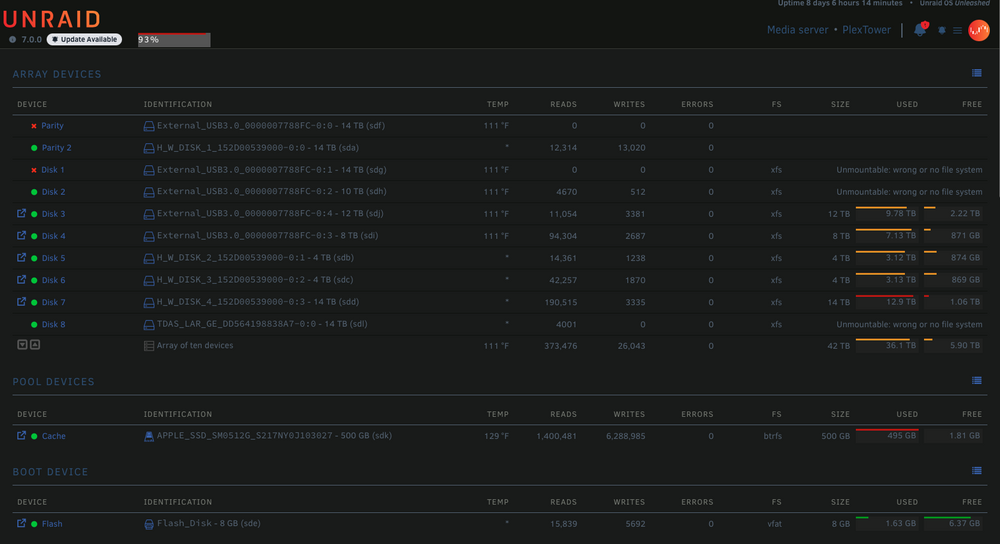
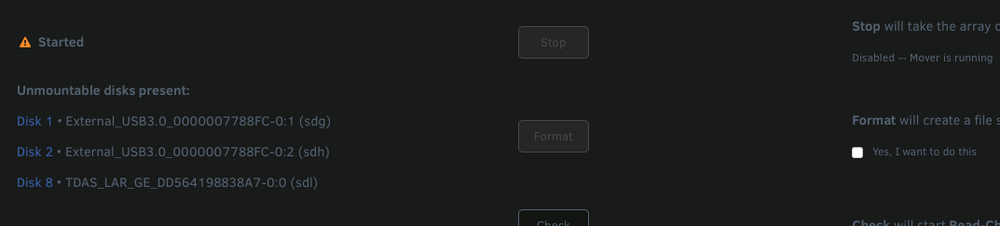
Hello, I’m currently experiencing some issues with my Unraid server and could use some expert guidance. It's been an issue that's plagued me for quite a few months now. My setup includes a Mac Pro (2013, Xeon E5-1650 v2, 64GB RAM) running Unraid 7.0.0. I currently do not have a backup and my array is almost full (93% usage), mainly because of this issue. My array configuration: Dual Parity (two 14TB drives) One 500GB internal SSD cache drive Disks are connected via two USB enclosures: MediaSonic 4-bay Orico 5-bay (which has recently started failing) Current Problem: The Orico 5-bay enclosure has become unreliable, causing multiple drives to randomly appear as "Unmountable: Wrong or No File System" and intermittently marking drives as disabled (red X). Currently affected drives: Parity Drive 1: Disabled (contents emulated) Disk 1 (14TB): Disabled (contents emulated) & Unmountable Disk 2 (10TB): Unmountable Disk 8 (brand new 14TB disk in a new Terramaster enclosure, pre-cleared but also showing Unmountable) Each reboot randomly changes which drives show up as unmountable, though data was previously intact before this started happening. What I've Tried: Purchased a new Terramaster 5-bay USB enclosure and an additional new 14TB drive. The hopes would be to try and move data from one of the drives onto this one, decommission the older drive and reformat it for the new enclosure, then repeat. Rebooted all of the systems many times, as well as left powered off for a few days When powering up the Orico 5-Bay, I have to connect the drives in a specific order first before I can start the array. Pretty annoying, so I'd be glad to get rid of this enclosure. Tried moving existing drives to the new enclosure, but Unraid suggests reformatting when connected there, which I've avoided to prevent data loss. Added a new drive (Disk 8 ) intending to offload data from affected drives, but Unraid is marking this new drive as unmountable too. Key Concerns: How can I safely move my existing drives (with data intact) to the new enclosure without Unraid requiring them to be reformatted? What steps should I follow to repair these unmountable file systems safely? What's the recommended process for recovering and re-enabling my disabled Parity Drive 1 and Disk 1 without losing data? I’ve attached my diagnostics for detailed review. Thanks in advance for your help — pretty much stuck at the moment and appreciate any clear steps or advice on safely resolving this. plextower-diagnostics-20250401-2302.zip
-
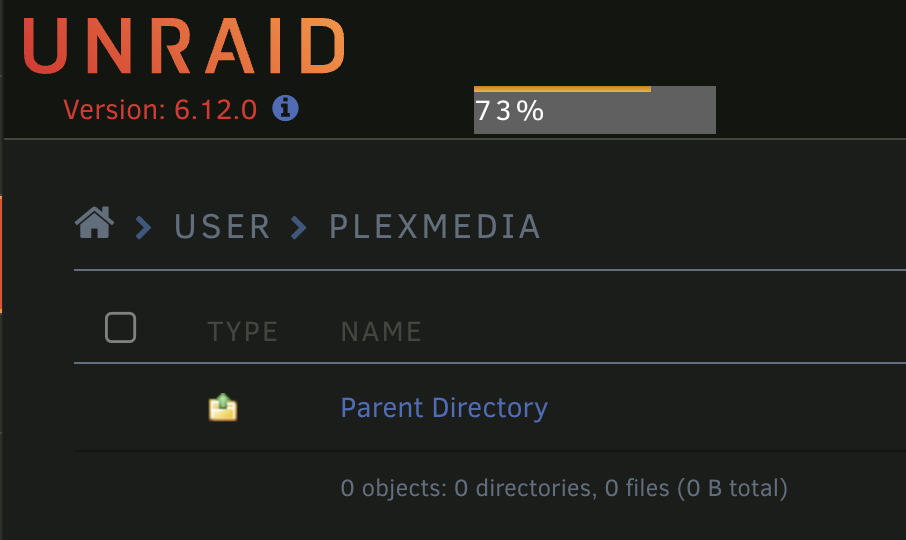
It looks like when I enable VM Manager, I lose access to all of my shares. After Parity Check completed, I disabled the VM's, shut down the array and rebooted the server. When it came back online, the Shares were visible again. Just sucks that I am not able to have VM's running along with my Docker. Would rather not risk the data loss than worry about having VMs. Thank you!
-
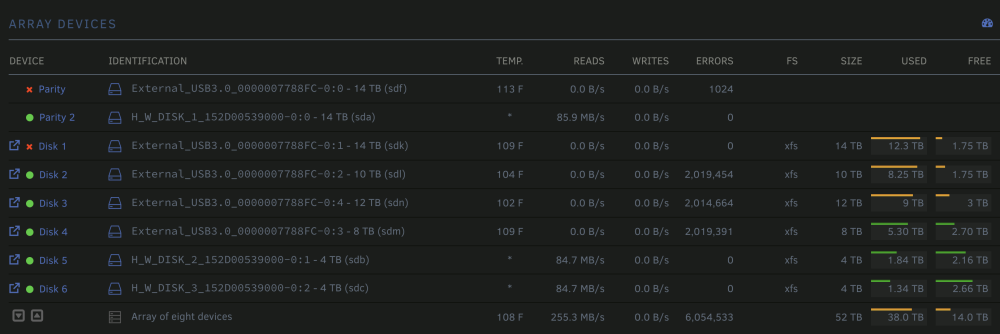
I'm quite a bit worried as I really don't want to lose all of my data again, but looking for some assistance with a recent issue. About a week ago, my Parity drive #1 and largest drive (drive 1) both showed up as a Red status. Hovering over the Disk 1 showed that the contents were being emulated. When I hovered over the first parity drive, it showed that it was disabled. I did try rebooting the server but the same issue persisted. Today, I was trying to enable VMs which requested a reboot of the server. Before I rebooted, the Shares began to act a bit funny by not showing all of the data. I proceeded with a reboot and started the Array without the 1st parity drive assigned (the 2nd Parity drive is still assigned and functioning); everything looked fine. I decided to try and Rebuild only the Parity drive. I stopped the array, re-assigned the 1st Parity drive, started the array. The Parity-Rebuild is in-progress now for the next 48 hours but I am in a state of panic as the folder where all of my contents reside is Empty. However, looking at the data consumption shows no change in state. Unfortunately, I haven't found a reliable backup method yet outside of purchasing Should this be expected behavior for the Share to show empty while a Parity-Rebuild is in-progress? Have I perhaps buggered up my entire setup? Thanks in advance for any help! plextower-diagnostics-20230708-2350.zip
-
Heh, I swear I'm not losing my mind. When I checked yesterday, only "latest" showed up but now I am seeing the older versions. Sorry about that! Thanks Shall give this a shot!
-
Thanks! Any good ways to downgrade from 535 to 530.41.03? Wasn't sure if there was something in the Plugin Store that allows us to do this but can't seem to find a quick guide for this process.


