





azwillnj
Members
-
Joined
-
Last visited
Everything posted by azwillnj
-
+1.. Removing GPU Statistics worked for me also. It seems to have made things more stable and faster responding in the 4 hours I've had it removed.
-
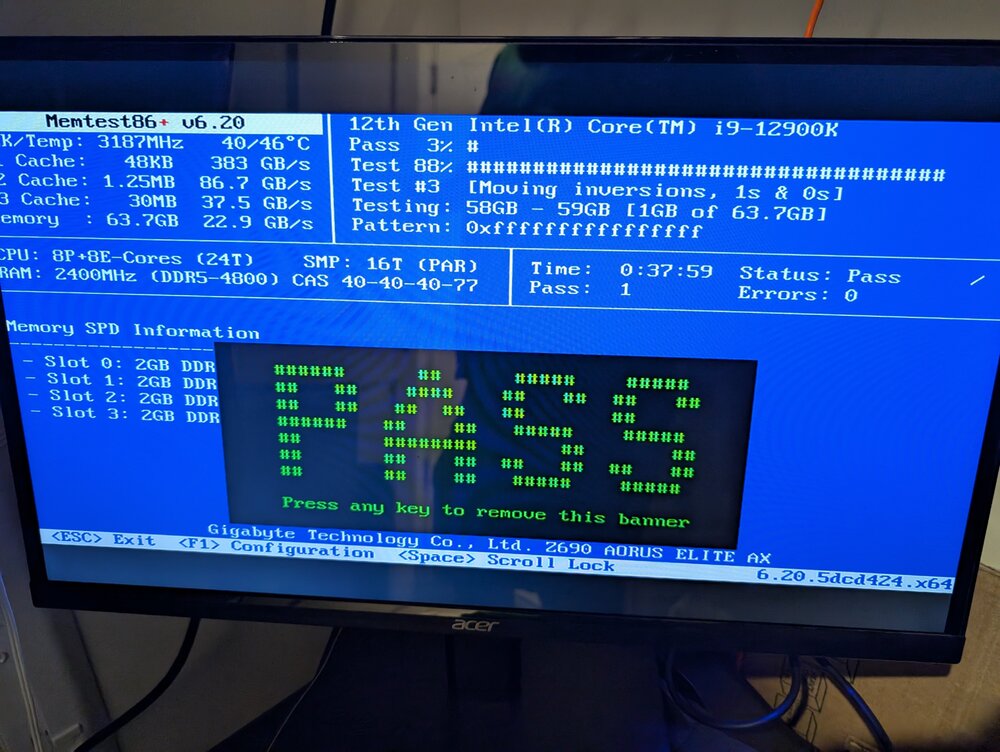
It did mount, I used 7.1.1 for approx 15-30 mins, I was adding a new docker container and configuring it when it died. Which is why it feels like 7.1.1 may have contributed, but then again..... I removed 2 of the sticks and it's running at home now, I'm at work so I have no idea what it's doing. With it being on random cpu's and at random points (54.6GB, 4.08, 32.7, 57.8, 58.9) could this point to a bad memory controller or CPU?
.thumb.jpg.82e2073dd9b731b367bfd4a002cf1723.jpg)
-
Running memtest now. It's not just me btw... https://www.reddit.com/r/unRAID/comments/1kkzh3c/upgraded_to_unraid_712_now_this/ https://www.reddit.com/r/unRAID/comments/1kkzh3c/upgraded_to_unraid_712_now_this/mrylbrd/ Update: I'm gonna let it go all night but this seems good.
-
It just seems awfully coincidental that it has been running completely fine for 4 ish years and then I update to 7.1.1 and within 10 mins everything crashes. Then also coincidentally a hotfix comes out over the weekend citing possible data loss and others are reporting similar issues. This restore is completely stuck at this point and I can't even reboot from the interface. One core on the CPU is completely pegged at 100%, there are no read/writes happening on any devices and I can't abort it from the plugin's interface. Any advice?
-
I cut my losses and started restoring the container backups I had. The Appdata.Backup plugin has been stuck on restoring the Plex container for about 8 hours now. Not sure what to do about that. Any clue why this happened in the first place? I see that they already hotfixed to 7.1.2 citing possible data loss issues and people on the reddit thread are complaining about similar failures. I am really disappointed that the Unraid team pushed an update that did this. I guess it's my fault for trusting a new update. Seems like theres no point in using RAID 1 for cache if an update can just corrupt both at the same time. I am splitting the drives, 1 for cache that I will run mover on nightly and the other one for VMs, Docker, etc. that I will take zfs snapshots of using spaceinvaderone's backup script. Is this a good idea? Should protect me against further botched updates?
-
Label: none uuid: 4074d3c1-c08e-4131-8287-b227a463a815 Total devices 1 FS bytes used 376.00KiB devid 1 size 80.00GiB used 2.02GiB path /dev/loop2 Label: none uuid: b652a3df-f5ff-45bd-ba76-156b4989e45a Total devices 1 FS bytes used 416.00KiB devid 1 size 1.00GiB used 126.38MiB path /dev/loop3 How the heck did it wipe? It wasn't warning about that, all i did was change drive orders in the pool.
-
root@Zenos:~# ls -l /dev/ | grep sd* drwxr-xr-x 2 root root 220 May 11 00:09 bsg/ crw-rw---- 1 root disk 10, 234 May 11 00:09 btrfs-control drwxr-xr-x 3 root root 60 May 11 00:08 bus/ crw------- 1 root root 5, 1 May 11 00:09 console drwxr-xr-x 8 root root 160 May 11 00:09 disk/ lrwxrwxrwx 1 root root 13 May 11 00:08 fd -> /proc/self/fd/ crw-rw-rw- 1 root root 10, 229 May 11 00:09 fuse crw-r--r-- 1 root root 1, 11 May 11 00:09 kmsg crw-rw---- 1 root users 10, 232 May 11 09:07 kvm srw-rw-rw- 1 root root 0 May 11 00:09 log= crw-rw---- 1 root disk 10, 237 May 11 00:09 loop-control brw-rw---- 1 root disk 7, 0 May 11 00:09 loop0 brw-rw---- 1 root disk 7, 1 May 11 00:09 loop1 brw-rw---- 1 root disk 7, 2 May 11 09:07 loop2 brw-rw---- 1 root disk 7, 3 May 11 09:07 loop3 brw-rw---- 1 root disk 7, 4 May 11 00:09 loop4 brw-rw---- 1 root disk 7, 5 May 11 00:09 loop5 brw-rw---- 1 root disk 7, 6 May 11 00:09 loop6 brw-rw---- 1 root disk 7, 7 May 11 00:09 loop7 brw-rw---- 1 root disk 9, 1 May 11 09:07 md1p1 brw-rw---- 1 root disk 9, 2 May 11 09:07 md2p1 brw-rw---- 1 root disk 9, 3 May 11 09:07 md3p1 brw-rw---- 1 root disk 9, 4 May 11 09:07 md4p1 brw-rw---- 1 root disk 9, 5 May 11 09:07 md5p1 brw-rw---- 1 root disk 9, 6 May 11 09:07 md6p1 brw-rw---- 1 root disk 9, 7 May 11 09:07 md7p1 lrwxrwxrwx 1 root root 10 May 11 00:09 mouse -> input/mice brw-rw---- 1 root disk 259, 0 May 11 09:03 nvme0n1 brw-rw---- 1 root disk 259, 2 May 11 09:04 nvme1n1 drwxr-xr-x 2 root root 0 May 11 00:08 pts/ brw-rw---- 1 root plugdev 8, 0 May 11 00:09 sda brw-rw---- 1 root plugdev 8, 1 May 11 00:09 sda1 brw-rw---- 1 root disk 8, 16 May 11 00:09 sdb brw-rw---- 1 root disk 8, 32 May 11 00:09 sdc brw-rw---- 1 root disk 8, 48 May 11 00:09 sdd brw-rw---- 1 root disk 8, 64 May 11 00:09 sde brw-rw---- 1 root disk 8, 80 May 11 00:09 sdf brw-rw---- 1 root disk 8, 96 May 11 00:09 sdg brw-rw---- 1 root disk 8, 112 May 11 00:09 sdh brw-rw---- 1 root disk 8, 128 May 11 00:09 sdi crw-rw---- 1 root disk 21, 0 May 11 00:09 sg0 crw-rw---- 1 root disk 21, 1 May 11 00:09 sg1 crw-rw---- 1 root disk 21, 2 May 11 00:09 sg2 crw-rw---- 1 root disk 21, 3 May 11 00:09 sg3 crw-rw---- 1 root disk 21, 4 May 11 00:09 sg4 crw-rw---- 1 root disk 21, 5 May 11 00:09 sg5 crw-rw---- 1 root disk 21, 6 May 11 00:09 sg6 crw-rw---- 1 root disk 21, 7 May 11 00:09 sg7 crw-rw---- 1 root disk 21, 8 May 11 00:09 sg8 drwxrwxrwt 2 root root 40 May 11 00:08 shm/ drwxr-xr-x 2 root root 60 May 11 00:08 snd/ lrwxrwxrwx 1 root root 15 May 11 00:08 stderr -> /proc/self/fd/2 lrwxrwxrwx 1 root root 15 May 11 00:08 stdin -> /proc/self/fd/0 lrwxrwxrwx 1 root root 15 May 11 00:08 stdout -> /proc/self/fd/1| drwxr-xr-x 2 root root 60 May 11 00:08 usb/ crw-rw---- 1 root tty 7, 0 May 11 00:09 vcs crw-rw---- 1 root tty 7, 1 May 11 00:09 vcs1 crw-rw---- 1 root tty 7, 2 May 11 00:09 vcs2 crw-rw---- 1 root tty 7, 3 May 11 00:09 vcs3 crw-rw---- 1 root tty 7, 4 May 11 00:09 vcs4 crw-rw---- 1 root tty 7, 5 May 11 00:09 vcs5 crw-rw---- 1 root tty 7, 6 May 11 00:09 vcs6 crw-rw---- 1 root tty 7, 128 May 11 00:09 vcsa crw-rw---- 1 root tty 7, 129 May 11 00:09 vcsa1 crw-rw---- 1 root tty 7, 130 May 11 00:09 vcsa2 crw-rw---- 1 root tty 7, 131 May 11 00:09 vcsa3 crw-rw---- 1 root tty 7, 132 May 11 00:09 vcsa4 crw-rw---- 1 root tty 7, 133 May 11 00:09 vcsa5 crw-rw---- 1 root tty 7, 134 May 11 00:09 vcsa6 crw-rw---- 1 root tty 7, 64 May 11 00:09 vcsu crw-rw---- 1 root tty 7, 65 May 11 00:09 vcsu1 crw-rw---- 1 root tty 7, 66 May 11 00:09 vcsu2 crw-rw---- 1 root tty 7, 67 May 11 00:09 vcsu3 crw-rw---- 1 root tty 7, 68 May 11 00:09 vcsu4 crw-rw---- 1 root tty 7, 69 May 11 00:09 vcsu5 crw-rw---- 1 root tty 7, 70 May 11 00:09 vcsu6 crw-rw---- 1 root users 10, 238 May 11 09:07 vhost-net prw-r----- 1 root root 0 May 11 00:09 xconsole| crw-rw-rw- 1 root root 10, 249 May 11 00:09 zfs zenos-diagnostics-20250511-0928.zip
-
I have the appdata backup plugin and it runs weekly, so I should be able to restore docker from that but my VMs are gone. It is also set to backup the flash drive, so I have a few working configurations cached there, I'm going to hold off on doing anything else until I hear from someone that can help me further. I really want to know why this happened, I don't have the normal files that were in the cache backed up and with the state of mover in 7.x who knows if they actually moved? This will likely caused me to lose a ton of data, how could the unraid team be so irresponsible with these updates? I guess it's on me for trusting a new update but this has really soured me on this OS, it was supposed to be rock solid. Going forward whats the correct way to prevent this in the future? Cache RAID 1 is clearly not it. Is there a way to have the second nvme function as a nightly shadow or something?
-
root@Zenos:~# btrfs check --readonly /dev/nvme0n1 Opening filesystem to check... No valid Btrfs found on /dev/nvme0n1 ERROR: cannot open file system root@Zenos:~# btrfs check --readonly /dev/nvme1n1 Opening filesystem to check... No valid Btrfs found on /dev/nvme1n1 ERROR: cannot open file system root@Zenos:~# btrfs rescue zero-log /dev/nvme0n1 No valid Btrfs found on /dev/nvme0n1 ERROR: could not open ctree root@Zenos:~# btrfs rescue zero-log /dev/nvme1n1 No valid Btrfs found on /dev/nvme1n1 ERROR: could not open ctree root@Zenos:~# I made triple sure to not start the array if the red message was there saying everything would get deleted. But I guess it did it anyway?
-
I had two identical drives in the cache pool in a RAID 1 while this was working. After the error started popping up it was only reporting an error on nvme0n1, the other one was fine according to the drive logs. After downgrading to 7.0.1 didn't work In a move of desperation last night I tried removing the failed drive from the cache thinking that because it was in RAID 1 it would just be a copy and it would start working. Nothing I tried worked, it kept giving me the same error no matter what I tried. I found a post on these forums where someone had success removing both cache drives, starting the array, stopping the array and then adding them both back in where they were before. I tried that and it didn't work. In addition when I ls -l /dev/ | grep sd* I am no longer seeing /dev/nvme0n1p1 just /dev/nvme0n1p Your command wont work on /dev/nvme0n1p or /dev/nvme1n1p I have a backup of the flash drive from all the previous updates, should I restore and try your command? Am I just completely hosed at this point? What the F is the point of having a RAID 1 cache if it can't be run on one drive? How can an update completely brick my cache? I don't think this is a coincidence, it happened 10 ish mins after updating.
-
Please help me. I found this: Uploaded my diagnostic file there too. Tried downgrading to 7.0.1 and that didn't work.
-
Updated to 7.1.1 last night, booted fine, was playing around in a new docker container and all of the sudden everything stopped. Rebooted and am now getting an error for one of my 2 NVME cache array drives: Unmountable: wrong or no file system I used 2 drives thinking it would failover to the second one if something like this happened but I guess I was wrong in that assumption. I tried removing the failed drive from the pool to get back running last night and it wouldn't let me do that. What's the point of using 2 cache drives if it doesn't failover? Anyway, below is the log for the failed drive and attached are the diagnostics. I am headed out to get some food and mow the lawn, I'll check back here in a few hours, thanks for the help! text error warn system array login May 10 01:21:33 Zenos kernel: nvme0n1: p1 May 10 01:21:33 Zenos kernel: BTRFS: device fsid 91cda563-e0b9-4158-98c1-9721a4f600e1 devid 3 transid 2154438 /dev/nvme0n1p1 (259:3) scanned by udevd (1298) May 10 01:22:03 Zenos rc.local: SMART: /dev/nvme0n1 ACTIVE (68958d5592) done in 75ms. May 10 01:22:15 Zenos emhttpd: online: WD_BLACK_SN850X_1000GB_23260J801922 (nvme0n1) 512 1953525168 May 10 01:22:15 Zenos emhttpd: /bin/lsblk -lnbo TYPE,PARTN,NAME,START,SIZE,PTTYPE,PARTTYPE /dev/nvme0n1 2>&1 May 10 01:22:15 Zenos emhttpd: disk nvme0n1 1000204886016 dos May 10 01:22:15 Zenos emhttpd: part 1 nvme0n1p1 2048 1000203837440 dos 0x83 May 10 01:22:15 Zenos emhttpd: device nvme0n1 partition: nvme0n1p1 type: dos start: 2048 size: 976761560, code: 0x83 (4) May 10 01:22:15 Zenos emhttpd: import 30 pool device: (nvme0n1) WD_BLACK_SN850X_1000GB_23260J801922 May 10 01:22:16 Zenos emhttpd: read SMART /dev/nvme0n1 May 10 01:22:22 Zenos emhttpd: /bin/lsblk -lnbo TYPE,PARTN,NAME,START,SIZE,PTTYPE,PARTTYPE /dev/nvme0n1 2>&1 May 10 01:22:22 Zenos emhttpd: disk nvme0n1 1000204886016 dos May 10 01:22:22 Zenos emhttpd: part 1 nvme0n1p1 2048 1000203837440 dos 0x83 May 10 01:22:22 Zenos emhttpd: device nvme0n1 partition: nvme0n1p1 type: dos start: 2048 size: 976761560, code: 0x83 (4) May 10 01:22:22 Zenos emhttpd: import 30 pool device: (nvme0n1) WD_BLACK_SN850X_1000GB_23260J801922 May 10 01:22:25 Zenos emhttpd: #011devid 3 size 931.51GiB used 540.03GiB path /dev/nvme0n1p1 May 10 01:22:25 Zenos kernel: BTRFS info (device nvme0n1p1): first mount of filesystem 91cda563-e0b9-4158-98c1-9721a4f600e1 May 10 01:22:25 Zenos kernel: BTRFS info (device nvme0n1p1): using crc32c (crc32c-intel) checksum algorithm May 10 01:22:25 Zenos kernel: BTRFS info (device nvme0n1p1): using free-space-tree May 10 01:22:25 Zenos kernel: BTRFS info (device nvme0n1p1): bdev /dev/nvme0n1p1 errs: wr 0, rd 0, flush 0, corrupt 12477, gen 0 May 10 01:22:25 Zenos kernel: BTRFS info (device nvme0n1p1): bdev /dev/nvme1n1p1 errs: wr 0, rd 0, flush 0, corrupt 12480, gen 0 May 10 01:22:25 Zenos kernel: BTRFS info (device nvme0n1p1): start tree-log replay May 10 01:22:26 Zenos kernel: BTRFS error (device nvme0n1p1): incorrect extent count for 2272235880448; counted 1346, expected 1345 May 10 01:22:26 Zenos kernel: BTRFS error (device nvme0n1p1): incorrect extent count for 2272235880448; counted 1338, expected 1337 May 10 01:22:26 Zenos kernel: BTRFS error (device nvme0n1p1 state A): Transaction aborted (error -5) May 10 01:22:26 Zenos kernel: BTRFS: error (device nvme0n1p1 state A) in convert_free_space_to_extents:471: errno=-5 IO failure May 10 01:22:26 Zenos kernel: BTRFS: error (device nvme0n1p1 state EA) in add_to_free_space_tree:1057: errno=-5 IO failure May 10 01:22:26 Zenos kernel: BTRFS: error (device nvme0n1p1 state EA) in do_free_extent_accounting:3002: errno=-5 IO failure May 10 01:22:26 Zenos kernel: BTRFS error (device nvme0n1p1 state EA): failed to run delayed ref for logical 2272264482816 num_bytes 32768 type 178 action 2 ref_mod 1: -5 May 10 01:22:26 Zenos kernel: BTRFS: error (device nvme0n1p1 state EA) in btrfs_run_delayed_refs:2215: errno=-5 IO failure May 10 01:22:26 Zenos kernel: BTRFS: error (device nvme0n1p1 state EA) in btrfs_replay_log:2104: errno=-5 IO failure (Failed to recover log tree) May 10 01:22:26 Zenos kernel: BTRFS error (device nvme0n1p1 state EA): open_ctree failed: -5 May 10 01:49:17 Zenos emhttpd: read SMART /dev/nvme0n1 May 10 01:49:27 Zenos emhttpd: /bin/lsblk -lnbo TYPE,PARTN,NAME,START,SIZE,PTTYPE,PARTTYPE /dev/nvme0n1 2>&1 May 10 01:49:27 Zenos emhttpd: disk nvme0n1 1000204886016 dos May 10 01:49:27 Zenos emhttpd: part 1 nvme0n1p1 2048 1000203837440 dos 0x83 May 10 01:49:27 Zenos emhttpd: device nvme0n1 partition: nvme0n1p1 type: dos start: 2048 size: 976761560, code: 0x83 (4) May 10 01:49:27 Zenos emhttpd: import 30 pool device: (nvme0n1) WD_BLACK_SN850X_1000GB_23260J801922 May 10 01:50:05 Zenos emhttpd: /bin/lsblk -lnbo TYPE,PARTN,NAME,START,SIZE,PTTYPE,PARTTYPE /dev/nvme0n1 2>&1 May 10 01:50:05 Zenos emhttpd: disk nvme0n1 1000204886016 dos May 10 01:50:05 Zenos emhttpd: part 1 nvme0n1p1 2048 1000203837440 dos 0x83 May 10 01:50:05 Zenos emhttpd: device nvme0n1 partition: nvme0n1p1 type: dos start: 2048 size: 976761560, code: 0x83 (4) May 10 01:50:05 Zenos emhttpd: import 30 pool device: (nvme0n1) WD_BLACK_SN850X_1000GB_23260J801922 May 10 01:50:23 Zenos emhttpd: /bin/lsblk -lnbo TYPE,PARTN,NAME,START,SIZE,PTTYPE,PARTTYPE /dev/nvme0n1 2>&1 May 10 01:50:23 Zenos emhttpd: disk nvme0n1 1000204886016 dos May 10 01:50:23 Zenos emhttpd: part 1 nvme0n1p1 2048 1000203837440 dos 0x83 May 10 01:50:23 Zenos emhttpd: device nvme0n1 partition: nvme0n1p1 type: dos start: 2048 size: 976761560, code: 0x83 (4) May 10 01:50:23 Zenos emhttpd: import 30 pool device: (nvme0n1) WD_BLACK_SN850X_1000GB_23260J801922 May 10 01:50:48 Zenos emhttpd: /bin/lsblk -lnbo TYPE,PARTN,NAME,START,SIZE,PTTYPE,PARTTYPE /dev/nvme0n1 2>&1 May 10 01:50:48 Zenos emhttpd: disk nvme0n1 1000204886016 dos May 10 01:50:48 Zenos emhttpd: part 1 nvme0n1p1 2048 1000203837440 dos 0x83 May 10 01:50:48 Zenos emhttpd: device nvme0n1 partition: nvme0n1p1 type: dos start: 2048 size: 976761560, code: 0x83 (4) May 10 01:50:48 Zenos emhttpd: import 30 pool device: (nvme0n1) WD_BLACK_SN850X_1000GB_23260J801922 May 10 01:50:53 Zenos emhttpd: /bin/lsblk -lnbo TYPE,PARTN,NAME,START,SIZE,PTTYPE,PARTTYPE /dev/nvme0n1 2>&1 May 10 01:50:53 Zenos emhttpd: disk nvme0n1 1000204886016 dos May 10 01:50:53 Zenos emhttpd: part 1 nvme0n1p1 2048 1000203837440 dos 0x83 May 10 01:50:53 Zenos emhttpd: device nvme0n1 partition: nvme0n1p1 type: dos start: 2048 size: 976761560, code: 0x83 (4) May 10 01:50:53 Zenos emhttpd: import 30 pool device: (nvme0n1) WD_BLACK_SN850X_1000GB_23260J801922 May 10 01:51:00 Zenos emhttpd: /bin/lsblk -lnbo TYPE,PARTN,NAME,START,SIZE,PTTYPE,PARTTYPE /dev/nvme0n1 2>&1 May 10 01:51:00 Zenos emhttpd: disk nvme0n1 1000204886016 dos May 10 01:51:00 Zenos emhttpd: part 1 nvme0n1p1 2048 1000203837440 dos 0x83 May 10 01:51:00 Zenos emhttpd: device nvme0n1 partition: nvme0n1p1 type: dos start: 2048 size: 976761560, code: 0x83 (4) May 10 01:51:00 Zenos emhttpd: import 30 pool device: (nvme0n1) WD_BLACK_SN850X_1000GB_23260J801922 May 10 01:51:02 Zenos emhttpd: #011devid 3 size 931.51GiB used 540.03GiB path /dev/nvme0n1p1 May 10 01:51:02 Zenos kernel: BTRFS info (device nvme0n1p1): first mount of filesystem 91cda563-e0b9-4158-98c1-9721a4f600e1 May 10 01:51:02 Zenos kernel: BTRFS info (device nvme0n1p1): using crc32c (crc32c-intel) checksum algorithm May 10 01:51:02 Zenos kernel: BTRFS info (device nvme0n1p1): using free-space-tree May 10 01:51:02 Zenos kernel: BTRFS info (device nvme0n1p1): bdev /dev/nvme0n1p1 errs: wr 0, rd 0, flush 0, corrupt 12477, gen 0 May 10 01:51:02 Zenos kernel: BTRFS info (device nvme0n1p1): bdev /dev/nvme1n1p1 errs: wr 0, rd 0, flush 0, corrupt 12480, gen 0 May 10 01:51:02 Zenos kernel: BTRFS info (device nvme0n1p1): start tree-log replay May 10 01:51:04 Zenos kernel: BTRFS error (device nvme0n1p1): incorrect extent count for 2272235880448; counted 1346, expected 1345 May 10 01:51:04 Zenos kernel: BTRFS error (device nvme0n1p1): incorrect extent count for 2272235880448; counted 1338, expected 1337 May 10 01:51:04 Zenos kernel: BTRFS error (device nvme0n1p1 state A): Transaction aborted (error -5) May 10 01:51:04 Zenos kernel: BTRFS: error (device nvme0n1p1 state A) in convert_free_space_to_extents:471: errno=-5 IO failure May 10 01:51:04 Zenos kernel: BTRFS: error (device nvme0n1p1 state EA) in add_to_free_space_tree:1057: errno=-5 IO failure May 10 01:51:04 Zenos kernel: BTRFS: error (device nvme0n1p1 state EA) in do_free_extent_accounting:3002: errno=-5 IO failure May 10 01:51:04 Zenos kernel: BTRFS error (device nvme0n1p1 state EA): failed to run delayed ref for logical 2272264482816 num_bytes 32768 type 178 action 2 ref_mod 1: -5 May 10 01:51:04 Zenos kernel: BTRFS: error (device nvme0n1p1 state EA) in btrfs_run_delayed_refs:2215: errno=-5 IO failure May 10 01:51:04 Zenos kernel: BTRFS: error (device nvme0n1p1 state EA) in btrfs_replay_log:2104: errno=-5 IO failure (Failed to recover log tree) May 10 01:51:04 Zenos kernel: BTRFS error (device nvme0n1p1 state EA): open_ctree failed: -5 May 10 02:11:52 Zenos emhttpd: read SMART /dev/nvme0n1 May 10 02:12:02 Zenos emhttpd: /bin/lsblk -lnbo TYPE,PARTN,NAME,START,SIZE,PTTYPE,PARTTYPE /dev/nvme0n1 2>&1 May 10 02:12:02 Zenos emhttpd: disk nvme0n1 1000204886016 dos May 10 02:12:02 Zenos emhttpd: part 1 nvme0n1p1 2048 1000203837440 dos 0x83 May 10 02:12:02 Zenos emhttpd: device nvme0n1 partition: nvme0n1p1 type: dos start: 2048 size: 976761560, code: 0x83 (4) May 10 02:12:02 Zenos emhttpd: import 30 pool device: (nvme0n1) WD_BLACK_SN850X_1000GB_23260J801922 May 10 02:13:10 Zenos emhttpd: /bin/lsblk -lnbo TYPE,PARTN,NAME,START,SIZE,PTTYPE,PARTTYPE /dev/nvme0n1 2>&1 May 10 02:13:10 Zenos emhttpd: disk nvme0n1 1000204886016 dos May 10 02:13:10 Zenos emhttpd: part 1 nvme0n1p1 2048 1000203837440 dos 0x83 May 10 02:13:10 Zenos emhttpd: device nvme0n1 partition: nvme0n1p1 type: dos start: 2048 size: 976761560, code: 0x83 (4) May 10 02:13:10 Zenos emhttpd: import 30 pool device: (nvme0n1) WD_BLACK_SN850X_1000GB_23260J801922 May 10 02:13:18 Zenos emhttpd: /bin/lsblk -lnbo TYPE,PARTN,NAME,START,SIZE,PTTYPE,PARTTYPE /dev/nvme0n1 2>&1 May 10 02:13:18 Zenos emhttpd: disk nvme0n1 1000204886016 dos May 10 02:13:18 Zenos emhttpd: part 1 nvme0n1p1 2048 1000203837440 dos 0x83 May 10 02:13:18 Zenos emhttpd: device nvme0n1 partition: nvme0n1p1 type: dos start: 2048 size: 976761560, code: 0x83 (4) May 10 02:13:18 Zenos emhttpd: import 30 pool device: (nvme0n1) WD_BLACK_SN850X_1000GB_23260J801922 May 10 02:13:29 Zenos emhttpd: /bin/lsblk -lnbo TYPE,PARTN,NAME,START,SIZE,PTTYPE,PARTTYPE /dev/nvme0n1 2>&1 May 10 02:13:29 Zenos emhttpd: disk nvme0n1 1000204886016 dos May 10 02:13:29 Zenos emhttpd: part 1 nvme0n1p1 2048 1000203837440 dos 0x83 May 10 02:13:29 Zenos emhttpd: device nvme0n1 partition: nvme0n1p1 type: dos start: 2048 size: 976761560, code: 0x83 (4) May 10 02:13:29 Zenos emhttpd: import 30 pool device: (nvme0n1) WD_BLACK_SN850X_1000GB_23260J801922 May 10 02:13:31 Zenos emhttpd: #011devid 3 size 931.51GiB used 540.03GiB path /dev/nvme0n1p1 May 10 02:13:31 Zenos kernel: BTRFS info (device nvme0n1p1): first mount of filesystem 91cda563-e0b9-4158-98c1-9721a4f600e1 May 10 02:13:31 Zenos kernel: BTRFS info (device nvme0n1p1): using crc32c (crc32c-intel) checksum algorithm May 10 02:13:31 Zenos kernel: BTRFS info (device nvme0n1p1): using free-space-tree May 10 02:13:31 Zenos kernel: BTRFS info (device nvme0n1p1): bdev /dev/nvme0n1p1 errs: wr 0, rd 0, flush 0, corrupt 12477, gen 0 May 10 02:13:31 Zenos kernel: BTRFS info (device nvme0n1p1): bdev /dev/nvme1n1p1 errs: wr 0, rd 0, flush 0, corrupt 12480, gen 0 May 10 02:13:31 Zenos kernel: BTRFS info (device nvme0n1p1): start tree-log replay May 10 02:13:32 Zenos kernel: BTRFS error (device nvme0n1p1): incorrect extent count for 2272235880448; counted 1346, expected 1345 May 10 02:13:32 Zenos kernel: BTRFS error (device nvme0n1p1): incorrect extent count for 2272235880448; counted 1338, expected 1337 May 10 02:13:32 Zenos kernel: BTRFS error (device nvme0n1p1 state A): Transaction aborted (error -5) May 10 02:13:32 Zenos kernel: BTRFS: error (device nvme0n1p1 state A) in convert_free_space_to_extents:471: errno=-5 IO failure May 10 02:13:32 Zenos kernel: BTRFS: error (device nvme0n1p1 state EA) in add_to_free_space_tree:1057: errno=-5 IO failure May 10 02:13:32 Zenos kernel: BTRFS: error (device nvme0n1p1 state EA) in do_free_extent_accounting:3002: errno=-5 IO failure May 10 02:13:32 Zenos kernel: BTRFS error (device nvme0n1p1 state EA): failed to run delayed ref for logical 2272264482816 num_bytes 32768 type 178 action 2 ref_mod 1: -5 May 10 02:13:32 Zenos kernel: BTRFS: error (device nvme0n1p1 state EA) in btrfs_run_delayed_refs:2215: errno=-5 IO failure May 10 02:13:32 Zenos kernel: BTRFS: error (device nvme0n1p1 state EA) in btrfs_replay_log:2104: errno=-5 IO failure (Failed to recover log tree) May 10 02:13:32 Zenos kernel: BTRFS error (device nvme0n1p1 state EA): open_ctree failed: -5 ** Press ANY KEY to close this window ** zenos-diagnostics-20250510-1115.zip
.jpg.7432c3bf9f77dee4451a609aa0ab8daa.jpg)
